
A business owner usually meets their Azure tenant at an inconvenient moment. A new staff member cannot access email on day one. MFA prompts start going to the wrong phone. An outside IT provider asks for admin rights, but nobody is sure which Microsoft account controls the business.
That confusion is common in Australian SMEs. The tenant often gets created when someone signs up for Microsoft 365, Azure, Intune, or another Microsoft cloud service. Months later, it is identified as the control point for user access, security settings, app connections, and the way Microsoft services are grouped under the business.
An Azure tenant works like your company’s private space inside Microsoft’s cloud. It separates your users, identities, and security policies from every other organisation using Microsoft services. In practice, that affects who can sign in, what they can reach, how securely staff work from different locations, and whether your billing and admin model stays clean as the business grows.
For smaller businesses, the risk is rarely the tenant itself. The risk is ending up with the wrong one, too many of them, or no clear ownership. I see this regularly in SME environments after a rushed Microsoft 365 setup, a website agency creates accounts on the side, or a former consultant leaves without handing over admin access. Those issues are fixable, but they cost time and can create real exposure if nobody is watching sign-in controls, privileged roles, and subscription ownership.
If you are weighing up the broader business case for Microsoft cloud services, our guide to the benefits of Azure cloud for small business gives useful context.
TLDR
An Azure Tenant is your business’s Microsoft cloud identity and control boundary. It holds your users, sign-ins, permissions, connected apps, and core security settings.
Your business usually has one because Microsoft creates it during setup for cloud services.
For an SME, good tenant management supports security, clean administration, and predictable growth. Poor management usually shows up later as access problems, duplicate accounts, weak governance, or avoidable support costs.
Introduction Your Business and Its Azure Tenant
A business owner usually learns about their Azure tenant at the worst possible time. Email stops syncing after a password reset. A new IT provider asks for admin access and no one knows who holds it. Two Microsoft logins exist for the same person, and staff are using both.
Those are not random Microsoft quirks. They usually point back to the tenant, because the tenant is the place where identity, access, and administrative control are set for your organisation.
Why this matters to Australian businesses
For Australian SMEs, tenant decisions show up in day-to-day operations very quickly. A well-managed tenant gives staff one clear sign-in path, keeps admin rights under control, and reduces the mess that builds up after rushed setup work or handovers between consultants. A poorly managed tenant creates support tickets, duplicate accounts, risky admin access, and billing confusion that often costs more to clean up later than it would have cost to set up properly.
There is also a local compliance and governance angle. If your business handles personal information, you still need to understand where data is stored, who can access it, and how your cloud environment is controlled. The Office of the Australian Information Commissioner guidance on APP 8 and overseas disclosure is the right place to start for privacy obligations, rather than relying on a generic blog summary. In practice, for many SMEs, the bigger risk is not the tenant existing. It is having the wrong tenant structure, unclear ownership, or no one checking whether Microsoft 365, Azure, devices, and security policies were tied together properly.
That is one reason many small businesses first ask about tenants while reviewing the broader benefits of Azure cloud for small business. The business value is real, but only if the underlying setup is clean.
The simple answer
Your Azure tenant is your business’s Microsoft identity home. It holds your users, sign-ins, core permissions, connected apps, and many of the security settings that decide who gets access to what.
Business owners often focus first on the subscription because that is where charges appear. From an MSP point of view, the tenant usually matters more. A subscription can be replaced or reorganised. A messy tenant is harder to fix because it affects staff access, admin control, security rules, and the way other Microsoft services connect across the business.
Demystifying Your Digital Headquarters
The best way to understand an Azure tenant is to stop thinking of it as a technical object and start thinking of it as your digital headquarters.
Your business has a physical office, shopfront, warehouse, school campus, or home office. Your Azure tenant is the cloud equivalent of that central place. It’s the environment where your people belong, where your rules apply, and where your Microsoft services recognise your organisation as separate from every other organisation.
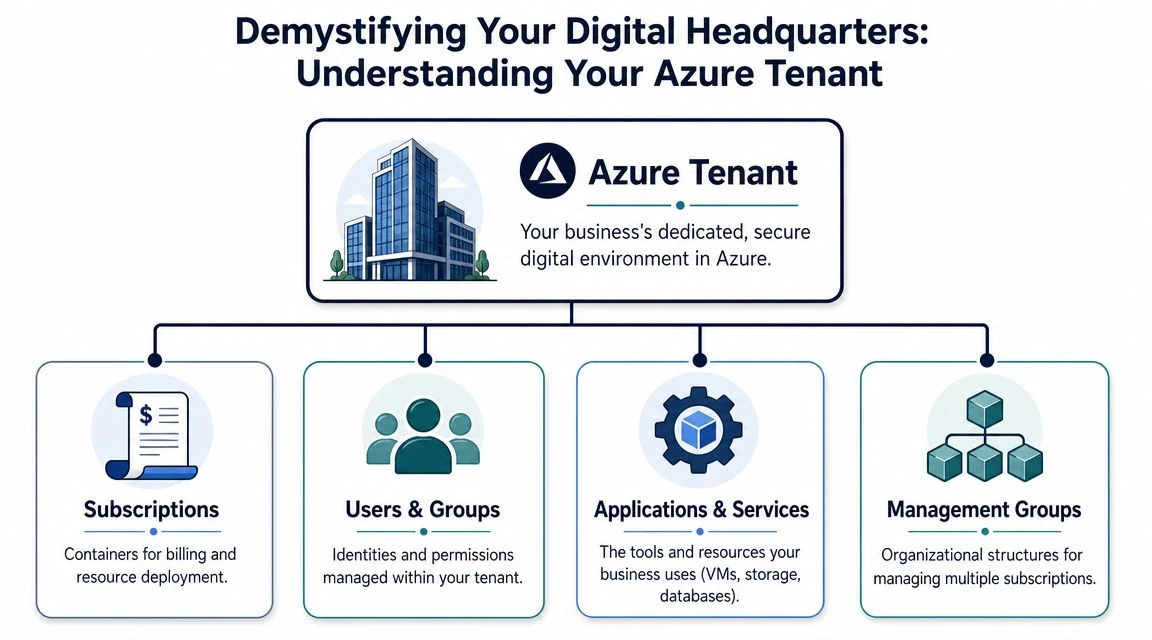
Microsoft’s own terminology can confuse people because it mixes tenant, directory, subscription, and management groups. For non-technical owners, that often sounds like four names for the same thing. They’re related, but they are not the same.
Tenant versus subscription
A tenant is the top-level identity and trust boundary. A subscription sits underneath it and acts as a billing and policy boundary.
A practical analogy helps:
| Term | Plain-English meaning | Business analogy |
|---|---|---|
| Azure Tenant | Your organisation’s dedicated Microsoft cloud environment | The whole building |
| Subscription | A billing container for cloud services and resources | A lease, budget, or utility account for part of the building |
| Resource Group | A logical grouping of resources | A room or department |
| Resources | The actual services like virtual machines, storage, or databases | The desks, servers, filing cabinets, and equipment |
A business can have one tenant with one subscription. It can also have one tenant with multiple subscriptions if it wants to separate production systems, testing, or different business units. That’s common once a company starts maturing its cloud setup.
Where Entra ID fits
An Azure tenant is a dedicated, isolated instance of Microsoft Entra ID, formerly Azure AD. Microsoft provisions it when you first sign up for Azure services, and it gets a unique tenant ID, which is a GUID. Microsoft also uses that tenant as the foundational identity and access management boundary, which means unauthenticated entities can’t access resources by default. That isolation point is explained in Microsoft’s discussion of tenant and directory concepts, and if you want the less technical version, Tbourke Solutions has a useful primer on what Microsoft Entra ID is.
The common misunderstanding
People often say “our directory” and “our tenant” interchangeably. In practice, that’s understandable, because they are tightly linked. But the business takeaway is this:
- The tenant is the secure organisational boundary
- The directory holds the identities inside that boundary
- The subscriptions handle spending and resource deployment under that boundary
Practical rule: If you don’t know who controls your tenant, you don’t fully control your Microsoft environment.
That’s why tenant ownership matters. If a former IT provider created it under the wrong account, or a staff member set it up using a personal address, your business can end up depending on cloud infrastructure it doesn’t properly govern.
The Reasons Your Business Has an Azure Tenant
Most businesses don’t go shopping for an Azure tenant as a standalone item. They get one because it’s the operating model Microsoft uses for cloud services.
When a business signs up for Azure, Microsoft usually provisions a dedicated Entra ID tenant as part of the process. In Australia, 62% of SMEs have migrated at least partial workloads to Azure, and each of those environments is automatically provisioned a tenant upon subscription according to this AU-focused Azure tenant overview. That’s one reason the term shows up so often even when no one in the business remembers choosing it.

One identity layer across the business
Without a tenant, every app would need its own user system, passwords, and access controls. That doesn’t scale. Staff forget passwords, managers lose track of who has access, and offboarding becomes messy.
With a tenant, one identity layer can support Microsoft services across the organisation. That’s why it becomes the practical centre of day-to-day access.
Security isolation isn’t optional
Your tenant separates your organisation from every other customer using Microsoft’s cloud. That matters because cloud services are shared platforms, but your identities and access rights must remain isolated.
If set up correctly, your tenant helps stop users from drifting into systems they shouldn’t touch. It also gives admins one place to apply controls such as MFA, role assignment, and sign-in restrictions.
A well-managed tenant makes access boring. People get into the right systems, and nobody needs heroics every Monday morning.
Governance from one control point
A tenant also gives your business a central control plane. That’s where admins manage users, groups, enterprise apps, external access, and tenant-wide settings. Even if you’re small today, that structure matters once you add contractors, open another location, or split systems between production and testing.
For many businesses still comparing cloud and legacy server models, this is one of the biggest practical differences. There’s a strong contrast between managing identity centrally in Azure and trying to stitch it together on ageing local infrastructure. Tbourke Solutions discusses those trade-offs in its article on Azure vs on-premise for Australian small businesses.
Common Tenant Configurations and Pitfalls for SMEs
The cleanest tenant designs are usually simple. The trouble starts when a business grows without a plan, or when different people create cloud services at different times.
Most SMEs sit in one of a few common patterns.
What a sensible setup looks like
A practical starting point often looks like this:
- Single tenant, single subscription for smaller businesses with straightforward needs
- Single tenant, multiple subscriptions when a business wants to separate workloads, budgets, or environments
- One core tenant plus guest access where external consultants or partner organisations need limited collaboration access
A tenant supports multiple subscriptions, each acting as a billing and policy boundary. For Australian MSP-managed tenants, 68% report 25% cost savings via tenant-consolidated reservations, and tenant-wide blueprints can lead to 35% faster compliance audits, according to Microsoft’s discussion of Entra ID tenants and Azure subscriptions.

The mistakes that create long-term pain
The most common problems aren’t exotic. They’re routine admin shortcuts that pile up over time.
Accidental extra tenants
This happens more often than people expect. Someone signs up for a Microsoft trial using a work email. Another staff member buys a separate cloud service. A developer creates a test environment. Now the business has multiple tenants and nobody realises it until access or billing gets messy.
That creates duplication, inconsistent security settings, and confusion over where the “real” environment lives.
Guest access sprawl
Guest accounts are useful. They let accountants, consultants, developers, and school contractors collaborate without becoming full internal users. But if nobody reviews them, guest access grows into a blind spot.
The issue isn’t that guest users exist. The issue is when nobody can answer basic questions such as who invited them, what they can still access, and whether they still need access at all.
Weak tenant-level security
Many businesses turn on MFA for a few users and assume the job is done. It usually isn’t. If privileged accounts, shared admin patterns, or old authentication methods remain in place, the tenant is still exposed.
For a practical business rollout, MFA has to be planned at tenant level, not left as an optional extra for whoever happens to enable it first. Tbourke Solutions covers the rollout side in its guide to MFA for business.
What works: standardise the tenant early, document admin ownership, review guest access, and separate subscriptions when there’s a real business reason.
What doesn’t: letting every project create its own cloud identity footprint.
A quick comparison
| Approach | Usually works well for | Main risk |
|---|---|---|
| One tenant, one subscription | Small businesses with simple operations | Everything ends up in one basket if governance is weak |
| One tenant, several subscriptions | Growing SMEs, schools, and firms with different workloads | Needs stronger admin discipline |
| Multiple tenants | Special cases such as legal separation or acquisitions | High management overhead and frequent identity confusion |
When to Get Professional Help with Your Tenant
A common SME pattern looks like this. The business starts with Microsoft 365 for email and files, then adds Azure services later, then brings in a second provider for a project or migration. A year or two on, nobody is fully sure who has admin access, which settings were changed, or whether the tenant is still set up in a way that suits the business.
That is usually the point where tenant management stops being routine admin and becomes a business risk.
Small teams with a clean setup can often handle basic user changes internally. The trouble starts when the tenant carries decisions about identity, security policy, external access, billing structure, and recovery options. At that stage, one well-meant change can interrupt sign-in, break integration with older systems, or leave a former staff member with more access than expected.
Signs the job has outgrown DIY
Professional help makes sense when the tenant is tied to a bigger business event or a higher-risk technical change, such as:
- A migration from on-premises systems, where local Active Directory, file access, devices, or server workloads need to line up properly with Microsoft cloud identity
- A merger, acquisition, or business restructure, especially if two Microsoft environments now need to coexist or be consolidated
- Unclear ownership of admin roles, where several people have high-level access and there is no clean record of why
- Security controls that need proper design, such as Conditional Access, privileged role separation, or guest access reviews
- A handover from a previous IT provider, where the tenant exists but the business does not have clear control of global admin accounts, domains, or recovery settings
For many owners, the primary question is not “can someone click the settings?” It is “who understands the impact if those settings are wrong?”
That is where MSP support tends to pay for itself. A provider with Microsoft tenancy experience can assess ownership, identify risky legacy choices, and set rules that fit how the business operates. Tbourke Solutions explains that operating model in its article on how MSPs manage Microsoft 365 securely.
Why timing matters
Tenant cleanup gets harder once years of shortcuts build up. I see this often with growing Australian SMEs. The original setup was good enough for ten staff, but not for thirty, multiple locations, outside contractors, and tighter client security requirements.
Getting help early usually costs less than sorting out a preventable outage, a failed migration, or an access problem during an audit. If you want a broader business-level explanation of where outsourced support fits, this comprehensive guide to managed services gives useful context.
The practical rule is simple. If your tenant now affects risk, compliance, or day-to-day operations, it deserves the same oversight you would expect for finance systems or legal records.
How Tbourke Solutions Manages Your Azure Environment
A tenant causes problems in very ordinary ways. A departed staff member still has admin rights. A shared mailbox stops working after a licence change. Azure costs drift up because no one can explain which subscription owns what. By the time the issue shows up, the business is already paying for the shortcut.

Tbourke Solutions manages Azure environments with that reality in mind. For Australian SMEs, the job is usually not building something flashy. It is getting control of identity, access, billing structure, and security settings so the Microsoft environment supports the business instead of surprising it.
What proper management looks like
The first step is to verify ownership and map the environment properly. In practice, that means confirming who can administer the tenant, which domains are attached, how subscriptions are separated, and whether the current setup still matches the way the business operates.
From there, management becomes an operating routine, not a one-off cleanup. Typical work includes:
- reviewing privileged roles and reducing unnecessary admin access
- removing stale user accounts and checking guest access
- standardising MFA, Conditional Access, and other core security settings
- organising subscriptions so billing and responsibility are clearer
- monitoring for configuration drift before it turns into an outage, access issue, or audit problem
For a small business, that discipline matters more than extra tooling. A clean tenant with clear rules is easier to support, easier to secure, and cheaper to run.
The business value of MSP oversight
A well-managed tenant reduces single-person dependency. If one staff member leaves, the business should not lose visibility over admin accounts, recovery methods, or subscription ownership.
It also improves day-to-day decisions. New starters get the right access faster. Former staff lose access properly. Security policies are applied consistently across Microsoft 365 and Azure. Costs are easier to trace because services sit in the right subscription instead of being scattered across ad hoc setups.
I see the biggest benefit as clarity. Business owners do not need to understand every Microsoft admin screen. They need to know who controls the environment, how risk is being managed, and what will happen if something goes wrong.
Why that approach suits Australian SMEs
Many local SMEs do not need a large internal IT team. They need a tenant that is documented, recoverable, and structured well enough to handle growth, staff turnover, client security requirements, and the occasional Microsoft licensing change.
That is the practical value Tbourke Solutions brings. Management is not limited to fixing isolated issues. It is about keeping the tenant usable as the business changes, so security, governance, and cost control stay aligned with real operations.
If you are unsure who owns your tenant, who holds admin access, or whether your subscriptions are set up sensibly, a short review will usually make the gaps obvious.
Frequently Asked Questions About Azure Tenants
Is an Azure tenant the same as a Microsoft 365 tenant
In practical business terms, yes. If your organisation uses Microsoft 365 and Azure services in the same environment, they typically rely on the same underlying Entra ID tenant. That’s why user access, identity, and admin roles often overlap.
Can one tenant have more than one subscription
Yes. That’s a normal setup for businesses that want to separate environments, billing, or workloads while keeping identity centralised.
Did I create my tenant on purpose
Maybe, maybe not. Many businesses didn’t knowingly create one. Microsoft often provisions it automatically when someone signs up for Azure or related business services.
Can I rename the default onmicrosoft.com name
You generally keep the original default Microsoft domain, but you can add and use your own custom business domain for sign-in, email, and identity presentation. Most businesses do.
How do I find my Tenant ID
An admin can find it in the Microsoft Entra admin centre or Azure portal. It appears as a unique identifier for the tenant. If you’re not sure which account has the right level of access, that’s usually a sign your admin ownership needs checking.
Can I have more than one tenant
Yes, but that doesn’t mean you should. Multiple tenants can make sense after acquisitions, legal separation, or specialised requirements. For most SMEs, one well-managed tenant is simpler and safer.
What’s the biggest mistake businesses make with tenants
They ignore ownership and governance until there’s a problem. The most expensive tenant issues usually start as small admin shortcuts, not dramatic technical failures.
Does a small business really need to care about this
Yes. Even with a small team, the tenant still controls identity, access, security settings, and administration. Small businesses often feel tenant issues faster because they don’t have spare internal resources to untangle them.
If your business uses Microsoft 365, Azure, or both, your tenant is already one of the most important parts of your IT environment. Tbourke Solutions helps Melbourne businesses, schools, sole traders, and growing teams bring order to Azure and Microsoft cloud environments with practical support, security-focused management, and clear advice. If you’d like help reviewing your setup, cleaning up access, or understanding who controls your tenant, submit an enquiry through the Tbourke Solutions contact page.
Share This Story, Choose Your Platform!