Your Microsoft 365 tenant might be running the business just fine on the surface. Email works, Teams chats keep moving, files sync, and staff log in every day without thinking much about what sits underneath. That’s exactly why hardening matters. Most businesses only discover weak points after a suspicious sign-in, a mailbox forwarding rule appears out of nowhere, or sensitive files have already been shared too broadly.
Our approach to Microsoft 365 tenant hardening is pragmatic. It starts with identity, moves to devices, then protects data, and it does that in phases that suit Australian SMBs instead of assuming every business has an E5 budget or an in-house security team. For Melbourne businesses in particular, the goal isn’t to turn Microsoft 365 into a science project. It’s to make it harder to break into, harder to misuse, and easier to manage properly.
TLDR
Most Microsoft 365 security problems come from a few predictable gaps: weak identity controls, unmanaged devices, overly open sharing, and poor data governance. A practical hardening program fixes those first, with phishing-resistant MFA, blocked legacy authentication, sensible Conditional Access, Intune device compliance, and data controls across Teams, OneDrive, and Outlook. This doesn’t have to start with expensive licensing. A phased rollout gives Australian SMBs a workable path to stronger protection without causing unnecessary disruption.
Foundations Discovery, Risk Assessment, and Strategy
A one-size-fits-all hardening checklist is dangerous. A law firm in Melbourne CBD, a trade business in the western suburbs, and a small school office all use Microsoft 365 differently. Their data, workflows, risk tolerance, and compliance pressure are different, so their tenant hardening plan should be different too.
That’s why the first step is always discovery. Before changing settings, you need to know what you’re protecting, who accesses it, where the weak points are, and which controls will create friction if they’re rolled out badly.
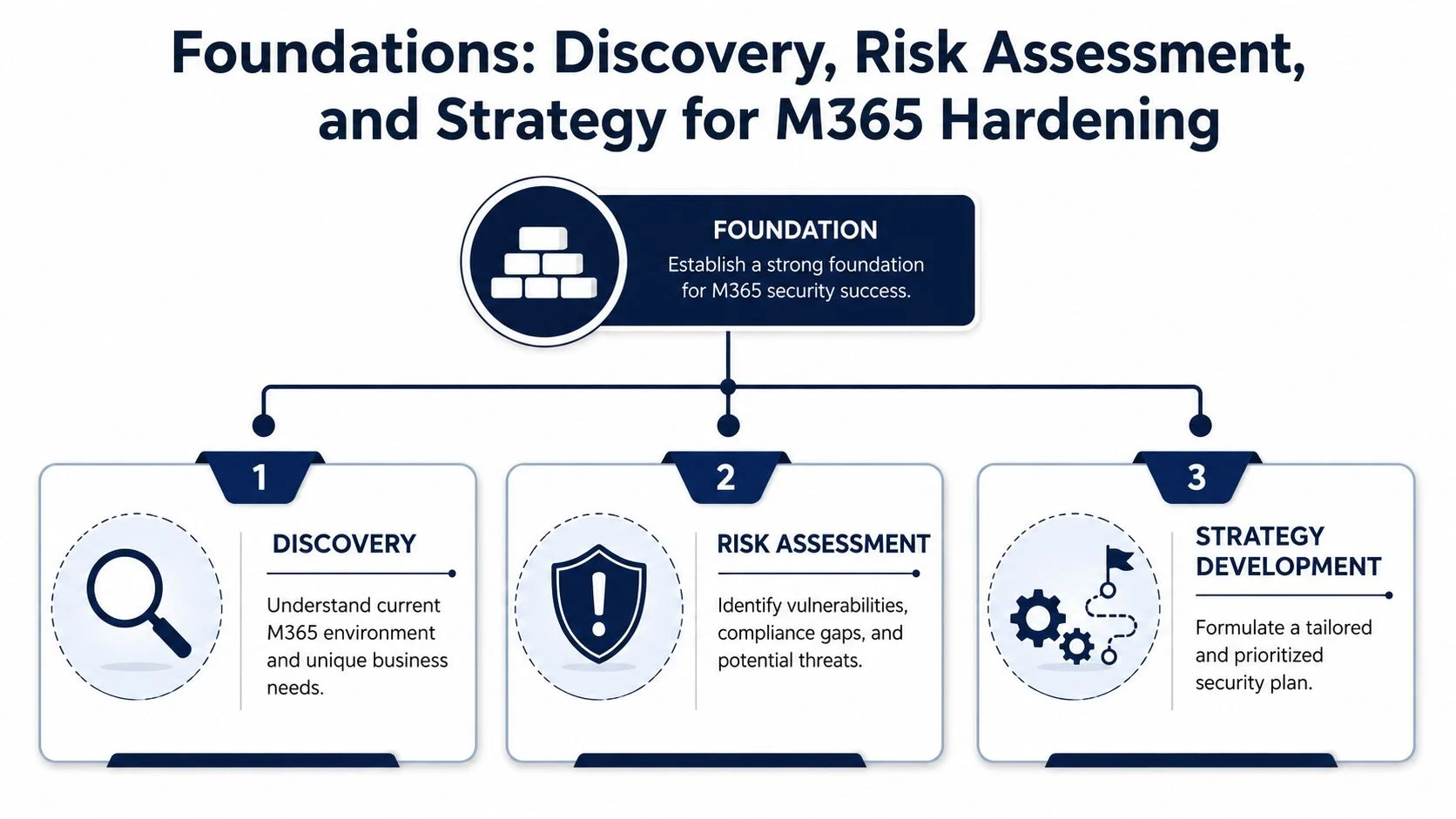
What discovery actually looks like
A proper review usually starts with a few basic questions that many businesses haven’t had to answer clearly before:
- Who has access to what: Staff, contractors, guests, shared mailboxes, administrators, and any old accounts that should’ve been removed.
- Where the data lives: Exchange Online, SharePoint, OneDrive, Teams, and line-of-business integrations.
- How people work: Office-based, hybrid, bring-your-own-device, mobile-heavy, or shared devices.
- What matters most: Financial records, customer information, student files, intellectual property, or operational email continuity.
This is the blueprint stage. You wouldn’t install locks, cameras, and alarms across a building without knowing where the doors, windows, and storerooms are. Microsoft 365 is no different.
Risk assessment before configuration changes
Once the environment is mapped, the next job is to identify the gaps that matter most. In smaller tenants, the same issues show up repeatedly: too many admin rights, guest access left open too long, no clear separation between personal and company devices, and sharing settings that made sense during a rush rollout but don’t make sense now.
One area that deserves close attention is external access. Australian small businesses face unique risks from compromised guest access in Teams and SharePoint, and CoreView notes that 72% of AU schools allow external sharing without expiry policies. That school-specific figure highlights a broader problem. Guest access often stays active long after the original reason for it disappears.
Practical rule: If you can’t explain why a guest still needs access, that access shouldn’t still exist.
A useful risk assessment also separates business inconvenience from business risk. Staff might dislike extra sign-in prompts. That’s manageable. A compromised account with persistent access to email, files, and Teams is not.
Strategy that matches the business
The output shouldn’t be a giant technical report that sits unread. It should be a prioritised plan. First, close the biggest doors attackers use. Then lift control over devices and data. Then improve monitoring, review, and operational maturity.
A strong strategy usually includes:
| Priority Area | What gets reviewed | Why it matters |
|---|---|---|
| Identity | MFA coverage, admin roles, legacy auth, guest accounts | Most attacks start at sign-in |
| Devices | Compliance, encryption, antivirus, unmanaged access | Trusted users still use risky devices |
| Data | Sharing, labels, DLP, forwarding rules | Data can leak even without a full compromise |
| Governance | Review cycles, role assignment, alerting, response | Controls drift if nobody owns them |
Good hardening doesn’t mean locking everything down so tightly that work stops. It means choosing controls that suit the way the business operates, then enforcing them properly.
Identity Controls The Core of Microsoft 365 Security
Identity is the digital front door of Microsoft 365. If that door is weak, nothing behind it matters much. You can have tidy SharePoint permissions, sensible Teams settings, and solid backup processes, but if an attacker signs in as a legitimate user, the tenant is already in trouble.
That’s why identity controls come first in our approach to Microsoft 365 tenant hardening.

MFA for every user, not just admins
This is the baseline. The Australian Cyber Security Centre confirms that enforcing MFA reduces account compromise risk by over 99.9%, and the Essential Eight mandates MFA for all users as a foundational control according to this Australian Microsoft 365 hardening summary.
That last part matters. Not just admins. Not just finance. All users.
A lot of businesses still treat MFA as something to apply only to privileged accounts. That approach leaves ordinary user accounts exposed, and ordinary user accounts are often the easiest path into the tenant. Once inside one mailbox or OneDrive, an attacker starts learning how the business works.
Why phishing-resistant methods matter
Not all MFA is equal. SMS codes are better than password-only sign-in, but they’re not where the standard should end. Hardening works best when the second factor is resistant to the tricks attackers use.
The practical model is simple:
- Remove easy bypasses by blocking old sign-in methods.
- Use stronger factors such as FIDO2 keys or Microsoft Authenticator.
- Apply policy logic so access depends on the context, not just the password.
A good explanation of the responsibilities around modern identity work appears in Nexus IT Group’s IAM engineer insight. It’s a useful reference because it reflects how much of Microsoft 365 security now lives inside identity and access management, not just “IT support”.
For businesses that need a plain-English primer, this overview of Microsoft Entra ID helps connect the identity layer to the daily reality of user access, role management, and sign-in protection.
Blocking the back door
Many compromise investigations come back to the same ugly finding. MFA was enabled, but legacy authentication was still allowed. That’s like fitting a deadbolt to the front door while leaving a side window unlatched.
Blocking POP3, IMAP, and SMTP where they’re not needed is mandatory hardening practice because those protocols don’t support modern MFA properly and remain a common loophole for attackers, as outlined in Blumira’s Microsoft 365 security best practices.
If the business relies on an older workflow, that dependency should be identified and replaced deliberately, not left sitting there because nobody wants to touch it.
Legacy authentication is rarely a business requirement. More often, it’s an old compromise that nobody has cleaned up.
Conditional Access as the security guard
Once MFA is in place and legacy auth is blocked, Conditional Access becomes the decision engine. With it, Microsoft 365 starts checking not just who is signing in, but how, from where, and on what device.
Useful policies often include:
- Risk-based sign-in blocks: Stop suspicious access attempts before they become a successful session.
- Device-based requirements: Allow access to sensitive resources only from compliant devices.
- Role-based protection: Put tighter controls around administrative accounts and sensitive apps.
- Guest and external user controls: Limit what outsiders can reach and under which conditions.
Identity hardening transitions from being a simple tick-box exercise to becoming operationally smart. The best setup feels predictable to legitimate users and frustrating to attackers.
Device Management and Endpoint Protection with Intune
A secure identity on an insecure laptop isn’t much comfort. If a user signs in from an unpatched, unencrypted, malware-riddled device, the tenant is still exposed. Hardening has to follow the user all the way to the endpoint.
That’s where Microsoft Intune earns its place. In simple terms, Intune lets you decide what a healthy business device looks like, then enforce that standard before the device gets access to company data.
The practical role of Intune
Most SMB owners don’t need to care about every acronym in Microsoft’s stack, but they do need to care about outcomes. Intune helps enforce outcomes such as:
- Encrypted storage: Business data shouldn’t be sitting on an unencrypted laptop.
- Basic access security: Devices should have a PIN, password, or stronger access method.
- Current protection: Antivirus needs to be active and current.
- Supported operating systems: Devices should be up to date enough to meet security policy.
That’s the gatekeeper model. The user may be legitimate, but the device also has to prove it’s fit for entry.
MDM and MAM in plain English
Businesses often hear MDM and MAM and tune out. The distinction is simpler than it sounds.
| Term | Plain-English meaning | Common use |
|---|---|---|
| MDM | Manage the whole device | Company-owned laptops and mobiles |
| MAM | Manage the company apps and data | Personal devices that still access work data |
MDM is the better fit when the business owns the device and needs stronger control. MAM is useful when staff use their own phone but the business still wants to protect Outlook, Teams, or OneDrive data.
If you want a broader sense of how Microsoft’s endpoint management approach evolved over time, the history of System Management Server is a worthwhile read. It gives useful context for why modern cloud device management now looks very different from older on-premises administration.
A practical introduction to the current approach sits in this Intune mobile device management guide, especially for businesses deciding whether they need full device enrolment, app protection, or a mix of both.
What works and what doesn’t
What works is rolling out compliance in layers. Start with encryption, operating system health, and antivirus status. Then apply access conditions to sensitive apps and data. Train users before enforcement, and pilot with a small group before going tenant-wide.
What doesn’t work is flipping on every control at once and hoping staff adapt. That creates resistance, support noise, and workaround behaviour. In hardening projects, rushed endpoint enforcement often causes more trouble than the policy itself.
Field advice: If a business can’t tell which devices are accessing Microsoft 365 today, it isn’t ready to trust those devices tomorrow.
The point of Intune isn’t control for its own sake. It’s to make sure company data is accessed by trusted users on trusted devices, whether they’re at a desk in Hillside, on the road, or working from home.
When to Get Professional Microsoft 365 Hardening Help
A common pattern looks like this. A business in Melbourne has turned on a few security settings, blocked one or two legacy sign-in methods, and assigned admin rights to whoever “needed it at the time”. On paper, Microsoft 365 looks reasonably locked down. In practice, no one is sure which changes are safe to enforce next, what might break, or where the risk sits.
That is usually the point where outside help saves time and avoids expensive mistakes.
Professional hardening support makes sense when the tenant needs more than a checklist. It needs a plan, testing, sequencing, and someone who understands the trade-off between tighter control and business disruption. That matters even more for Australian SMBs that want meaningful risk reduction without assuming an E5 budget from day one.
The signs are usually clear:
- The risk is unclear: If no one can say whether the bigger problem is admin sprawl, weak identity controls, unmanaged devices, or open sharing, effort gets wasted fast.
- Internal IT is stretched: Hardening work is not just configuration. It includes review, pilot groups, exception handling, rollback planning, and user communication.
- Compliance pressure is increasing: Small businesses still handle sensitive staff, customer, finance, and health-related data. Privacy obligations apply whether the tenant has 15 users or 150.
- The environment has grown untidy over time: Inherited tenants often carry old accounts, stale groups, broad permissions, third-party app consents, and settings changed by multiple admins over several years.
- Business interruption would hurt: A poorly built Conditional Access policy can lock out the wrong people just as easily as it blocks the right threat.
The biggest problem with self-directed hardening is not usually lack of effort. It is poor sequencing. Teams often start with the visible controls, skip the dependencies, and end up with gaps in the places attackers commonly use. It is a bit like upgrading the locks on the front door while leaving side windows open because they were harder to reach.
Good external help should also be pragmatic. For many SMBs, the right answer is not “buy every premium licence first”. The right answer is to tighten identity, admin access, device trust, sharing, and data handling in phases, then add higher-end controls where the risk justifies the spend. For example, if sensitive information is already moving through Teams, OneDrive, and Exchange, it helps to understand how Microsoft Purview Data Loss Prevention works in practice before turning on policies that affect day-to-day work.
A proper review gives the business a clear order of operations. What to fix first. What can wait. What needs testing. What can be done with current licensing, and where an upgrade is worth paying for.
Data Governance and Advanced Threat Protection
Once identity and device controls are in better shape, attention shifts to the thing the business cares about most. The data itself. That means customer records, contracts, payroll files, quotes, school documents, finance emails, and everything staff move through Outlook, Teams, OneDrive, and SharePoint every day.
A hardened tenant doesn’t just stop intruders. It also reduces the chance that authorised users share the wrong thing, to the wrong person, at the wrong time.

DLP as the digital librarian
A useful way to think about Data Loss Prevention (DLP) is as a digital librarian. It watches what’s being handled, where it’s going, and whether the rules say that movement is allowed.
A key hardening step is applying DLP policies across Teams, OneDrive, and Outlook, combined with sensitivity labels that classify and encrypt documents. This is essential to prevent the accidental or malicious sharing of confidential files, as outlined in this practical Microsoft 365 four-pillar approach.
That matters because many real-world incidents aren’t dramatic hacker stories. They’re ordinary mistakes. A staff member emails a spreadsheet externally. A document gets shared with a broad link. A Teams file containing sensitive information ends up in the wrong channel.
A plain-English explanation of how these controls work in Microsoft’s compliance stack is available in this guide to Microsoft Purview Data Loss Prevention.
Sensitivity labels and forwarding controls
Sensitivity labels tell Microsoft 365 how to treat content. Public. Internal. Confidential. Highly confidential. Once labels are properly planned, they help drive encryption, sharing restrictions, and user guidance.
That only works if the labels reflect the way the business classifies information. Overcomplicate them and staff ignore them. Keep them meaningful and they become useful.
There’s another control that deserves more attention than it gets. Tenant hardening should globally block external email forwarding and remove existing forwarding rules to external domains, because mailbox forwarding is a common way data leaves the business unobserved, according to Integricom’s hardening checklist.
Threat protection for email and collaboration
Email is still where many attacks begin, even in businesses that rely heavily on Teams and cloud file sharing. Advanced threat protection tools matter because malicious links and attachments often look routine at first glance.
A sensible protection stack focuses on:
- Malicious link scanning: Detect dangerous destinations before the user lands on them.
- Attachment analysis: Check files before they become a problem inside the tenant.
- Impersonation protection: Reduce the chance that staff trust fake messages that look internal.
- Reviewable alerting: Make sure suspicious activity generates something the business can act on.
This is also where insider risk thinking starts to matter. Not every dangerous action comes from malware. Large abnormal exports, odd sharing patterns, and unusual file movement deserve attention even when the sign-in itself looks valid.
Good data governance isn’t about distrusting staff. It’s about assuming mistakes happen and designing the tenant so one mistake doesn’t become a breach.
A Phased Roadmap to a Hardened M365 Tenant
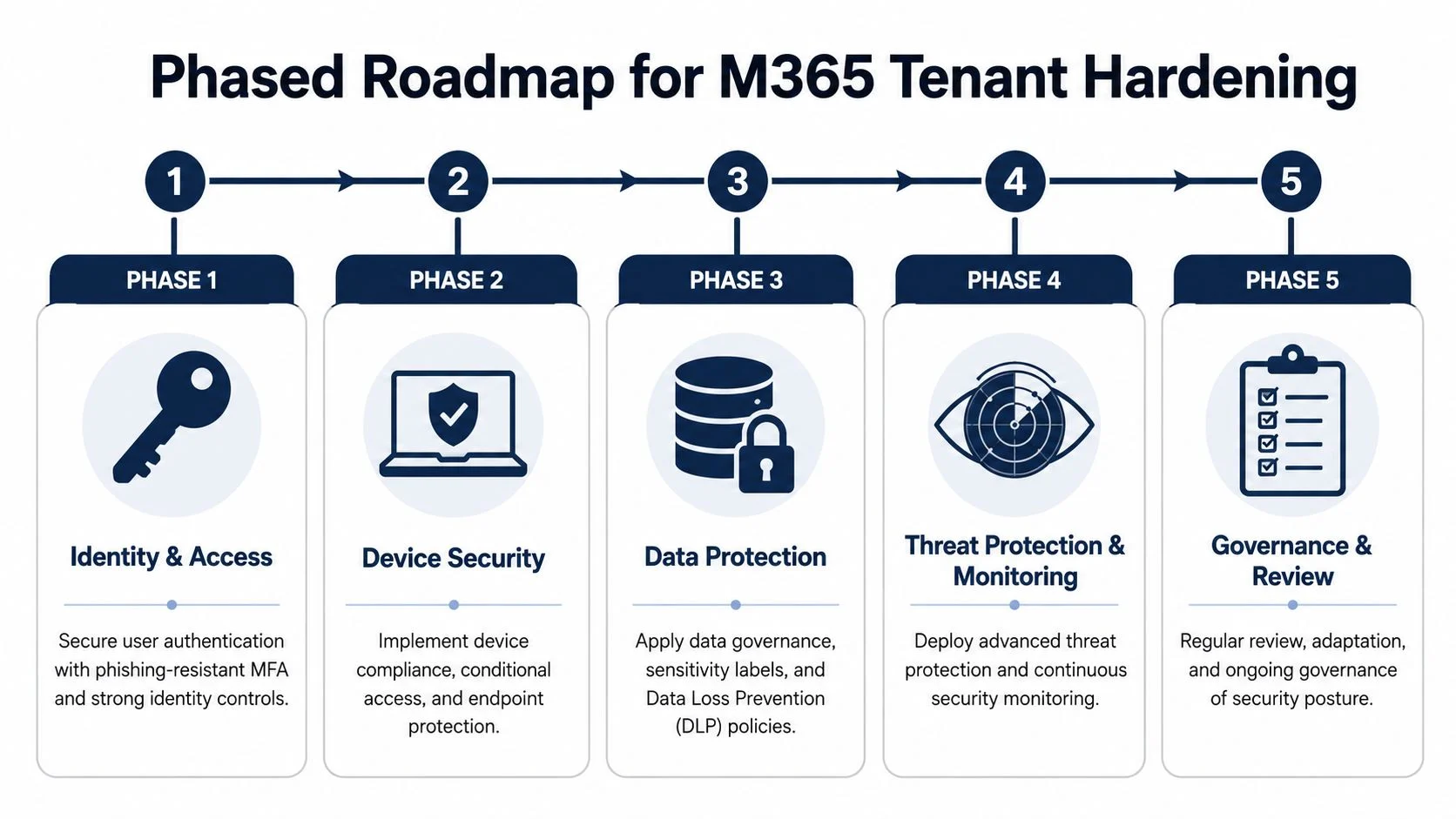
Trying to harden everything in one hit usually fails. Users get overwhelmed, project teams get pulled into support noise, and important settings end up disabled because the rollout was too abrupt. The better approach is staged implementation with a clear sequence.
That’s why our approach to Microsoft 365 tenant hardening follows a roadmap. Not because roadmaps are fashionable, but because security controls work better when people can absorb them and operations can keep moving.
Start with the biggest wins
The first phase is identity and access. In this phase, phishing-resistant MFA, blocked legacy authentication, and cleaner role assignments make the fastest difference. If the front door is exposed, spending time on more advanced controls before fixing identity is poor sequencing.
The second phase moves into device security. Conditional Access and Intune then begin working together. Granular Conditional Access policies that block risky sign-ins, such as impossible travel, and enforce device compliance via Microsoft Intune are key to preventing data exfiltration and support Privacy Act 1988 data protection obligations, as described in Netrix Global’s Microsoft 365 hardening checklist.
The third phase is data protection. DLP, sensitivity labels, and document handling rules come in once the identity and device baseline is stable. At that point, the business can apply stronger controls with less risk of chaos.
What the roadmap looks like in practice
| Phase | Focus | Key Actions | Outcome |
|---|---|---|---|
| Phase 1 | Identity & Access | Enforce phishing-resistant MFA, remove unnecessary admin roles, block legacy authentication, review guest access | Fewer easy account compromise paths |
| Phase 2 | Device Security | Configure Intune compliance, require healthy devices for access, separate managed and unmanaged use cases | Company data accessed from trusted endpoints |
| Phase 3 | Data Protection | Apply DLP, sensitivity labels, sharing restrictions, and forwarding controls | Reduced risk of accidental or deliberate data leakage |
| Phase 4 | Threat Protection & Monitoring | Improve alerting, review logs, refine protection policies, watch for abnormal behaviour | Faster detection and better visibility |
| Phase 5 | Governance & Review | Review policies, validate exceptions, revisit access decisions, train users | Security remains current instead of drifting |
Trade-offs that matter for SMBs
Global guidance often assumes premium licensing and a mature security team. Many Australian SMBs face a different situation. A lot of businesses are running Business Standard or Business Premium and still need a sensible hardening plan.
What works is prioritising the controls that give real risk reduction without pretending every tenant needs the most advanced feature set on day one. That means selecting the strongest controls available within the licence mix, documenting what isn’t yet covered, and building maturity over time.
What doesn’t work is waiting for “the perfect future project” with “the ideal future budget”. Hardening delayed is usually hardening avoided.
Keep the phases measurable
Each phase should end with a practical review:
- Are all users covered by the intended identity controls?
- Have legacy sign-in methods been disabled?
- Which devices are still outside compliance?
- What sensitive data can still be shared too broadly?
- Which exceptions are temporary, and who owns them?
That review cycle matters because Microsoft 365 environments drift. Staff change roles, new apps get connected, guest users accumulate, and temporary workarounds become permanent if nobody checks.
Ongoing Security Monitoring, Response, and Training
A hardened tenant isn’t finished when the initial configuration is done. It’s only more resilient than it was before. Security keeps moving because the business changes, Microsoft adds features, staff habits evolve, and attackers keep adjusting.
That means the final discipline is ongoing maintenance.
Monitoring the posture, not just the alerts
Microsoft gives businesses plenty of information, but information isn’t the same as oversight. Monitoring should focus on a few practical questions:
- Are risky sign-ins appearing more often than expected?
- Have new administrators or high-privilege changes been introduced?
- Are users bypassing policy through unmanaged processes?
- Has the tenant’s overall security posture improved or drifted backward?
Secure Score can help identify gaps and priorities, but it shouldn’t be treated like a game where the only point is to increase the number. Some recommendations are useful. Some aren’t appropriate for the way a business operates. Good monitoring means understanding the difference.
Response planning before something goes wrong
A lot of SMBs have backups but no proper incident response steps. Those are different things. If a suspicious inbox rule appears, a user reports an unusual MFA prompt, or external sharing gets abused, the business needs to know who does what first.
A practical response model usually covers:
- Containment: Disable access, revoke sessions, isolate affected accounts or devices.
- Validation: Check logs, sharing activity, forwarding rules, and admin changes.
- Communication: Inform decision-makers and affected users quickly.
- Recovery: Restore safe access and remove persistence.
- Review: Work out how the issue happened and which control needs tightening.
Without playbooks, businesses improvise under pressure. That rarely ends well.
The best time to decide how you’ll respond to an incident is before anyone is staring at a compromised mailbox.
User training as part of the control set
Even a well-configured tenant can be undermined by user behaviour. Staff still click links, trust urgent payment requests, overshare files, and approve prompts too quickly. That’s why security awareness training belongs inside the hardening program, not outside it.
Regular education helps users recognise suspicious emails, understand sharing boundaries, and respond correctly when something feels off. It also makes technical controls easier to roll out because staff understand the reason behind them.
For businesses building that human layer, security awareness and training should sit alongside technical hardening rather than as a separate afterthought.
The strongest Microsoft 365 environments combine three things: solid controls, monitored activity, and staff who know how to avoid helping the attacker.
Next Steps How We Help and Common Questions
A lot of Melbourne businesses reach this point with the same problem. They know Microsoft 365 needs tightening, but they do not need an oversized enterprise project built around E5 licensing and controls they will never use.
The better approach is to match the work to the business. Start with the gaps that create real exposure, fix the licensing blind spots, document the settings properly, and roll changes out in stages so staff can keep working. That is usually the difference between hardening that sticks and hardening that gets bypassed six weeks later.
At Tbourke Solutions, we handle Microsoft 365 hardening as a practical security program, not a box-ticking exercise. That can mean a one-off review and remediation project, a phased uplift for a growing tenant, or ongoing oversight for businesses that want someone watching the platform properly. For a broader view of how MSPs manage Microsoft 365 securely, that guide explains the operating model in more detail.
Common questions
Will these security changes disrupt day-to-day work?
Some changes do affect routines at first, especially MFA, Conditional Access, and device compliance checks. Good rollout planning keeps that manageable. We usually stage controls, test with a pilot group, and avoid dropping every policy on staff at once.
We use Microsoft 365 Business Standard. Can we still harden the tenant properly?
Yes, within limits. Business Standard can still be improved a long way with the right identity settings, admin cleanup, mailbox protections, sharing controls, and baseline device management where available. The key is choosing the controls that reduce risk first, then upgrading licences only where the extra features solve a clear problem.
How long does a hardening project usually take?
It depends on user count, device condition, admin sprawl, and how much drift has built up over time. A tidy tenant can move quickly. An older environment with inherited settings, unmanaged phones, guest accounts, and unclear ownership needs more care.
What gets missed most often in DIY hardening?
Legacy authentication, stale admin roles, mailbox forwarding, guest access, and sharing settings are common misses. Business owners often lock the front door and leave a side window open. Microsoft 365 has plenty of side windows if nobody checks the details.
What does help from Tbourke Solutions usually look like?
Most engagements fall into three models. A review with a remediation plan. A phased security uplift that fits budget and licence level. Or ongoing Microsoft 365 management as part of broader IT support.
If your tenant has grown organically, start with an assessment and a clear remediation plan. That gives you a sensible order of work, shows where licence upgrades are justified, and avoids spending money on controls that do not match the business.
Share This Story, Choose Your Platform!