If you’re running a small business or a school, your security tools probably already generate more noise than clarity. Your firewall has alerts. Microsoft 365 has alerts. Endpoint protection has alerts. Your backup platform has alerts. Most of them matter a little, a few matter a lot, and almost none arrive in a way that helps a busy manager make a fast decision.
That’s where Microsoft Sentinel comes in. It used to be called Azure Sentinel, and the name change matters because the platform now clearly sits beyond just Azure workloads. It’s designed to become the central security brain for your environment, pulling together signals from cloud services, devices, servers, identity systems, and third-party tools so someone can see the whole picture instead of isolated fragments.
Introduction
A principal gets a call at 7:10 am. Staff cannot access files. A student account has started sending suspicious emails. The firewall logged unusual traffic overnight, but nobody connected it with the Microsoft 365 alerts until the school day was already disrupted.
That is the core problem Microsoft Sentinel solves. It gives smaller organisations a way to see security events as one incident instead of a string of disconnected warnings across email, devices, servers, identity, and cloud apps.
For Australian SMBs and schools, the value is practical. You do not need to build an internal security operations centre to get stronger monitoring, faster investigation, and more consistent response. You also need to think about where security data is stored, who is watching it, and whether the platform will fit a school or business budget. Sentinel makes sense when it is deployed with those constraints in mind, especially in Microsoft’s Australian cloud regions and with an MSP that can set it up, tune it, and manage it properly.
Tbourke Solutions handles that translation layer. We help organisations decide what data should flow into Sentinel, keep ingestion costs under control, align deployment with local residency expectations, and turn the platform into something useful for day-to-day operations instead of another security product that generates noise.
TLDR A Quick Summary
Microsoft Sentinel, formerly Azure Sentinel, is a cloud-based security operations platform that acts like a central command centre for your IT environment. It collects security data from multiple systems, helps detect suspicious activity, gives your team a clearer way to investigate incidents, and can automate parts of the response.
The short version is this:
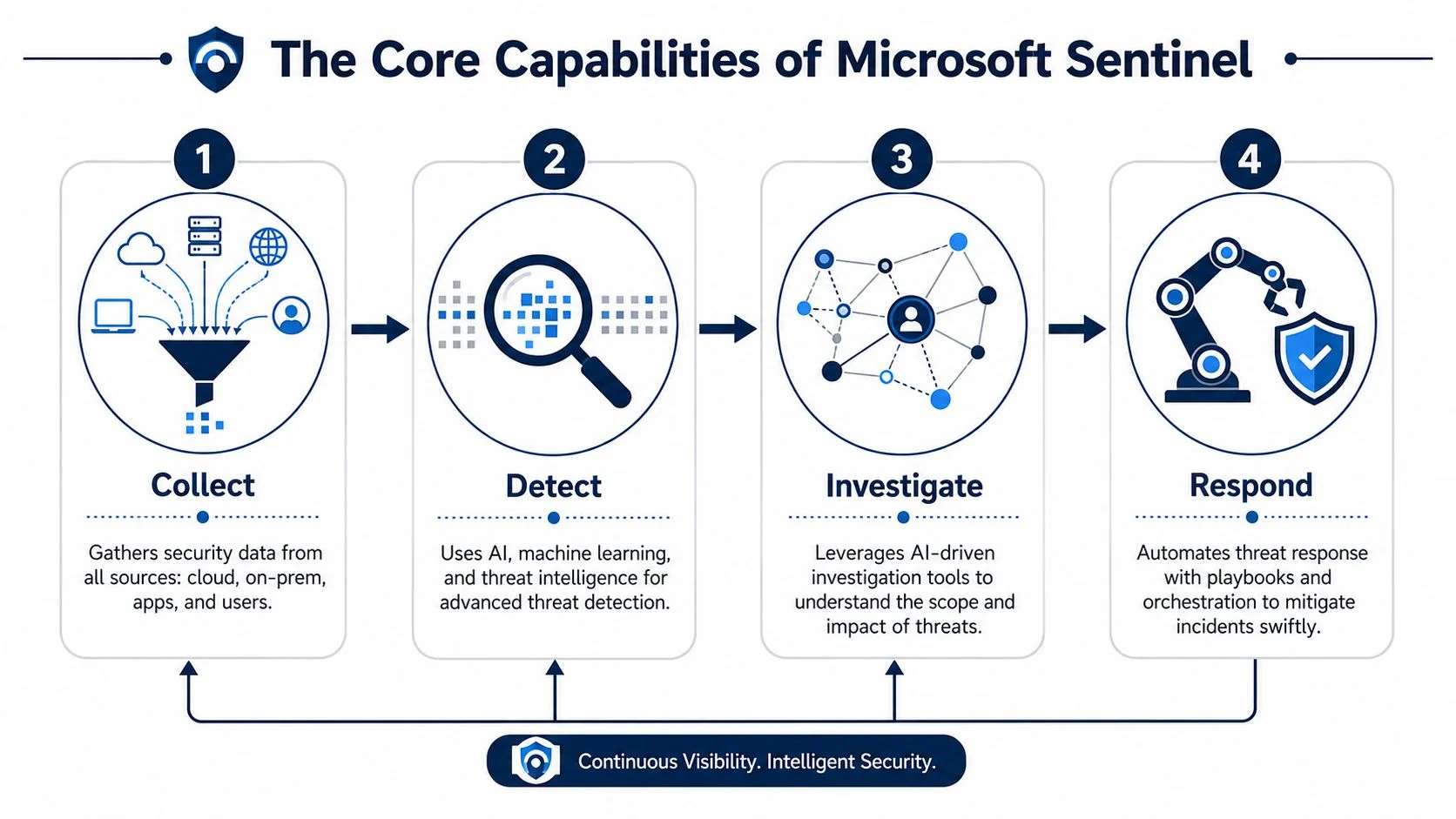
- Collect means bringing logs and alerts from your systems into one place.
- Detect means using rules, analytics, and threat intelligence to spot problems faster.
- Investigate means seeing related activity as a connected incident instead of a pile of raw logs.
- Respond means automating practical actions so your team isn’t starting from scratch every time.
For Australian businesses and schools, Sentinel is a smart option when you need stronger security without building a full internal security operations centre. It helps centralise visibility, reduce manual effort, and support local hosting expectations when deployed in Microsoft’s Australian cloud regions.
Decoding Sentinel What It Is and Why It Matters
A ransomware email lands in a school office inbox at 8:12 am. By recess, the same compromised account is probing SharePoint, creating suspicious mailbox rules, and trying sign-ins from overseas. In a small business, that kind of activity often sits across five different admin portals, with no one joining the dots fast enough. Microsoft Sentinel exists to fix that operational gap.
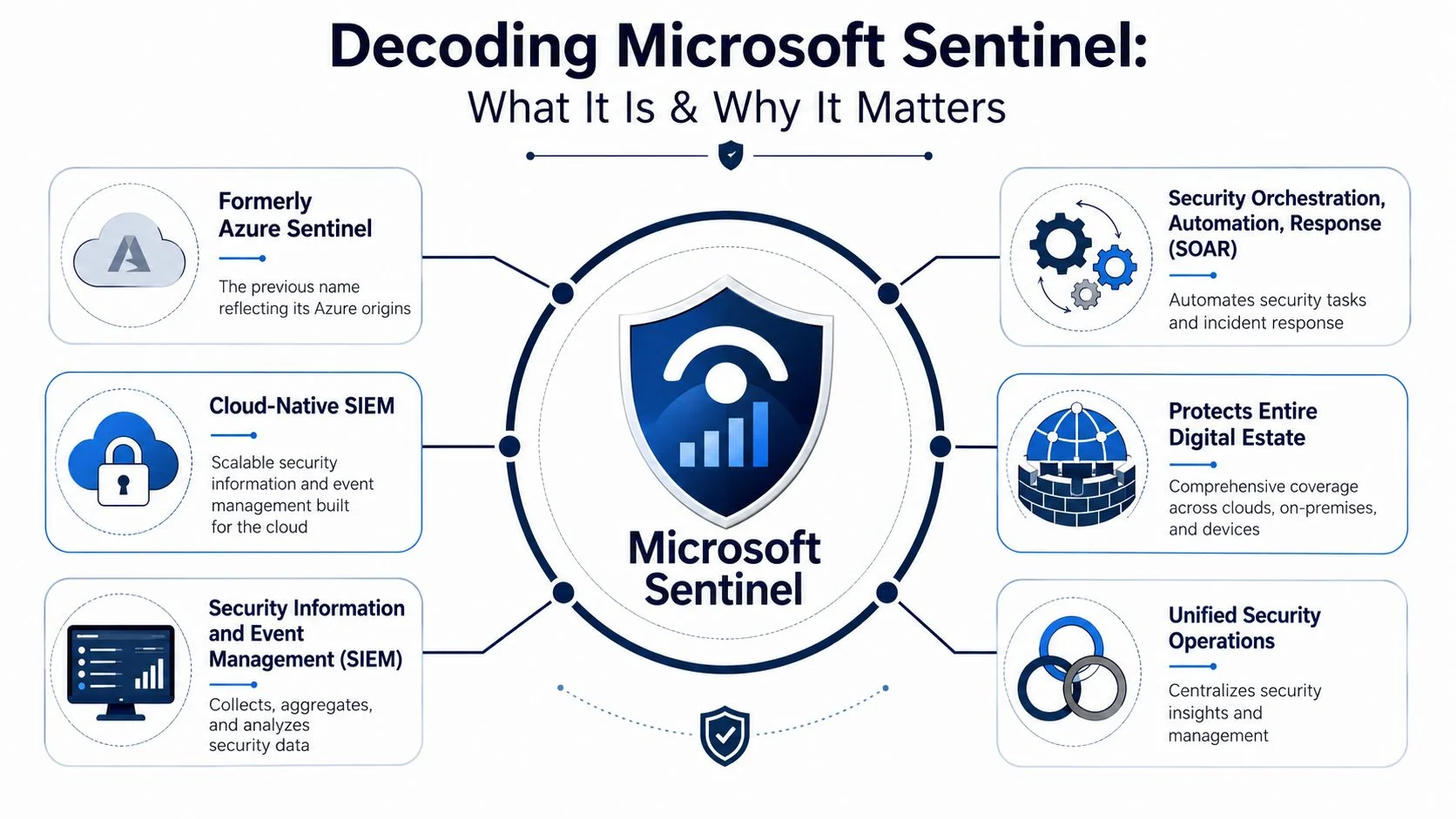
The old name was Azure Sentinel. Microsoft Sentinel is the current name, and the change reflects a broader job. It is Microsoft’s platform for running security operations across cloud services, identities, endpoints, email, servers, and network tools from one place.
Sentinel combines two jobs that many organisations used to buy and manage separately.
SIEM means seeing the whole problem early
SIEM stands for Security Information and Event Management. In plain English, it collects security signals from different systems and correlates them so a real incident stands out from everyday noise.
That matters because attacks rarely stay inside one product. A stolen password can trigger an unusual sign-in, followed by file access, email forwarding changes, and suspicious network traffic. If those events stay isolated, staff lose time and miss context. If they are connected properly, your team can investigate the incident as one story instead of a pile of unrelated alerts.
For Australian SMBs and schools, that is a practical advantage, not a technical nicety. You probably do not have a dedicated security operations centre watching logs all day. You have an internal IT manager, a small admin team, or an MSP. A SIEM helps that smaller team make better decisions faster because the important signals are grouped, prioritised, and easier to interpret.
SOAR means response starts faster
SOAR stands for Security Orchestration, Automation, and Response. It handles the repeatable actions that should happen once suspicious activity is confirmed, such as notifying the right people, opening a ticket, collecting evidence, or triggering containment steps.
Speed matters here. An alert no one acts on is just documentation of a problem. Sentinel helps reduce the lag between detection and response, which is often where smaller organisations get hurt. If your team is still reading alerts one by one and deciding every action manually, incident handling stays slow, inconsistent, and expensive.
Why this matters more in Australia
The Australian context changes the conversation. Local businesses and schools are not choosing Sentinel just because it is a Microsoft product. They are usually trying to strengthen security without funding an enterprise-sized SOC, and they need a sensible answer to questions about where data is stored and who is managing the platform day to day.
For schools, in-country hosting matters when student, parent, and staff data must be handled carefully. For SMBs, it matters when customers, insurers, or auditors ask where security logs and investigation data live. Sentinel can be deployed in Microsoft’s Australian cloud regions, which helps organisations keep security operations aligned with local expectations around data handling and governance.
Cost also matters. Sentinel can be highly effective for a smaller organisation, but only if it is designed with discipline. Pull in every possible log source and you will pay for noise. Connect the right systems, tune detections, and set retention properly, and you get far better value from the same platform.
Configuration decides whether Sentinel helps or wastes money
I will be direct. Sentinel rewards good design and punishes lazy setup.
A poorly planned deployment creates alert fatigue, unnecessary ingestion costs, and a dangerous sense that someone is watching the environment when no one really is. A well-planned deployment gives your team usable visibility, cleaner triage, and faster response during the incidents that actually matter.
That is why Sentinel works best on top of solid foundations. Identity protection, endpoint controls, patching, backups, and policy baselines still matter. If those basics need work first, start with the ACSC Essential 8 guidance for Australian organisations. Then layer Sentinel over that base so it strengthens an already sensible security posture.
This is also where a local MSP makes a real difference. Tbourke Solutions can scope what data should come in, keep costs under control, tune detections for your environment, and manage the platform so your team gets outcomes instead of another dashboard.
The Core Capabilities of Microsoft Sentinel
A lot of vendors bury you in feature lists. That’s not useful. What matters is what Sentinel accomplishes during a real incident.
Microsoft Sentinel is a cloud-native SIEM and SOAR platform. In practical terms, it ingests security events through data connectors into Azure Log Analytics, uses analytics rules to generate incidents, and uses playbooks to automate response workflows. That model shifts a team away from manual log review and toward rule-driven detection, correlation, and response, which is especially useful for SMBs and schools with limited staff, as explained in this breakdown of how Microsoft Sentinel works.
Collect
Collection is where Sentinel starts earning its keep. Data connectors pull in relevant logs and alerts from Microsoft 365, Azure resources, identity systems, endpoints, firewalls, servers, and many third-party platforms.
For a small business, this means you stop checking five consoles to work out whether one suspicious event is isolated or part of something larger. For a school, it means your admin systems, staff sign-ins, and network activity can be reviewed as part of one operating picture.
A centralised event pipeline is the reason SIEM exists at all. If the data stays scattered, the response will stay slow.
Detect
Detection is where Sentinel turns raw telemetry into incidents your team can act on. It uses analytics rules and correlation logic to spot patterns that don’t make sense in normal operations.
Here’s a business example. An employee account signs in successfully, but the behaviour that follows is wrong. File access patterns change. Unusual activity appears in collaboration tools. If you’re relying on separate products, that sequence can look harmless in isolation. In Sentinel, the behaviour can be treated as one developing incident.
For schools, the same logic applies differently. A student account trying to reach systems or records it shouldn’t touch is often not just a policy issue. It’s a potential identity misuse issue. The difference matters because the response should be faster and better documented.
Investigate
This is the stage non-specialists usually underestimate. Collection and alerting sound important. Investigation is where your team regains control.
Sentinel helps analysts follow the trail. Instead of trawling line by line through disconnected logs, they can inspect related alerts, accounts, assets, and actions as part of a single incident. That shortens the path from “something looks odd” to “we know what happened and what needs containment”.
A useful security platform should reduce detective work, not create more of it.
If you want a broader primer on how SIEM fits into incident visibility and response, this SIEM security event management guide is a good companion.
Respond
Response is where Sentinel can save serious time. With playbooks, teams can automate repeatable actions once an incident meets defined conditions.
That could include:
- Account containment by disabling or restricting a user while the incident is reviewed
- Notification workflows that alert internal stakeholders or create a service desk ticket
- Security actions that trigger downstream tools to block or isolate risky behaviour
A small internal IT team usually can’t watch every alert all day, a common situation. Sentinel’s response layer helps narrow the gap between enterprise-grade expectations and limited staffing.
When to Get Help Deploying Your Security Shield
A school business manager signs off on Microsoft Sentinel, connects a few data sources, and expects stronger security by the end of the week. Three months later, the dashboard is noisy, the useful alerts are buried, and the monthly bill is higher than expected. That is the point to bring in help. In practice, it is usually smarter to do it earlier.
Sentinel rewards good design. It also punishes rushed setup. For Australian SMBs and schools, that matters because budgets are tighter, internal IT teams are smaller, and there is less room to waste money collecting logs no one will use or automating actions that disrupt staff and students.
A DIY deployment usually runs off course in three places. The first problem is data selection. Teams miss important sources, or they ingest too much low-value data and pay for noise. The second problem is detection setup. Poorly written analytics rules create alert fatigue and train staff to ignore what matters. The third problem is automation. A playbook that looks clever in testing can lock accounts, interrupt teaching, or slow down business operations if it is not matched to your environment.
Tuning decides whether Sentinel is useful or expensive
Sentinel needs ongoing configuration, not a one-off install. Someone has to make clear decisions about risk, priorities, and cost.
That includes:
- Which logs justify the spend based on your actual threats, compliance needs, and systems
- Which alerts need action now versus review during business hours
- Which automated responses are safe for staff, students, and critical services
- Which Microsoft 365, Azure, on-premise, and third-party systems deserve deeper coverage
- Which data residency and governance requirements apply if your organisation needs to keep a close eye on where security data is processed and stored
For smaller organisations, this is where experience pays for itself. A local MSP can shape Sentinel around your environment instead of dropping in a generic template built for a large enterprise with a full security operations team.
Good deployment is also cost control
Sentinel pricing follows data usage. That can work well for smaller Australian organisations, but only if someone is actively managing what goes in, what gets retained, and what improves detection. Otherwise, you end up paying to store noise.
Schools and SMBs should be especially strict here. Start with your highest-risk systems, tune the detections, review the alert quality, then expand. That staged approach is far more practical than trying to copy an enterprise setup on a school or small-business budget.
If your team does not have SIEM experience, managed support is often the sensible option. Our guide to managed security services for small businesses explains what that support can include and why it often costs less than trying to build the capability internally.
Tbourke Solutions handles the planning, deployment, tuning, and ongoing review. That gives Australian SMBs and education clients a Sentinel setup that is useful from the start, aligned to local operating realities, and easier to justify to leadership.
Real-World Sentinel Use Cases for SMBs and Schools
Theory is fine. Operations are what matter. Sentinel proves its value when something suspicious happens at an inconvenient time and your team needs a clear, controlled response.
SMB example with identity misuse and file activity
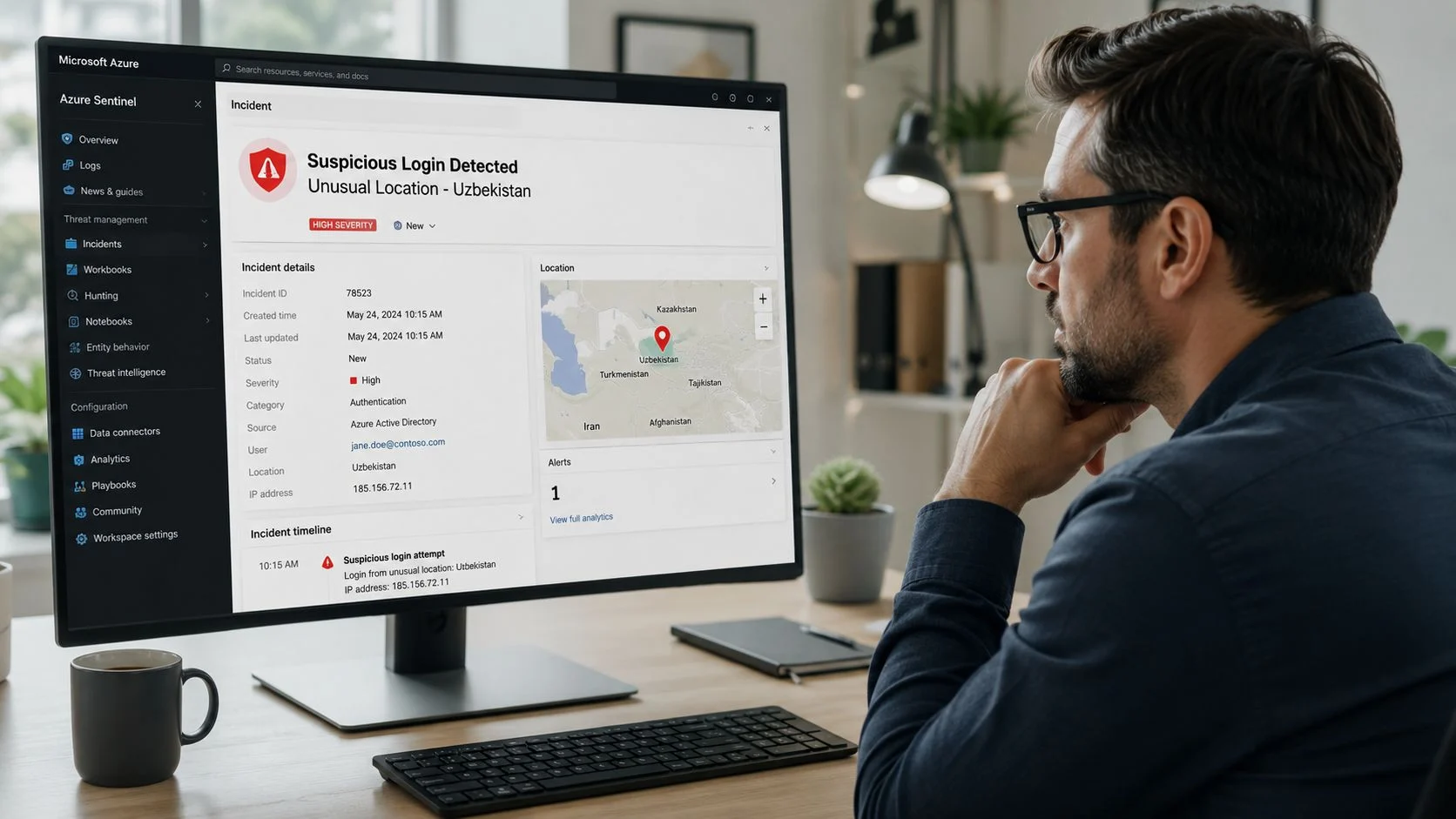
A business user account shows a strange sign-in pattern. Not impossible. Just wrong enough to deserve attention. A little later, file access behaviour shifts in SharePoint and other collaboration tools. Separately, these events might look minor. Together, they suggest compromise or account abuse.
A sensible Sentinel workflow can raise that as one incident, not a string of unrelated alerts. The response playbook might force credential action, restrict the account temporarily, and notify the responsible team so they can review whether the activity was legitimate or part of an attack path.
The operational benefit is straightforward. Your staff don’t need to manually correlate identity, file, and cloud activity under pressure.
School example with after-hours access attempts
Schools often have broad user populations, limited IT staffing, and systems that absolutely shouldn’t be accessed casually. A student account trying to interact with staff financial records or administrative systems after hours is the kind of event that needs both context and restraint.
Sentinel can treat that behaviour as a policy and security incident. Instead of waiting until the next morning for someone to discover scattered logs, the platform can flag the incident, restrict the relevant access path, and leave a documented trail for review.
That’s especially valuable in education, where a small IT team often juggles teaching support, device management, identity, and compliance. If education-specific IT pressures sound familiar, this overview of IT services for education environments gives useful context.
Why these scenarios matter
These aren’t fantasy enterprise cases. They’re normal modern incidents. The common thread is that Sentinel acts like a vigilant operations layer between your systems and your team.
Here’s what that looks like in practice:
| Situation | Without centralised SIEM | With Sentinel |
|---|---|---|
| Suspicious sign-in | One alert in one console | Related activity grouped into an incident |
| Unusual file access | Manual investigation across apps | Correlated with identity and other signals |
| After-hours behaviour | Seen late, or not at all | Detected and routed for review promptly |
| Small IT team | Alert backlog grows | Response steps can be standardised and automated |
That’s why Sentinel fits smaller organisations better than many people assume. It doesn’t replace good IT management, but it gives a lean team a much stronger operating model.
Cost and Licensing Considerations for Sentinel
Most readers eventually ask the key question. Is Sentinel going to blow out the budget?
The better question is this. Can you control the scope well enough to make it practical? In many cases, yes.
Microsoft Sentinel is a cloud-native SIEM and SOAR platform, and its operating model is built around Azure resource provisioning, data connectors, and automated response rather than on-premises security appliances. That architecture lets it scale with data volume and handle multicloud, multiplatform telemetry without traditional hardware sizing constraints, as outlined in this Microsoft Sentinel platform overview.

What drives cost
Sentinel cost usually comes down to two practical decisions:
- How much data you ingest
- How long you keep it
That’s not a flaw. It’s the trade-off of a flexible cloud model. You don’t need to buy oversized hardware up front, but you do need discipline.
How smaller organisations keep it sensible
Budget-conscious organisations should avoid the lazy approach of “send everything and sort it out later”. That strategy creates waste.
A better approach is to prioritise the data sources that carry the most security value:
- Identity and access logs because user compromise is a common attack path
- Endpoint and server telemetry where compromise or lateral movement often shows up
- Firewall and network edge logs to provide context around connections and blocks
- Critical application logs for systems that hold financial, student, client, or operational data
Then review retention based on actual operational needs, governance obligations, and incident response expectations. Not every log type deserves the same retention period.
Practical budgeting questions to ask
Before you approve a Sentinel rollout, ask these:
- Which systems are business-critical? Start there.
- Which alerts already waste staff time? Those are strong candidates for better correlation and automation.
- What data is high-value versus nice-to-have? Be selective.
- Who will maintain the rules and playbooks? If nobody owns tuning, performance and cost both suffer.
A lot of SMBs also benefit from comparing security spend against broader cloud decisions, not in isolation. This guide on Azure cost for a small business helps frame that bigger picture.
Good SIEM budgeting is not about buying less security. It’s about collecting the right security data with a clear purpose.
Your Next Steps with Tbourke Solutions
A school business manager gets a call at 7:15 a.m. Staff cannot access Microsoft 365, a few parent payment records look odd, and nobody can tell whether it is a login issue, a phishing attack, or both. That is the point where security tooling either earns its keep or becomes another dashboard nobody trusts.
For Australian SMBs and schools, the next step with Sentinel should be practical. Start with a short assessment of your real risks, your key systems, and who will respond when alerts fire. If that part is vague, the rollout will be expensive and noisy.
Tbourke Solutions approaches Sentinel as an operating system for security decisions, not a box to tick. The job is to decide what needs visibility first, what should trigger investigation, and what can be automated safely without disrupting staff, teachers, or business operations.
What good support should look like
Good Sentinel support covers planning, setup, tuning, and day-to-day ownership.
A sensible engagement usually includes:
- A security review to identify the systems and accounts that matter most
- Deployment and configuration of connectors, analytics rules, workbooks, and access controls that fit your environment
- Alert tuning and automation design so the platform reduces noise instead of creating more of it
- Ongoing management to keep detections relevant as your users, apps, devices, and risks change
That matters more in smaller organisations. An enterprise can absorb a few bad rules and a flood of low-value alerts. A school office team or a growing business cannot. They need clear signals, predictable costs, and response processes that work on a busy Monday morning.
Why local guidance matters
Local context changes the design. Australian organisations often care about where security data is stored, how cloud services fit internal governance, and how to improve detection without hiring a full security operations team. Sentinel can support that. It still needs to be configured with discipline.
That is where a local MSP adds value. Tbourke Solutions can handle the technical setup, shape the monitoring around your budget, and keep the platform useful after go-live. You get stronger visibility and faster investigation without building everything in-house.
If Sentinel looks like the right fit, the right next step is a scoped conversation about your environment, your risks, and the level of support you need.
Common Questions About Microsoft Sentinel
Is Microsoft Sentinel only for large enterprises
No. That’s one of the biggest misconceptions. It’s cloud-native, scalable, and well suited to organisations that need stronger security operations without building a full internal SOC. SMBs and schools can benefit if the deployment is focused and properly tuned.
How is Sentinel different from antivirus
Antivirus protects individual devices by detecting known and suspicious activity on the endpoint. Sentinel works at a broader level. It collects signals from multiple systems so your team can see relationships between identity events, cloud activity, device alerts, and infrastructure logs.
Does it only work with Microsoft products
No. Sentinel is designed to support multicloud and multiplatform environments. That’s one of the reasons the product name shifted from Azure Sentinel to Microsoft Sentinel. It’s meant to be a broader security operations platform, not just an Azure-only tool.
What’s the hardest part of adopting Sentinel
The hardest part is usually tuning. If you connect the wrong data, write poor analytics rules, or automate the wrong action, the platform becomes noisy and frustrating. The technology is strong. The design work is where success or failure happens.
Is Sentinel a replacement for good IT management
No. It won’t fix weak identity controls, poor patching, messy permissions, or unclear ownership. It gives you stronger detection and response. It does not replace basic security discipline.
If you want help deciding whether Microsoft Sentinel is the right fit, or you need someone to design, tune, and manage it properly, talk to Tbourke Solutions. We work with Australian businesses and schools that need practical security, not buzzwords. To ask a question or start a conversation, use the contact page.
Share This Story, Choose Your Platform!