Running a small business in Footscray means wearing too many hats at once. You’re chasing invoices, handling staff issues, sorting suppliers, and trying to keep customers happy. Cybersecurity sits in the background until something breaks, an account gets hijacked, a laptop starts acting strangely, or a supplier email turns out to be fake.
That’s where SIEM: Security Information & Event Management Guide becomes useful, but if explained in practical terms. Most SIEM content is written for big internal security teams with large budgets. That is not the situation for most local businesses, schools, startups, or sole traders around Melbourne’s west.
A better way to think about SIEM is this. It’s a central security watch desk for your business. It collects activity logs from your computers, servers, firewall, Microsoft 365, cloud apps, and other systems, then looks for patterns that suggest something is wrong. In Australia, cybercrime costs businesses AUD 33 billion annually, SMEs make up 99.8% of businesses, are targeted in 43% of attacks, and have faced a 300% increase in ransomware incidents since 2020 according to Mordor Intelligence’s AU SIEM market report. That’s why even a small Footscray business should care.
Introduction
Many business owners know the feeling. Something seems off, but there’s no clear answer. Maybe a staff member clicked a strange invoice link. Maybe Microsoft 365 showed a suspicious login alert overnight. Maybe your internet dropped, your point of sale froze, and you started wondering whether it was just bad luck or something worse.
SIEM helps answer that question by pulling together the evidence from across your systems. Instead of checking ten different dashboards, it centralises logs and highlights suspicious patterns so someone can act before a small issue turns into a business interruption.
For Australian businesses, that matters for two reasons. First, the threat level is significant. Second, compliance expectations don’t disappear just because your team is small. If your business handles customer records, staff details, payment data, or school information, you need visibility into what happened, when it happened, and what you did next.
This guide is written like a working playbook, not a vendor brochure. It focuses on what works for small businesses with limited time, limited budget, and no appetite for unnecessary complexity.
TLDR Your Quick Cybersecurity Playbook
SIEM is useful, but it’s not the first thing to buy if your basics are weak. Get the foundations right first with multi-factor authentication, patching, and reliable backups, then add SIEM where it gives you better visibility, faster response, and cleaner compliance reporting.
For a small Footscray business, the smart path is simple. Protect accounts, reduce easy attack paths, separate risky parts of the network, train staff, and have a response plan ready before you need it. If you don’t have the time or skills to monitor alerts properly, get help rather than paying for a tool that nobody’s watching.
What is SIEM and Why Should a Footscray Business Care
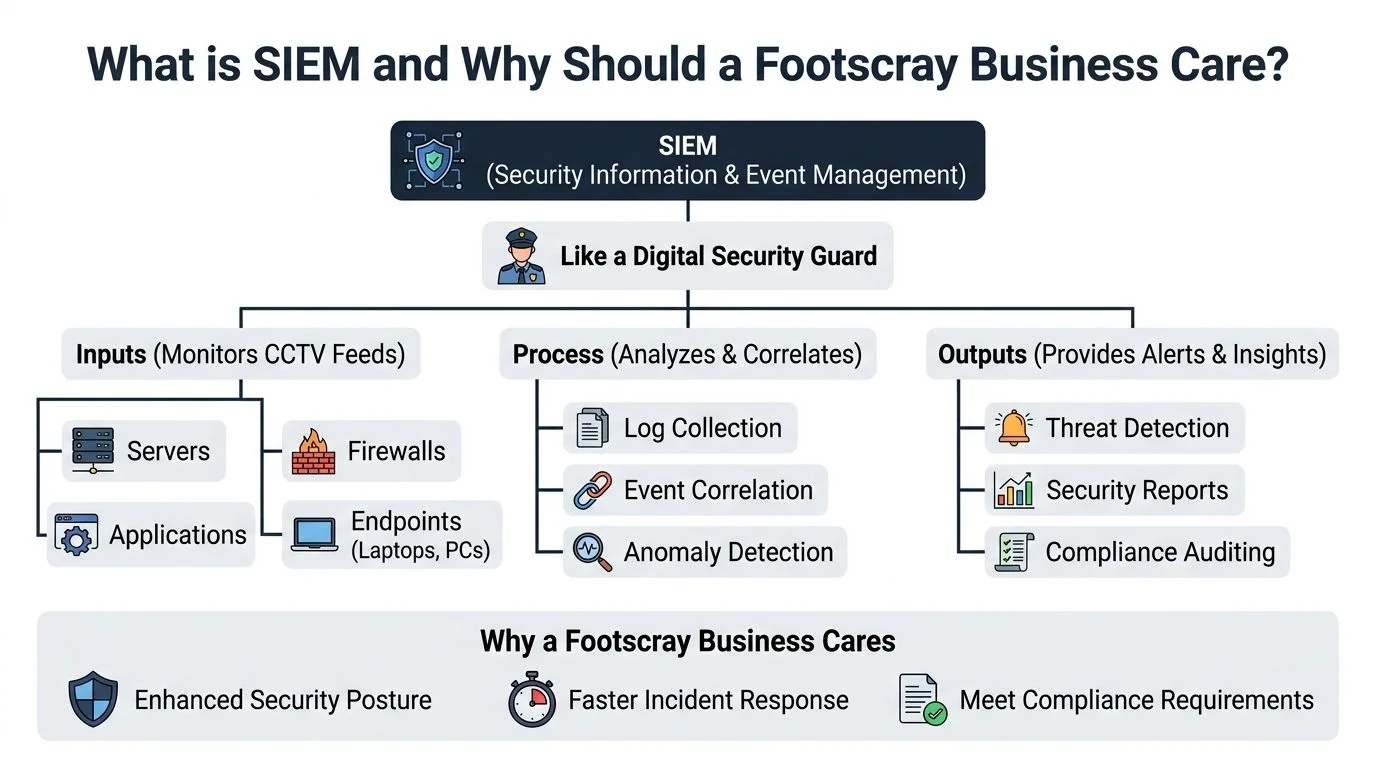
The easiest way to understand SIEM is to stop thinking about software and start thinking about security guard duty.
A Security Information and Event Management platform watches the digital equivalent of your doors, windows, cameras, and alarm panel. It pulls in records from firewalls, endpoints, servers, cloud apps, and user logins. Then it checks whether those separate events form a suspicious pattern.
The simple version
If a staff member logs in from Footscray at 9:00 am, that’s normal.
If the same account tries to log in from another country, fails several times, then accesses shared files and sends unusual email traffic, that’s not normal. A decent SIEM connects those events instead of treating them as unrelated technical noise.
This is the core value: Context.
Without SIEM, a small business sees disconnected warnings:
- Email alert: Someone logged into Microsoft 365
- Firewall alert: Traffic spiked unexpectedly
- PC alert: A script launched from a temp folder
Seen separately, each alert may look harmless. Seen together, they can point to account compromise, malware, or data theft.
Why it matters locally
Small businesses assume attackers only chase big brands. They don’t. Attackers go where controls are weak, patching is inconsistent, and nobody is watching logs after hours.
For a Footscray café, medical clinic, school, tradie office, or startup, SIEM matters because it helps with three things:
| Business need | What SIEM helps with |
|---|---|
| Visibility | Shows what’s happening across devices, apps, and network activity |
| Response | Helps spot suspicious behaviour faster so you can isolate systems quickly |
| Compliance | Preserves evidence and reporting that support incident investigations and privacy obligations |
A practical example is network separation. If a café runs guest Wi-Fi on the same network as the POS terminals, a problem on one side can spill into the other. SIEM won’t replace segmentation, but it can show the traffic patterns and failed access attempts that tell you the design needs fixing.
Practical rule: SIEM is not a magic shield. It’s a way to notice trouble early enough to do something useful about it.
What SIEM does well, and what it doesn’t
SIEM is good at:
- Collecting logs from multiple systems
- Correlating events that don’t look dangerous on their own
- Alerting on anomalies that need investigation
- Supporting audits and incident reviews
SIEM is poor value when:
- MFA isn’t enabled
- Patching is neglected
- Backups aren’t tested
- Nobody owns the alerts
That last point matters most. A SIEM that isn’t tuned and monitored becomes an expensive noise machine. For a small business, the right question isn’t “Do I need SIEM?” It’s “Am I ready to use SIEM properly?”
Your First Layer of Defence Foundational Controls
Before you spend money on SIEM, get the basics right. If the foundation is weak, the rest of the stack won’t save you.

Security works the same way a house build does. You don’t start with premium finishes before the slab is poured. For small businesses, the slab is made up of a few controls that do most of the heavy lifting.
Patch what attackers look for first
Unpatched systems give attackers easy entry. That includes Windows devices, Microsoft 365-connected endpoints, firewalls, line-of-business apps, remote access tools, and anything staff use from home.
The mistake isn’t ignorance. It’s drift. Businesses patch laptops but forget the firewall. They update the server but not the accounting app. They replace one old PC and leave another one under the reception desk running outdated software because “it still works”.
That mindset creates gaps attackers love.
A practical patching routine should include:
- Operating systems: Windows, macOS, mobile devices
- Business apps: accounting, CRM, browsers, PDF tools
- Infrastructure: firewalls, switches, wireless gear, VPN appliances
- Review cadence: a fixed schedule, plus urgent updates when a serious issue appears
If you want a broader small business baseline, the ACSC Essential 8 guidance from Tbourke Solutions is a useful starting point because it frames cyber hygiene in plain business terms.
Put MFA on the front door
If a password gets stolen, multi-factor authentication is the control that can stop that mistake becoming a breach.
Start with the systems that matter most:
- Email accounts
- Microsoft 365 or Google Workspace
- Remote access
- Accounting platforms
- Admin accounts
- Password manager access
Many owners ask whether MFA annoys staff. Sometimes it does. It also annoys attackers. That’s the point.
The common failure is partial rollout. One director account without MFA can undo all the good work done elsewhere. Apply it consistently, especially to privileged accounts.
Backups are your bargaining power
Backups don’t prevent compromise. They do something equally important. They stop attackers from controlling your recovery.
If ransomware hits and your only backup is a permanently connected device that’s never been tested, you don’t have a recovery plan. You have hope.
Use this checklist:
- Keep multiple copies of critical business data
- Separate backup storage from day-to-day access where possible
- Protect backup access with strong credentials and MFA
- Test restores so you know files, systems, and processes come back properly
- Document who does what during a recovery
Businesses overspend on detection while underinvesting in recovery. That’s backwards for most SMEs.
A simple self-check
Use this quick test before looking at SIEM seriously.
| Question | If the answer is no |
|---|---|
| Are all key accounts protected with MFA? | Fix this first |
| Do you patch endpoints, network gear, and apps on a schedule? | Fix this first |
| Can you restore critical files and systems from backup? | Fix this first |
| Do you know which devices and apps hold sensitive data? | Map this before adding tools |
If you fail most of that checklist, SIEM should wait. Not forever. Until the basics stop being the biggest risk.
Stepping Up Security with Advanced Protections
Once the basics are steady, the next gains come from better endpoint protection and cleaner network design.
Many small businesses think in old categories like antivirus, firewall, router, done. That model is too thin for modern threats. Email-based compromise, identity attacks, malicious scripts, and stolen session tokens don’t always look like classic malware.
Endpoint protection that looks at behaviour
Modern endpoint tools don’t just scan files for known bad signatures. They watch behaviour.
That matters because many attacks start with actions that look ordinary in isolation. A script launches. A user opens a compressed file. A command shell starts from an unusual location. A browser process triggers something it shouldn’t. Behaviour-based monitoring helps catch that kind of pattern earlier.
For a small business, what matters isn’t the branding on the box. It’s whether the product gives you:
- Central visibility across business devices
- Meaningful alerts rather than a flood of junk
- Isolation options for a suspected infected machine
- Coverage for laptops that leave the office every day
If your team works across the office, home, and mobile connections, endpoint security gives better early value than fancy perimeter gear.
Segment the network like you mean it
Network segmentation sounds technical, but the concept is simple. Don’t let every device trust every other device.
A Footscray café is the easiest example. The POS terminals should not sit on the same network as guest Wi-Fi. If a customer device on free Wi-Fi becomes a problem, it shouldn’t have a clean path toward payment systems or back-office devices.
The same logic applies elsewhere:
- School admin systems should be separated from student devices
- Office PCs should be separated from server management interfaces
- IoT gear like cameras or printers should not have broad access to file shares
The people problem still decides the result
Advanced tools help, but culture decides whether they work.
If staff report suspicious emails quickly, if admin rights are limited, and if someone checks unusual alerts instead of ignoring them, your technology performs better. If nobody takes ownership, even expensive tools become shelfware with monthly invoices.
Buy fewer tools if it means you can run them properly.
When to Get Help Knowing Your Limits
Small business owners in Footscray usually wait too long to bring in security help. I see the same pattern often. The business is running, staff are flat out, and cyber jobs get handled in the gaps between invoices, customers, and payroll.
Then the warning signs start stacking up.
Microsoft 365 sends alerts nobody can explain. The firewall is turned on, but no one is confident it is set up properly. Backups are in place, yet nobody has tested whether a full restore will work under pressure. At that point, the question is no longer whether security matters. The core question is whether your current setup can be trusted when something goes wrong.
NetWitness notes in its SIEM guide for beginners that many SMBs under 200 employees struggle with cost and skill shortages, and managed services remain underused despite ransomware pressure on sectors such as education. That lines up with what happens on the ground. Small teams try to do the right thing, but they do not always have the time or depth to monitor, tune, and respond properly.
Signs it’s time to call someone
Bring in help if any of these are true:
- You’re getting security alerts and no one can tell which ones matter
- You’re unsure about privacy obligations or breach reporting
- Patching happens inconsistently or nobody owns it from start to finish
- Backups exist, but recovery steps are undocumented or untested
- Cloud apps, remote access, and user accounts have grown faster than your controls
- Security decisions keep landing on the owner, office manager, or whoever is least busy that day
That is not a failure. It is a capacity issue.
A practical rule works well here. If the problem is limited to one device, one user, or one minor software fault, you may be able to handle it internally. If it touches email, identities, customer records, finance systems, remote access, or compliance, treat it as a business risk with technical consequences.
Managed security can make sense at that stage, especially if you need someone watching the basics consistently rather than buying another tool you will not have time to run. For a plain-English breakdown, this overview of MSSP services for small businesses explains what gets monitored, what gets tuned, and what should be escalated.
Don’t wait for proof of damage
Owners often hold off because they want certainty before spending money. That usually costs more.
Get help when:
- You suspect an account, device, or mailbox has been compromised
- You do not understand an alert and cannot verify whether it is harmless
- You want an independent check of your current setup
- You are adding staff, locations, or cloud systems and security has not kept pace
For a Footscray business on a tight budget, the goal is not to outsource everything. It is to get the right help at the point where DIY starts creating blind spots. That might mean a one-off review, incident support, or ongoing monitoring. The smart move is choosing help before a confusing alert turns into downtime, lost data, or a long week explaining the problem to customers.
Building a Resilient Business Culture
At a small Footscray business, security culture usually shows up in ordinary moments. A receptionist gets a supplier invoice that looks slightly off. A staff member approves a Microsoft 365 login prompt they did not expect. Someone in accounts is asked to change bank details five minutes before close. Tools can flag some of this. Your team decides whether the business loses money.

That is why resilient businesses spread a few clear security habits across the whole team instead of leaving judgment to one IT contact or one careful manager. Staff do not need to memorise every attack type. They need to know what to do in the first two minutes. Pause, verify, report, and avoid making the problem bigger.
Turn awareness into routine
One annual slide deck is not enough. People forget it, especially when they are busy, covering multiple roles, or switching between front desk work, mobiles, and email.
Good routines are simple:
- Report fast: Give staff one clear method for flagging suspicious emails, texts, or login prompts
- Verify requests: Confirm payment changes, invoice updates, and password resets through a second channel
- Handle data carefully: Set clear rules for where customer files live and who should access them
- Treat near misses as useful: Review mistakes quickly and fix the process without turning it into a blame session
In Footscray, I often see the same pattern in smaller firms. The business is busy, several people wear multiple hats, and a fake parcel message or supplier invoice lands at the worst possible time. That is not a people problem. It is a process problem.
Keep the rules short enough to use
If your policy reads like a legal document, staff will ignore it. A short operating model works better because people can remember it under pressure:
- Stop if something feels off
- Check the sender, request, and timing
- Report it to the right person
- Do not click, reply, or forward until someone has reviewed it
Print that. Put it near shared desks. Add it to onboarding.
Train for the work your team does
A clinic, school, trade business, and online retailer do not face the same day-to-day risks. Training should match the systems and decisions your staff deal with every week.
If your team lives in Microsoft 365, focus on login prompts, account sharing, file permissions, and business email compromise. If you handle customer forms, student records, or job details, focus on privacy, access control, and where data should be stored. If staff move between site, home, and office, train on device use, public Wi-Fi, and what to do if a phone or laptop goes missing.
If you want a structured way to build that habit, security awareness and training services can turn scattered reminders into a repeatable program staff will follow.
Culture also includes recovery. Staff should know who to call, what to record, and where the business keeps its recovery checklist if a mailbox is hijacked or a shared folder is encrypted. That planning sits alongside Disaster and Recovery Planning, because a calm team with a simple process usually contains damage faster than a panicked team with a thick policy binder.
Your Playbook for When Things Go Wrong
The worst time to decide how to respond to a cyber incident is during the incident.
A simple incident response plan doesn’t need to be complicated. It needs to be clear enough that stressed people can follow it. In small business environments, speed matters. A successful incident response methodology can reduce Mean Time to Detect to under 30 minutes and Mean Time to Respond to under 2 hours, with 85% detection efficacy in small business pilots, according to the incident response methodology in this SIEM implementation study.

Isolate first
If you think a device is compromised, remove it from the network quickly. Don’t keep “having a look” while it stays connected to shared systems.
That may mean:
- Disconnecting Wi-Fi
- Unplugging network access
- Stopping remote access sessions
- Preventing the user from continuing normal work on that device
Isolation is about reducing spread. It protects shared drives, cloud sessions, and nearby systems while you work out what happened.
Investigate without destroying evidence
The next mistake businesses make is wiping the system immediately.
That can destroy the trail you need to understand the incident. Preserve logs, screenshots, suspicious emails, and user observations. Write down what was seen, when it was seen, and which accounts or devices were involved.
A useful response sequence is:
| Step | What to do |
|---|---|
| Isolate | Remove affected devices or accounts from active access |
| Investigate | Review logs, alerts, emails, account activity, and timeline |
| Eradicate | Remove malware, reset credentials, close exposed access paths |
| Recover | Restore systems from known-good backups |
| Learn | Fix the gap that let it happen and update the process |
Recovery is operational, not just technical
Recovery isn’t about restoring files alone. It’s about restoring business function.
That means checking:
- What staff need first
- Which systems can come back in stages
- Whether restored systems are clean
- Whether customer communication is required
- Whether reporting obligations apply
For businesses reviewing continuity options, Disaster and Recovery Planning offers useful background on planning the business side of recovery, not just the technical side.
If you want examples of what a practical recovery plan looks like for smaller environments, these disaster recovery plan examples are a good reference point.
Panic causes extra damage. A written checklist reduces bad decisions when time is tight.
How Tbourke Solutions Delivers Peace of Mind
Small business security usually breaks down in the handoff between advice and daily work. Someone still has to sort real alerts from junk, tighten Microsoft 365 settings, check whether backups will restore, and decide if SIEM is worth the cost for a team with limited time and budget.
Tbourke Solutions works with Melbourne small businesses, schools, sole traders, and startups that need practical security support without building an internal security team. That can include security reviews, ongoing monitoring, Microsoft 365 and endpoint hardening, and SIEM-related monitoring where the environment is complex enough to justify it. Their managed cybersecurity services for small businesses page gives a clear picture of the support available.
The value is not the tool itself. It is the time spent tuning it to your environment.
A Footscray business with ten staff, a few laptops, Microsoft 365, and a cloud accounting platform should not be paying for the same monitoring setup as a larger firm with multiple sites and servers. Good managed support starts by narrowing the scope to the systems that matter most, then building sensible alerting around those systems. That keeps costs under control and gives you alerts someone can act on.
Poorly tuned SIEM creates noise, and noise gets ignored. Well-tuned monitoring gives cleaner visibility into account misuse, unusual logins, endpoint threats, and configuration drift. That is the difference between a dashboard nobody trusts and a process that helps the business make faster decisions during a real incident.
For owners and managers, peace of mind comes from clarity. What are we protecting first? What gets monitored now? What can wait? Where do we need outside help? Tbourke Solutions focuses on those decisions so smaller businesses can improve security in stages instead of buying a big platform and hoping it solves the problem.
If you want a practical second opinion on whether SIEM fits your business, or whether your money should go into foundational controls first, ask for an assessment and outline the systems you rely on most.
Frequently Asked Cybersecurity Questions
Do all small businesses need SIEM
No. Not every small business needs a full SIEM immediately.
If your patching, MFA, backups, and device management are still inconsistent, fix those first. SIEM starts making more sense once you need better visibility across multiple systems, want cleaner investigation capability, or have compliance pressure that requires stronger logging and monitoring.
Is SIEM the same as antivirus
No.
Antivirus or endpoint protection works on the device itself. SIEM collects and analyses activity from across multiple systems. One helps block or detect activity on endpoints. The other helps you see patterns across the wider environment.
Can a small business manage SIEM in-house
Sometimes, but if someone owns it.
A SIEM needs log onboarding, rule tuning, alert review, and periodic cleanup. If nobody can maintain it, the business ends up paying for noise. Small teams often get better outcomes from a leaner setup or managed monitoring.
What logs should be collected first
Start with the systems most likely to tell you about a real problem:
- Firewall and VPN logs
- Microsoft 365 or core email platform activity
- Endpoint security alerts
- Server logs
- Critical business app authentication logs
Don’t start by collecting everything because you can. Start with what you can review and act on.
What’s the biggest mistake businesses make
Buying advanced tooling before they’ve locked down the basics.
That shows up as weak MFA coverage, poor patch discipline, untested backups, too many admin rights, or no clear response process. Fancy dashboards don’t compensate for that.
How often should we review our security setup
Regularly enough that it reflects the actual business, not the business you had last year.
Any change in staff, software, remote work patterns, cloud use, or compliance obligations should trigger a review. If you’ve added systems, changed providers, or grown quickly, your security controls should be revisited as well.
What should we do if we think something suspicious is happening right now
Act early. Isolate affected devices or accounts where possible, stop further risky activity, preserve evidence, and get help.
Don’t wait for absolute proof. The cost of checking early is far lower than the cost of letting an incident spread.
If you want practical help improving security without turning your business into a full-time IT project, Tbourke Solutions can help you assess the basics, decide whether SIEM is appropriate, and build a sensible security roadmap for your environment. If you’re ready to ask a question or want someone to review your current setup, use the contact form at http://tbourke-solutions.com.au/contact.
Share This Story, Choose Your Platform!