
If you’re a small business owner in Melbourne looking at Azure, the first reaction is usually the same. The pricing page looks simple until you realise you’re not buying one thing. You’re buying compute, storage, support, and the right to scale without boxing yourself into hardware you may outgrow.
That’s why the question isn’t just “how much does Microsoft Azure cost for a small business in Australia”. It’s “what will Azure cost my business once everything necessary is included, in Australian conditions, with support, GST, and the right setup choices from day one”.
Untangling Azure Costs Your Essential Guide
A Melbourne business owner approves an Azure rollout after seeing a low monthly estimate, then gets the first full bill and finds extra costs for storage growth, backup retention, support, and GST. That happens because Azure pricing is modular. The entry price can be low, but a production setup is never just one line item.
For a small business, Azure works more like fitting out a leased office than buying a single asset. The rent matters, but so do power, security, cleaning, after-hours access, and the cost of calling someone when something goes wrong. Cloud pricing follows the same pattern. The number you pay depends on the workload, the operating model, and how much risk the business is prepared to carry itself.
If you’re still mapping out what needs to run in Azure, it helps to review Azure platform services for business workloads before setting a budget. That usually makes the later pricing choices far easier to justify.
TLDR: Azure can be cost-effective for an Australian SMB, but only when you budget for total cost of ownership in AUD. That includes the core services, support, backup, storage growth, GST, and the cost difference between managing it yourself and paying an MSP. Small test environments can stay inexpensive. Business-critical systems rarely do.
What small businesses usually get wrong first
The first mistake is pricing Azure like a product catalogue. Owners often look at the virtual machine rate and stop there. In practice, the bill is shaped by several decisions made around that server, not just the server itself.
A more useful starting point is:
- Define the workload clearly: A file server, hosted application, backup target, and customer-facing website all create different cost patterns.
- Separate test from production: A trial environment can run lean. A live business system usually needs monitoring, backup, tighter security settings, and support coverage.
- Budget in Australian business terms: Allow for GST, allow for support, and decide early whether your team will manage Azure directly or hand that responsibility to an MSP.
- Price the operating model, not just the infrastructure: DIY can look cheaper on paper, but internal time, slower issue resolution, and configuration mistakes often turn into avoidable cost.
Handled properly, Azure becomes a controllable operating expense. Handled casually, it turns into a bill that looks different every month for reasons no one spotted at the start.
Understanding Your Azure Pricing Options

A Melbourne business owner usually asks a simple question first. Should we keep Azure flexible, or commit to lower rates? That decision shapes your monthly bill more than is often anticipated.
Azure pricing mainly comes down to how certain you are about the workload. If the server size, usage pattern, or business demand might change, flexibility has value. If the workload is steady and likely to stay that way for years, commitment usually cuts waste.
Pay as you go for changing workloads
Pay-as-you-go works like hiring equipment by the day. You pay for what you run, and you can change direction quickly. That suits a business testing a new application, migrating in stages, or replacing an old server without knowing the final shape yet.
The upside is obvious. No long commitment, fast setup, and less risk of paying for capacity you guessed wrong.
The downside shows up later. A server that runs 24/7 for months on pay-as-you-go rates often costs more than the same workload under a committed pricing model. I see this with small businesses that start cautiously, then leave the environment in its trial settings long after it becomes part of daily operations.
Pay-as-you-go usually fits:
- Short-term projects
- Test and development systems
- New workloads with uncertain demand
- Businesses still working out the right server size
Savings plans and reserved capacity for steady systems
Once a workload becomes predictable, Azure gives you ways to lower the compute rate by committing to usage over time. Microsoft explains these options through its Azure reservations and savings plan pricing guidance.
For a small business, the practical question is simple. Will this server still be here in one year, doing roughly the same job?
If the answer is yes, a savings plan or reserved capacity can make financial sense. Common examples include a line-of-business application server, a domain controller, or a production database that runs every business day. The trade-off is reduced flexibility. If you commit to the wrong size, or the application is replaced sooner than expected, part of the saving can disappear.
That is why committed pricing should follow a few months of real usage data, not guesswork made during the first week of a migration.
Burstable versus sustained performance
VM type matters as much as the pricing model. Some Azure virtual machines are priced low because they are designed for light, inconsistent demand. Others are built for workloads that stay busy all day.
A burstable VM is similar to a small ute used for occasional deliveries. It is economical when the load is light. It is the wrong vehicle for constant heavy freight.
For small businesses comparing Azure infrastructure and cloud services, this becomes a business decision, not just a technical one. A quiet utility server, print server, or low-use internal tool may run well on burstable compute. A production application used by staff all day usually needs sustained performance.
Cheap hourly pricing can be misleading here. If staff are waiting on a slow accounting system or CRM because the VM keeps hitting its limits, the primary cost lands in lost time and frustration, not just the Azure invoice.
Match the pricing option to the business pattern
The cleanest way to choose is to match the Azure model to how the business uses the system.
- Uncertain or temporary workload: Pay-as-you-go
- Stable long-running workload: Savings plan or reserved capacity
- Light, occasional demand: Burstable VM
- Consistent production usage: General-purpose or higher sustained-performance VM
Small businesses can save money without cutting corners. Pick flexibility where the workload is still changing. Commit only after the pattern is clear.
The True Cost What Most Azure Calculators Miss
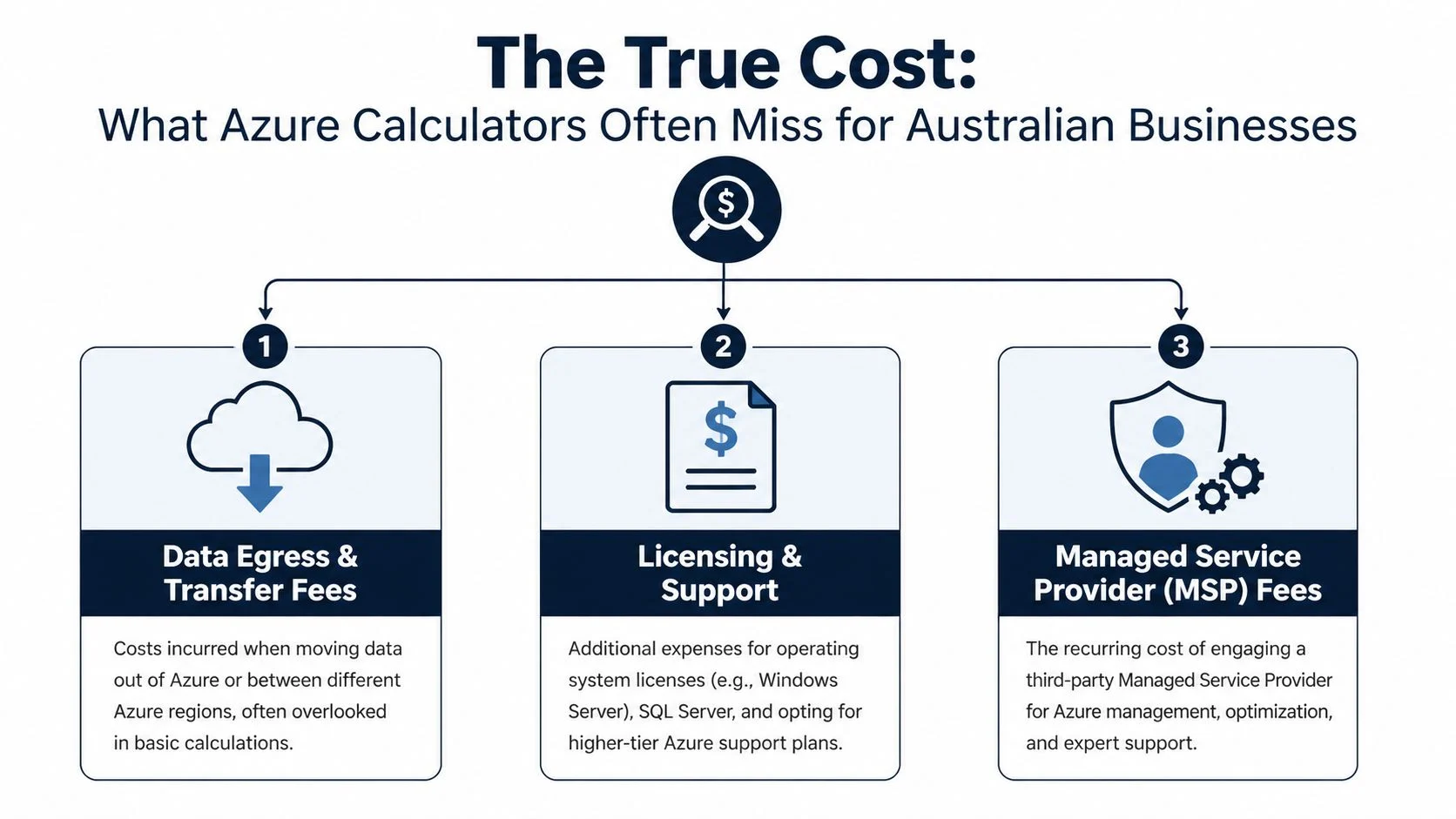
A Melbourne business owner gets an Azure estimate that looks manageable, signs off on the move, and then the first real invoice comes in higher than expected. The gap usually is not caused by one big mistake. It comes from smaller costs that the calculator did not include, then GST on top.
Support is part of the real operating cost
Online calculators usually focus on compute, storage, and bandwidth. They do not reflect the full cost of running production systems for a small business.
Support is a common example. Microsoft lists support plans separately, and many SMBs leave them out of the budget because the calculator does not force the decision. On Microsoft’s Azure support plans page for Australia, the published prices are shown in USD, including Developer at $29 USD per month and Standard at $100 USD per month. The AUD amount changes with exchange rates, so it makes more sense to budget for the USD price plus currency movement rather than rely on a fixed converted figure.
That matters because support is not just an IT line item. It affects response times when something breaks, who is responsible for escalation, and how long staff may be waiting if a system goes down.
GST changes the business case
Australian SMBs also need to budget the payable amount, not just the base platform estimate.
A quote can look reasonable at first pass, then drift once 10% GST is applied across the monthly spend. For a business comparing Azure with replacing an on-premises server, that difference can distort the decision quickly, especially if the margins are already tight.
The bigger cost is often outside the calculator
The monthly Azure bill is only one part of total cost of ownership. The other part is what it takes to keep the environment usable, secure, and aligned with the business.
That includes licensing choices, backup design, monitoring, patching, cost reviews, and the time someone spends keeping resources under control. If that work lands on an owner, office manager, or internal admin, the cost is still real. It just shows up as lost time and avoidable risk instead of a Microsoft invoice.
The management model also changes the numbers. A DIY setup may look cheaper on paper. An MSP adds a service fee, but it can reduce waste, catch poor sizing earlier, and stop expensive misconfigurations from running for months. The right option depends on how much in-house capability the business has, not how much Azure confidence it assumes it has.
If you are planning a move from existing servers, Azure migration planning for SMB environments helps frame the cost properly. Migration spend is shaped by cleanup, resizing, licensing, cutover work, and what support model will be in place after go-live.
Costs calculators often miss
- Paid support plans: Often excluded from early estimates, but commonly needed for production use
- GST: The invoice paid in Australia is higher than the base service figure
- Licensing: Windows Server, SQL Server, and some third-party software can shift the monthly cost fast
- Management time: Someone still has to review spend, monitor performance, and tidy up unused resources
- MSP vs DIY trade-off: One adds a service fee. The other can add hidden labour, slower issue resolution, and more billing mistakes
Practical rule: If a calculator only shows VM, storage, and bandwidth, you do not have a budget yet. You have a starting estimate.
That is the difference between a low Azure sticker price and the amount your business will carry each month.
When To Get Help With Your Azure Setup
A common pattern with small businesses is simple. Azure starts as one server, some backup storage, and a plan to tidy up the old on-prem setup later. Six months on, the monthly bill has crept up, no one is fully sure what can be switched off, and routine changes now depend on whoever last logged into the portal.
That is usually the point to bring in help.
The trigger is not that Azure has become “too technical”. The trigger is that cloud decisions are now affecting cash flow, risk, and staff time. For an Australian SMB, that can mean paying for resources that are oversized, carrying production workloads without the right support setup, or spending internal labour on tasks that would be cheaper to hand to someone who does this every week.
Signs your setup is costing more than it should
A review makes sense when the environment is creating uncertainty or draining time:
- Azure admin keeps falling to the owner or office manager: That labour has a cost, even if it never appears on the Microsoft invoice.
- Monthly charges are hard to explain: If no one can clearly link the bill to specific servers, storage, backup, and business systems, spend usually drifts.
- Changes feel risky: Adding a user, adjusting storage, or resizing a server should not feel like a gamble.
- Security and recovery are unclear: If the answer to “How fast could we restore this?” is vague, exposure is larger than the Azure line item.
- A migration has slowed down because no one wants to make the final call: That delay costs money too, especially when old infrastructure stays running while Azure is only half finished.
If you are at that stage, a server migration to Azure service in Melbourne can help clarify the design, the likely monthly cost in AUD, and who should own the environment after go-live.
What good help should actually do
Outside help should reduce waste and reduce decision risk. It should not add another layer of jargon.
A competent consultant or MSP should be able to show which workloads belong in Azure, which ones should stay simple, and where the full cost sits once support, licensing, GST, and management time are included. They should also be willing to say when a DIY model is still reasonable, and when it is likely to cost more than it saves.
Here is the practical test. If you cannot tell whether you are paying for the right setup, or you are delaying business decisions because the Azure side feels uncertain, get a second opinion before those costs settle in as “normal.”
Azure Monthly Cost Examples for Australian SMBs
A Melbourne business owner usually asks a fair question first. “Are we talking about a $100 cloud bill or a $1,000 one?” With Azure, both can be true. The difference is usually the workload, the operating system, and whether the monthly figure includes the costs many calculators leave out, such as support, management time, and GST.
These examples are budgeting ranges for Australian small businesses, not fixed quotes. They are framed around total monthly ownership in AUD, because the decision is not just what Azure resources cost. It is what the business will pay to run them responsibly.
Estimated Monthly Azure Costs for Australian Small Businesses 2026
| Business Scenario | Key Azure Services | Estimated Monthly Cost (AUD) |
|---|---|---|
| Trades business with cloud backups and light integration | Azure Storage, backup, light automation, basic monitoring | $80 to $180 |
| Small accounting firm with a remote Windows file or app server | One Windows VM, managed disks, backup, support plan, GST | $280 to $550 |
| Startup running a small app with room to scale | One to two Linux VMs or app services, storage, monitoring, support | $180 to $450 |
Those ranges assume a small production setup in an Australian region, not a lab environment that can tolerate downtime.
Example one for a lean cloud footprint
A trades business that wants offsite file storage, backups, and a little automation often lands at the low end of Azure spend. The infrastructure itself can be modest. The monthly bill usually stays reasonable until storage grows faster than expected or backup retention is set too aggressively.
In practice, this type of setup often suits businesses that want safer data handling without replacing every system at once. A few hundred gigabytes of storage and light automation can stay affordable. The catch is that a cheap resource bill can still turn into a poor value outcome if nobody is watching usage or restore performance.
Example two for a Windows-centred office
At this point, costs step up.
A small accounting firm running a Windows-based line-of-business application or remote file server is usually not shopping in the bargain aisle. Windows workloads tend to need more memory, steadier performance, backup, and a support path when something breaks. Once those are included, a realistic monthly figure is often several hundred dollars, not the headline VM price a calculator suggests.
If you are planning that kind of move, a server migration to Azure for Melbourne businesses should be scoped around who uses the system, when they use it, and how quickly it must recover after an outage.
Example three for a small app stack
A startup or software business can often begin with a simpler Linux-based setup and keep monthly costs under control, especially if the application is lightweight and the team avoids overbuilding early. One or two application servers, managed storage, and basic monitoring can sit in the low hundreds per month before the environment becomes more demanding.
That said, “small app” does not always mean “cheap app.” If the service needs high availability, production monitoring, daily backups, and someone accountable for changes, the total monthly cost rises quickly. This is why I tell clients to budget for the operating model, not just the compute.
For owners comparing options, external guidance on cloud cost optimization strategies can be useful, but the practical test is simpler. Add up Azure resources, support, GST, and the time your team will spend managing it. That total is the number that matters.
Smart Strategies to Optimise Your Azure Bill

Most Azure overspend doesn’t come from one disastrous decision. It comes from a series of small, ordinary ones. A VM left oversized. Storage left in the wrong tier. Test systems running overnight. Nobody checking whether the architecture still matches the business.
Practical ways to cut waste
- Set budgets and alerts early: Azure Cost Management and Billing helps you catch drift before invoice day. Even a simple alert gives owners more control.
- Use Azure Advisor recommendations: Rightsizing matters. The Flexera benchmark notes Azure Advisor recommendations have reduced bills in some comparisons by improving fit between workload and VM choice, as discussed in the earlier pricing reference.
- Shut down what doesn’t need to run all the time: Development or test machines often don’t need to be online outside working hours.
- Match storage to access patterns: Hot storage is for frequently accessed data. Cool storage is better when access is less frequent. Paying the wrong storage rate every month is a slow leak.
- Review support and management together: Sometimes the cheapest cloud bill is attached to the most expensive internal admin burden.
Optimisation is mostly discipline
A lot of owners expect cloud savings to happen automatically. They don’t. Azure gives you flexibility, but flexibility without governance turns into sprawl.
For businesses that want broader reading on this topic, these cloud cost optimization strategies are a helpful complement to Azure’s native tools because they frame cloud waste as an operational issue, not just a technical one.
The best cost optimisation habit is simple. Review what you’re paying for, why it exists, and whether it still matches the business.
How Tbourke Solutions Provides Transparent Azure Management
A small business owner usually asks a fair question after the first few Azure estimates: who keeps this under control once it is live?
Transparent Azure management means more than keeping servers online. It means knowing which costs sit in Microsoft, which sit in support, which attract GST, and who is responsible when a change affects performance, security, or the monthly bill. For an Australian SMB, that is the difference between a cloud service you can budget for and one that keeps surprising you.
A good management arrangement should make the commercial side as clear as the technical side. You should be able to see what is included each month, what falls outside scope, and what happens if usage grows. That matters even more if you are comparing DIY administration against an MSP, because the cheaper-looking option on paper can become the more expensive one once staff time, mistakes, and after-hours fixes are counted properly.
What transparent management should include
A sensible Azure management service usually covers a few basics:
- Defined scope: Which systems are managed, monitored, patched, backed up, and reviewed.
- Readable billing: Charges explained in plain English, with Microsoft consumption separated from management fees.
- Cost accountability: Regular checks on whether the environment still matches the business requirement.
- Support ownership: One clear path for incidents, instead of the business chasing multiple providers.
- Local context: Advice framed in AUD, with GST and support implications understood upfront.
Tbourke Solutions’ Azure cloud services for small business are built around that model: planning, migration, cost review, and ongoing management with clearer visibility over what the business is paying for.
For Melbourne businesses, that approach is practical. Many SMBs do not need a full-time cloud engineer. They do need someone who can set up Azure properly, explain the trade-offs, and keep the monthly cost aligned with the value the system is delivering.
That is the central point. Azure should never feel like a black box. You should know what each major cost does, what can be reduced, and where a support or management decision changes total cost of ownership.
Frequently Asked Questions About Azure Costs
Is Azure cheaper than AWS for a small business in Australia
It depends on the workload. Both platforms are competitive. The cheaper option usually comes down to your application design, operating system choice, support model, and whether you already use Microsoft tools heavily across the business.
Is Azure affordable for a very small business
It can be. Azure’s pay-as-you-go model means you can start small without upfront costs or cancellation fees, as noted earlier from Microsoft’s published pricing. The catch is that a real production setup often needs more than the bare minimum services shown in a calculator.
Do I need a paid Azure support plan
If the workload is business-critical, usually yes. Free support may be fine for testing or learning, but production environments generally need a support path that matches business risk.
Are Linux and Windows workloads priced the same on Azure
No. In practical small business planning, Linux often starts much cheaper. Windows server workloads usually cost more and need more careful sizing for performance.
Can I use Azure just for storage or backups
Yes. Many small businesses use Azure for storage, backup targets, or lightweight cloud services rather than moving every server at once. That staged approach often reduces risk.
Is the Azure pricing calculator enough to set a budget
It’s useful, but not enough on its own. It won’t always reflect the full ownership picture for an Australian SMB, especially once support, GST, and operational overhead are factored in.
If you want a realistic Azure cost estimate for your business, Tbourke Solutions can help you assess the workload, identify hidden costs, and choose a setup that fits your budget without overcomplicating the environment. If you’d like to discuss your needs or submit a query, use the contact page.
Share This Story, Choose Your Platform!