Free antivirus sounds sensible when you’re watching costs. For a business, it usually isn’t. The popular advice says something is better than nothing, but in practice, “free” often buys a false sense of security, weak visibility, licence problems, and a privacy risk you didn’t mean to accept.
In Melbourne, this comes up constantly with small businesses, sole traders, schools, and growing teams that have decent intentions but patch security together from consumer tools. That approach can hold for a while, right up until someone clicks the wrong link, a device goes unpatched, or a breach forces uncomfortable questions about software licensing, customer data, and what was being monitored. If you want a broader view of practical cyber defence, this guide to protecting against cyber attacks is a useful companion.
TLDR: Free antivirus is not enough for your business because modern threats don’t behave like the old viruses these tools were built to catch. It also creates business risk beyond security, including licensing breaches, privacy concerns, and poor oversight across staff devices. If your business handles customer data, has more than a couple of devices, or needs reliable protection, you need business-grade endpoint security and a clear security policy. The cost of doing it properly is usually far lower than the disruption of doing it late.
Introduction The Cost of a False Sense of Security
The biggest problem with free antivirus isn’t that it’s useless. It’s that it can look good enough while leaving major gaps open.
A lot of business owners see the word antivirus and assume the job is covered. That made more sense years ago when many threats arrived as obvious infected files. It doesn’t match how attacks work now. Today’s attackers use phishing, malicious links, fileless techniques, stolen credentials, fake invoices, browser-based payloads, and trusted tools already sitting on the machine.
That difference matters because a business doesn’t just need software that scans files. It needs protection that can spot suspicious behaviour, isolate threats quickly, apply policy across all devices, and give someone responsible a clear view of what’s happening.
Practical rule: If your security only tells you about problems after a user notices something is wrong, you’re already too late.
Free antivirus also tends to be built for home use, not commercial use. That affects more than features. It affects licensing, support, administration, reporting, and how consistently protection is applied across a team. One laptop might be updated, another might be ignored, and nobody knows until there’s an incident.
For Australian businesses, that is not a small technical detail. It is a business decision with legal, operational, and reputational consequences. If you store client records, student information, financial documents, or internal files, you need to think beyond the price tag and look at actual risk.
The Dangerous Gaps in Free Antivirus Protection
A simple way to think about free antivirus is this. It’s like hiring a security guard who only checks visitors against an old printed list. If the intruder isn’t on the list, or walks in wearing a courier vest, the guard waves them through.
That is how many basic, signature-based products work. They compare files and processes against known malware patterns. If the threat is new, disguised, running in memory, or delivered through a legitimate process, detection becomes far less reliable.

Why old detection methods struggle
Business-grade endpoint security usually adds layers that free products often don’t provide well, or don’t provide at all in a commercial context.
- Behavioural analysis watches what a program does, not just what it’s called. If a process starts encrypting files, injecting into memory, or spawning suspicious scripts, the system can react even if the malware is brand new.
- Heuristics look for patterns that suggest malicious intent. That helps catch threats designed to avoid obvious signatures.
- Sandboxing can isolate suspicious files or activity so they can be examined safely before they spread.
- Central policy control lets an admin apply settings across every device instead of trusting each user to manage their own protection.
- Alerting and response tells someone when a threat appears, instead of hoping the user notices.
Between 2020 and 2023, Australia saw ransomware reports to the ACSC increase by over 200%, and 40% of reported incidents affected SMEs, according to Palo Alto Networks’ summary of ACSC reporting. That matters because ransomware operators don’t rely on old, obvious malware anymore. They use techniques that basic free antivirus doesn’t detect well.
Where businesses get caught out
The weak point usually isn’t one dramatic event. It’s a chain of ordinary oversights.
A staff member opens an attachment from a supplier name they recognise. A macro runs. A browser session is hijacked. A legitimate admin tool is abused. Files begin changing. By the time a basic scanner recognises a pattern, the damage may already be underway.
This is also why patching matters so much. Security software is one layer, not the whole answer. If devices are behind on updates, known holes remain open whether antivirus is installed or not. For businesses reviewing that side of the problem, this Windows patch management guide is worth reading.
Free antivirus often protects against yesterday’s malware. Businesses need protection that reacts to what a system is doing today.
The practical trade-off is straightforward. Free tools may be acceptable as a temporary home-user measure. They are not a solid control for organisations that need consistency, visibility, and defence against current attack methods.
What ‘Free’ Really Costs Your Business Data and Compliance
The technical gap is only half the story. The other half is where many Australian businesses get blindsided.
A free antivirus product can cost you through data harvesting, licensing misuse, and compliance exposure. None of those show up neatly on a monthly invoice, which is exactly why they get overlooked.

If you’re not paying, your data may be part of the model
Some free security products operate on a model where user behaviour and system data become part of how the vendor makes money. For a business, that’s not an abstract privacy debate. It can mean telemetry about browsing habits, application use, system activity, and potentially sensitive patterns leaving your environment through software you installed for protection.
For organisations handling customer records, internal financials, student information, or commercially sensitive files, that should trigger serious questions. What data is being collected? Where is it going? Is consent clear? Does your use of that software create a problem under the Australian Privacy Principles?
If identity misuse is part of the broader concern after a breach, businesses and individuals often need practical next steps beyond device cleanup. In that context, this resource on AWTS identity theft solutions is a sensible follow-on read.
The licence issue is not a fine-print technicality
A lot of free antivirus products are licensed for personal use, not business use. That means a company can install the software, feel protected, and still be operating outside the licence terms.
According to Go Lead IT’s analysis of free antivirus in business, using free antivirus in a business often violates the software’s licence agreement. In the event of a data breach, that can void cyber insurance policies and create significant liability under Australian regulations like the Privacy Act 1988 and the Notifiable Data Breaches scheme.
A breach is bad enough. A breach on unlicensed security software is harder to defend, harder to insure, and harder to explain.
That risk lands differently in a business than it does at home. If you’re a sole trader, you may be handling client files on one machine. If you run a school or education service, you may hold student records and staff data. If you’re a small office, you may have payroll, contracts, and account access spread across multiple endpoints. In each case, “we thought the free version was fine” is a poor position to be in after an incident.
What this means in practice
A free antivirus tool may leave you with all of the following:
| Issue | Business impact |
|---|---|
| Personal-use licence only | Commercial use may breach vendor terms |
| Limited visibility | No clear view across staff devices |
| Data collection concerns | Potential privacy and client trust issues |
| Weak reporting | Harder to investigate incidents properly |
| No meaningful support | Slow response when something goes wrong |
That is why the cost of free antivirus isn’t just missed malware. It’s exposure on multiple fronts at once.
When to Get Help from a Cybersecurity Partner
A cybersecurity partner becomes necessary when security decisions start affecting legal exposure, client trust, and day-to-day operations, not just antivirus settings.
I usually see the tipping point before a breach, not after one. It shows up when a Melbourne business has staff working from the office, home, and on the road, but no one can say with confidence which devices are protected, which alerts matter, or who is responsible for responding. At that stage, the risk is managerial as much as technical.
Get outside help if your business looks like this:
- Several staff use laptops, mobiles, or personal devices for work and there is no central control over security settings, updates, or device health.
- You store information that would be difficult to explain after an incident such as client files, payment details, health records, student information, contracts, payroll data, or account access.
- Security is handled informally with each staff member choosing apps, dismissing warnings, or deciding what is safe on the fly.
- No one in-house can investigate suspicious activity properly or contain an incident before it spreads from one device to shared systems.
- Clients, insurers, or regulators expect evidence of due care and you would struggle to produce clear policies, logs, or response records.
There is also a practical threshold. If one compromised inbox could expose invoices, banking details, or customer data, the business has moved beyond basic DIY protection. Free tools do not give management the oversight needed to prove reasonable care, and that matters if a client complains, an insurer asks questions, or a breach report has to be prepared.
For many small businesses, the next sensible step is to understand how managed security services for small businesses work in practice. The right partner helps standardise protection, monitor alerts across all devices, and give the business a clear response path when something goes wrong.
That is often the difference between a minor security event and a business problem that drags on for weeks.
Comparing Free vs Business-Grade Endpoint Security
The gap between free and business-grade protection is not branding. It is about control, visibility, and response.
A home product assumes one person is sitting at one computer and can make decisions as alerts appear. A business product assumes several people are using several devices, that not all of them make good security choices, and that someone needs oversight.
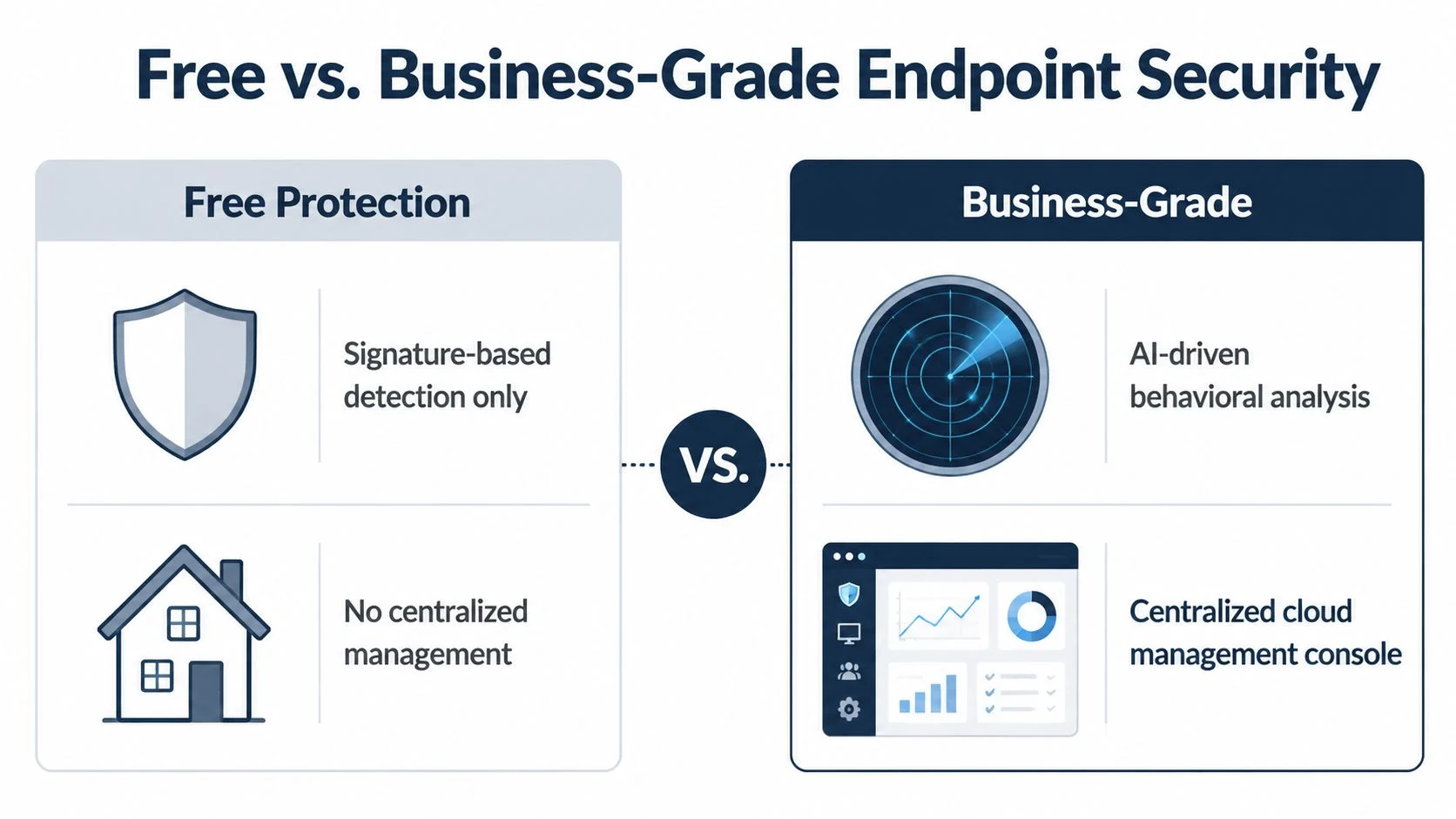
The side-by-side difference that matters
| Capability | Free antivirus | Business-grade endpoint security |
|---|---|---|
| Detection method | Mostly signature-based | Behavioural analysis plus broader detection methods |
| Management | Per device, usually by the user | Central console for all business devices |
| Alerts | Limited and local | Central alerts for admins or IT support |
| Policy control | Minimal | Standardised rules across the organisation |
| Response actions | Often manual | Isolation, remediation, and guided response options |
| Reporting | Basic or absent | Reporting for audits, reviews, and investigations |
| Support | Limited self-help | Vendor or provider support built for business use |
| Commercial licensing | Often unsuitable | Licensed for business environments |
What these differences mean day to day
Central management is not just convenient. It closes the gaps that appear when one device is properly configured and another isn’t. In a small business, those gaps are common because everyone is busy and security becomes “someone else’s job”.
Reporting and alerts matter because businesses need evidence. If a machine is compromised, you need to know what happened, when it happened, and whether other endpoints were affected. Free tools rarely provide enough context.
Web and device control helps reduce risky behaviour before malware lands. That can include controlling downloads, blocking dangerous sites, or limiting USB use where it creates unnecessary risk.
Support matters more than most owners expect. During an incident, time counts. Forum posts and generic help articles aren’t enough when staff can’t work or you’re trying to decide whether a breach has occurred.
Security software for business should help you manage risk across people, devices, and data, not just scan a hard drive.
There is also a bigger identity and access question that sits beside endpoint security. Protecting devices is one part of the picture. Controlling who can access what is another. If you’re reviewing that broader layer, this guide on choosing the right identity management system is a useful reference.
For businesses wanting a plain-English overview of this category, endpoint security explained is a practical place to start.
What works better in the real world
A better setup usually includes business-grade endpoint protection, patch management, email security, multi-factor authentication, and a basic security policy for staff. That combination is far more reliable than expecting antivirus alone to carry the whole load.
The key trade-off is simple. Free antivirus reduces upfront spend. Business-grade security reduces uncertainty, manual effort, and the chance that one weak endpoint becomes a business-wide problem.
Actionable Steps to Secure Your Business Today
Most businesses don’t need to rebuild everything at once. They need a sensible sequence.
In Australia, 46% of small businesses reported at least one cyber incident, 68% of small businesses in a 2023 Victorian survey had no formal cybersecurity policy, and more than 70% of incidents affecting SMEs could have been mitigated or reduced by multi-layered controls, according to Justin C’s summary of Australian cyber resilience data. That points to the practical fix. Stop relying on a single tool and tighten the basics.
Start with an audit, not a purchase
Before buying anything, find out what you have.
List every endpoint
Include laptops, desktops, shared PCs, and any business-owned device used remotely. If a machine accesses work email or business files, it belongs on the list.Record the current protection on each one
Note what antivirus is installed, whether it’s free or paid, whether updates are current, and who manages it.Check for unsupported or neglected systems
One forgotten reception PC or an old laptop used for payroll can become the weak link.
A short asset list often reveals the underlying issue. Many businesses don’t have one standard setup. They have a mix of old decisions.
Classify the data you hold
Not all files carry the same risk. The device storing basic marketing drafts is not the same as the device holding payroll records, contracts, customer data, or student information.
Use simple categories:
- Public material such as brochures and website content
- Internal business information such as procedures and quotations
- Sensitive records such as personal details, finance, HR, health, or education data
This helps you decide where stronger controls are needed first.
The right security stack depends on what your business would struggle to lose, expose, or restore.
Replace free tools with layered controls
Many businesses jump straight to a product comparison. A better approach is to define the controls you need.
- Business-grade endpoint security for malware, behavioural detection, and central oversight
- Patch management so operating systems and applications don’t lag behind
- Email protection because many incidents begin in the inbox
- Multi-factor authentication for key accounts
- Backups and recovery planning so one incident doesn’t become a prolonged outage
For businesses that want external support rather than self-managing these layers, one option is a managed IT provider such as Tbourke Solutions, which can supply and administer security tools as part of an ongoing service model.
Write a simple policy your staff can follow
A policy doesn’t need to be long to be useful. It needs to be clear.
Include items such as:
- Approved software only so staff aren’t installing random tools
- No personal use of business devices where that creates unnecessary risk
- How to report suspicious emails and who to contact
- Rules for passwords and multi-factor authentication
- What to do if a laptop is lost, stolen, or behaving oddly
If you need a benchmark for the broader security posture around these controls, the ACSC Essential 8 overview gives a practical framework.
Plan the rollout properly
Changing security tools can create blind spots if it is rushed. Remove old software cleanly, confirm the new product is reporting to a central console, test alerts, and verify each endpoint is covered before considering the project complete.
The aim isn’t to create a perfect system overnight. It is to move from scattered consumer-grade tools to a business setup that can be managed.
How Tbourke Solutions Delivers Peace of Mind
Peace of mind in cybersecurity does not come from seeing an antivirus icon in the system tray. It comes from knowing who is watching alerts, who is checking whether every device is covered, and what happens when something looks wrong.
That is the gap many Melbourne businesses run into. The software may be installed, but nobody owns the outcome. A laptop misses updates. A staff member works from home on an older machine. A suspicious alert appears on Friday afternoon and sits there until Monday. Free tools leave too much of this to chance, and chance is a poor security policy.
Tbourke Solutions addresses that problem by treating endpoint security as an ongoing business function. Devices are set up consistently, protection is monitored, policies are applied across the fleet, and incidents have a response path that does not rely on a stressed office manager or the most tech-savvy person in the room.
The value is operational, but the risk is legal as well.
If a business is using software licensed for personal use, or software that gathers more device and browsing data than the owner realises, the fallout from a security incident gets more complicated. Questions can come from insurers, clients, legal advisers, and in some cases from regulators. The issue is no longer only whether malware was blocked. It is whether the business took reasonable steps to protect information and whether its tools introduced avoidable privacy exposure. As noted by JCP IT’s discussion of free antivirus business risks, some free antivirus products rely on data collection practices that can create a second problem inside the first one.
What peace of mind looks like in practice is fairly plain:
- Every business device is covered under the same standard, instead of a patchwork of different setups
- Someone can see which machines are out of date, misconfigured, or unprotected
- Alerts are reviewed by people who know what matters and what can wait
- Staff are less exposed to making the wrong call under pressure
- There is a clear response process if a device is compromised, lost, or behaving oddly
That matters for a Brunswick clinic, a Moorabbin trade business, or a school in the eastern suburbs. The risks differ, but the pattern is familiar. Security breaks down where nobody is accountable for the day-to-day details.
Tbourke Solutions has more than 20 years of experience supporting Melbourne organisations across managed IT, cybersecurity, infrastructure, cloud services, and consultancy. The practical benefit is straightforward. Businesses get an informed assessment of their current setup, a business-grade security stack that fits their risk profile, and ongoing management so protection does not drift over time.
For owners and managers, that usually means fewer blind spots, fewer ugly surprises, and fewer difficult conversations after something has already gone wrong.
Frequently Asked Questions
Is free antivirus better than nothing for a business?
Malware scanning is better than having no protection at all, but that is a very low bar. For a business, the issue is not only detection. It is also licensing, central management, reporting, support, and whether the tool matches the threats and compliance expectations you face.
Can a small business get by with free antivirus if staff are careful?
Careful staff help, but they don’t remove risk. People are busy, phishing emails are more convincing than they used to be, and many attacks rely on ordinary user behaviour. Security should assume someone will eventually click the wrong thing.
Is paid antivirus enough on its own?
Often, no. Business-grade endpoint protection is a core layer, but it works best alongside patching, email security, multi-factor authentication, backups, and a simple policy for staff. Security works better as a set of controls than as one product.
Why does licensing matter so much?
Because many free products are licensed for personal use only. If your business uses them commercially and then suffers a breach, you may face awkward questions from insurers, regulators, clients, or legal advisers about whether the software was even authorised for that use.
What kind of businesses should move off free antivirus immediately?
Any business handling customer records, financial information, staff files, student data, or commercially sensitive material should treat free antivirus as unsuitable. The same applies if you have multiple staff devices, remote work, or no central visibility over your environment.
What should I do first if I think our current setup is weak?
Start by identifying all devices, the security software on each one, and what sensitive data they access. Then review whether the software is licensed for business use and whether anyone can monitor alerts centrally. If the answer is unclear, get external advice before an incident forces the issue.
If your business is still relying on consumer-grade protection, Tbourke Solutions can help you review the risk, replace free antivirus with a business-appropriate security setup, and put proper management around your devices. If you’d like custom advice, submit an enquiry through the contact page.
Share This Story, Choose Your Platform!