You’re probably already doing vendor management, just without a system.
It looks like chasing a cloud provider for a billing correction, waiting on a web developer to update a plugin, trying to remember who manages your Microsoft 365 tenancy, and realising a former contractor may still have access to something important. For a small business or school, that mess builds slowly. Then one day it becomes a cost problem, a service problem, or a security problem.
Good vendor management isn’t corporate theatre. It’s the habit of deciding who gets access, what they’re responsible for, how you measure them, when you review them, and how you shut the door properly when the relationship ends.
Your Guide to Smarter Vendor Management
A lot of owners and managers I speak with don’t have a vendor problem. They have a visibility problem. They’ve got software subscriptions, IT providers, internet services, phone systems, cyber tools, printers, payment platforms, and outside consultants, but no single place that shows what each one does, who owns the relationship, and whether it’s still worth paying for.
That’s where vendor management becomes useful. Not as procurement jargon, but as a practical way to bring order to the businesses and schools that rely on multiple outside providers every day. If you’ve ever paid for two tools that do the same job, renewed a contract by accident, or discovered that no one can find the signed agreement, you’ve already seen what happens when vendor management is left to memory.

For Australian SMEs, this gap is often underestimated. While 78% of Australian SMEs cite vendor risk as a top concern, only 12% have formal vendor management policies. Many existing guides are designed for large enterprises, ignoring the need for minimum viable agreements that can provide 90% of the risk mitigation benefits without the legal overhead (Reckon’s supplier and vendor management guide). That’s the part most small organisations need: something lean, useful, and realistic.
If your business depends on external providers for day-to-day operations, it helps to understand the role of IT outsourcing vendors before those relationships start running your schedule and budget.
Practical rule: If a vendor can affect your data, your customers, your staff, or your cash flow, manage them like they matter.
TLDR
Vendor management is the simple discipline of controlling how outside providers are selected, contracted, monitored, renewed, and offboarded. Done well, it reduces waste, tightens security, and gives you fewer nasty surprises. For Australian SMEs and schools, the smartest approach is usually lightweight: clear agreements, sensible review points, and strict access removal when a vendor exits. This guide shows how to do that without building an enterprise-sized process.
What Is Vendor Management and Why It Matters
Think of your business like a house build. You might hire a plumber, electrician, cabinet maker, and painter. Each one can be excellent on their own, but if nobody coordinates the sequence, budget, handover points, and defects, the build blows out. Business vendors work the same way.
Your accounting platform, internet provider, cyber security tool, managed printer contract, website host, and IT support partner don’t operate in isolation. They touch the same staff, systems, and budget. Vendor management is the discipline that keeps those moving parts aligned.
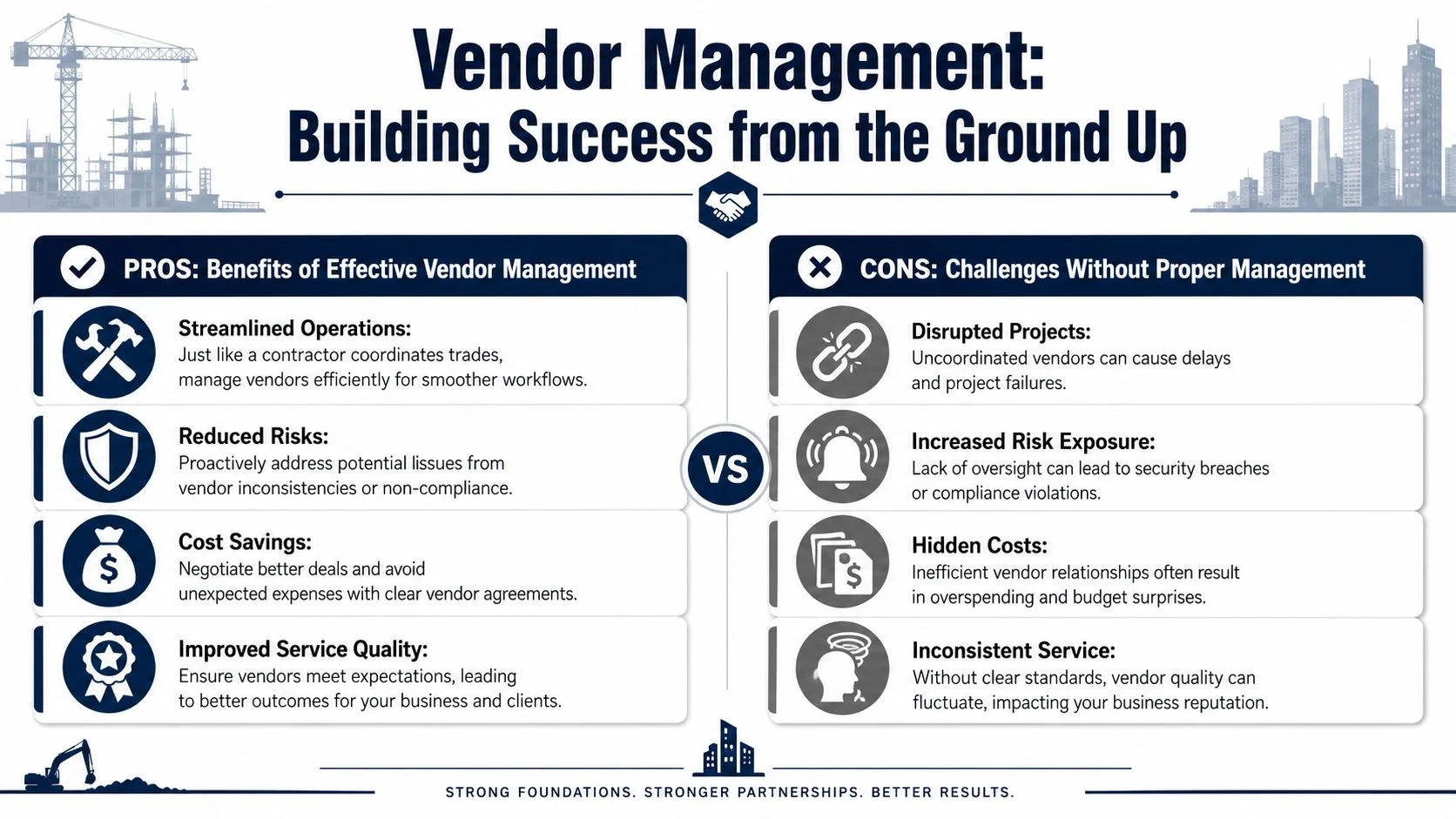
What you gain when you manage vendors properly
The first gain is control. You know what services you’re buying, what they’re supposed to deliver, and who inside your organisation owns the relationship.
The second gain is a stronger position. When agreements are documented and review dates are visible, it’s easier to renegotiate poor value, remove duplication, or replace a weak provider before they cause bigger damage.
The third gain is consistency. Your staff stop relying on side conversations and inbox archaeology to work out who approved what.
A good starting point is understanding what MSPs are, because many SMEs rely on a managed service provider to coordinate not just support, but also the wider vendor ecosystem around cloud, security, networking, and software.
What goes wrong without it
Poor vendor management usually shows up in boring ways before it shows up in expensive ways. A service renews without review. A vendor’s invoice no longer matches the original scope. A tool stays in place because nobody wants to risk changing it, even though it’s underperforming.
For Australian small businesses, it’s important to monitor small vendors more frequently than large ones. Their limited resources make them a higher risk for cybersecurity, privacy, and operational failures. Best practice includes requiring explicit approval for all contract renewals and conducting annual reviews to remove redundant or underperforming vendors (Venminder’s guidance on small business vendor relationships).
A neglected small vendor can create a bigger operational mess than a well-governed large one.
There’s also a staffing angle. If one person keeps all the vendor knowledge in their head, the business has a single point of failure. When they leave, the contract history, escalation path, and practical know-how often leave with them.
If you’re weighing whether to keep work in-house or hand it to an outside provider, this breakdown of how to compare insourcing and outsourcing options is worth reading. It helps frame a vendor decision as an operating model decision, not just a price comparison.
An Actionable Vendor Management Framework
Small businesses don’t need a giant procurement department. They need a repeatable process that’s easy to follow and hard to ignore. The framework below is built for that reality.
Step 1 and Step 2 set the ground rules
Start with a simple policy. It doesn’t need to be fancy. It should answer five questions:
- Who can approve a new vendor
- Who signs contracts
- Which vendors need IT or security review
- How renewals are handled
- What happens when a vendor leaves
Then move into selection and onboarding. Many SMEs rush during this phase. The risk usually isn’t choosing a bad-looking vendor. It’s choosing a decent one without checking the details that matter in your environment.
For larger procurement teams, there are more complex methods for effective large-scale vendor setup. SMEs can borrow the useful parts without copying the bureaucracy.
Step 3 and Step 4 make expectations measurable
A vendor agreement should answer practical questions, not just legal ones. What are they delivering? How quickly do they respond? What counts as a major issue? What happens if they miss the mark repeatedly?
For this reason, a minimum viable agreement proves helpful. For most SME relationships, you don’t need a giant contract pack. You need a plain-English agreement that covers:
- Scope. What they will and won’t do.
- Service levels. Response times, support hours, and escalation.
- Security obligations. Data handling, account access, backups, and notification expectations.
- Commercial terms. Pricing, billing method, renewal terms, and notice period.
- Exit rules. Handover, access removal, return of data, and asset recovery.
For IT-heavy businesses, schools, and growing firms, it also helps to know what IT services can be outsourced so you can decide where external help adds value and where internal control matters more.
Simple Vendor Onboarding Checklist
| Check Item | Why It Matters | Status (Done/NA) |
|---|---|---|
| Confirm legal business name and ABN details | Prevents contract and invoicing errors | Done/NA |
| Identify service owner inside your organisation | Ensures someone is accountable | Done/NA |
| Define scope and exclusions in writing | Stops scope creep and disputes | Done/NA |
| Set service levels and response expectations | Makes performance measurable | Done/NA |
| Review data access requirements | Limits unnecessary system exposure | Done/NA |
| Check security controls and MFA use | Reduces avoidable cyber risk | Done/NA |
| Record renewal date and notice period | Prevents accidental rollovers | Done/NA |
| Document offboarding requirements | Protects continuity at exit | Done/NA |
Step 5 and Step 6 keep vendors honest
Once a vendor starts, don’t put them on autopilot. Most underperformance isn’t dramatic. It’s gradual. Response times stretch out. Billing gets fuzzy. Small issues stay open longer. Nobody escalates because everyone is busy.
Use a simple review rhythm:
- Monthly for critical vendors with access to systems, customer data, or core operations.
- Quarterly for important but lower-risk vendors.
- Annually for low-impact vendors, mainly to confirm they still deserve a place on the list.
Track a few measures that matter. Ticket response. Resolution quality. Invoice accuracy. Uptime commitments. Communication quality. If a measure doesn’t affect cost, risk, or service, it probably doesn’t need to be in the scorecard.
Step 7 is where many businesses fail
Offboarding is the part most organisations leave too late. They focus on signing vendors. They don’t focus enough on ending them safely.
Recent 2025 Australian data shows that 43% of IT vendor breaches occurred because system access was not fully revoked after contract termination (Origin Digital’s vendor relationship guidance). That number tells you exactly why offboarding deserves equal weight. If a former vendor still has login access, remote support tools, shared passwords, backup visibility, or admin rights, the contract may be over but the risk isn’t.
Don’t treat offboarding as admin. Treat it as a security event.
A proper offboarding checklist should include user account removal, shared credential rotation, recovery of company assets, confirmation of data return or deletion, transfer of documentation, and written closure. If the vendor had deep technical access, test that they can no longer get in. Don’t assume.
When to Get Help with Vendor Management
Friday afternoon is when this usually blows up. A renewal notice lands in the inbox, the vendor wants an answer by Monday, nobody can find the original agreement, and no one is sure who approved the service in the first place. For an Australian SME, that is not a process problem on paper. It is money walking out the door and risk sitting in the background.
A simple spreadsheet works for a while. Then the business adds a cloud backup provider, a Microsoft 365 partner, a payroll platform, a school app, or an outsourced IT vendor. At that point, vendor management starts working like asset maintenance. If you do it late, it costs more and causes more disruption.
Signs you’ve outgrown ad hoc management
You probably need help if any of these are happening:
- Renewals keep surprising you and you are approving spend under time pressure.
- Ownership is unclear so vendor issues end up with the owner, office manager, or whoever notices the problem first.
- Agreements are inconsistent and some suppliers have proper terms while others were approved from a quote in an email thread.
- Vendors have access to important systems or data and no one has a current list of who can get into what.
- You need suppliers to meet privacy, cyber, or industry obligations but there is no standard way to check that.
- Offboarding is informal so old accounts, shared passwords, or support access may still exist after the relationship ends.
If that sounds familiar, many businesses are dealing with the same pattern once they have outgrown ad hoc IT support. Growth happened first. Process came later.
What good help looks like
Good vendor management support should not add corporate overhead your business will never use. Australian SMEs usually need a lighter approach. Start with a clean vendor register, a risk ranking, and minimum viable agreements for the suppliers that matter most. Then tighten a few pressure points. Renewal control, access reviews, ownership, and offboarding.
That gives you a system your team can maintain.
I usually advise clients to get outside help before one of three events forces the issue. A messy renewal. A security incident. A handover where the outgoing vendor leaves with too much knowledge and too much access. Fixing those after the fact is always slower and more expensive than setting a clear process upfront.
If your business also relies on community programs, rosters, or volunteer-run services, even related admin platforms can add hidden risk. Tools that look harmless can still hold personal data, contact lists, and access permissions. That is why small organisations should keep the same discipline across all third-party systems, including volunteer management tools.
If these warning signs are showing up, it is time to formalise the process. Tbourke Solutions can help you put a practical framework in place without turning a small business into a bureaucracy.
Special Compliance for Schools and Local Businesses
Schools and local businesses often assume vendor compliance is mostly a concern for banks, big corporates, or government departments. That’s a mistake. If a provider stores student information, payroll records, customer data, device backups, or access credentials, vendor selection becomes part of your security posture.

Why the Australian context has changed
Finalised on 20 December 2024, Australia’s Technology Vendor Review Framework mandates a proactive process to assess foreign ownership, control, or influence (FOCI) risks. This requires organisations, especially those using MSPs, to rigorously evaluate vendor backgrounds to mitigate foreign interference, making vendor management a strategic compliance function (Australian Government Technology Vendor Review Framework).
In plain English, that means vendor management isn’t just about service quality anymore. It’s also about understanding who stands behind the technology you rely on, how influence is exercised, and whether the provider introduces a broader risk you haven’t considered.
For a school, this could affect decisions around learning platforms, cloud storage, identity systems, or communications tools. For a local business, it applies to any provider with deep access to systems or sensitive data.
What practical due diligence looks like
You don’t need a government-sized review process. You do need a sharper checklist.
Ask questions such as:
- Who owns the vendor and where are decision-makers based
- What data do they access or store
- What subcontractors are involved
- How do they handle support access and privileged accounts
- What happens if the service is disrupted or the relationship ends
For cyber maturity, many SMEs benefit from aligning vendor oversight with the ACSC Essential 8, especially around access control, application management, and recovery planning. That gives schools and local firms a practical baseline, not just a vague promise that a vendor is “secure”.
Some community organisations and schools also juggle non-IT platforms for rostering and coordination. If that’s part of your environment, reviewing external systems such as volunteer management tools through the same vendor lens is a good habit. The category may be different, but the questions about access, privacy, and continuity still apply.
How Tbourke Solutions Implements Your Vendor Strategy
A common SME pattern looks like this. The business has five or six key providers, nobody has one clean record of who owns each relationship, and access keeps accumulating because cancelling a service is treated as an admin task instead of a risk task.

Tbourke Solutions implements vendor strategy by turning that sprawl into a working system an Australian small business can maintain. The focus is not a heavy procurement model borrowed from a large enterprise. It is a practical control set: clear ownership, minimum viable agreements, review dates that do not get missed, and a proper offboarding process that closes the security gap many SMEs leave open.
What that looks like in practice
Vendor audit and rationalisation
We start by listing every provider that affects operations, cost, access, or data. That usually includes software subscriptions, managed services, cloud platforms, internet and phone services, cyber tools, website providers, and any third party with admin access. The aim is to find overlap, unused services, weak ownership, and vendors that have become business-critical without anyone formally deciding that.Minimum viable agreements
Small teams do not need long contracts full of clauses nobody will read again. They need agreements that clearly state scope, support expectations, security responsibilities, renewal dates, pricing triggers, and exit steps. That gives you enough control to manage risk without creating paperwork for its own sake.Security review before connection
A new vendor should not be plugged into email, file storage, remote access, or line-of-business systems on trust alone. We check what access they need, how that access will be controlled, who approves it, and how it will be removed later. Offboarding gets the same attention. If a vendor leaves but their accounts, API keys, forwarding rules, or remote tools stay behind, the risk stays too.Performance and renewal control
Underperforming vendors cost money in quiet ways. Staff waste time chasing support, workarounds become normal, and renewals roll over before anyone asks whether the service still fits. A simple review cadence fixes that. Keep evidence, compare delivery against the agreement, and decide early whether to improve, renegotiate, replace, or exit.
Why this works for SMEs and schools
In a small business or school, the person dealing with vendors is often also handling operations, finance, admin, or IT. That is why vendor management needs to be light enough to function in daily operations.
The practical value is straightforward. You get fewer duplicate services, cleaner accountability, less lingering access, and better renewal decisions. You also avoid a common mistake I see often. Businesses spend time choosing vendors, then lose control when the relationship changes, staff move on, or the service ends.
Tbourke Solutions applies a framework that fits smaller organisations. It is built to reduce avoidable cost and prevent the expensive clean-up jobs that follow poor vendor exits, unclear agreements, and unmanaged third-party access.
Frequently Asked Questions about Vendor Management
A typical SME issue looks like this. Three software subscriptions renew in the same month, one vendor still has old remote access, and nobody is sure which contract determines the support terms. Good vendor management fixes those small failures before they turn into wasted spend, outages, or a security clean-up.
Is there a difference between vendor management and supplier management
For most Australian SMEs, the terms overlap. “Supplier” often covers physical goods and general services, while “vendor” is more common for software, cloud platforms, IT providers, and outsourced support. The practical answer is simple. Use one process for both so contracts, renewals, contacts, and access controls are tracked in one place.
Do small businesses need vendor management software
Usually not at the start. A shared spreadsheet, a contract folder, and calendar reminders are enough for many smaller businesses if someone assumes ownership of the process.
Software starts to make sense when renewals are being missed, multiple people are buying tools without central approval, or you cannot quickly see which vendors have system access. Until then, keep it lightweight and disciplined.
What should a basic SLA include
For SMEs, I usually recommend a minimum viable agreement rather than a long document full of clauses nobody uses. Cover the service scope, support hours, response times, escalation contacts, pricing, renewal terms, and exit steps.
If the vendor handles business data or touches your systems, add security requirements in plain language. State who can access what, how access is approved, how incidents are reported, and what must happen when the relationship ends.
What should I do first if a vendor is underperforming
Start with evidence, not frustration. Pull the agreement, list the failures against specific terms, and keep examples such as missed response times, recurring faults, or unresolved tickets.
Then run a formal review with a deadline for correction. If there is no clear improvement, decide whether to renegotiate, replace, or exit. Hoping a vendor improves on its own is how small problems become expensive habits.
How often should I review my vendor list
Review the full list at least once a year. Review high-risk vendors more often, especially ones with access to financial systems, customer data, school records, or critical operations.
This check does not need to be complicated. Confirm the service is still needed, the price still makes sense, the agreement is current, and access still matches the work being performed.
What’s the easiest way to cut vendor waste
Tier your vendors by risk and business impact. A payroll platform, internet provider, or managed IT partner deserves more attention than a low-cost utility app used by one staff member.
That one change usually exposes duplicate tools, auto-renewals nobody questioned, and vendors still being paid for work that has faded out over time. The same approach is reflected in ASD procurement and outsourcing guidance, which puts attention on the third parties that can cause the most operational or security harm.
What gets missed most often in vendor management
Offboarding.
I see plenty of businesses put effort into choosing a vendor, then lose control when the service ends. Old accounts stay active. Shared mailboxes still forward messages. API keys remain in place. Remote support tools are forgotten. For SMEs, that gap is one of the highest-value fixes because it reduces both risk and clean-up costs with very little process overhead.
Share This Story, Choose Your Platform!