
June is usually when the warning signs show up. A server takes longer to reboot. Staff start asking why shared folders are lagging. Someone in accounts discovers a subscription nobody remembers approving. Then the pressure ramps up because the books need to close, budgets need to be set, and every interruption suddenly matters.
That’s why the question is your it infrastructure ready for the new financial year matters more than most business owners realise. It isn’t just about replacing old gear or adding another security tool. It’s about making sure your systems can support payroll, invoicing, reporting, customer service, and compliance without nasty surprises at the worst possible time.
For Melbourne businesses, this is a practical business issue, not a technical hobby. Network downtime can cost mid-sized Australian firms approximately $5,000 per minute on average, and 44% of SMB infrastructure involves aging servers, according to IT budget statistics relevant to Australian SMBs. If you walk into July with old hardware, untested backups, poor documentation, and unclear cloud spend, you’re carrying risk straight into the new year.
TLDR Your Quick Readiness Guide
If you haven’t audited your IT before the new financial year, now’s the time. Start with backups, security, user access, hardware age, cloud costs, and compliance because those are the areas that turn into expensive problems fastest.
A practical pre-FY review helps you catch hidden waste, reduce avoidable risk, and build a clear upgrade plan instead of reacting to outages later. For most small businesses, the right answer is simple: if your systems are ageing, undocumented, or difficult to trust, they’re probably not ready yet.
Strengthening Your Foundations with Security and Backup Audits
The first check is always the least glamorous and the most important. If your backups fail or your security gaps go unnoticed, nothing else on the list matters much.

A lot of businesses say they have backups when what they really mean is, “the backup software says last night completed”. That’s not the same as proving you can restore a file, a mailbox, a server, or an entire business system in a timeframe the business can tolerate.
According to OpenMetal’s audit readiness guidance, Australian businesses with unpatched systems suffer 28% more ransomware attacks, and a verified backup plan can prevent 90% of data loss. That’s why a proactive audit starts with asset inventory, vulnerability scanning, and restore testing, not wishful thinking.
What to test before 1 July
Use a short, hard-nosed checklist:
- Restore a real file: Pick something non-critical but important, delete it safely, and restore it from backup.
- Test a system recovery: Don’t stop at files. Confirm whether a server image, Microsoft 365 data set, or line-of-business application can be recovered.
- Check backup scope: Make sure laptops, cloud data, shared drives, and critical apps are included. Many businesses protect the server but miss the SaaS data.
- Confirm access controls: Review who has admin rights, shared mailbox access, finance platform permissions, and remote access privileges.
- Run vulnerability scans: Tools like Nessus are useful for surfacing missing patches and known exposures.
- Verify MFA coverage: MFA should be active on email, remote access, admin accounts, cloud platforms, and any system holding sensitive data.
Practical rule: A backup you haven’t restored is only a theory.
Good security work is often boring. It’s patching. It’s removing stale accounts. It’s checking whether ex-staff still have access to old systems. It’s confirming laptops are encrypted and remote access isn’t wider than it needs to be.
What works and what doesn’t
What works is disciplined repetition. Quarterly access reviews work. Patch windows work. Tested recovery procedures work. Written incident steps work.
What doesn’t work is relying on one person who “just knows how it all fits together”. That approach holds until they’re on leave, leave the business, or can’t fix an outage quickly enough. If you want a practical model, these disaster recovery plan examples for small business show the difference between having a checklist and having a plan you can execute.
Security reviews also need to include your vendors. If your business uses AI tools or external platforms that handle customer or operational data, read their technical controls rather than assuming the marketing page tells the full story. A useful example is Mintline’s security protocols, which show the kind of detail worth checking when evaluating third-party services.
Optimising Budgets with Software and Cloud Reviews
Security keeps the doors locked. Budget review stops money leaking through the floorboards.

Many SMBs don’t have a spending problem. They have a visibility problem. Software renewals stack up, often unnoticed, cloud resources stay oversized long after demand changes, and legacy integrations keep chewing through budget because nobody has time to revisit them.
According to Alltek’s financial year infrastructure planning article, Australian SMB IT spending is projected to grow 15.2% in FY26, while 62% of Melbourne enterprises overspend on unoptimised cloud services by 25%. That doesn’t mean cloud is the wrong choice. It means unmanaged cloud is expensive.
Where to look for wasted spend
A useful software and cloud review usually uncovers four categories.
| Area | What to check | Typical problem |
|---|---|---|
| Software licences | Active users against paid seats | Former staff or duplicate tools still billed |
| Microsoft 365 and SaaS | Feature tier versus actual use | Paying for premium plans that nobody needs |
| Cloud compute and storage | Resource sizing and uptime schedules | Systems running oversized or after hours |
| Integrations | Sync jobs, connectors, middleware | Old workflows left in place after system changes |
One common example is paying for several tools that all do half the same job. A team might use Microsoft Teams, Zoom, Slack, Trello, and another project platform, all because nobody stopped to ask which one is the standard. That’s not flexibility. That’s drift.
How to review cloud usage properly
Start with utilisation reports. If a workload is predictable, stable, and always on, it may need a different pricing model or a resized instance. If it only serves staff during business hours, schedule it accordingly. If storage is growing quickly, separate operational data from cold archive data so you’re not paying premium rates for everything forever.
For businesses running workloads in AWS, Server Scheduler’s EC2 right sizing insights are a helpful reference for understanding how over-allocation happens and how to assess fit more sensibly.
Cloud bills rarely explode because of one dramatic error. They creep up through dozens of small decisions nobody revisits.
Your budget review should also separate CapEx decisions from OpEx decisions. Buying replacement hardware, shifting a workload to hosted infrastructure, or keeping a hybrid setup all affect cash flow differently. If you’re comparing those options before the new year, this CapEx vs OpEx budgeting guide is a useful way to frame the discussion.
A good outcome here isn’t “spend less at all costs”. It’s spend with intent. Keep what supports the business. Remove what no longer does.
When to Get Expert Help
A lot of Melbourne business owners wait too long to bring in outside help. They keep patching issues internally until a backup restore fails, a staff member leaves with key system knowledge, or a supplier asks a compliance question nobody can answer clearly.
The right time to get expert help is earlier than that. Bring someone in when the risk is clear, but before the cost shows up in downtime, missed obligations, or a rushed hardware purchase that blows the new year budget.
Ask for outside support if these problems are showing up:
- Backup tests fail: Backups exist, but restore tests fail, run too slowly, or no one has confirmed what would happen during a real outage.
- No one has a full picture: Access, vendors, licences, cloud services, and hardware sit with different people, so decisions are made with gaps.
- Security calls keep getting deferred: MFA, admin rights, endpoint controls, and incident response are still open questions because nobody has time to assess them properly.
- Compliance risk is starting to matter: Privacy Act obligations, breach response, customer due diligence, and APRA-related supplier expectations are becoming part of tenders, contracts, or board conversations.
- Your internal team is stuck in support mode: They can keep systems running, but they do not have the capacity to review architecture, document risk, or plan next year’s priorities properly.
External help should give you clarity, not dependency. A good adviser maps the environment, identifies the highest-risk gaps, and shows the trade-offs between fixing now, accepting the risk, or staging the work across the financial year. That matters for SMBs weighing cash flow, cloud costs, and whether a planned upgrade may line up better with FY2027 tax incentives.
If you are still deciding what to keep in-house and what to hand to a provider, this guide to choosing IT outsourcing vendors for growing businesses is a practical starting point.
At Tbourke Solutions, we usually find the same pattern. The business does not need more tools first. It needs a clear owner, a ranked list of risks, and a realistic plan that fits budget and compliance pressure. That is usually the point where expert help pays for itself by preventing a more expensive mistake later.
Future-Proofing with Hardware and Documentation Reviews
Plenty of IT problems don’t start with a cyber attack. They start with a switch that’s past warranty, a server nobody wants to reboot, or a workstation so old that every update becomes an event.

Hardware reviews matter because old equipment creates two problems at once. It becomes less reliable, and it becomes harder to support properly. If a device is nearing end-of-life or already out of support, the question isn’t only “does it still work?”. It’s also “what happens when it stops, and can we fix it fast enough?”
The hardware review most businesses need
Start with an asset list that covers:
- Core infrastructure: Servers, firewalls, switches, wireless gear, NAS devices, and backup appliances
- User devices: Laptops, desktops, tablets, and mobiles used for business work
- Age and support status: Purchase date, warranty expiry, operating system support, and vendor lifecycle
- Business dependency: Which systems affect payroll, sales, classroom delivery, bookings, or customer service if they fail
This doesn’t need to be fancy. A well-maintained spreadsheet is better than an undocumented environment. The point is to know what you own, what condition it’s in, and what the replacement path looks like.
Documentation is part of resilience
The businesses that recover fastest from change are usually the ones that write things down. Network diagrams, admin access records, supplier lists, onboarding steps, device standards, and recovery procedures all reduce dependency on memory.
According to Simon Painter’s cloud readiness methodology, a proper readiness assessment should review technical skills and operational process maturity, and teams with low maturity scores face 40% higher project failure rates. In practice, that often shows up as poor handovers, undocumented workarounds, inconsistent naming, and decisions that can’t be traced six months later.
If your IT only makes sense to one person, your business has a resilience problem.
Documentation also helps with budgeting. Once you know which server is ageing, which laptops are due for replacement, and which network gear is carrying too much load, you can spread costs sensibly instead of making panicked purchases.
For businesses still relying on older on-prem infrastructure, this guide on when to replace an ageing server in a small business can help you decide whether to extend, migrate, or retire equipment.
One practical note here. This is also where a one-off health check can be useful. Some businesses use internal staff for the basic inventory and then bring in Tbourke Solutions for an external assessment, recommendations, and a clearer lifecycle plan.
Navigating Australian Compliance and Reporting
A lot of generic IT checklists talk about “staying secure” but skip the legal side. That’s a mistake, especially in Australia, where privacy, breach reporting, and operational resilience obligations are now a board-level issue for many businesses.
According to this 2025 to 2026 Australian infrastructure compliance checklist, only 41% of Melbourne SMEs conduct annual compliance audits specific to financial year requirements, and the same source notes that potential fines over AUD 50M make ignoring the Privacy Act and APRA’s CPS 234 a major risk for FY2027. Even if your business isn’t directly regulated like a bank, you may still sit in a supply chain where customers, insurers, or larger partners expect stronger controls.
What to review before the new year
A practical compliance review should cover these areas:
- Privacy handling: Where personal information is stored, who can access it, and how it’s protected
- Breach response: Whether staff know how to identify, escalate, and document a suspected incident
- Access governance: Joiners, movers, and leavers processes so access stays current
- Logging and monitoring: Enough visibility to investigate suspicious activity or support reporting
- Supplier risk: Third-party systems that process business or customer data on your behalf
- Policy alignment: Written policies that match what your systems and staff do
For businesses with financial sector exposure, CPS 234 isn’t something to treat lightly. It pushes attention onto information security capability, control effectiveness, and third-party oversight. The businesses that struggle most are usually the ones with patchy documentation and unclear accountability.
Compliance isn’t separate from infrastructure
If your laptops aren’t managed, your backups aren’t tested, or your access controls are loose, that’s not just an IT gap. It becomes a compliance gap the moment customer or staff data is involved.
A practical starting point is to measure your current controls against the ACSC Essential 8 guidance for Australian businesses. It gives owners and managers a clearer way to think about patching, MFA, application control, backups, and privilege management in a local context.
Legal exposure often starts as an ordinary technical shortcut. Shared logins, missing MFA, old systems, and weak offboarding processes all look small until an incident forces scrutiny.
The new financial year is a good trigger for this work because budgets, policies, contracts, and operational plans are already under review. It’s easier to fix control gaps when the business is already making decisions, rather than after an incident.
Building Your Prioritised IT Action Plan for the New Year
An audit on its own doesn’t improve anything. The value comes from turning findings into a short list of actions, owners, dates, and budget decisions.
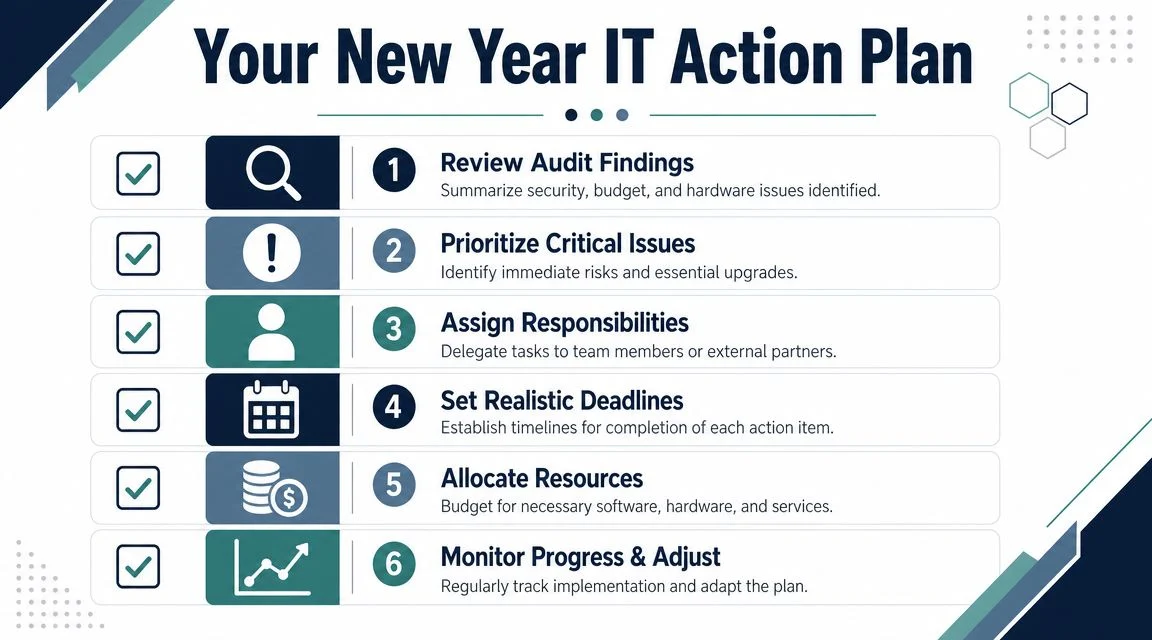
The easiest way to do this is with four priority levels.
A simple prioritisation model
| Priority | What belongs here | Example |
|---|---|---|
| Critical | Immediate business or security risk | Failed restore test, exposed admin access, unsupported core server |
| High | Important issue that can become costly quickly | Major cloud overspend, missing device standards, weak offboarding |
| Medium | Operational improvements with clear value | PC refresh planning, documentation cleanup, licence rationalisation |
| Low | Useful refinements, not urgent | Cosmetic reporting changes, non-essential tool consolidation |
This stops everything being labelled urgent. If every finding is urgent, nothing is.
Turn findings into a working plan
A one-page plan usually works better than a giant spreadsheet no one revisits. Include:
Issue summary
Keep it plain. “Backups exist but restore testing is incomplete” is clearer than a page of technical jargon.Business impact
Explain what suffers. Payroll delay, classroom disruption, lost sales time, compliance exposure, or avoidable support cost.Owner
Name a person, not a department.Target date
Tie dates to the quarter, renewal cycle, or budget window.Decision needed
Identify whether the item needs money, policy approval, vendor input, or internal labour.Status review point
Put a recurring review date on the calendar so the plan stays alive.
This is also where trade-offs become visible. You may not replace every ageing device this quarter. That’s fine if the risk is understood and the sequence is planned. What hurts businesses is not staged improvement. It’s unmanaged drift.
A good action plan also separates quick wins from structural fixes. Removing unused licences and tightening admin access can happen quickly. Replacing infrastructure, redesigning backups, or cleaning up a messy cloud estate may take longer and need budget approval.
How Tbourke Solutions Can Help You Start the New Year Strong
If your review has surfaced gaps, the next step is getting clarity on what matters now, what can wait, and what will cost more if ignored. That’s where an experienced local MSP can be useful.
For Melbourne SMBs, schools, startups, and sole traders, the practical support usually falls into a few buckets. An IT health check helps identify risks and blind spots. Managed IT services help keep patching, monitoring, support, and lifecycle planning consistent. IT consultancy helps when you need a roadmap for infrastructure upgrades, cloud decisions, security improvements, or documentation cleanup.
The goal isn’t to add complexity. It’s to simplify decision-making so your technology supports the business instead of draining time and budget.
If you want help reviewing your readiness before the new financial year, submit an enquiry through the Tbourke Solutions contact page. A short conversation can usually clarify whether you need a focused audit, project support, or ongoing management.
Frequently Asked Questions
| Question | Answer |
|---|---|
| How often should a small business review its IT infrastructure? | At minimum, do a formal review before the new financial year and then revisit key items quarterly. Backups, access, patching, hardware age, and subscription costs change throughout the year, so waiting too long creates blind spots. |
| What’s the first thing to check if I’m short on time? | Check whether backups can be restored and whether admin access is tightly controlled. If those two areas are weak, the consequences of an incident become much harder to manage. |
| Should we move everything to the cloud before the new financial year? | Not automatically. Cloud can be the right fit, but rushed migration often creates cost, complexity, and support issues. Review workload suitability, licensing, internet dependency, backup coverage, and support capability before making the call. |
| Do small businesses really need formal documentation? | Yes. Even simple documentation helps with onboarding, troubleshooting, handovers, and vendor management. Without it, routine changes take longer and outages become harder to resolve. |
| What if our systems are old but still working? | “Still working” isn’t the same as “low risk”. If hardware is out of support or difficult to recover, the business should at least have a replacement timeline and a contingency plan. |
| How do I know whether our compliance position is good enough? | Start by checking whether your practices around data access, backups, incident response, logging, offboarding, and vendor oversight are documented and consistently followed. If you can’t answer those questions confidently, get an external review. |
A useful rule for owners is this: if your IT setup depends on memory, luck, or one overloaded person, it probably needs attention before the new financial year starts.
If you want a practical review of your systems, risks, and next steps, speak with Tbourke Solutions. We help Melbourne businesses make sense of infrastructure, security, cloud costs, and compliance so they can start the new financial year with a plan instead of a backlog.
Share This Story, Choose Your Platform!