

Moving your servers to the cloud can feel like a massive, overwhelming project. For Melbourne businesses, though, it’s one of the most powerful moves you can make for real, tangible growth. This guide is your playbook, built from over 20 years of hands-on IT experience with local small and medium businesses, schools, and sole traders right here in Melbourne.
We’re here to demystify the process of moving to Microsoft Azure, breaking it down from the first look at your current setup all the way to post-migration optimisation.
TL;DR: Your Quick Guide to Azure Migration
Migrating your servers to Microsoft Azure offers Melbourne businesses a strategic advantage, boosting security, scalability, and enabling flexible work. This guide walks you through the essential phases: assessing your current servers, choosing the right migration strategy (like ‘lift and shift’ or replatforming), and executing a smooth transition using tools like Azure Migrate. By moving to Azure’s Melbourne-based data centres, you ensure data sovereignty and compliance while unlocking significant operational efficiencies. The key to success is a well-planned project that aligns with your specific business goals.
Your Practical Guide to a Seamless Azure Migration
Forget the confusing jargon and technical overload. We’re breaking down what it really takes to server migrate to an Azure service in Melbourne with an actionable plan. This isn’t generic advice; it’s tailored for the specific challenges and opportunities we see in the local market every day. We’ll show you why now is the perfect time to make the switch, how to pick the right strategy, and what to expect along the way.
The Migration Journey Simplified
At its heart, the journey to the cloud follows three core phases. This simple visual flow outlines the essential stages every business will navigate.
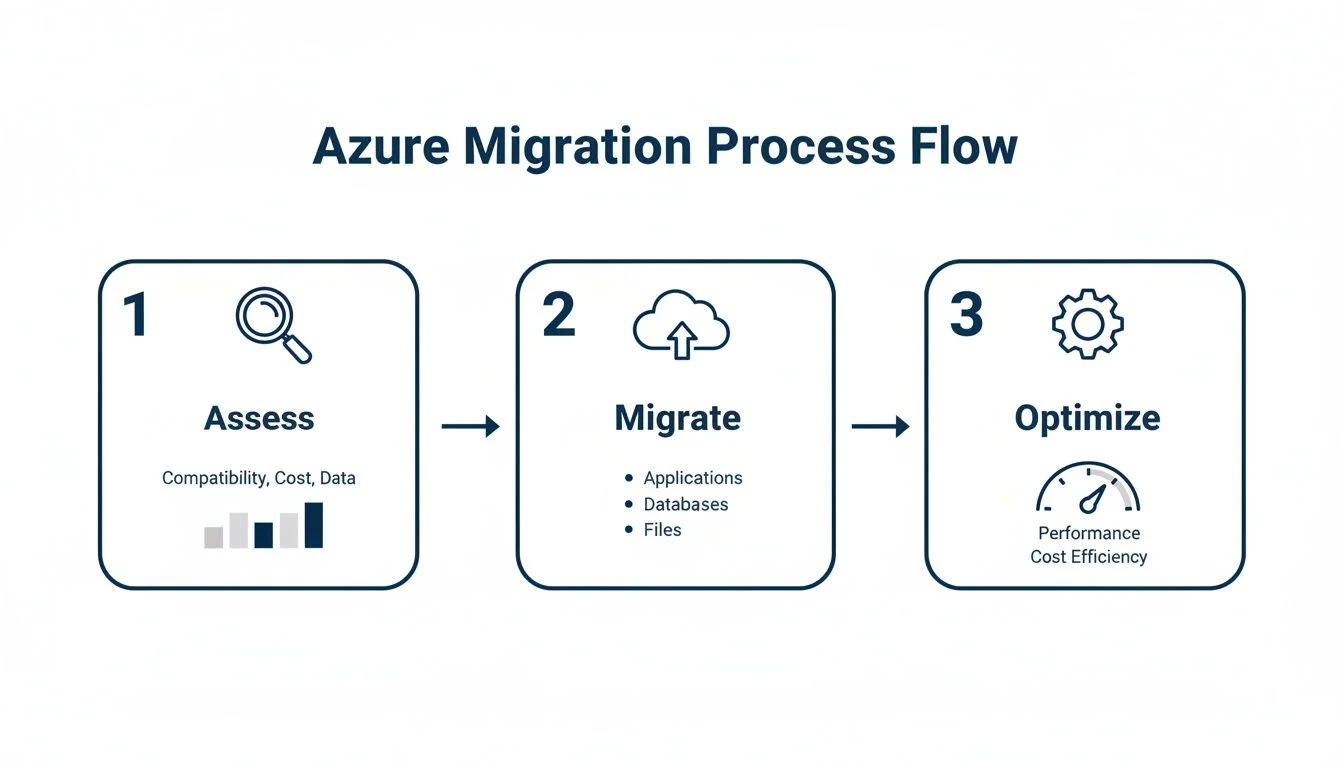
This process highlights a simple truth we’ve learned over the years: a great project always starts with a thorough assessment, moves into the technical migration, and finishes with ongoing optimisation to get the most value from your investment.
It also underscores that migration isn’t a one-off event but a continuous lifecycle. In fact, many local businesses are already benefiting from the wide array of top IT services in Melbourne that support this very journey. We’re here to help you navigate this transition, making technology simple and accessible every step of the way.
More and more, you hear about Melbourne businesses making the jump to the cloud. But this isn’t just about following the latest tech trend. It’s a strategic shift that’s delivering real, measurable results for local companies from professional services firms in the CBD to manufacturers out in the western suburbs.
They’re discovering that a server migrate to Azure service Melbourne move is about fundamentally changing how work gets done for the better.

We’re not just talking about saving a bit of money on server hardware. This is about unlocking genuine productivity gains that give you a serious advantage.
A Major Boost to Productivity and Efficiency
Local data shows Melbourne businesses that embrace Azure are seeing 40–60% improvements in productivity and team collaboration. For a typical small business of 10–50 people, we often see the entire migration wrapped up in just 2–4 weeks, with next to no downtime.
This jump in efficiency comes from a few key places:
- Work from Anywhere, Securely: Your team can access all their applications and data whether they’re in the office, working from home, or visiting a client on the other side of town. That flexibility is a massive driver of productivity.
- Smarter Collaboration: Cloud-based tools let teams work on the same documents and projects together, in real-time. No more version control headaches or emailing files back and forth.
- Less IT Admin Headache: Moving your servers to Azure means you can stop worrying about hardware maintenance, patching, and updates. This frees you up to focus on growing your business instead of just keeping the lights on.
A common worry is that a migration will drag on for months. The reality for most small to medium Melbourne businesses is that a well-planned Azure migration is a swift process that delivers a quick return.
Nail Your Data Sovereignty and Compliance
For many organisations, especially in fields like law, finance, and healthcare, data sovereignty isn’t just a preference; it’s a non-negotiable legal requirement. The Australian Privacy Act 1988 has strict rules about how personal information is handled, and keeping that data on Australian soil is critical.
This is where Azure’s local footprint is a huge advantage. Microsoft operates multiple data centre regions in Australia, including the Australia Southeast region located right here in Melbourne.
When we migrate your servers to Azure, we can ensure your data stays physically located within Australia. This directly addresses those data sovereignty concerns and helps you meet your compliance obligations under national privacy laws. You can explore how our infrastructure and cloud services are built with local compliance at their core.
Gain a Real Competitive Edge
Ultimately, the decision to migrate your servers to Azure is about giving your business a competitive edge. It gives you access to enterprise-grade technology and security without the enterprise-level price tag.
You slash your capital spending on physical servers and switch to a predictable operational cost model, freeing up cash for growth. The incredible scalability of Azure means your IT infrastructure can grow with your business instantly, a level of agility your on-site hardware just can’t match.
This allows you to respond faster to market changes and client needs, keeping you a step ahead of the competition.
Laying the Groundwork: Assessment and Strategy
A successful server migration to Azure doesn’t start with the move itself. It begins much earlier, with careful planning and a deep dive into your current setup. Think of it as drawing up the blueprints before you even think about laying the foundation. Get this part right, and the entire project runs smoother.
This first phase is all about discovery. You need a complete inventory of every server, application, and how they all talk to each other. Without understanding exactly what you have and how it works, you’re flying blind. It’s a non-negotiable step for any Melbourne business serious about a successful move to the cloud.
What Are You Trying to Achieve?
With a clear inventory, you can start defining your real goals. Is this move about slashing hardware costs? Do you need better performance for a team working from home? Or is strengthening your security and compliance your top priority? Your answers will steer your entire strategy.
A logistics company out in the western suburbs might be all about performance and scalability to handle seasonal rushes. On the other hand, a law firm in the CBD will likely put data security and sovereignty at the top of its list.
It’s a classic mistake to treat a cloud migration as just another IT project. It’s a business project, plain and simple. Your goals, whether they’re financial, operational, or strategic, have to drive every single decision.
Once you know your ‘why’, you can choose ‘how’. There’s no single right way to migrate; the best path depends entirely on your apps, your budget, and what you want to achieve long-term.
Choosing Your Azure Migration Strategy
Before diving into the technicals, you need to pick a migration strategy. Each one offers a different trade-off between speed, cost, and the long-term benefits you’ll unlock. Understanding these options is key to making a smart decision that fits your business.
Here’s a breakdown of the three main approaches to help you decide.
| Strategy | Description | Best For | Pros | Cons |
|---|---|---|---|---|
| Lift-and-Shift (Rehost) | Essentially copying your servers and applications to Azure as-is, with minimal changes. | Legacy apps, tight deadlines, or exiting a data centre contract quickly. | Fastest and least complex migration path. | Doesn’t take full advantage of cloud features; can be less cost-effective long-term. |
| Replatform (Repackage) | Making some smart tweaks to your apps, like switching to a managed database service (e.g., Azure SQL). | Getting some cloud benefits without a full rewrite; improving performance and efficiency. | Better performance and lower operational overhead than lift-and-shift. | Requires more planning and testing than a simple rehost. |
| Refactor (Rearchitect) | Completely redesigning your applications to be fully cloud-native, often using microservices or serverless tech. | Businesses wanting maximum scalability, resilience, and cost-efficiency. | Unlocks the full power of the cloud; highly resilient and cost-optimised. | Most expensive and time-consuming approach; requires specialised skills. |
Choosing the right path isn’t just a technical decision; it’s a strategic one that will impact your IT costs and capabilities for years to come.
To properly design your new home in Azure and build a migration plan that holds up, you’ll need a solid grasp of Azure’s infrastructure. A fantastic resource for getting up to speed is the Designing Microsoft Azure Infrastructure Solutions Study Guide, which is great for understanding the core concepts behind a successful design.
When to Get Help with Your Azure Migration
A DIY Azure migration can seem straightforward at first. But now you’re deep in the weeds, staring at application dependency maps that look like spaghetti, and the cloud cost calculator is spitting out numbers that just don’t feel right.
This is a familiar moment for many Melbourne businesses. The initial enthusiasm for a server migration hits the hard reality of just how complex these projects are. Making a mistake here isn’t just a learning curve; it can lead to serious downtime, lost data, or a budget blowout that stings for months.
The Red Flags You Can’t Ignore
Knowing when to pivot from a DIY attempt to calling for backup is a critical business decision. It’s not admitting defeat; it’s protecting your operations.
If you’re wrestling with designing a secure network architecture in Azure or can’t confidently project your costs, those are clear signals. These aren’t minor details; they’re the foundations of your entire cloud environment. Getting them wrong can cripple the project before it even gets off the ground.
Other warning signs often pop up around this stage. Maybe you’re not sure how to meet data compliance requirements, your team doesn’t have the skills for proper testing, or you simply can’t build a rollback plan you’d trust if things went south. Pushing through these challenges without firsthand experience is a gamble most businesses can’t afford to take.
A server migration isn’t just an IT upgrade; it’s a strategic business move. The risk of getting it wrong in terms of security, cost, or operational disruption is simply too high to leave to chance.
At Tbourke Solutions, we’ve spent over 20 years guiding Melbourne businesses through this exact maze. We specialise in making your server migrate to Azure service Melbourne project feel smooth and predictable, ensuring it’s not just a technical success but also a strategic win.
If you’ve hit that point where the complexity feels overwhelming, that’s the perfect time to reach out. We can bring the clarity and deep technical know-how to get your project across the finish line successfully. Get in touch via our contact page to discuss your project.
Planning Your Move with Azure Migrate
The good news is you don’t have to guess your way through this. Microsoft gives you some brilliant tools to help plan your server migrate to Azure service Melbourne project.
The main one is Azure Migrate. It acts as a central hub for discovering your on-premises servers, analysing how they perform, and mapping out all the tangled dependencies between your applications.
Most importantly, it gives you detailed cost estimates. This allows you to forecast what your monthly Azure bill will look like with surprising accuracy, preventing that dreaded bill shock and keeping your migration on budget. The assessment process also shines a light on where your disaster recovery plans might be weak, something you can learn more about in our guide on disaster recovery plan examples.
By combining a thorough hands-on assessment with the hard data you get from Azure Migrate, you can build a solid strategy. This plan will align with your business goals, minimise risk, and set you up for a migration that actually delivers value. This planning phase is arguably the single most important predictor of a smooth and successful transition to the cloud.
Executing the Migration and Managing the Cutover
You’ve done the planning, and now it’s time for the rubber to meet the road. This is the technical heart of your migration project, where all that careful strategy turns into hands-on execution.
The goal here is simple: replicate your servers to the cloud with the least possible disruption, test everything until you’re confident it’s rock-solid, and then flick the switch from your old on-premise hardware to your new Azure home. Let’s walk through what a successful migration and cutover looks like for a Melbourne business.
Setting Up Your Azure Landing Zone
Before you can move your furniture in, you have to build the house. In Azure, this is called a landing zone. It’s a pre-configured environment we build to make sure your new cloud setup meets your security, compliance, and operational standards right from day one.
Building a proper landing zone isn’t just about clicking a few buttons. It involves a few key steps:
- Configuring Virtual Networks (VNets): This is your own private network in the cloud. We’ll design a VNet structure that keeps your cloud resources talking securely to each other and, if needed, connects safely back to your office.
- Setting Up Storage Accounts: Azure has different storage options for different jobs. We make sure to provision the right type of storage for your virtual machine disks, your application data, and of course, your backups.
- Implementing Security Groups: Think of Network Security Groups (NSGs) as the basic firewalls for your virtual machines. They control who and what can get in or out, protecting your servers from unwanted access.
A well-designed landing zone is the bedrock of any successful server migrate to Azure service Melbourne project. It’s the secure, organised foundation you need for a smooth and predictable migration.
Replicating Your Servers with Azure Migrate
With your landing zone ready, it’s time to start copying your servers. For this, we lean on powerful tools like Azure Migrate and Azure Site Recovery. These let us create a perfectly synchronised copy of your on-premise servers in Azure, all without taking your original servers offline.
This replication hums away quietly in the background, having almost no impact on your day-to-day work. Depending on how much data you have and the speed of your internet connection, it might take a few hours or a few days. The beauty of it is that your business just keeps running as normal while all the heavy lifting happens behind the scenes. Our comprehensive Azure Migrate guide dives deeper into how this powerful tool takes the pain out of the process.
The shift to the cloud isn’t just a trend; it’s a tidal wave. Australia’s cloud spending is forecast to jump from A$12.2 billion in 2022 to A$22.4 billion by 2026. This growth is getting a huge push from a new five-year agreement between the Australian Public Service and Microsoft, set to expand Azure capacity by about 250%. For Melbourne SMEs, this signals a massive opportunity and unprecedented support for moving servers seamlessly. You can read more about this in Microsoft’s agreement with the Australian government.
Testing, Validation, and the Final Cutover
Once the initial copy is complete, we move into the most critical phase: testing. We perform what’s called a test failover, which spins up a temporary, isolated copy of your servers in Azure for us to validate. This has zero impact on your live production environment.
During this phase, we work through a structured checklist to confirm a few key things:
- Application Functionality: Do all your critical programs launch and work exactly as they should?
- Data Integrity: Has all your data come across correctly, with no corruption or missing files?
- Performance Levels: Does the system feel as fast as it did on-premise, or even better?
A cutover should never be a leap of faith. Thorough testing is what turns a potentially risky final step into a predictable, controlled event. It’s the final quality check before you go live.
After we get the green light from testing, we schedule the final cutover. This is the moment we switch your live operations from your old servers to the new ones running in Azure. We plan this meticulously, often for a weekend or after-hours, to guarantee the absolute minimum disruption to your business.
A clear communication plan makes sure your team knows exactly what’s happening and when, turning what could be a stressful night into a smooth and celebrated transition.
Post-Migration Optimisation and Management
Getting your servers onto Azure is a huge win, but the work doesn’t stop once the cutover is complete. The migration project might be finished, but this is where the real journey begins, turning that initial investment into long-term value. Now, the focus shifts from a one-off project to a continuous cycle of improvement, making sure your Azure setup isn’t just running, but running smart.

Right now, many Melbourne businesses are hitting what we’re calling ‘The Great Cloud Reset’. As 2026 unfolds, we’re seeing a big push to redesign Azure environments that were thrown together in a hurry during the 2020–2023 cloud rush. Back then, speed was the only thing that mattered, so simple “lift-and-shift” migrations were the go-to.
Today, those same businesses are taking a breath and looking to intentionally optimise everything from session host density and concurrency modelling to getting a firm grip on costs with FinOps. You can dig deeper into why so many are now looking to intentionally redesign their Azure environments.
Mastering Cost with FinOps Principles
The most common post-migration shock? An unexpectedly high Azure bill. The key to dodging this bullet is to adopt a FinOps (Financial Operations) mindset from day one. It’s all about bringing financial accountability to the cloud’s pay-as-you-go model so you only spend on what you actually use.
Azure gives you some powerful tools to make this happen:
- Azure Cost Management + Billing: This is your command centre for all things spending. You can set budgets, get alerts before you hit your limits, and analyse past spending to spot trends before they become problems.
- Azure Advisor: Think of this as a free, built-in consultant. It scans your setup and gives you practical recommendations to optimise for cost, security, performance, and reliability. It might point out that you can safely resize an underused virtual machine or delete resources that are just sitting idle.
- Azure Reservations and Savings Plans: If you have workloads with predictable, steady usage, you can commit to a one or three-year term. In return, you get a significant discount compared to standard pay-as-you-go pricing.
By making a habit of checking these tools, you turn cost management from a reactive headache into a proactive, strategic advantage.
Fine-Tuning Performance and Security
Once you’re confident your costs are under control, the next job is making sure your applications are running at their absolute best. This isn’t a one-time check; it involves continuous monitoring and small, ongoing adjustments.
Azure Monitor is your go-to service here. It pulls in telemetry data from your cloud and on-premise environments, giving you a deep-dive view into the performance and health of your applications. You can track things like CPU usage, memory, disk I/O, and network traffic to identify bottlenecks before your users even notice them.
And just like performance, security is never a set-and-forget task. Your security posture needs to be constantly assessed and hardened against new threats.
A post-migration health check is essential. It confirms your environment is not only cost-effective but also performing optimally and secured against modern threats, turning your initial investment into long-term value.
Microsoft Defender for Cloud (which you might remember as Azure Security Center) gives you a single pane of glass for security management. It constantly checks your environment against security best practices and gives you a “Secure Score,” a clear, simple metric of your overall security health. It will flag vulnerabilities like open management ports or servers that are missing updates, and even give you step-by-step guides to fix them.
This ongoing cycle of optimising cost, performance, and security is what truly defines a successful server migrate to Azure service Melbourne project. It transforms your cloud platform from a static utility bill into a dynamic asset that actively drives your business forward.
FAQ: Common Azure Migration Questions
Moving your servers to the cloud naturally brings up a lot of questions. We get it. Here are the clear, straightforward answers to the queries we hear most often from Melbourne businesses considering a shift to Azure.
How long will an Azure migration take?
For a typical small to medium Melbourne business (10-50 users), a full server migration to Azure usually takes between 2 to 4 weeks. This includes the initial assessment, planning, replication, testing, and final cutover. The complexity of your applications and the amount of data can influence the timeline, but a well-planned project is a swift one.
How much downtime should we expect?
Minimal to none. We use replication technologies that copy your servers to Azure in the background with no impact on your live operations. The final “cutover” is meticulously planned and almost always scheduled for after-hours or on a weekend to ensure zero disruption to your business day.
Is our data safe and where is it located?
Yes, your data is extremely safe. In fact, it is likely more secure in Microsoft’s cloud platform than on an in-office server, thanks to enterprise-grade security and compliance certifications. Crucially for Melbourne businesses, we ensure your data resides in the ‘Australia Southeast’ Azure region, which is physically located in Melbourne. This guarantees data sovereignty and full compliance with the Australian Privacy Act.
What are the ongoing costs after migration?
Azure operates on a pay-as-you-go model, replacing large upfront server purchases with a predictable monthly operational expense. As part of our service, we provide detailed cost projections before the project begins and use Azure’s cost management tools to continuously monitor and optimise your spending post-migration, ensuring there are no surprises. Our goal is to make your cloud investment efficient and predictable.
How Tbourke Solutions Can Help
Choosing the right partner for your server migrate to Azure service Melbourne project is the single most important decision you will make. It determines whether the project is a strategic success or a costly technical exercise. At Tbourke Solutions, we are a Melbourne-based IT service provider with over 20 years of experience helping local businesses navigate this transition successfully.

It’s no secret that the best IT partners are easy to find online because they focus on client success, which naturally leads to good visibility through things like effective B2B SEO best practices. It’s often a good sign you’re dealing with a professional outfit that knows its stuff.
We offer practical, end-to-end services designed to guide you through your entire cloud journey.
- IT Consultancy and Migration Planning: We start by listening to understand your business goals. From there, we map out a migration strategy that minimises risk and maximises your return on investment.
- End-to-End Migration Execution: Our skilled team handles the entire technical process, from initial assessment and deployment right through to final testing and a seamless cutover.
- IT Managed Services: The journey doesn’t end after migration. We provide ongoing IT managed services to manage, monitor, and optimise your new Azure environment so you can focus on your business.
- Cybersecurity Solutions: We secure your cloud infrastructure using industry-leading practices, protecting your valuable data from modern threats.
Ready to start the conversation about a more efficient and secure future? Reach out to our team for a no-obligation consultation. You can submit a query directly on our contact page at http://tbourke-solutions.com.au/contact and let us help make your cloud migration a genuine success.
Share This Story, Choose Your Platform!




