Moving to Azure often starts with a sensible business decision. You want better resilience, less hardware to maintain, and easier access for staff, vendors, or students. Then the security questions arrive. Who can talk to what, how do you stop risky outbound traffic, and what’s protecting the gaps between your cloud systems?
That’s where many Australian SMBs get stuck. They’ve already got Microsoft 365, maybe a few virtual machines, a line-of-business app, some remote access, and perhaps a plan to connect an office or branch. The old idea of “the firewall is the box in the comms rack” no longer fits. In cloud environments, security has to follow the workload, not the building.
Securing Your Business in the Cloud
A lot of businesses start their cloud journey with a simple assumption. If the servers are now in Azure, Microsoft must be handling the security. Microsoft does secure the platform, but your organisation still has to control traffic, apply policy, and decide what should be allowed or blocked inside your own environment.
That’s harder than it sounds once your setup grows past a single workload. A few virtual networks, remote users, cloud apps, vendor access, and internet-facing services can quickly create a messy security picture. Without a central checkpoint, decisions get spread across too many places, and that’s where mistakes happen.
Azure Firewall fits into that gap. Think of it as the central security desk for your Azure environment. Instead of relying on scattered controls alone, you get one place to inspect and enforce traffic decisions across connected cloud resources. If you’re reviewing your current posture, this secure Azure environment checklist is a practical place to start.
A cloud environment without central traffic control usually works fine until the day you need to investigate an incident, prove compliance, or shut down a risky connection quickly.
TLDR
TLDR: Azure Firewall is Microsoft’s cloud-native firewall service for controlling and inspecting traffic in Azure. It helps protect your cloud environment by acting as a central gatekeeper for inbound, outbound, and internal Azure traffic, rather than leaving security decisions scattered across subnets and individual resources. For SMBs, it matters because it supports stronger policy control, cleaner segmentation, and a more manageable security model as cloud environments grow. It’s especially useful when basic controls alone no longer give you enough visibility or consistency.
What Azure Firewall Is and Why It Matters
Azure Firewall is a cloud-native, fully stateful firewall-as-a-service that Microsoft positions as offering built-in high availability and unlimited cloud scalability for Azure workloads, and Microsoft says it inspects both east-west and north-south traffic in Azure workloads, as outlined in the Microsoft Azure Firewall overview. In plain terms, that means it’s designed to sit in the middle of your cloud traffic decisions without you having to deploy and maintain a traditional firewall appliance.
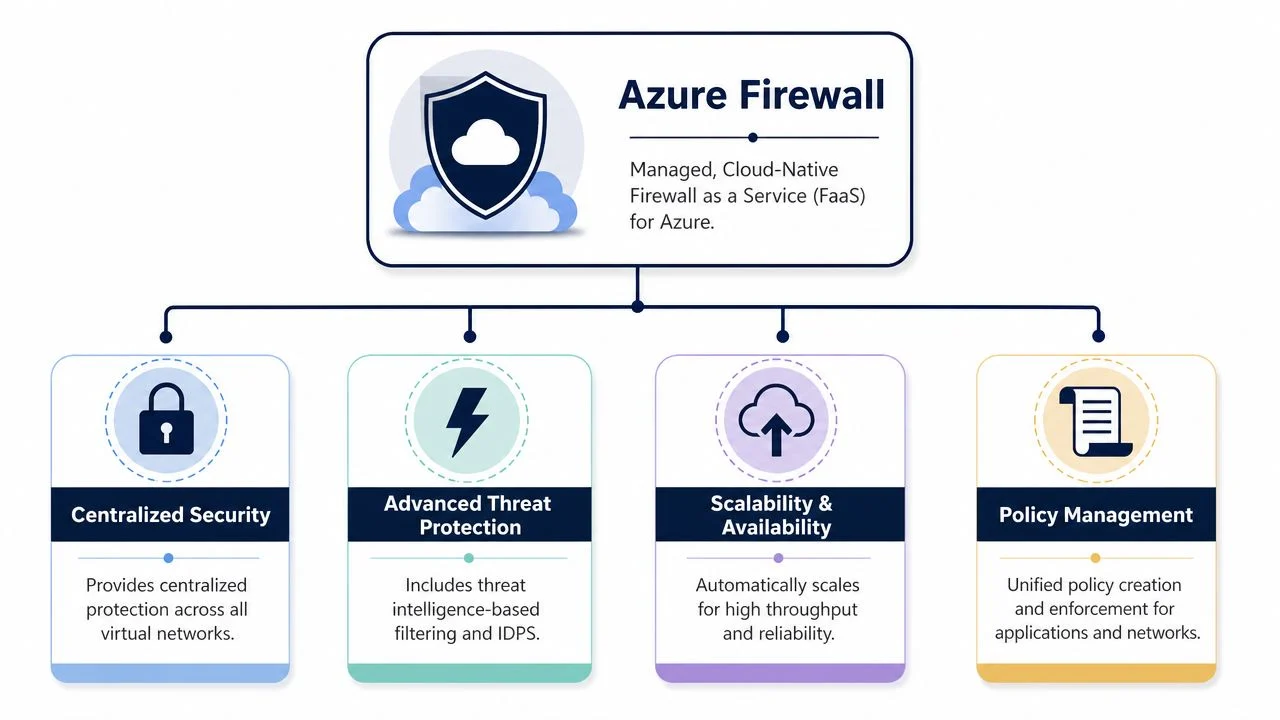
Think of it as a central checkpoint
A useful analogy is a security checkpoint in a multi-tenant office building. You can still lock individual rooms and offices, but you also want a central desk that checks who’s entering, who’s leaving, and whether movement between sensitive areas is allowed.
That’s the role Azure Firewall plays in a modern Azure estate. It isn’t just for internet traffic. It can also inspect traffic moving between Azure resources, which matters if you want to reduce lateral movement and keep systems segmented.
Why stateful matters to a business owner
A stateful firewall tracks the context of connections. It doesn’t just inspect isolated packets in a vacuum. That matters because security decisions become more accurate and operationally cleaner. You’re not trying to brute-force every traffic pattern with simplistic allow or block rules.
For Australian organisations, this is particularly relevant in segmented environments such as branch-to-cloud, subnet-to-subnet, and internet-facing protection, without having to plan around local hardware refresh cycles, as Microsoft notes in its overview. That makes Azure Firewall attractive for growing businesses, schools, and distributed teams that want one security layer across multiple cloud-connected environments.
The SKU question most SMBs ask
Microsoft offers three SKUs: Basic, Standard, and Premium, according to the same Azure platform documentation. The practical point isn’t just that there are options. It’s that you can align the firewall to the risk level and complexity of the environment.
For a basic understanding:
| Option | Best fit in practice | Trade-off |
|---|---|---|
| Basic | Smaller environments needing baseline filtering | Lower feature depth |
| Standard | Broader production use with stronger policy control | More to configure and manage |
| Premium | Higher-risk or more regulated environments | Highest complexity and cost profile |
The pricing model is simpler than appliance thinking
One of the more useful parts of Azure Firewall is how Microsoft prices it. Billing is split into a fixed hourly fee plus a data processing fee, and Microsoft explicitly says there are no separate compute charges in the pricing model described in the same overview. That’s a very different conversation from buying, sizing, renewing, and eventually replacing a physical firewall.
What works well here is predictability at the service level. What doesn’t work is treating cloud firewall spend as “set and forget”. Poor routing, broad policies, and avoidable traffic flows can still make a security design more expensive than it needs to be.
How Azure Firewall Actively Protects Your Cloud
A firewall only earns its place if it changes what attackers, malware, and careless configurations can do. Azure Firewall does that by controlling traffic paths, enforcing default rules, and adding extra inspection where the risk justifies it.
It starts with deny by default
Microsoft states that Azure Firewall operates in default-deny mode, so traffic is blocked unless you explicitly allow it in the policy described in the Azure Firewall ransomware defence article. That’s the right starting point for cloud security because it forces deliberate decisions.
In practice, this reduces the “we didn’t realise that server could reach that destination” problem. A lot of breaches and malware events get worse because outbound access was too open for too long.
Practical rule: If your environment allows broad outbound access “for convenience”, you’re trusting every workload and every admin change more than you should.
Rule control and traffic handling
Azure Firewall can be used to apply traffic rules at a central point instead of scattering decisions across every subnet. That makes it easier to govern application access, network access, and published services in one policy set.
Typical protection patterns include:
- Outbound control: Restrict what workloads can reach on the internet so a compromised server can’t freely call out.
- Internal segmentation: Control movement between cloud networks so one breach doesn’t automatically become a wider incident.
- Published services: Use NAT-style publishing patterns to expose only what needs to be reachable, rather than exposing internal design directly.
A common mistake is allowing broad network traffic first and then expecting finer application rules to save the day. In real environments, over-permissive early rules usually create blind spots and policy sprawl.
For organisations pairing network controls with endpoint and posture tools, this Microsoft Defender for Cloud business guide is worth reviewing because firewall policy works best as one layer in a wider control stack.
Premium features for higher-risk environments
For environments with stricter risk tolerance, Azure Firewall Premium adds TLS inspection and IDPS, and Microsoft states its IDPS uses hundreds of signatures to detect command-and-control connectivity and can inspect every packet, including headers and payload, to identify and optionally block malicious activity, according to the same Microsoft article above.
That matters because much of today’s traffic is encrypted. If you can’t inspect traffic where it makes sense, you may only see part of the picture. Premium is designed for the situations where “allowed over HTTPS” is not a good enough answer.
Microsoft also says that enabling Threat Intelligence in alert/deny mode blocks known malicious IPs and domains. That’s particularly useful in reducing ransomware exposure where outbound control is important. It won’t replace patching, identity controls, or backups, but it does add a meaningful barrier against known bad destinations.
Choosing the Right Tool Azure Firewall vs NSGs and WAFs
Businesses often compare Azure Firewall with NSGs and WAFs as if they’re competing products. They’re not. They solve different problems, and confusion usually leads to either overspending or under-protecting something important.
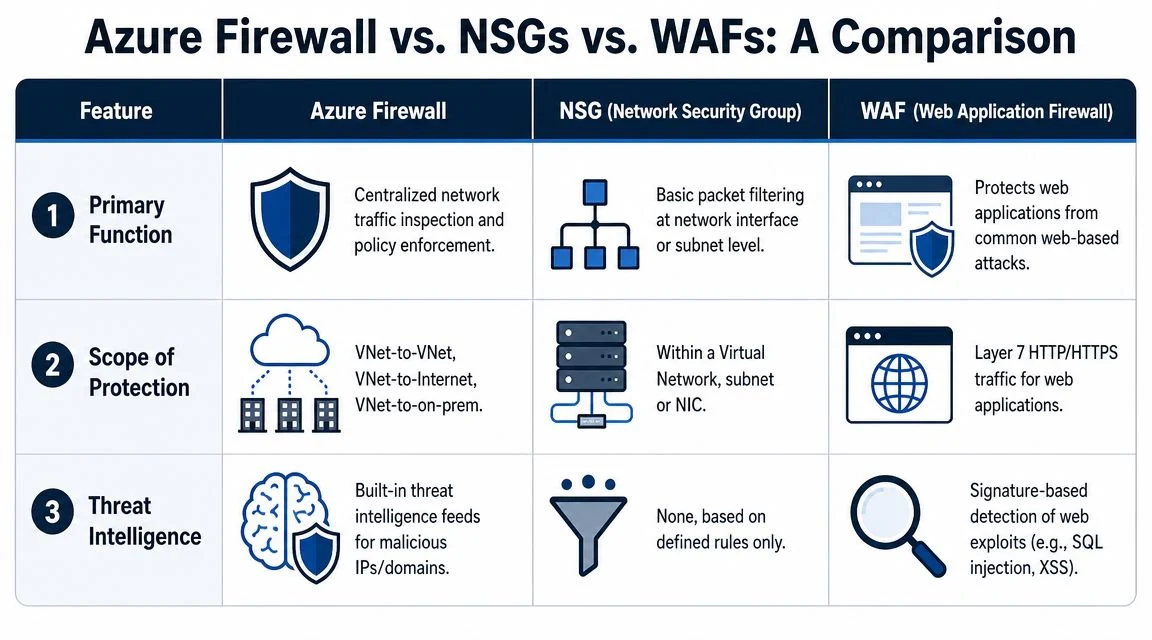
A simple way to picture the difference
Use this building analogy:
- NSGs are like guards on individual doors. They control who can enter or leave a particular room or hallway.
- Azure Firewall is the main staffed checkpoint for the building. It inspects broader traffic movement and applies central policy.
- WAFs are specialist guards protecting the public reception desk for a web app. They’re focused on web-specific attacks.
That’s why an SMB asking “Do I need Azure Firewall or NSGs?” is usually asking the wrong question. The better question is where each control belongs.
Where each tool fits
| Control | Best used for | What it does not do well |
|---|---|---|
| NSG | Basic subnet or interface-level filtering | Centralised inspection across the environment |
| Azure Firewall | Shared policy enforcement and broader traffic inspection | Deep app-specific web attack protection |
| WAF | Protecting public web applications at HTTP and HTTPS level | General network egress and internal segmentation control |
What works in practice
For many SMB Azure environments, NSGs still matter. They’re useful for local boundaries and straightforward allow or deny decisions close to the workload. They’re not a strong replacement for central inspection when multiple networks, shared services, branch connectivity, or internet egress policy become part of the picture.
A WAF matters when you have a public-facing web application and need protection against web-layer threats. That’s not the same as controlling whether backend systems can talk to risky external destinations or whether internal Azure networks should communicate freely.
This becomes much clearer once you map your network by trust zones. This guide to network segmentation helps frame that conversation properly.
If all your controls sit at the edge, internal movement stays too open. If all your controls sit locally on each subnet, governance becomes fragmented. Good design usually uses both central and local enforcement.
When to Call for Expert Azure Firewall Help
A common pattern for Australian SMBs is this: Azure starts small, then a second site comes online, a vendor needs access, Microsoft 365 backups are added, and someone asks for tighter control over internet traffic. At that point, Azure Firewall is no longer a simple feature choice. It affects routing, operations, auditability, and monthly spend.
That is usually the right time to bring in outside help.
The trigger is not lack of capability inside your team. The trigger is complexity that gets expensive if it is handled late. I see this most often after a business has already built parts of Azure with NSGs, then realises it also needs central policy, cleaner logging, and better control over hybrid traffic.
Expert help makes sense if any of these apply:
- Your environment is growing beyond a few simple workloads. Multiple virtual networks, separate dev and production environments, or shared services across sites all need deliberate traffic design.
- You need security decisions that hold up under review. Compliance checks, customer security questionnaires, and insurer requirements usually need clearer policy control than scattered rule sets.
- You are linking office, datacentre, or branch systems into Azure. Hybrid connectivity introduces routing dependencies and trust boundaries that are easy to misconfigure.
- You are comparing Azure Firewall costs against cheaper controls. This is a sensible question. Azure Firewall can be the right tool, but only if the design justifies the spend. A good starting point is this breakdown of Azure cost for a small business.
- No one has clear ownership after deployment. Firewall rules, log review, exceptions, and policy cleanup all need a named owner. Without that, the rule base gets messy fast.
The business risk is usually straightforward. A poor design can leave gaps between Azure, on-premises systems, and internet access rules. It can also create unnecessary cost if traffic is forced through the wrong path or if a simpler control would have done the job.
For many SMBs, the best time to call an MSP such as Tbourke Solutions is before rollout, not after a failed audit, a routing problem, or a surprise bill. Early design input is cheaper than reworking a live environment.
Practical Guide to Deployment and Cost Management
The technical side of Azure Firewall is only half the story. The other half is whether the design stays manageable, visible, and cost-aware after go-live.
The hub-and-spoke model is popular for a reason
A practical pattern for SMBs is the hub-and-spoke layout. The firewall sits in a central hub virtual network, and workloads sit in separate spoke networks. Traffic that needs inspection routes through the hub.
That model works well because it creates a single control point for multiple environments. It also tends to produce cleaner policy management than placing isolated controls everywhere.
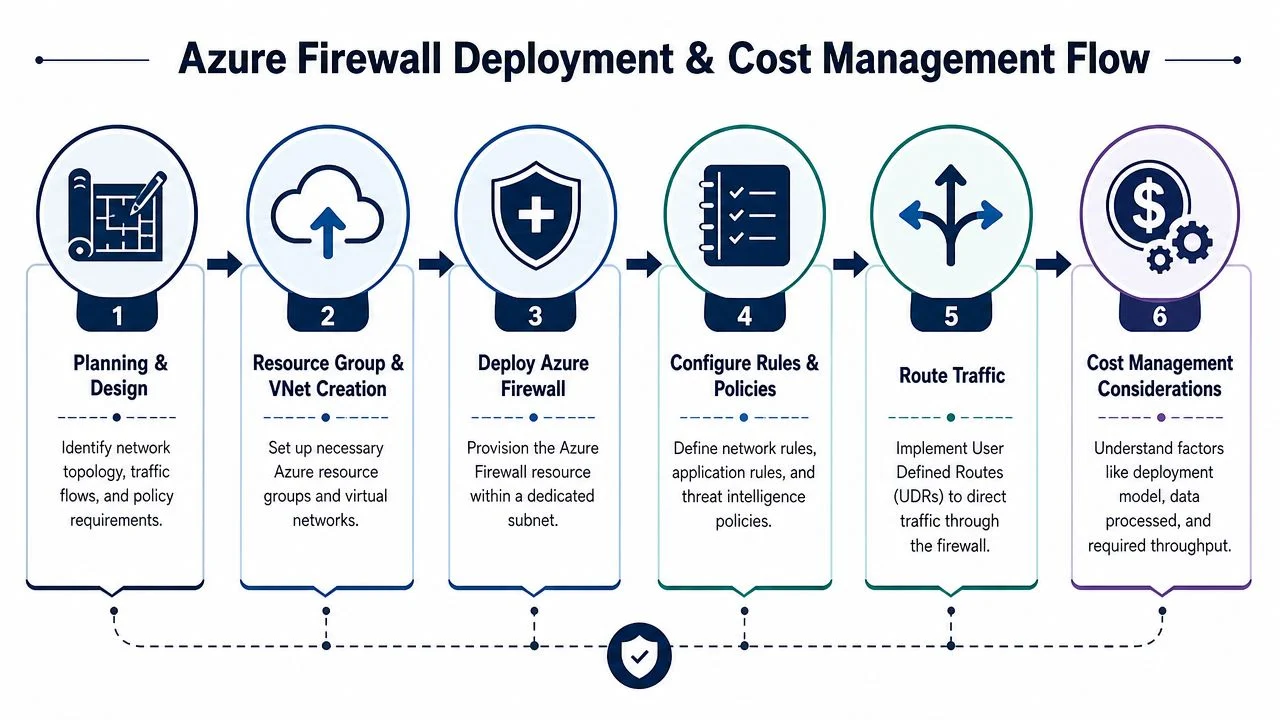
A sensible deployment sequence
A clean rollout usually follows this order:
Design the traffic paths first
Identify which systems need internet access, which networks should be isolated, and what shared services must stay reachable.Place the firewall centrally
Put Azure Firewall where it can enforce policy consistently, not as an afterthought added after applications are already talking freely.Route traffic deliberately
If traffic isn’t directed through the firewall properly, the policy looks good on paper but doesn’t control much in reality.Write narrow rules
Specific allow rules age better than broad exceptions. Temporary shortcuts become long-term weaknesses very quickly.Enable logging and review it
If no one checks firewall logs, you won’t know whether it’s blocking the right things, missing patterns, or carrying stale rules.
Logging is not admin overhead. It’s the evidence trail that tells you whether policy matches reality.
Cost management without guesswork
Microsoft’s pricing model for Azure Firewall is based on a fixed hourly fee plus a data processing fee, with no separate compute charges, as covered earlier from Microsoft’s documentation. For budgeting, that means two main levers matter in practice:
- The SKU you choose: Basic, Standard, and Premium don’t carry the same operational purpose.
- How much traffic you push through it: More inspected traffic means more processing cost exposure.
The trap is assuming the firewall is expensive when poor architecture is the underlying issue. If teams route unnecessary traffic through the firewall, leave broad internet access in place, or design around convenience instead of policy, spend rises without improving security much.
For businesses trying to estimate the broader impact of Azure architecture decisions, this Azure cost guide for a small business is useful context.
Visibility is what makes the firewall operationally useful
A firewall that blocks traffic but produces no useful operational habits becomes shelfware in cloud form. You need visibility for three reasons:
- Troubleshooting: When an app breaks, you need to know whether the firewall is involved.
- Security review: Denied traffic patterns often expose misconfigurations, shadow IT, or suspicious behaviour.
- Change control: Policy grows over time. Logging helps teams justify rules instead of keeping everything forever “just in case”.
What works and what doesn’t
What works:
- Centralised rule ownership
- Clear segmentation between environments
- Reviewing denied traffic and stale rules regularly
- Matching the SKU to the risk level
What doesn’t:
- Copying on-prem firewall habits into Azure without redesign
- Treating NSGs alone as a substitute for central policy
- Allowing broad outbound traffic because “the users need it”
- Deploying the firewall but failing to route traffic through it consistently
Your Next Steps Securing Azure with Tbourke Solutions
A practical Azure Firewall plan starts with three business questions. What needs to talk to the internet, what should stay isolated, and who will maintain the rules after go-live? For Australian SMBs, that matters more than chasing every premium feature in the Azure portal.
Common FAQ
Do I still need NSGs if I have Azure Firewall?
Usually, yes. NSGs still make sense for local control at the subnet or interface level. Azure Firewall handles central policy, logging, and broader traffic decisions across the environment.
Is Azure Firewall only for large enterprises?
No. It often becomes relevant once an SMB has multiple workloads, hybrid links, remote access requirements, or stricter compliance expectations.
Will Azure Firewall replace every other security tool?
No. It sits alongside identity controls, patching, backups, endpoint protection, and sound Azure configuration.
How do I know if Premium is necessary?
Premium is worth considering when encrypted traffic inspection or more advanced threat detection matches the risk in your environment. If your setup is simpler, a lower SKU may be the better financial decision.
A good Azure Firewall design is one users barely notice. Access works, risky paths are blocked, and the admin team can explain why each rule exists.
How support works in practice
Some businesses run Azure Firewall in-house. Others bring in outside help for the initial design, then keep operational ownership internally. A third model is ongoing MSP support for deployment, policy changes, reviews, and troubleshooting. Tbourke Solutions fits into that third category, with services across cybersecurity, networking, and consultancy that align closely with Azure security work for SMBs and schools.

The right model depends on internal capability and time. A capable IT manager may only need help with architecture, routing, and a policy review before rollout. A lean team with competing priorities usually gets more value from managed support, especially when firewall changes need to be documented, tested, and reviewed regularly.
This is also where cost decisions become practical. Azure Firewall can be the right control, but not every environment needs the same SKU, inspection depth, or traffic path. I usually advise SMB clients to compare the firewall spend against the cost of poor visibility, weak outbound control, and time lost troubleshooting app connectivity with no central policy.
For many businesses, the decision is less about buying another security product and more about getting a setup that is understandable, supportable, and aligned with daily operations. If you want a second opinion on architecture, rule design, or whether Azure Firewall is the right fit at all, Tbourke Solutions can assess the environment and outline practical implementation or support options.
Share This Story, Choose Your Platform!