
If you’re running a small business or school in Melbourne, this probably sounds familiar. You’ve got a server that’s getting noisy and old, remote staff who need reliable access, backups you hope are working, and a growing sense that one hardware failure could turn into a very expensive week. Most owners don’t wake up wanting “cloud infrastructure”. They want systems that stay up, data that stays safe, and IT costs that don’t jump every time something breaks.
That’s where Azure enters the conversation. Not as a buzzword, and not as an all-or-nothing move, but as a practical way to stop patching around the limits of old setups and start making IT fit the business.
Is Your IT Holding Your Business Back
A lot of businesses outgrow ad hoc IT slowly. First it’s a shared drive that gets messy. Then staff start working from home, and access becomes clunky. Then backup, security, email, file access, and line-of-business software all end up stitched together in ways that technically work, but only if no one touches the wrong thing.
Schools see a similar pattern. Student data, staff devices, shared systems, and compliance expectations keep growing, but the underlying setup often stays much the same. That gap creates risk.
One of the clearest warning signs is when IT becomes reactive. You’re paying for fixes, not planning. You’re replacing hardware because it failed, not because the business made a strategic choice. If that sounds familiar, it’s worth reading these signs your business has outgrown ad hoc IT support.
Practical rule: If your current setup depends on one old server, one key staff member, or one backup routine nobody tests, your IT is already limiting the business.
Azure can help, but it isn’t automatically the answer for everyone. Sometimes the right move is cloud backup only. Sometimes it’s a hybrid setup that keeps one local system and moves everything else. Sometimes a full move makes sense because the old environment is costing more in downtime, risk, and maintenance than the cloud ever will.
TLDR
Microsoft Azure is Microsoft’s cloud platform for running servers, storage, backups, security, apps, and remote work systems without relying only on on-premises hardware. For many Melbourne SMEs and schools, it’s worth considering when security, backup, remote access, compliance, or growth are becoming harder to manage locally. You don’t always need a full migration. But if your current setup is ageing, risky, or hard to scale, Azure often becomes less of a nice-to-have and more of a sensible next step.
What Exactly Is Microsoft Azure
Azure is a cloud platform. In plain English, that means Microsoft runs the underlying infrastructure, and your business rents the computing, storage, networking, and security services it needs instead of buying and maintaining all of it in-house.
Building your own server room is like buying a warehouse because you need shelf space. Azure is renting exactly the space, power, and capability you need, then changing that allocation as the business changes.
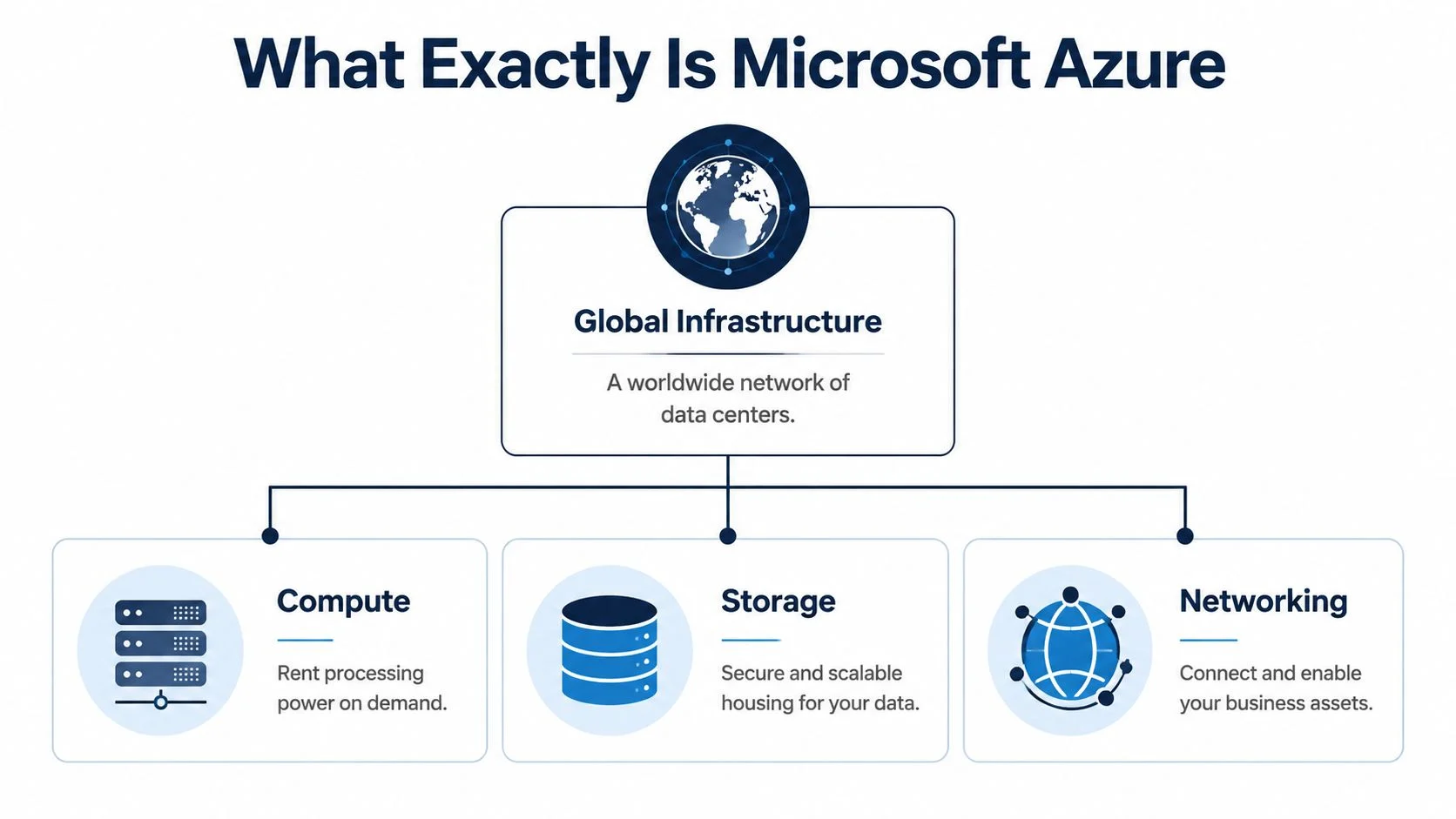
Azure isn’t one product. It’s a large toolkit. That toolkit includes virtual servers, cloud storage, identity management, backup, disaster recovery, analytics, and security tools. Microsoft Azure powers over 38% of organisations worldwide for cloud services, and in the AU region it holds a 25% market share with data centres in Melbourne, Sydney, and Canberra, which matters for local performance and data sovereignty requirements for Australian businesses (Statista’s Azure market overview).
For industries with tighter controls, context matters. If you’re in finance, lending, or adjacent regulated services, this guide for banking leaders gives a useful view of how technology decisions increasingly connect security, compliance, and data strategy.
The simplest way to understand cloud models
People often hear terms like IaaS, PaaS, and SaaS and switch off. The pizza analogy still works.
| Model | What you manage | What Microsoft manages | Simple example |
|---|---|---|---|
| On-premises | Everything | Nothing | You make the pizza from scratch |
| IaaS | Apps, data, operating systems | Hardware, core infrastructure | Someone gives you a ready kitchen |
| PaaS | Your app and data | Infrastructure and platform layer | You get the dough and oven, you add toppings |
| SaaS | Very little beyond user setup and data | Nearly everything | You order the pizza ready to eat |
For many SMEs, Azure starts with IaaS, which means virtual servers, storage, and networking hosted in Microsoft’s environment. If you’re already using Microsoft 365, Azure often fits naturally around it because identity, access, security, and collaboration tools can work together.
Why the local footprint matters
A Melbourne business doesn’t just care that Azure is global. It cares that services can be deployed in Australia, close to users, and in ways that align with local privacy expectations. That’s one reason Azure is often part of the conversation for schools and SMEs handling staff records, student information, financial data, or customer files.
If you want a more service-specific view, this overview of the Windows Azure platform shows how the platform maps to practical business workloads.
Core Azure Services Your Organisation Can Use Today
The best way to judge Azure is not by reading a list of products. It’s by asking what problem you’re trying to solve right now.

Replacing an ageing server
If the server in the office is nearing the end of its useful life, Azure Virtual Machines are often the first service to look at. They let you run Windows Server or Linux workloads in the cloud without buying new physical hardware.
The practical benefit is flexibility. Azure’s IaaS model lets businesses right-size infrastructure to match actual workloads rather than buying for peak demand, and that can reduce operational costs by 30 to 40% compared to on-premises alternatives (Azure service selection guidance).
That matters for seasonal businesses, growing offices, and schools that don’t want to overinvest in hardware for occasional spikes in usage.
Backup and disaster recovery that aren’t held together by hope
A surprising number of businesses have backup systems that look fine on paper and fail in practice. Azure Backup and Site Recovery are useful because they move backup and recovery into a managed cloud environment, rather than relying on a local device that might sit next to the same server it’s supposed to protect.
If your backup can be lost in the same incident as your production server, it isn’t much of a backup.
This is often one of the fastest wins in Azure. You don’t need to migrate everything to start protecting what matters.
Secure remote work and access control
For businesses with hybrid staff, contractors, or multiple sites, Azure can help centralise how people access systems. Microsoft Entra ID handles identity and access. Azure Virtual Desktop can provide a controlled desktop environment without putting company data on unmanaged devices.
That setup tends to work well when you’re trying to support flexible work without losing control of files, permissions, and user security. If you’re comparing options, this page on virtual desktop in Azure gives a practical view of where it fits.
Analytics and role-specific platforms
Not every Azure conversation is about servers. Some organisations use Azure because they need better reporting, better integrations, or a more modern data layer. Tools such as Synapse Analytics and Power BI often come into play here.
For nonprofits and schools trying to tighten finance workflows while modernising systems around them, this look at streamlined nonprofit finance management is useful context for how cloud-connected finance processes can reduce manual admin.
When to Get Help with Your Azure Strategy
Azure usually gets expensive or risky at the design stage, not the moment you switch it on.
A simple backup job or a small file share migration is often manageable. The stakes change once the project touches student records, client data, Microsoft 365 identities, remote staff, legacy software, or more than one site. That is the point where a poor setup can leave a Melbourne business paying for the wrong resources, storing data in the wrong region, or creating security gaps that only show up during an audit or outage.
For SMEs and schools, the hard part is rarely access to Azure itself. The hard part is making sound decisions before money is committed. That includes choosing what should stay on-site, what belongs in Azure, how to handle Australian compliance requirements, how much NBN reliability matters to daily operations, and who will keep an eye on usage after the rollout.
Get outside help if your situation looks like this:
- You handle sensitive data such as financial records, health information, or student files, and need clear rules around access, retention, and recovery.
- You depend on older line-of-business software and are not sure whether it will run properly in Azure without performance or licensing issues.
- You want a hybrid setup because some systems still need to stay local, but you need cloud services and on-site infrastructure to work together properly.
- You do not have internal IT capacity to manage permissions, patching, security baselines, and monthly Azure cost reviews.
- You are still deciding whether Azure is right now, later, or not at all and want a realistic answer instead of a sales pitch.
I usually tell clients to get advice before the first migration, not after the first bill shock. A short planning conversation with an IT partner can prevent months of rework, unnecessary spend, and security settings that were never properly thought through.
A Practical Checklist Does Your Business Need Azure
Azure makes sense when it solves a real business problem better than your current setup. It doesn’t make sense just because “everyone is moving to the cloud”.

Ask these questions honestly
- Is your current server approaching end of life
If yes, this is the ideal time to compare replacement options. Buying another on-premises server may still be right, but only if you need local infrastructure.
Do staff need secure access from different locations
If remote work, field work, or multi-site access is part of daily operations, cloud identity and hosted workloads often simplify access and security.
Can you recover quickly after an outage
Many businesses have backups. Fewer have tested recovery. If downtime would seriously hurt operations, Azure deserves a close look.
Are you worried about privacy and data location
This is a common concern in Australia. A 2025 ABS report showed that 42% of Australian SMEs cite data sovereignty concerns under the Australian Privacy Principles as a top barrier to cloud adoption, and using Azure’s Australia East region with Melbourne data centres helps address local compliance and latency concerns (Tbourke Solutions cloud guidance).
Does your IT spend come in unpredictable bursts
Cloud isn’t automatically cheaper, but it is often more controllable when designed properly. The shift from lump-sum hardware spend to operating expense can suit growing businesses.
When Azure is a good fit
Azure is usually worth serious consideration if you fall into one or more of these groups:
| Scenario | Azure fit |
|---|---|
| Growing business with ageing infrastructure | Strong fit |
| School needing better backup, access control, and resilience | Strong fit |
| Business with remote or hybrid staff | Strong fit |
| Very small office with simple needs and no compliance pressure | Maybe, but not always urgent |
| Business with one specialised local device or app that must stay on-site | Better as a hybrid setup |
When Azure is overkill
Not every business needs a broad Azure rollout. If you have a stable, simple setup with few users, one location, minimal compliance exposure, and no real need for scale or remote access, a lighter approach may be better. That might mean local systems plus cloud backup, or Microsoft 365 without a larger Azure footprint.
The wrong Azure project is the one that moves everything simply because it can, not because it should.
The best results usually come from staged decisions. Start with backup, identity, or one server. Then expand only if the business case stays clear.
Understanding Azure Costs and Security
Cost and security are the two issues most owners care about first, and rightly so. They’re also the two areas where poor planning causes the most frustration.

How Azure pricing works in real life
Azure uses a pay-as-you-go model. In practical terms, you pay for what you consume. That often includes compute, storage, backup, networking, and sometimes licensing depending on the workload.
That flexibility is useful, but it also means costs need active management. The common mistake is assuming cloud bills look after themselves. They don’t. A poorly sized virtual machine, unused storage, or forgotten services can inflate monthly spend.
Good Azure cost control usually comes down to a few habits:
- Right-size early by matching server specs to real workloads, not guesswork.
- Review usage regularly so old resources don’t keep running after they’re no longer needed.
- Separate nice-to-have from critical because not every workload needs premium performance.
- Use cost visibility tools to spot trends before they become billing surprises.
If you want a business-focused breakdown, this guide to Azure cost for a small business is a sensible place to start.
Security isn’t fully outsourced
A lot of owners hear “Microsoft secures the cloud” and assume that means the environment is secure by default. That’s not how it works.
Microsoft secures the underlying platform. Your organisation, or your IT partner, still has to secure user access, device policies, permissions, backup settings, and workload configuration. That’s the shared responsibility model.
A simple analogy helps. If Azure is a high-security office building, Microsoft secures the building, power, lifts, and perimeter. You’re still responsible for locking your suite, managing staff keys, and deciding who can access which files.
Why this matters more now
With Australia’s 2025 Mandatory Cyber Incident Reporting Scheme, tools such as Azure Sentinel and Defender matter more for detection and response. The same source notes that cyber attacks on Australian SMBs rose 17% in 2025, and Azure’s Copilot for Security, updated in 2026, can automate 70% of incident responses (Intercept’s overview of Azure benefits for SMBs).
For a small business, that doesn’t mean you need every advanced security feature on day one. It does mean security can no longer be an afterthought.
How Tbourke Solutions Makes Azure Work for You
Most businesses don’t need more options. They need a clear recommendation, a migration path that won’t break operations, and someone to keep the environment tidy after it goes live.
Tbourke Solutions provides Azure design, deployment, support, and ongoing management for Melbourne SMEs, schools, sole traders, and startups through its cloud Azure services. The useful part isn’t just provisioning services. It’s mapping Azure to practical outcomes such as replacing a server, improving backup, setting up secure remote work, tightening access control, or building a hybrid model when a full move doesn’t make sense.
What sensible Azure support should include
A well-run Azure engagement usually starts with business questions, not product selection.
- Readiness assessment to determine whether Azure fits your current needs.
- Migration planning so workloads move in the right order with minimal disruption.
- Security configuration around identity, access, backup, and monitoring.
- Cost optimisation so the environment stays efficient after deployment.
- Ongoing management for patching, performance, changes, and user support.
Australian businesses are also seeing practical gains from Azure-based tools. Australian users report 35% productivity gains via Azure AI tools, and Azure’s Canberra secret region extends hybrid and security benefits to schools and startups (Microsoft Azure cloud computing dictionary).
Good Azure support should tell you when not to migrate something. That’s usually the sign the advice is grounded in operations, not sales.
If you’re weighing up whether to move one workload, modernise your whole stack, or improve backup and security first, the right process is to assess before you commit.
Frequently Asked Questions About Azure
Can I move my existing software to Azure
Often, yes. But the right answer depends on the software vendor, licensing model, database requirements, and how that application interacts with printers, local devices, or other systems. Some apps move cleanly into Azure Virtual Machines. Others work better in a hybrid setup where part stays on-site.
Is Azure better than AWS or Google Cloud for a small Melbourne business
“Better” depends on the job. For many small businesses already using Microsoft 365, Windows Server, Teams, Outlook, and Entra ID, Azure is often the most natural fit because integration is simpler. If your business already lives heavily in another ecosystem, the answer may differ. The practical question isn’t which platform wins a feature comparison. It’s which one fits your staff, your systems, and your support model with the least friction.
How long does an Azure migration take
It varies based on what you’re moving. A backup rollout or small workload can be relatively quick. A server migration involving identity, file access, line-of-business apps, and staff cutover takes more planning. The more important measure isn’t speed. It’s whether the migration is staged properly and tested before users depend on it.
Do I need to move everything to Azure at once
No. In many cases, you shouldn’t. Hybrid setups are common because they let businesses keep one or two systems on-site while moving backup, identity, remote desktops, or selected workloads into Azure first. That’s often the lower-risk path.
If you’re deciding whether What Is Microsoft Azure and Does Your Business Need It is just a research question or an immediate IT decision, Tbourke Solutions can help you assess the fit, plan the next step, and avoid expensive guesswork. If you’d like advice specific to your business, school, or current setup, submit an enquiry through the contact page.
Share This Story, Choose Your Platform!