The Windows Azure Platform is Microsoft’s comprehensive cloud computing service that lets your business build, deploy, and manage applications without needing physical servers, providing the digital foundation—computing power, storage, and networking—to run your operations more efficiently online. In essence, it’s a powerful and flexible toolkit that scales with your needs. At Tbourke Solutions, we translate Azure’s powerful technology into practical business outcomes, helping you harness its full potential with a clear strategy that turns this complex platform into a simple, powerful advantage for your business.
In plain English, Azure provides the digital foundation—computing power, storage, and networking—to run your business more efficiently online.
Your Practical Guide to the Windows Azure Platform

The best way to understand Azure is to imagine renting a secure, infinitely expandable workshop from Microsoft. Instead of buying, maintaining, and upgrading your own expensive machinery (your servers), you just pay for the specific tools and space you use, exactly when you need them.
This guide is here to demystify Azure. We’ll break down its core architecture, essential services, and strategic benefits into simple terms you can actually use.
At Tbourke Solutions, our job is to translate Azure’s powerful technology into practical business outcomes. We help you harness its full potential with a clear strategy that matches your goals, turning a complex platform into a simple, powerful advantage.
What Azure Really Offers Your Business
Azure isn’t just one single product; it’s a massive collection of over 200 cloud services that you can mix and match to solve real-world business problems. This incredible flexibility means you can start small and scale up without hitting any limits.
It’s all built on a “pay-as-you-go” model, which is a game-changer for budgeting. You stop paying for resources the moment you’re done using them, completely eliminating the cost of idle equipment.
We’ll show you exactly how Azure can drive growth, improve your security, and offer unmatched flexibility. For Australian businesses, this means gaining access to enterprise-grade technology that was once completely out of reach for anyone but the big corporations.
Demystifying the Cloud Service Models
To get the most out of Azure, it helps to understand how these services are delivered. The Windows Azure Platform offers three main models, and each gives you a different level of control.
This table breaks down the three main cloud service models on the Windows Azure Platform, helping you quickly understand their functions and best use cases for your business.
Azure Service Models at a Glance
| Service Model | What It Provides | Primary Use Case for Your Business |
|---|---|---|
| Infrastructure as a Service (IaaS) | The raw building blocks: virtual servers, storage, and networking. | Migrating existing on-premise servers to the cloud; hosting traditional applications with full control. |
| Platform as a Service (PaaS) | A complete development and deployment environment. Microsoft handles the infrastructure. | Building and deploying custom web or mobile applications without worrying about the underlying servers. |
| Software as a Service (SaaS) | Ready-to-use software delivered over the internet, like Microsoft 365. | Accessing powerful applications like email, collaboration tools, or accounting software on a subscription basis. |
Choosing the right model is all about balancing control with convenience, and that’s where we come in.
The core idea behind Azure is to shift your focus from managing hardware to driving business innovation. By letting Microsoft handle the infrastructure, you free up valuable time and resources to concentrate on what truly matters: your customers and your growth.
Tbourke Solutions helps you navigate these options, selecting the right model that aligns perfectly with your technical expertise, budget, and business goals. We make the technical simple, ensuring your move to the cloud is a smooth and valuable one right from day one.
Understanding the Core Architecture of Azure
To really get your head around the Windows Azure Platform, don’t think of it as a single computer in a server room. Instead, picture a massive, global power grid built just for your business data and applications. It’s a worldwide network of Microsoft-managed data centres, all working in sync to keep your services online, secure, and lightning-fast. At Tbourke Solutions, our job is to help you plug into this grid the right way, so you get all the power your business needs without any of the headaches.
This whole structure is built on two simple but powerful ideas: Regions and Availability Zones. A Region is just a specific geographic location, like Sydney or Melbourne, where Microsoft has built a cluster of data centres.
Inside each Region, you’ll find multiple Availability Zones. Think of an Availability Zone as a physically separate, independent data centre with its own power, cooling, and networking. This deliberate separation is the secret sauce behind Azure’s incredible resilience.
Building Resilience with Regions and Zones
Let’s say one data centre in a Region suffers a rare power outage. What happens? Not much, really. Because your applications can run across multiple Availability Zones, your services just keep humming along from another zone without missing a beat.
This automatic failover is what gives you high availability—a core promise of the Azure platform. It’s like having a series of backup generators that kick in so seamlessly you never even knew the lights flickered. This design pulls you away from relying on a single point of failure and moves you toward a system that’s built to withstand problems from the ground up.
For Australian businesses, this isn’t just about uptime; it’s also about data residency and performance. Keeping your data on Aussie soil is often a legal or compliance must-have. With Azure, you can choose to store and process everything exclusively in local Regions.
The real genius of Azure’s architecture is how it’s spread out. By distributing your resources across isolated yet connected locations, it turns a potential local disaster into a complete non-event for your business, guaranteeing continuity and peace of mind.
This concept map helps visualise how all these pieces fit together.
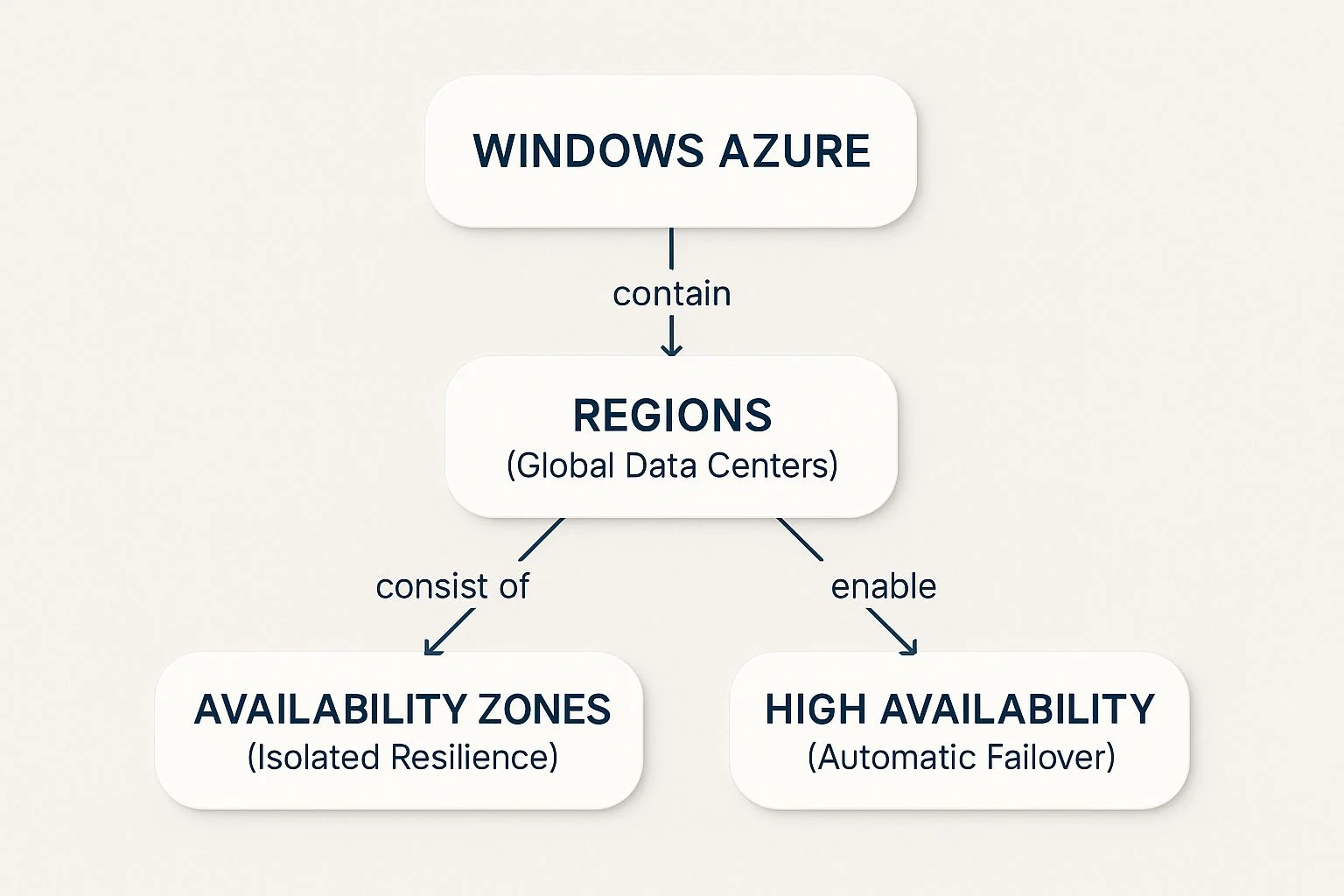
As you can see, the global network of Regions contains separate Availability Zones. It’s this structure that delivers the high availability that keeps your business running, no matter what.
Azure’s Growing Footprint in Australia
Microsoft is constantly pouring money into this infrastructure. In Australia, Azure has expanded its physical presence in a big way, now running at least four major regions: Australia East (New South Wales), Australia Southeast (Victoria), Australia Central (Canberra), and the newly announced Azure Extended Zone in Perth, Western Australia, set to launch by mid-2025.
Each of these regions is backed by multiple availability zones—three in Australia East, three in Australia Southeast, and three in Australia Central—giving local businesses low-latency and highly resilient cloud services right on their doorstep. You can read more about this expansion and what it means for local businesses by exploring Microsoft’s data centre developments.
This local presence means your applications run faster for Australian users, which translates to a better customer experience. For businesses running a mix of on-premise and cloud systems, knowing how Azure connects with your existing setup is key. You can explore our insights on managing servers in our guide to Windows Server solutions.
Choosing the right regional setup is a critical first step that impacts performance, cost, and compliance down the line. Tbourke Solutions specialises in helping businesses navigate these decisions. We’ll help you pick the perfect regional configuration, ensuring your Azure foundation is perfectly aligned with your operational needs and long-term goals.
Exploring Essential Azure Services for Your Business
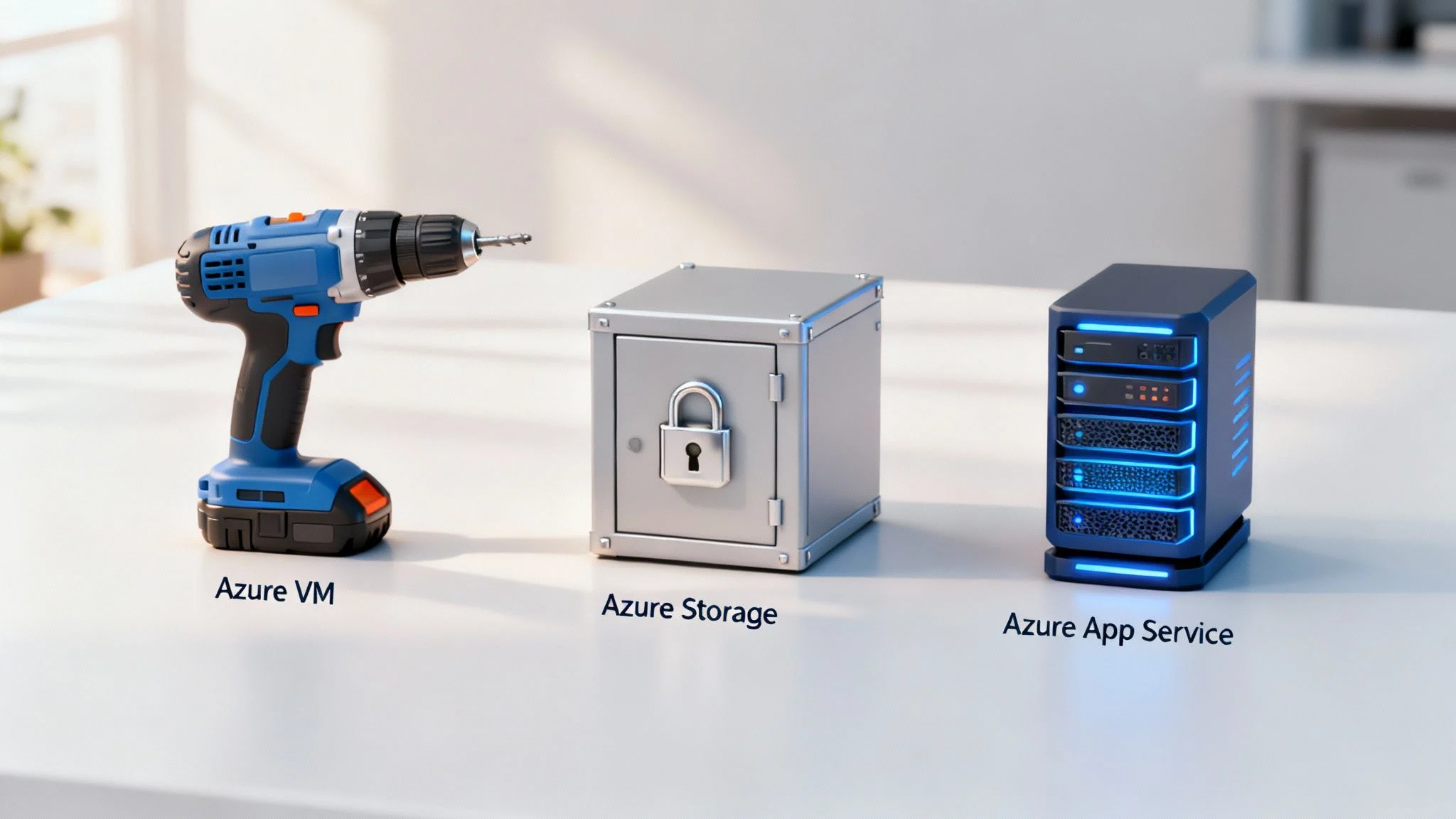
Stepping into the Windows Azure Platform can feel like walking into a massive hardware store with over 200 different tools on the shelves. It’s impressive, but also a bit overwhelming. The good news? You don’t need to know what every single tool does. For most small and medium businesses, a handful of core services will do nearly all of the heavy lifting.
Think of it as building your own digital toolkit. Instead of buying a pre-packaged set with tools you’ll never use, you get to pick the exact ones you need for the jobs you actually have. This approach keeps things simple, effective, and incredibly cost-efficient. At Tbourke Solutions, we act as your expert guide, helping you select the right tools to build a powerful IT foundation that’s both future-proof and budget-friendly.
Your Core Toolkit The Essentials
Let’s focus on three foundational services that solve the most common business challenges. These are the versatile, must-have tools you’ll return to again and again.
- Azure Virtual Machines (VMs): Your Power Drill
This is the workhorse of Azure. A VM is essentially your own server in the cloud. You can run Windows or Linux on it, install your custom software, and have complete control. It’s the ultimate multi-purpose tool, perfect for moving an old physical server into the cloud or running a specific line-of-business application that needs its own dedicated space. - Azure Storage: Your Secure Warehouse
Every business needs somewhere to keep its data. Azure Storage is like a secure, infinitely expandable digital warehouse. It can hold everything from simple documents and images to massive databases and backups. It’s incredibly durable and you only pay for the space you use, whether that’s a few gigabytes or hundreds of terabytes. - Azure App Service: Your Specialised Tool
If your business runs a website or a web-based application, this is for you. App Service is a specialised tool designed to do one job perfectly: host, run, and scale web apps without you ever having to worry about the underlying server infrastructure. It handles all the patching, security, and maintenance, so you can just focus on your application.
Understanding the Bigger Picture
While these services are powerful on their own, their real strength comes from how they work together within the broader Microsoft ecosystem. For instance, you can use Azure to host a server that authenticates users for your Microsoft 365 apps.
Similarly, other services like Azure Active Directory (now Microsoft Entra ID) manage user identities and access, ensuring only the right people can access your data. This is crucial for securing your cloud environment, especially when managing multiple devices. To learn more about how device management fits in, you can explore our guide on how Microsoft Intune simplifies security.
Below is a simple breakdown of how these services solve everyday business problems for Australian SMBs.
Core Azure Services for Australian SMBs
| Azure Service | Primary Function | Solves This Business Problem |
|---|---|---|
| Azure Virtual Machines | Provides on-demand, scalable computing power (virtual servers). | Replacing ageing on-premise servers without buying new hardware; running legacy software. |
| Azure Storage | Offers secure, scalable, and redundant cloud storage for data. | Creating reliable offsite backups for disaster recovery; storing business files accessibly. |
| Azure App Service | A fully managed platform for building, deploying, and scaling web apps. | Hosting a company website or e-commerce store that can handle traffic spikes without crashing. |
| Microsoft Entra ID | Manages user identities and controls access to apps and resources. | Securing access to business data and applications with a single, secure sign-on. |
| Azure SQL Database | A managed, intelligent SQL database service in the cloud. | Running business applications that rely on a database without the hassle of managing it. |
By starting with these essentials, you build a solid foundation. As your business grows and your needs change, you can easily add more specialised tools from the Azure catalogue. This modular approach is the key to creating a flexible and powerful IT system that grows with you.
What Are the Real-World Benefits of Adopting Azure?
Moving to the Windows Azure Platform isn’t just a technical tweak; it’s a strategic shift that delivers clear, tangible advantages for your business. The first thing most businesses notice is a dramatic improvement in cost efficiency. This comes from Azure’s pay-as-you-go model, which completely removes the need for huge upfront investments in physical servers.
This model fundamentally changes how you budget for IT. Instead of tying up capital in hardware that might sit idle most of the time, you only pay for the computing power you actually use, often down to the second. This frees up cash that would otherwise be spent on maintenance, allowing you to invest in growing your business instead. At Tbourke Solutions, we help you build a solid business case, clearly showing this return on investment and aligning your Azure adoption with your long-term goals.
Unmatched Scalability for Business Agility
Beyond the immediate cost savings, Azure delivers incredible scalability. Imagine you’re an online retailer heading into the busy Christmas season. With a traditional on-premise setup, you’d need to buy, install, and configure extra servers just to handle the temporary surge in traffic—a costly and slow process.
With Azure, you can instantly scale up your resources with just a few clicks to meet the demand. Then, once the rush is over in January, you can scale back down just as easily. This ensures you never pay for capacity you don’t need, giving your business a powerful competitive edge.
The real power of the Windows Azure Platform lies in its ability to match your IT infrastructure perfectly to your business rhythm. It grows when you grow and shrinks when you need it to, ensuring optimal performance without wasted expenditure.
This elasticity isn’t just for seasonal peaks. It applies to any business need, from launching a new product to running a short-term data analysis project or handling unexpected growth.
Robust Security and Compliance
For Australian businesses, security and compliance are non-negotiable. Azure is built with security at its core, backed by a multi-billion dollar annual investment from Microsoft in cybersecurity research and development. The platform adheres to a vast array of international and industry-specific compliance certifications, including those critical for operating right here in Australia.
This means you can operate with confidence, knowing your data is protected by enterprise-grade security measures that would be prohibitively expensive to implement on your own. It’s a foundational layer of trust that supports your entire operation.
Optimising Your Cloud Spend
As more businesses move to the cloud, managing costs effectively becomes a key focus. Recent industry analysis shows that Australian organisations are increasingly prioritising the optimisation of their Azure budgets. Leading enterprises are actively implementing best practices to manage their cloud spend and uncover hidden savings. You can explore more about these trends in the latest Azure Benchmark Report.
This is precisely where Tbourke Solutions comes in. We don’t just help you move to the cloud; we make sure your environment is configured for maximum cost efficiency from day one. We analyse your usage patterns and implement strategies to eliminate waste, guaranteeing you get the most value from every dollar you invest in the Windows Azure Platform.
How Azure Works in Real Business Scenarios

Theory is one thing, but seeing how the Windows Azure Platform solves real-world problems is where it all clicks. So, let’s look at a couple of practical situations Aussie businesses face every day, showing how specific Azure services deliver tangible results.
Think of an e-commerce site that can’t afford to crash during a sale, or a firm that needs to make remote work genuinely secure and productive. These are the exact kinds of challenges where Azure provides the tools to succeed. At Tbourke Solutions, we’ve guided countless businesses through these scenarios, turning cloud potential into business reality.
These examples cut through the technical jargon and focus on the problems you’re likely trying to solve right now.
Scenario 1: The Local Retailer Needing Stability
Imagine a Melbourne-based online retailer gearing up for the Boxing Day sales. Last year was a disaster. Their website, hosted on a single physical server, crashed under the traffic surge, leading to lost sales and very unhappy customers.
The Problem: The old setup couldn’t handle peak demand, putting their most important sales day of the year at serious risk.
The Azure Solution:
The retailer decides to move its e-commerce site to Azure App Service, which is built specifically for hosting web applications and can scale automatically when traffic spikes.
- Azure App Service: This handles the website hosting, smoothly adding more computing power as visitor numbers climb. No more manual interventions.
- Azure SQL Database: Their product catalogue and customer orders are shifted to a managed database that can handle thousands of transactions per second without breaking a sweat.
- Azure Content Delivery Network (CDN): Website images and key files are stored closer to customers across Australia, making the site load noticeably faster for everyone.
The Measurable Outcome:
On Boxing Day, the website experiences zero downtime. It handles 500% more traffic than the previous year, resulting in a 40% jump in sales. Best of all, once the sale is over, the resources automatically scale back down, so the retailer only paid for the extra horsepower when they actually needed it.
Scenario 2: The Professional Services Firm Enabling Remote Work
Now let’s picture a Sydney-based accounting firm with 50 employees. The team needs secure access to client files and specialised software whether they’re at home, a client’s office, or in the city. Their old on-site server made remote access slow, clunky, and a real security headache.
The Problem: The firm needed a secure, reliable way to support a hybrid work model without compromising performance or data protection.
This is a common challenge for modern businesses. The solution isn’t just about remote access; it’s about building a secure and productive digital workspace that functions seamlessly, regardless of location.
The Azure Solution:
The firm rolls out Azure Virtual Desktop, giving every employee a secure and consistent desktop experience on any device they use.
- Azure Virtual Desktop (AVD): Staff log into a familiar Windows desktop environment hosted in Azure, with all their applications and files ready to go.
- Microsoft Entra ID: This service manages who can log in, enforcing multi-factor authentication to ensure only authorised employees get access.
- Azure Files: All company and client documents are moved to a centralised, secure cloud file share, accessible only through the virtual desktops.
The Measurable Outcome:
Employee productivity increases by 20% because access to their work environment is finally fast and reliable. The firm also easily meets its data compliance obligations by keeping all client data within Australian Azure data centres. This modern setup also opens doors to new tools; for instance, many firms are now exploring how Microsoft Copilot can automate tasks inside this secure environment.
As you can see, the Windows Azure Platform isn’t just a collection of abstract technologies. It provides specific tools for specific business challenges. Tbourke Solutions can help you identify the right services and build a practical roadmap for your own journey.
How We Make Your Azure Journey Simple
Getting started with the Windows Azure Platform can feel like a massive project, but you don’t have to go it alone. Think of Tbourke Solutions as your local expert guide, here to simplify every step as you move to the cloud. We kick things off with a straightforward chat—a strategic consultation to properly understand your business and what you want to achieve. This ensures every technical decision we make is directly tied to a real-world goal.
From there, our certified Azure specialists get to work. We design a custom migration and implementation plan built to cause as little disruption as possible while delivering maximum value. We handle all the tricky technical bits—the setup, configuration, and security—making sure your new cloud environment is perfectly tuned for performance and cost right from day one.
From Strategy to Support
Our approach is all about taking the guesswork out of moving to the cloud. We’ve built a clear, structured process designed to deliver predictable results and give you peace of mind. We manage the entire lifecycle, ensuring the whole transition is smooth.
Here’s our simple breakdown:
- Strategic Planning: First, we analyse your current IT setup and business needs to map out a clear path forward.
- Custom Design: We then architect an Azure solution specifically for your operations, choosing the right services to hit your targets.
- Seamless Migration: Our team executes the migration with precision, moving your data and applications securely and efficiently.
- Ongoing Management: After you’re up and running, we provide continuous monitoring, management, and support to keep your systems in top shape.
Our goal is to turn the Windows Azure Platform from a complex piece of technology into a powerful business asset that actively fuels your growth. We look after the tech, so you can focus on what you do best.
A Partner Invested in Your Success
We also make sure you get the full benefit of Microsoft’s ever-expanding infrastructure. As of 2025, Microsoft Azure’s global network includes 79 regions, with a strong local presence in Sydney, Melbourne, Canberra, and soon, Perth. Having this infrastructure right here means your data stays in Australia, giving you faster performance and better reliability. You can see the sheer scale of this investment by exploring the details of Microsoft’s growing data centre network.
Ultimately, we’re more than just a service provider; we’re your dedicated IT partner. From the initial plan to long-term support, our team is here to help. Discover more about our dedicated cloud and Azure services and let us make your move to the cloud a simple and successful one.
Common Questions About the Windows Azure Platform
Deciding to move to a cloud platform like Windows Azure always brings up a few practical questions. How secure is it? What will it really cost? Does it even work with the software we already use? Getting straight answers is the only way to move forward with confidence.
At Tbourke Solutions, we help businesses get clarity on these points every day. Think of this as a quick Q&A to cover the most common questions we hear from Australian businesses looking at Azure.
Is the Windows Azure Platform Secure for My Business Data?
Yes, absolutely. Security isn’t an afterthought with Azure; it’s built into its very core. Microsoft invests billions each year into cybersecurity, and the platform is designed from the ground up to meet a huge range of international and industry-specific compliance standards—including those critical for Australian businesses governed by APRA and the Privacy Act.
Features like Microsoft Defender for Cloud provide multiple layers of threat protection, acting as a powerful shield against online attacks. Our job at Tbourke Solutions is to make sure these tools are configured correctly for your business, matching your security setup to your specific needs and risk profile.
How Does Azure Pricing Work and Can It Save Me Money?
Azure mostly runs on a ‘pay-as-you-go’ model. In simple terms, you only pay for the computing resources you actually use, when you use them. This is a huge shift from the old way of buying and maintaining physical servers, and it often leads to significant savings by avoiding massive upfront capital costs.
The real win here is the transparency and control. You can forecast, manage, and fine-tune your IT spending without being locked into expensive hardware that quickly becomes outdated.
Tools like the Azure Pricing Calculator and Azure Cost Management give you a clear view of your budget. We specialise in cost optimisation, analysing your usage to make sure you’re only paying for what you need and getting the best possible return on your cloud investment. For more detailed answers, feel free to explore our comprehensive FAQ page.
What Is the Difference Between Azure and Microsoft 365?
This is a great question, and one we get all the time.
The easiest way to think about it is this: Microsoft 365 gives you ready-to-use software applications like Outlook, Word, and Teams. This is often called Software as a Service (SaaS) because the software is provided to you as a complete package.
In contrast, the Windows Azure Platform provides the raw building blocks—things like virtual servers, storage, and databases—that let you build and run your own custom applications and services. This is known as Infrastructure as a Service (IaaS) and Platform as a Service (PaaS). While they’re different, they’re designed to work together, and we make sure they do so seamlessly to support your business.
Ready to see how the Windows Azure Platform can be tailored to fit your business? Contact Tbourke Solutions today for a clear, no-obligation consultation. Let us help you build a secure, efficient, and scalable cloud foundation. http://tbourke-solutions.com.au/
Share This Story, Choose Your Platform!