

Microsoft Copilot is an AI-powered smart assistant integrated directly into the Microsoft 365 apps you use daily—like Word, Excel, Teams, and Outlook—to help you draft documents, analyse data, summarise meetings, and manage your inbox with simple text commands. It’s designed to significantly boost your team’s productivity by automating routine tasks. Tbourke Solutions provides expert guidance to help your business seamlessly integrate Microsoft Copilot, ensuring you get it up and running correctly to maximise your return on investment.
Unlocking Productivity With Your AI Assistant

Imagine having an assistant who can draft a project proposal in Word, analyse the latest sales figures in Excel, and summarise your last Teams meeting—all in a few seconds. That’s the reality of what Copilot brings to the table. You don’t need to learn a whole new application; it works right alongside you in the familiar Microsoft 365 environment.
What makes it so clever? Copilot combines powerful AI language models with your own business data. It securely accesses your emails, files, and meeting notes to give you context-aware help that’s actually relevant. This deep integration is what really separates it from the generic AI chatbots you see online.
The Real-World Impact on Australian Businesses
For Australian businesses, this is a major shift. Instead of getting bogged down in administrative busywork, your team can focus on the things that actually drive growth—like building client relationships or innovating. It’s more than just a tool for efficiency; it’s about unlocking the true potential of your staff.
We’re already seeing the results right here in Australia. Data#3, Microsoft’s biggest Copilot partner locally, found that successful adoption is more about changing how people work than tackling a technical challenge. In their early access program, a massive 90% of staff felt more productive after getting Copilot, a figure that even topped Microsoft’s global results.
This move to AI-assisted work is becoming essential in a competitive market. It gives small and medium-sized businesses the kind of agility and insight that was once only available to large corporations. We provide expert guidance on a range of IT solutions for small business to make this transition as seamless as possible.
How Copilot Transforms Daily Workflows
The practical applications are immediate. Here’s a quick rundown of what Copilot can help your team with right away.
To give you a clearer picture, this table breaks down exactly how Copilot works within your favourite M365 apps and the tangible benefits it delivers.
Copilot Features and Their Business Impact
| Application | Core Copilot Feature | Primary Business Benefit |
|---|---|---|
| Word | Drafts documents, proposals, or summaries from a prompt. | Drastically cuts down on writing time for first drafts. |
| Excel | Analyses data and creates charts using natural language. | Makes data insights accessible to everyone, not just Excel gurus. |
| Teams | Summarises meetings, lists action items, and answers questions. | Ensures everyone is on the same page, even if they missed a call. |
| Outlook | Drafts email replies and summarises long threads. | Helps you get to “inbox zero” faster and manage communications. |
| PowerPoint | Creates entire presentations from a simple outline. | Speeds up the creation of client-facing and internal presentations. |
As you can see, the goal isn’t just to automate tasks but to fundamentally improve how work gets done across every part of your business.
By taking care of the routine work, Microsoft Copilot frees up your team’s time to focus on the creative, strategic thinking that actually moves the needle. It’s all about working smarter, not just harder.
How Copilot Securely Accesses Your Business Data
When you ask Microsoft Copilot to whip up a proposal, it’s not just scraping information from the public internet. It’s securely tapping into your company’s own knowledge base to give you a response that’s actually relevant and useful. This is what separates Copilot from a generic AI and makes it a genuine business tool. At Tbourke Solutions, we help businesses implement Copilot correctly so they can use it confidently, knowing their sensitive information is locked down.
The whole thing is designed with security at its very core. When you type a prompt into an app like Word or Teams, your request doesn’t get fired off to some public AI model. First, it stays within your secure Microsoft 365 environment while Copilot figures out the context.
This is where the Microsoft Graph plays a key role. Think of the Graph as your organisation’s private data map—it connects your emails, files, meetings, and chats. Copilot uses this map to find the specific details it needs to ground your prompt in reality. It might pull key figures from a recent sales report or grab action items from your last team meeting, for example.
A Secure Three-Step Process
This entire interaction happens inside a strict, secure workflow that keeps your data protected from start to finish. It’s a closed-loop system that respects all your existing security settings and permissions.
This infographic gives a simple view of how your request is handled securely inside the Microsoft 365 ecosystem.
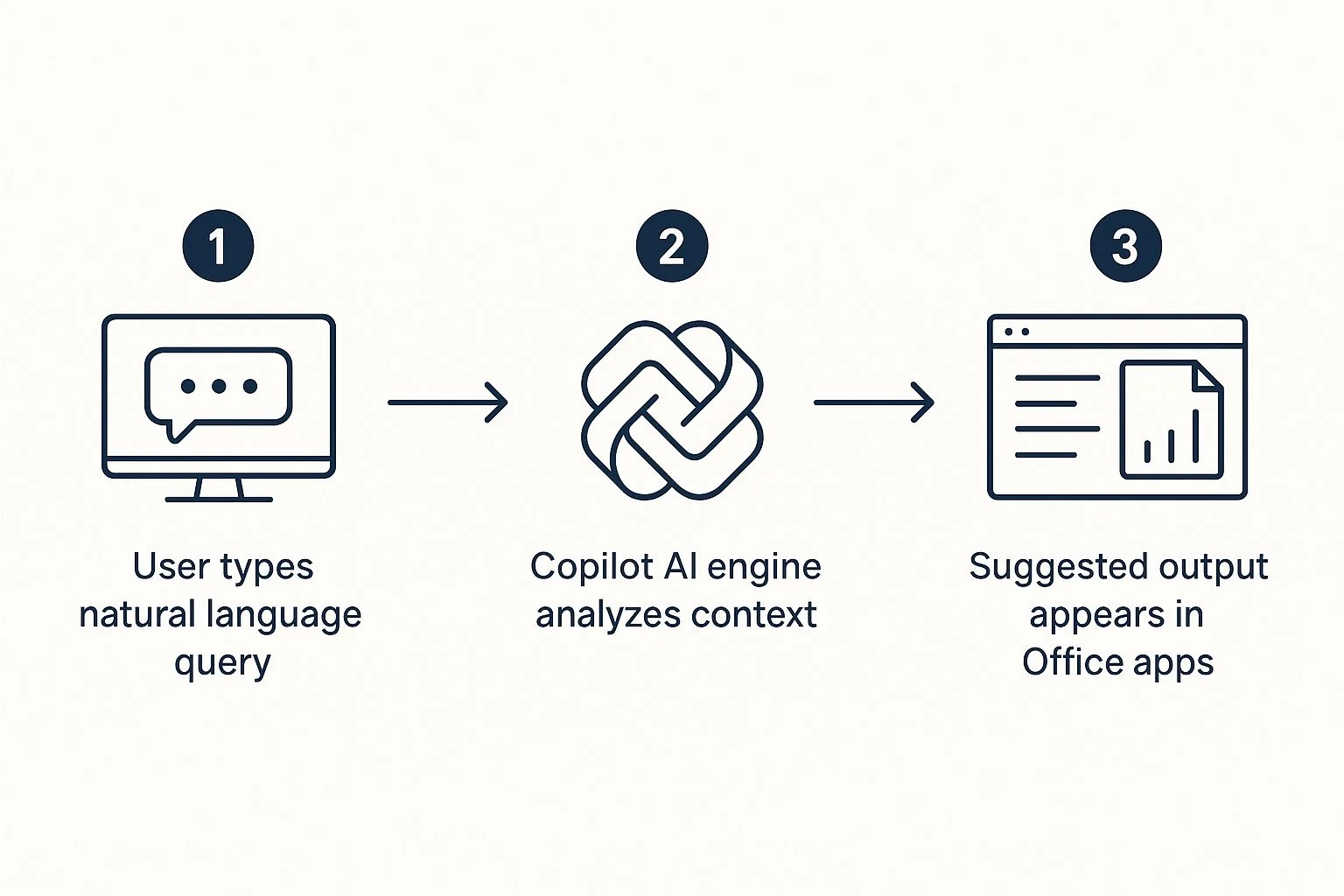
The main takeaway here is that the AI engine acts as a processor inside your secure bubble, not as an external tool that your data gets sent out to.
Here’s how it works:
- Pre-processing: Your prompt is first refined within your own Microsoft 365 tenant. This is where Copilot adds relevant business context it finds via the Microsoft Graph.
- LLM Interaction: This enriched—but still anonymised—prompt is then sent to a powerful Large Language Model (LLM). Crucially, your company data is never used to train the model.
- Post-processing: The AI-generated response comes back through the Microsoft Graph for one last round of security, compliance, and privacy checks before it ever appears in your app.
Your Data Stays Your Data
This multi-layered approach makes sure your business information never leaves the safety of your Microsoft 365 tenant. The system automatically inherits all your existing security policies, which means Copilot can only access data a user already has permission to see.
The most important principle here is tenant isolation. Microsoft Copilot will never mix your data with another organisation’s or use your information to improve the service for other customers.
This is a fundamental difference between an enterprise-grade tool and the public AI services out there. For any business wanting to keep tight control over its information, understanding these security boundaries is non-negotiable. It’s the same logic that applies to good IT practices like network segmentation, where you create barriers to protect sensitive areas. With Copilot, you get all the power of advanced AI without having to lower your security standards.
Putting Copilot to Work Across Microsoft 365
The real magic of Microsoft Copilot isn’t that it’s another app to learn; it’s how it weaves itself directly into the Microsoft 365 tools your team uses every single day. Think of it as a productivity booster that works inside your existing routines, helping you handle communications, create content, and understand data far more efficiently. At Tbourke Solutions, we help businesses tap into these integrations to unlock some serious time savings and empower their teams.
Because Copilot is already inside your workflow, it understands the context of what you’re doing, whether you’re in a team meeting or trying to draft an important email. It’s designed to cut out the tedious, manual steps that slow projects down, freeing up your staff to focus on the high-value work that actually matters.
Revolutionising Communication in Teams and Outlook
In Microsoft Teams, Copilot becomes your dedicated meeting assistant. It can give you a real-time summary of a discussion, making sure no key decisions get missed, and then generate a list of action items with names assigned to them. This is a game-changer for keeping projects moving and making sure everyone is on the same page. You can find more tips on getting the most out of your collaboration tools in our guide to Microsoft Teams.
It works just as well in Outlook, helping you finally get on top of your inbox. Copilot can take a long, tangled email thread and boil it down to a few concise bullet points, saving you precious time. Need to draft a reply? Just give it a simple prompt, and Copilot will write a professional response that you can tweak to fit your own voice.
Accelerating Content Creation and Data Analysis
When it comes to creating content, Copilot is seriously impressive. In Word, you can give it a simple instruction and watch as it builds out a complete first draft of a report, proposal, or blog post. It can even rewrite sections you’ve already written to make them more formal, casual, or punchy.
The screenshot below shows Copilot in action inside Word, taking a user’s prompt and turning it into a structured document almost instantly.

This shows how Copilot does the heavy lifting, giving your team a solid starting point to refine and build upon.
Over in Excel, it makes data analysis something anyone can do, not just the spreadsheet gurus. You can ask Copilot in plain English to analyse your data, spot trends, create charts, or even suggest the right formulas. This capability helps you pull out insights that can lead to smarter business decisions.
By transforming your instructions into tangible outputs across the M365 suite, Microsoft Copilot effectively removes the friction between an idea and its execution, dramatically speeding up workflows.
Finally, in PowerPoint, Copilot can take a Word document or a simple outline and turn it into a complete, professional-looking presentation, complete with speaker notes. A task that once took hours of fiddling with slides can now be done in minutes. Each of these features is designed to give your team back their most valuable resource: time.
Real-World Examples That Boost Productivity
The true test of any business tool isn’t just what it can do, but how it directly impacts day-to-day work. This is where Microsoft Copilot really proves its worth. It slots right into your team’s workflow, turning boring, routine tasks into massive time-savers. At Tbourke Solutions, we specialise in helping businesses identify these high-impact uses, ensuring they get genuine value from their AI investment.
Imagine a sales team finishing a client call in Microsoft Teams. Normally, they’d spend the next hour writing up notes and crafting a follow-up. Instead, they can just ask Copilot to summarise the key points and action items from the call. With that summary ready, they can then tell Copilot in Outlook to draft a personalised follow-up email. A process that used to take ages is now done in minutes. This is just one small way Copilot claws back valuable hours every single week.
How Different Departments Can Use It
The benefits aren’t just for one team; they stretch right across the business, from marketing to management. Every department can find smart ways to use Copilot for its own unique challenges.
A marketing team can use Copilot as a creative partner. It can brainstorm campaign slogans, whip up a first draft of a blog post in Word from a simple brief, or even build out a whole launch presentation in PowerPoint. This frees the team up to focus on the bigger picture and fine-tuning the content, rather than staring at a blank page.
Meanwhile, a manager can use Copilot in Excel to make sense of complex data without needing to be a spreadsheet guru. They could ask Copilot to analyse recent sales figures and point out any interesting trends, getting instant insights. They could also use it for a quick progress check by asking it to summarise project updates from a bunch of different documents and emails. To get the most out of these features, it’s vital your team is on a modern operating system; you can learn more about the benefits in our guide to Windows 11.
Microsoft Copilot becomes an embedded partner in your daily work, automating the mundane and accelerating the critical. It allows your team to shift its focus from doing the work to improving the work.
Proof That It Actually Works
These aren’t just hypotheticals; the results are showing up in the real world. A great Australian example is the consulting firm Protiviti Australia. By actively managing their Microsoft Copilot rollout and keeping an eye on how it was being used, they achieved an incredible 82% adoption rate across their staff.
This wasn’t just a novelty, either. The high adoption led directly to a 161% increase in actions generated by Copilot, which shows that people were truly integrating it into their daily work. Their success proves that a smart, supportive rollout focused on helping users can turn AI from a curiosity into a real productivity engine. You can discover more about their business-centric adoption strategy and how it drove this evolution.
How to Get Copilot Working for Your Business
Rolling out Microsoft Copilot isn’t like installing a new piece of software; it’s a strategic decision that needs a proper plan. For Australian businesses, a successful launch goes way beyond just handing out licences. At Tbourke Solutions, we specialise in helping organisations get this right, from technical readiness assessments to user adoption strategies, ensuring the AI assistant is a valuable asset that boosts productivity from day one.
The journey begins by getting your technical house in order. A successful Copilot implementation relies on a solid foundation of well-managed data and strong security. Before you even start thinking about training, you need to be sure your data governance and permissions are correctly set up in your Microsoft 365 environment.
Getting this right first prevents headaches later, ensuring Copilot only sees the information it’s supposed to. Our process kicks off with a readiness assessment to see how your current setup looks and what, if anything, needs tweaking.
Building a Strategy for User Adoption
Once the technical groundwork is solid, the focus shifts to your most important asset: your people. Simply giving your team access to a new tool and hoping for the best is a recipe for failure. You need a clear plan for change management and user adoption.
This means more than just a quick “how-to” session. The best approach is to develop targeted training that shows people how to use Copilot in their specific roles. For example, showing a sales team how it can summarise a client call in Teams is far more powerful than a generic tour of its features. This is how you build genuine excitement and get people using it in their daily work straight away.
Why Targeted Training is So Critical
You can’t overstate the importance of good training. A six-month trial by the Australian Government proved this point perfectly. The trial found that 75% of participants who received three or more types of training felt confident using Copilot. This was a massive 28 percentage points higher than those who got limited training.

The findings were clear: while 86% of people wanted to keep using the AI tool, its success was directly tied to the quality of the onboarding. Users quickly got the hang of summarising and rewriting tasks in Teams and Word but struggled with more complex functions where their training was lacking. You can read more about the Australian Government trial on CX Today.
To get real value from your Microsoft Copilot investment, you have to invest in your team’s ability to use it properly. Customised training bridges the gap between having a powerful tool and knowing how to solve specific business problems with it.
A smooth rollout also depends on having a well-managed IT environment, where every device is properly configured and secure. You can learn more about how we help with our guide on managing devices with Microsoft Intune.
Finally, you need to know if your investment is actually paying off. We help businesses set up clear Key Performance Indicators (KPIs) to track productivity gains, time saved on routine tasks, and the overall return on investment. With Tbourke Solutions as your partner, you get the expertise needed to turn Copilot into a genuine competitive advantage.
Your Top Questions About Microsoft Copilot, Answered
Jumping into a new technology like Microsoft Copilot always brings up a few questions, especially when you’re trying to figure out the real-world value for your business. Getting straight answers is the only way to make a smart decision. At Tbourke Solutions, we spend our days helping clients get to grips with Copilot, from the initial setup to making it a core part of their daily workflow.
We’ve put together the most common questions we hear from Australian businesses just like yours. This section cuts through the noise to cover data security, product versions, and the practical side of getting your team up and running.
Is My Business Data Safe When Using Microsoft Copilot?
Yes, absolutely. Microsoft Copilot for Microsoft 365 is built on the same enterprise-grade security, compliance, and privacy foundations that underpin the entire Microsoft 365 ecosystem.
Crucially, it operates exclusively inside your organisation’s secure Microsoft 365 environment (your “tenant”). This means your data, the prompts you type, and the answers it generates are never used to train the public AI models. Copilot simply inherits the security and privacy policies you already have in place, so data access is always governed by your existing user permissions.
What Is The Difference Between Copilot and Copilot for Microsoft 365?
This is a big one. The free version of Copilot (what used to be called Bing Chat) is a public AI chatbot. It’s great for general questions and research, pulling its answers mainly from the public internet.
Microsoft Copilot for Microsoft 365, on the other hand, is the premium, business-grade service. It’s deeply woven into the apps you use every day—Outlook, Teams, Word, Excel—and securely connects to your company’s internal data via the Microsoft Graph. This allows it to understand the context of your work, accessing your emails, chats, and documents to give you truly relevant help while keeping everything secure.
Think of it this way: the free Copilot is a public librarian, while Copilot for Microsoft 365 is your confidential, in-house business analyst who already knows your company’s files and projects.
How Much Training Does My Team Need to Use Copilot Effectively?
Copilot is designed to be intuitive, but to really get the most out of it, your team needs to learn how to ask the right questions. The amount of training really depends on your team’s current comfort level with technology.
A trial by the Australian Government offered clear evidence: users who received proper training were significantly more confident and got far better results. That’s why at Tbourke Solutions, we don’t just show you the buttons. We run structured training focused on role-specific tasks and best practices for writing good prompts, ensuring your team starts seeing productivity gains from day one.
Can We Trial Microsoft Copilot Before Committing?
Microsoft doesn’t offer a standard free trial for the full Microsoft Copilot for Microsoft 365 service; it’s typically a one-year subscription commitment.
However, the best way to see if it’s a fit is to run a targeted pilot program. You can roll it out to a small, select group of users or a single department to measure the impact on their productivity. This gives you concrete data and direct feedback, building a solid business case before you commit to a company-wide deployment. Tbourke Solutions can help you design, manage, and measure a pilot that gives you the clarity you need to make the right call for your business.
Ready to see how Microsoft Copilot can reshape your operations? The team at Tbourke Solutions has the expertise to guide your implementation from start to finish—from checking your technical readiness to training your team for success. Contact us today to get started.
Share This Story, Choose Your Platform!

