
If your business is navigating the challenges of hybrid work, struggling with IT security, or looking for a way to provide your team with secure, consistent access to their work from anywhere, a virtual desktop in Azure is the modern solution. This guide explains what Azure Virtual Desktop (AVD) is, how it solves these common problems by moving your desktop environment to the cloud, and why it’s a strategic move for Australian businesses aiming for flexibility and growth.
Why Azure Virtual Desktop Is a Game Changer

The move to flexible work isn’t just a passing trend; it’s a permanent part of how modern business operates. This shift brings big challenges, from securing company data on personal devices to giving everyone the same seamless experience, no matter where they’re logging in from. This is exactly where Azure Virtual Desktop (AVD) comes in.
Unlike traditional Virtual Desktop Infrastructure (VDI), which demanded huge investments in on-premise servers and was a nightmare to manage, AVD is a cloud-native service. It lets you deliver Windows 10 or Windows 11 desktops and applications directly from Azure to any device, anywhere in the world. This approach offers some serious advantages for growing businesses.
The Business Impact of AVD
For Australian organisations, the appeal of desktop virtualisation is growing fast. The market, valued at around USD 278 million, is expected to skyrocket to USD 579.31 million by 2033. This growth makes sense when you realise that 53% of Australian employees now work from home at least part-time, creating an urgent need for flexible and secure IT solutions. You can explore more data on the growing Australian desktop virtualisation market to see the trend for yourself.
AVD fundamentally changes how you think about IT. Instead of managing physical hardware, you’re managing a secure, scalable service that adapts to your business needs. This frees up your IT team to focus on growth initiatives rather than constant firefighting and maintenance.
To put it simply, implementing a virtual desktop in Azure offers a direct path to a more agile and secure way of working. It’s a solution that addresses the core challenges of the modern workplace head-on.
Here’s a quick summary of the key benefits your organisation can expect.
AVD Key Benefits at a Glance
| Benefit | Business Impact |
|---|---|
| Enhanced Security | Centralises data in Azure, reducing the risk of data loss from stolen or compromised employee devices. |
| Scalability & Flexibility | Easily add or remove users as your business grows or seasons change, paying only for what you use. |
| Cost Efficiency | Reduces capital expenditure on expensive on-premise hardware and lowers ongoing IT maintenance costs. |
| Consistent User Experience | Provides every user with the same high-performance desktop, regardless of their location or the device they use. |
| Simplified IT Management | Manages desktops and applications from a single, unified console, freeing up valuable IT resources. |
These benefits translate into a more resilient, productive, and competitive business, ready to thrive in a hybrid work environment.
Tbourke Solutions: Your AVD Partner
Navigating the setup and ongoing management of a virtual desktop in Azure can feel complex, but the rewards are massive. At Tbourke Solutions, we specialise in designing and deploying AVD environments that are secure, cost-effective, and perfectly aligned with your business goals. We handle all the technical heavy lifting so you can focus on what you do best.
Ready to explore how the benefits of Azure cloud for small business can transform your operations? Get in touch via our contact page to start the conversation.
Preparing Your Azure Environment for AVD
A successful Azure Virtual Desktop (AVD) deployment is all about getting the foundations right. Before you can even think about spinning up virtual machines or giving users access to their desktops, the core components in your Azure environment need to be correctly configured.
Skipping these early steps is a common mistake that leads to setup headaches, security gaps, and performance issues down the track. Let’s walk through what you need in place first.
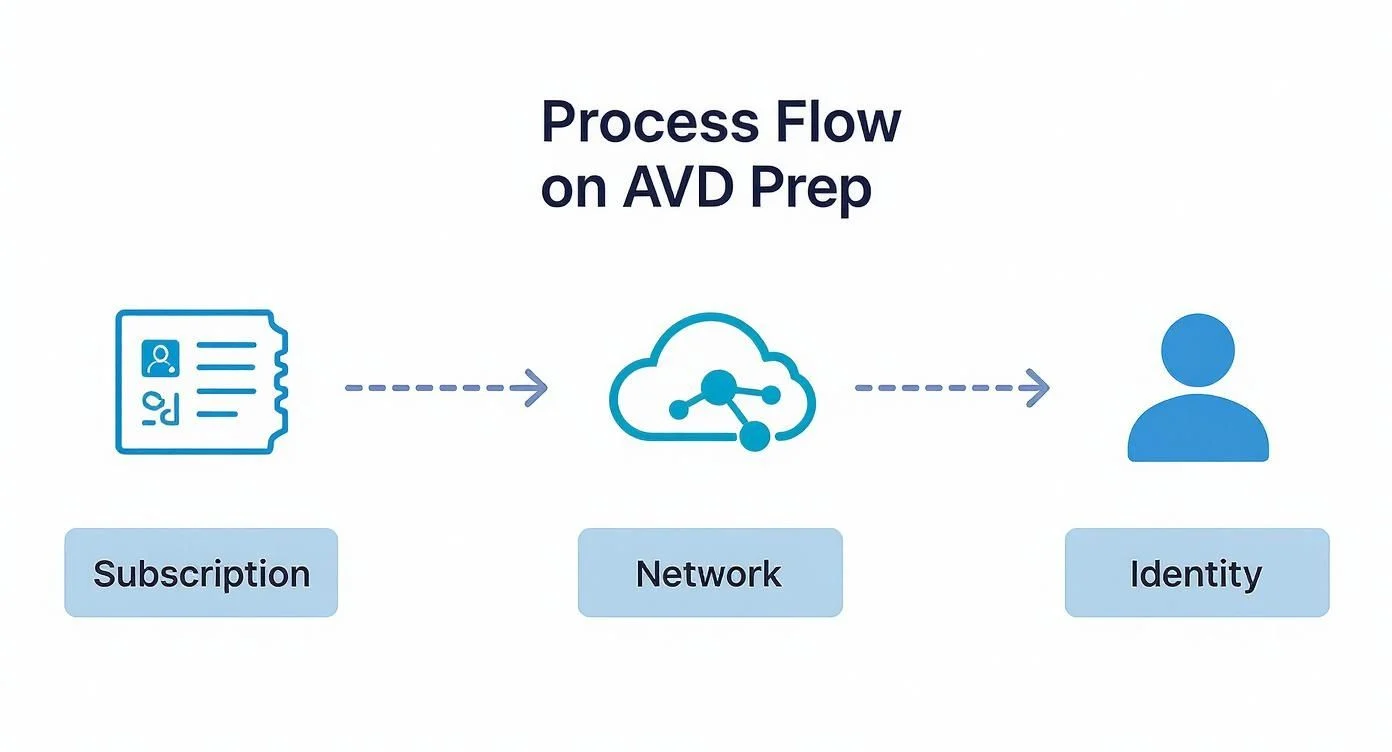
The absolute starting point is an active Azure subscription. You’ll need an account with enough permissions to create and manage resources. Inside that subscription, the first thing you should do is create a dedicated resource group. Think of it as a container for everything AVD-related—your VMs, storage, and networking all live here, which makes management and cost tracking much simpler.
Core Identity and Networking
With your subscription and resource group sorted, it’s time to focus on identity. AVD is built on Microsoft Entra ID (which you might know as Azure Active Directory). You must have an Entra ID tenant set up and running, as this is how AVD authenticates your users and ensures only the right people can access their virtual desktops.
Networking is the other critical piece of the puzzle. You’ll need to set up a Virtual Network (VNet) in Azure. This VNet acts as a private, secure space for your AVD session hosts to communicate with each other. It’s also the component that allows them to connect back to your on-premises network if you’re running a hybrid setup.
Laying this groundwork correctly is non-negotiable. A misconfigured network or identity setup can turn a powerful tool into a frustrating roadblock, creating security vulnerabilities and performance bottlenecks that are difficult to fix later.
Frequently Asked Questions
What licenses do I need for AVD?
AVD access rights are included with many common Microsoft 365 and Windows enterprise licences, such as Microsoft 365 E3/E5 or Windows 10/11 Enterprise E3/E5. Remember, you still pay for the underlying Azure infrastructure that your virtual desktops consume.
Can AVD connect to our on-site servers?
Yes, it can. By setting up a VPN or an ExpressRoute connection between your Azure VNet and your local office network, you can create a hybrid environment. This allows your virtual desktops to securely access on-premises resources like file servers and internal applications, just as if they were in the office.
Let Tbourke Solutions Handle the Setup
Feeling a bit overwhelmed by the prerequisites? This is where we come in. Tbourke Solutions can manage your entire Azure environment preparation from start to finish.
We’ll make sure your subscription, networking, and identity services are perfectly configured for a secure and efficient AVD deployment. We often integrate this setup with management tools like those detailed in our guide to Microsoft Windows Intune.
Ready to build a solid foundation for your virtual desktops? Reach out to us through our contact page to discuss your needs.
Building Your First AVD Host Pool
Think of the host pool as the engine room for your entire virtual desktop in Azure setup. It’s the collection of virtual machines your team will actually connect to, and getting this foundation right is crucial. This is where the big decisions on performance, user experience, and—most importantly—cost are made.
The first choice you’ll face is the host pool type: pooled or personal. A pooled setup is brilliant for cost-efficiency, as users share a common pool of VMs. It’s a perfect fit for task-based roles like call centres or data entry teams where nobody needs a personalised machine. On the flip side, a personal host pool gives each user their own dedicated VM, which is ideal for developers, designers, or executives who need persistent settings or administrator rights.
Key Configuration Choices
Once you’ve settled on the type, it’s time to configure the virtual machines themselves. This means picking the right VM size for your workload—a classic spot where businesses either overspend on horsepower they don’t need or under-provision and frustrate their users. You can also specify a custom image, which lets you deploy VMs with all your essential business applications pre-installed. This is a game-changer for ensuring a consistent, ready-to-go experience from day one.
The screen below from the Azure portal is where you’ll lock in these initial settings.
This is your command centre for the host pool’s core properties, including its location and whether it’s a validation environment for testing.
Making smart choices here really matters, especially with the rapid uptake of Azure in Australia. Analysts are tipping Azure’s growth to hit 33% to 34% in late fiscal 2025, fuelled by strong investment from businesses of all sizes. A well-configured AVD setup ensures you’re part of that efficient cloud shift. You can read more about Australia’s accelerating cloud adoption and what it means for local IT.
How Tbourke Solutions Can Help
Designing the perfect host pool isn’t just about clicking buttons; it requires careful planning. At Tbourke Solutions, we specialise in creating AVD environments optimised for your specific needs, making sure you get the best performance without the unnecessary costs. Our deep expertise in Azure cloud services means we can build a solution that aligns directly with what your business is trying to achieve.
Let us help you make the right calls from the start. Get in touch with our team via our contact page to discuss how we can build a high-performing and cost-effective virtual desktop solution for your business.
Connecting Users to Desktops and Apps
So, you’ve built your host pool. What’s next? The crucial part is actually getting your team connected to the virtual desktop in Azure. This happens through something called application groups, which essentially act as the bridge between your users and the resources you’ve prepared for them.
The real power here is in the flexibility. You can set up different groups to give some users a full desktop experience, while others might only get access to a single, specific app.
Imagine your finance team getting a complete desktop loaded with all their accounting software. At the same time, your sales crew might only need access to the company’s CRM app and nothing else. This kind of granular control means everyone gets exactly what they need to do their job, without unnecessary clutter or security headaches.
Assigning Users and Securing Access
With your application groups defined, the next step is assigning your users to them, pulling directly from Microsoft Entra ID. It’s a straightforward process, but getting it right is vital for keeping everything secure and organised. Proper user assignments stop unauthorised access in its tracks and make it much easier to bring new employees on board or adjust permissions when roles change.
Security should be front and centre at this stage. Just assigning a user isn’t enough—you absolutely must enforce strong authentication methods to protect your company’s data.
One of the best ways to bolster security is by turning on multi-factor authentication. If you’re not sure about its importance, our guide on what two-factor authentication is breaks it down. Adding this extra layer of verification makes it significantly harder for the wrong people to get in.
The payoff for a well-managed AVD setup is huge. We’ve seen studies showing AVD can boost productivity by up to 22 person-hours per user annually. One Australian nonprofit even saw a 60% reduction in cloud costs. You can find more insights into the Azure Virtual Desktop benefits that make it such a popular choice for remote work.
Tbourke Solutions Can Help
Need a hand with configuring application groups or locking down your AVD environment? At Tbourke Solutions, we handle the entire user connection process. We make sure the right people get the right access, securely and without fuss.
Ready to get started? Reach out via our contact page, and let’s get your AVD environment working for you.
Optimising Your AVD for Cost and Performance

Getting your virtual desktop in Azure up and running is a great start, but the real win comes from continuous optimisation. By actively managing your AVD environment, you can cut costs significantly while making sure your team has the performance they need to get their work done. This isn’t a “set and forget” platform; it’s a dynamic solution that rewards smart management.
A critical tool for this is FSLogix, which smartly separates user profiles from the virtual machine itself. This clever bit of tech gives users a consistent, personalised experience every time they log in, no matter which VM they connect to in a shared host pool. The result? Dramatically faster login times and snappier application performance.
Another powerful technique is setting up scaling plans. Think of these as automated rules that power on virtual machines at the start of the business day and, more importantly, shut them down when they aren’t needed—like overnight or on weekends. This simple action can slash your compute costs by over 40% by stopping you from paying for idle resources.
Keeping a Watchful Eye
You can’t optimise what you can’t measure. This is where Azure Monitor comes in—it’s your go-to service for keeping tabs on your AVD environment. It gives you detailed insights into session host performance, user connection latency, and application responsiveness.
By setting up alerts in Azure Monitor, you can proactively spot and troubleshoot potential issues before they slow your team down. This shifts your IT approach from reactive to proactive, saving everyone time and frustration.
Frequently Asked Questions
How does auto-scaling actually work?
Auto-scaling uses schedules and performance thresholds you define. You can set it to add more VMs during peak hours (scaling out) and remove them during quiet periods (scaling in), making sure you only pay for what your team is actively using.
Is FSLogix complicated to set up?
It does require careful configuration of a file share and some group policies, but the benefits are massive. We consider it a foundational piece for any modern, non-persistent AVD environment.
Expert Help from Tbourke Solutions
Optimising an AVD environment is where expertise really counts. Tbourke Solutions specialises in fine-tuning Azure Virtual Desktop deployments for peak performance and cost-efficiency. We can implement smart scaling plans, configure FSLogix correctly, and set up monitoring to ensure your investment is delivering maximum value.
To chat about how we can help, please get in touch via our contact page.
Common Questions About Virtual Desktops in Azure
When businesses consider moving their desktops to the cloud, a few key questions always come up. Here are straightforward answers to the most common queries we hear.
What is the main difference between AVD and traditional VDI?
The biggest difference is management. With traditional Virtual Desktop Infrastructure (VDI), your IT team is responsible for managing everything—the physical servers, storage, networking, and the complex software layer. With Azure Virtual Desktop, Microsoft manages all of that backend infrastructure for you as part of the service. This frees your team from constant hardware maintenance and allows them to focus on delivering a great user experience.
How does the pricing work for AVD?
AVD pricing is broken into two parts. First, the right to access the service is often included in your existing Microsoft 365 or Windows enterprise licences, so you may not need to pay an extra per-user fee. Second, you pay for the Azure infrastructure your virtual desktops run on—the virtual machines, storage, and networking. This is a consumption-based model, meaning you only pay for what you use, and you can use tools like scaling plans to control costs.
Can we run our existing business applications?
Yes, absolutely. AVD is highly compatible with nearly all Windows-based applications, including legacy or custom software that is critical to your operations. You can deliver these applications as part of a full virtual desktop or publish them individually as RemoteApps, where they look and feel like they are running locally on the user’s device, even though they are securely hosted in Azure.
How Tbourke Solutions Can Help You Succeed with AVD
Deploying a virtual desktop in Azure can transform your business, but the initial setup and ongoing management can be complex. At Tbourke Solutions, we are certified Azure experts who specialise in designing, deploying, and managing AVD solutions tailored for Australian businesses. We take the guesswork out of the process, ensuring your environment is secure, cost-effective, and optimised for performance.
We offer a range of services to fit your needs:
- Consultation and Design: We work with you to understand your goals and design a bespoke AVD solution that meets your specific requirements for security, performance, and budget.
- Full Implementation: Our team handles the entire deployment process, from setting up the Azure foundations and configuring host pools to securing user access and integrating your business applications.
- Managed Services and Support: For businesses that want a hands-off approach, we provide ongoing IT managed services to monitor, manage, and optimise your AVD environment, ensuring it runs smoothly and efficiently.
We believe in building practical solutions that deliver real business value. Ready to explore how a virtual desktop in Azure can empower your team? Reach out and submit your query on our contact page to start the conversation.
Share This Story, Choose Your Platform!