
As a small business owner in Australia, are you constantly seeking a competitive edge—a way to operate more efficiently, securely, and with the agility of a large enterprise, but without the hefty price tag? If managing IT infrastructure distracts you from growing your business, Microsoft Azure offers a powerful solution. It’s not just for big corporations; it’s a platform that provides tangible benefits of Azure cloud for small business, levelling the playing field by offering enterprise-grade tools on a flexible, pay-as-you-go basis. Tbourke Solutions specialises in making this powerful technology accessible, helping you harness these benefits to secure your data and pave the way for sustainable growth.
This guide moves beyond generic advice to give you practical, actionable insights into the 8 most impactful benefits of Azure. We’ll explore how you can achieve significant cost savings, bolster your security, and enable seamless remote work for your team, all with a clear strategy.
Common Questions Small Businesses Ask About Azure
Q: Is Azure too complex for my small business without an IT department?
A: Azure has a learning curve, but many of its services are designed to simplify IT management. For a seamless transition, partnering with an expert like Tbourke Solutions is the ideal approach. We handle the complexity so you can focus on running your business.
Q: How much does it really cost to get started on Azure?
A: With Azure’s ‘pay-as-you-go’ model, you can start small, often for less than the cost of a daily coffee. Tbourke Solutions can perform a cost analysis to estimate your specific monthly spend and identify areas for maximum savings, ensuring there are no surprises.
Q: Is my data truly secure in the cloud?
A: Yes. Azure’s security infrastructure is often more robust than what a small business can build on its own. It’s backed by Microsoft’s billion-dollar security investment and global compliance standards. We help configure these protections to meet your specific needs.
To discover how we can help you harness the power of Azure, reach out to us for a personalised assessment via our contact page.
1. Cost Efficiency and Pay-As-You-Go Pricing
One of the most significant benefits of Azure cloud for small business is the immediate shift from capital expenditure (CapEx) to operational expenditure (OpEx). Instead of purchasing expensive servers and hardware upfront, Azure’s pay-as-you-go model allows you to pay only for the computing resources you consume. This eliminates the financial barrier to entry, making enterprise-grade technology accessible and affordable for any budget.
This consumption-based pricing means your IT costs directly align with your business activity. During a busy period, you can scale up resources instantly, and during quieter times, you can scale down to minimise expenses. This flexibility is a game-changer for startups and small businesses managing tight cash flow. For instance, a small accounting firm saved over $15,000 annually by switching from dedicated on-premises servers to Azure’s serverless functions, which only run when specific tasks are executed.
How it Translates to Real Savings
The following infographic highlights key statistics that demonstrate Azure’s direct impact on your bottom line.
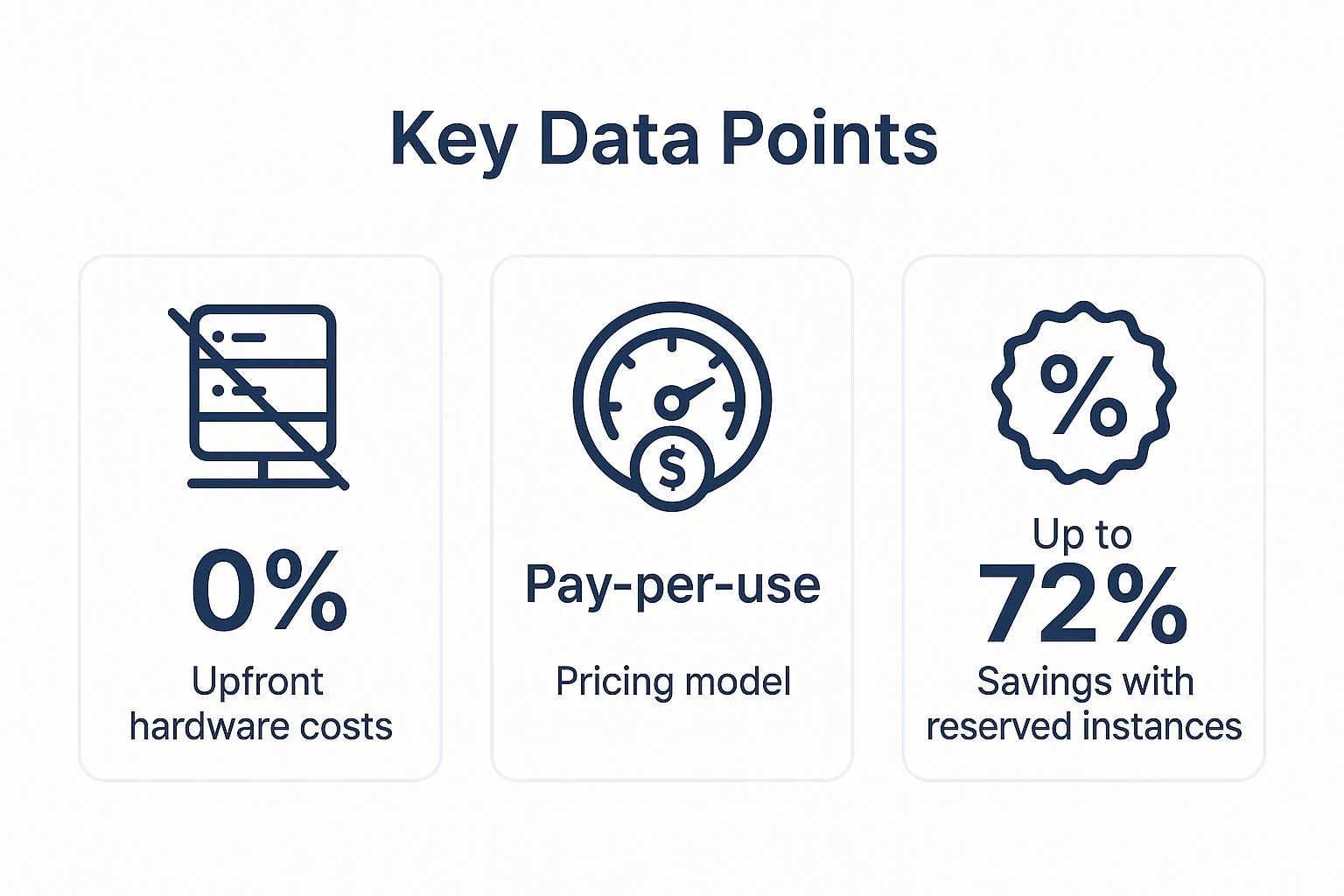
These figures illustrate how Azure removes initial hardware costs while offering substantial long-term savings through smart resource management.
Actionable Tips for Cost Optimisation
To maximise your savings, you need a proactive approach to managing your Azure environment. Here are some practical steps:
- Estimate Before You Deploy: Use the Azure Cost Calculator to forecast expenses for your planned services.
- Set Up Alerts: Configure billing alerts in the Azure portal to receive notifications when your spending approaches a predefined limit, preventing unexpected costs.
- Review and Remove: Regularly audit your resources and shut down or deallocate any virtual machines, storage accounts, or other services that are no longer in use.
- Leverage Existing Licences: If you own Windows Server or SQL Server licences with Software Assurance, use the Azure Hybrid Benefit to receive discounted rates on Azure services.
How Tbourke Solutions Can Help
Navigating Azure’s pricing and optimisation tools can be complex. Tbourke Solutions specialises in designing and managing cost-effective Azure environments for small businesses. We conduct a thorough analysis of your needs to ensure you only pay for what you use, implementing cost-saving strategies like Azure Reserved Instances and automated resource clean-up. Let us manage the technical details so you can focus on growing your business.
To start optimising your cloud spending, reach out to our team for a consultation via our contact page.
2. Enterprise-Grade Security and Compliance
For a small business, achieving enterprise-level security is often out of reach due to the immense cost and expertise required. This is where the benefits of Azure cloud for small business become a true competitive advantage. Azure provides access to the same advanced, multi-layered security infrastructure that protects Fortune 500 companies, integrating it directly into the platform. This means your business is defended by a global team of cybersecurity experts and sophisticated AI-driven threat detection systems, 24/7.

This built-in security helps you meet complex compliance standards that might otherwise be impossible. For example, a small e-commerce business can prevent devastating DDoS attacks using Azure’s native protection, and a healthcare startup can achieve HIPAA compliance in a fraction of the time using Azure’s certified frameworks. These capabilities safeguard your data, protect your reputation, and build trust with your customers.
Actionable Tips for Securing Your Cloud
To leverage Azure’s powerful security tools, you need to configure them correctly. Here are some essential steps to secure your environment:
- Enable Multi-Factor Authentication (MFA): Immediately activate MFA for all user accounts to add a critical layer of protection against unauthorised access.
- Centralise Identity Management: Use Azure Active Directory (Azure AD) to manage all user identities and enforce consistent security policies.
- Implement Role-Based Access Control (RBAC): Restrict user permissions to the minimum necessary for their roles, limiting the potential impact of a compromised account.
- Activate Azure Security Centre: Enable the free tier of Azure Security Centre for continuous security posture assessments and actionable recommendations.
- Configure Azure Backup: Regularly back up your critical business data to ensure you can recover quickly from a ransomware attack or data loss event.
How Tbourke Solutions Can Help
Understanding and implementing Azure’s security features can be a complex task for a small business. Tbourke Solutions acts as your dedicated security partner, translating complex security requirements into a practical, manageable strategy. We specialise in configuring robust security controls, from implementing MFA and RBAC to setting up advanced threat protection. Our team will help you navigate compliance requirements and ensure your cloud environment is hardened against modern cyber threats.
For comprehensive protection, explore how we operate as one of Australia’s leading managed security service providers. To secure your digital assets, reach out to our team for a consultation via our contact page.
3. Seamless Integration with Microsoft 365 and Business Tools
For small businesses already using Microsoft 365, one of the most compelling benefits of Azure cloud is its native and seamless integration. This creates a unified digital ecosystem where productivity tools, collaboration platforms, and business applications work together effortlessly. This tight connection eliminates compatibility issues, streamlines workflows, and centralises management, providing a significant competitive advantage.
This cohesive environment means your team can operate more efficiently. For example, a consulting firm can automate client reporting by connecting a Power BI dashboard directly to an Azure SQL Database, then securely share those insights within a Microsoft Teams channel. This removes manual data handling, reduces errors, and accelerates decision-making. Similarly, a real estate agency can build a custom property management app using Power Apps that pulls data from an Azure backend, empowering agents on the go.
How it Translates to Enhanced Productivity
A unified Microsoft platform allows your existing tools to become more powerful. By connecting services, you reduce context-switching and create automated processes that save valuable time.
Azure and Microsoft 365 integration allows small businesses to leverage their existing technology investment to build sophisticated, automated solutions without the complexity of managing disparate systems.
This synergy transforms everyday applications into a powerful, interconnected business operating system.
Actionable Tips for Integration
To harness the full power of this integration, focus on connecting services to solve specific business challenges.
- Centralise Identity Management: Use Azure Active Directory (Azure AD) to manage user access and single sign-on for all your Microsoft 365 and Azure services, enhancing security and simplifying administration.
- Automate Workflows: Leverage Power Automate to create automated workflows between Azure services and Microsoft 365 apps. For instance, you can create a flow that automatically saves an email attachment from Outlook to Azure Blob Storage.
- Create a Central Hub: Configure Microsoft Teams to receive alerts and notifications directly from Azure Monitor, providing your technical team with a centralised hub for operational awareness.
- Protect Your Data: Implement Azure Information Protection to classify and protect sensitive documents created in Office 365, ensuring data remains secure whether it’s stored in SharePoint or an Azure virtual machine.
How Tbourke Solutions Can Help
Unlocking the full potential of the Azure and Microsoft 365 ecosystem requires strategic planning and technical expertise. Tbourke Solutions specialises in creating unified Microsoft environments for small businesses. We help you connect your applications, automate processes, and implement robust security controls across the entire platform. Our team ensures your technology works cohesively, boosting productivity and enabling innovation.
To build a seamless and powerful Microsoft ecosystem for your business, reach out to our team for a consultation via our contact page.
4. Scalability and Flexibility for Business Growth
One of the most powerful benefits of Azure cloud for small business is the ability to adapt instantly to changing demands. With Azure, you can start small and seamlessly scale your IT resources up or down as your business grows, experiences seasonal peaks, or faces unexpected opportunities. This eliminates the traditional constraints of physical infrastructure, where you either over-invest in hardware you don’t need or risk performance issues during high-demand periods.
This elasticity ensures your business remains agile. For instance, a seasonal retail business can scale its resources by 400% during the holiday rush to handle increased website traffic and then scale back down to minimise costs in the off-season. This dynamic capability means you are always prepared, paying only for the capacity you actively use while ensuring resources are available the moment you need them.
How it Translates to Real Growth
The following infographic highlights key statistics that demonstrate how Azure’s scalability directly supports business expansion and operational agility.

These figures illustrate how Azure empowers your business to respond to market changes without being held back by rigid IT infrastructure.
Actionable Tips for Effective Scaling
To harness Azure’s full potential, you need a clear strategy for managing scalability. Here are some practical steps:
- Start with App Services: Use Azure App Service for web applications and APIs, as it offers built-in, easy-to-configure auto-scaling features.
- Configure Auto-Scaling Rules: Set up rules based on metrics like CPU usage or request count to automatically add or remove resources, ensuring optimal performance and cost-efficiency.
- Monitor Performance: Use Azure Monitor to track performance metrics and scaling patterns, helping you predict future needs and refine your scaling rules.
- Test Before Peak Demand: Run load tests and simulate high-traffic scenarios to ensure your scaling configurations work as expected before a critical period.
How Tbourke Solutions Can Help
Designing a scalable architecture that is both high-performing and cost-effective requires expertise. Tbourke Solutions specialises in creating customised Azure environments that grow with your business. We help you implement auto-scaling rules, containerise applications with Azure Kubernetes Service (AKS), and use load balancing to ensure your services are always available and responsive. Let us build a flexible foundation for your growth.
To learn more about how we can help you scale effectively, explore our Windows Azure Platform services or reach out via our contact page.
5. Business Continuity and Disaster Recovery
For a small business, a significant outage or data loss event can be catastrophic. One of the most critical benefits of Azure cloud for small business is access to enterprise-grade disaster recovery and business continuity solutions. These ensure your operations can continue even during unexpected hardware failures, natural disasters, or cyber-attacks. Previously, achieving this level of resilience required a massive investment in secondary data centres and complex infrastructure, putting it out of reach for most small businesses.
Azure democratises this protection by integrating powerful tools like Azure Backup and Azure Site Recovery into its platform at an affordable, operational cost. For example, an accounting firm hit by ransomware was able to restore all its critical data within two hours using Azure Backup, avoiding a devastating operational halt. Similarly, a manufacturing company maintained full operations during a fire at its main office by seamlessly failing over its systems to a replicated environment in Azure, showcasing the power of a robust recovery plan.
How it Translates to Real Resilience
Building a resilient business is not just about backing up files; it’s about ensuring your entire operation can withstand disruptions. Azure provides a comprehensive toolkit to achieve this.
These statistics highlight how Azure empowers small businesses to protect their data, applications, and reputation against unforeseen events.
Actionable Tips for Building Resilience
Implementing a solid disaster recovery strategy requires careful planning and consistent management. Here are some practical steps to get started:
- Follow the 3-2-1 Rule: Maintain at least three copies of your data, on two different types of media, with one copy stored offsite in Azure.
- Test Your Plan: Regularly test your disaster recovery procedures (at least quarterly) to ensure they work as expected and your team knows their roles.
- Configure Geo-Redundancy: Use Azure’s geo-redundant storage (GRS) for your most critical data, which automatically replicates it to a secondary region hundreds of kilometres away.
- Automate Application Failover: Set up Azure Site Recovery for core business applications to enable automated failover to a secondary Azure region during an outage.
How Tbourke Solutions Can Help
Designing and testing a reliable business continuity plan is a complex task. Tbourke Solutions specialises in creating customised disaster recovery strategies for small businesses using Azure. We handle everything from initial setup of backups and site recovery to regular testing and documentation, ensuring your business is prepared for any eventuality. We’ll build a plan that meets your specific recovery time objectives (RTOs) and recovery point objectives (RPOs).
To create a robust disaster recovery plan that protects your business, get in touch with our expert team via our contact page.
6. Advanced Analytics and Business Intelligence
Azure empowers small businesses to leverage sophisticated data analytics, artificial intelligence (AI), and machine learning (ML) capabilities previously accessible only to large enterprises. By democratising access to these advanced technologies, Azure enables you to gain deep insights from your business data, automate processes, and make data-driven decisions to compete more effectively in your market. This is a key benefit of Azure cloud for small business, turning raw data into a strategic asset.

This ability to analyse information leads to tangible outcomes. For instance, a local retail store increased sales by 23% using Azure ML to predict customer buying patterns and optimise inventory. Similarly, a healthcare clinic reduced no-show appointments by 35% by using predictive analytics to identify at-risk patients and send targeted reminders.
Actionable Tips for Data-Driven Insights
Getting started with analytics doesn’t have to be overwhelming. Here are some practical steps to begin unlocking the power of your data:
- Start with Visualisation: Use Power BI for basic reporting and creating interactive dashboards from your existing data sources like Excel, SQL, or your CRM.
- Leverage Pre-built AI: Explore Azure Cognitive Services for powerful, pre-built APIs that can add intelligence like text analysis or image recognition to your applications without needing ML expertise.
- Automate Model Building: Take advantage of Azure Machine Learning’s AutoML feature to automatically build, train, and deploy high-quality predictive models.
- Begin with Small Projects: Start with a small, well-defined proof-of-concept project to demonstrate value and build momentum before scaling up.
How Tbourke Solutions Can Help
Harnessing the full potential of Azure’s analytics and AI tools can be complex. Tbourke Solutions demystifies this process for small businesses. We help you identify the right tools for your specific goals, from setting up initial Power BI dashboards to implementing sophisticated machine learning models. Our team can integrate your disparate data sources and build a cohesive analytics strategy that delivers actionable intelligence.
To start making smarter, data-driven decisions, reach out to our team for a consultation via our contact page.
7. Remote Work and Collaboration Enablement
The shift to flexible work models is one of the most significant benefits of Azure cloud for small business, providing the infrastructure to support secure and productive remote teams. Azure allows you to deliver a consistent, secure desktop experience to any employee, on any device, anywhere in the world. This eliminates the need for complex and often unreliable VPNs, empowering your team with seamless access to business-critical applications and data as if they were in the office.
This capability is particularly vital for small businesses that need to attract talent from a wider geographical area or offer flexible work arrangements. For instance, an architecture firm can use Azure Virtual Desktop to give its designers remote access to resource-intensive CAD software, or a medical billing company can ensure its remote staff securely access patient data in a HIPAA-compliant environment. The technology breaks down physical barriers, ensuring business continuity and operational agility.
Enabling a Secure and Productive Remote Workforce
The following video from Microsoft provides an overview of how Azure Virtual Desktop can transform your remote work strategy.
This platform is central to creating a remote work environment that is both highly productive and deeply secure.
Actionable Tips for Remote Work Enablement
To build an effective remote work environment with Azure, focus on security, user experience, and cost management. Here are some practical steps:
- Deploy Azure Virtual Desktop: Start with Azure Virtual Desktop (AVD) to provide a complete, centrally managed desktop experience from the cloud.
- Enforce Strong Security: Use multi-factor authentication (MFA) for all remote connections and implement Conditional Access policies to control access based on user location, device health, and risk.
- Centralise File Storage: Use Azure Files to create a central, secure repository for company data that remote employees can access easily without syncing issues.
- Manage Costs Actively: Configure auto-shutdown schedules for virtual desktops to ensure they are not running and incurring costs outside of business hours.
How Tbourke Solutions Can Help
Designing and securing a remote work infrastructure requires careful planning and technical expertise. Tbourke Solutions specialises in deploying Azure Virtual Desktop and other remote access solutions tailored for small businesses. We handle the entire setup, from network configuration and security policies to user onboarding, ensuring your team can work productively from day one. We also integrate tools like Microsoft Teams to enhance collaboration. To learn more, explore our insights on Microsoft Teams.
Let us build a secure and seamless remote work solution for your business. Reach out to our team for a consultation via our contact page.
8. Simplified IT Management and Reduced Complexity
One of the most practical benefits of Azure cloud for small business is the significant reduction in IT management overhead. Azure’s platform handles the underlying infrastructure maintenance, security patching, and hardware management, freeing your team from time-consuming operational tasks. This allows businesses without dedicated IT staff to maintain a professional-grade technology stack while redirecting valuable resources towards core business activities and growth.
This shift from hands-on management to strategic oversight empowers small businesses to operate more efficiently. Instead of troubleshooting server failures or managing software updates, you can focus on leveraging technology to drive innovation. For instance, a small law firm eliminated the need for a dedicated IT position, saving over $75,000 annually while simultaneously improving system reliability and security by migrating to Azure’s managed services.
Actionable Tips for Simplifying IT Management
To get the most out of Azure’s management capabilities, it’s important to adopt the right services and practices. Here are some effective strategies:
- Choose PaaS Over IaaS: Whenever possible, opt for Platform as a Service (PaaS) offerings like Azure App Service or Azure SQL Database. These services abstract away the underlying operating systems and servers, drastically reducing your management burden.
- Automate Routine Tasks: Use Azure Automation to handle repetitive and routine tasks such as starting or stopping virtual machines, performing backups, or applying updates.
- Enable Automatic Updates: Configure automatic updates and define maintenance windows for your virtual machines and services to ensure they remain secure and performant without manual intervention.
- Leverage Azure Advisor: Regularly check Azure Advisor for personalised recommendations on optimising your resources for reliability, security, performance, and cost.
How Tbourke Solutions Can Help
While Azure simplifies many aspects of IT, configuring and optimising these managed services requires expertise. Tbourke Solutions provides specialised IT support for small businesses in Melbourne, designing Azure environments that are secure, efficient, and easy to manage. We implement automation, configure monitoring, and select the right services to minimise your administrative workload, ensuring your technology supports your business goals without becoming a distraction.
To discover how we can streamline your IT operations, reach out to our team for a consultation via our contact page.
Benefits Comparison of Azure Cloud for Small Business
| Aspect | Cost Efficiency and Pay-As-You-Go Pricing | Enterprise-Grade Security and Compliance | Seamless Integration with Microsoft 365 and Business Tools | Scalability and Flexibility for Business Growth | Business Continuity and Disaster Recovery | Advanced Analytics and Business Intelligence | Remote Work and Collaboration Enablement | Simplified IT Management and Reduced Complexity |
|---|---|---|---|---|---|---|---|---|
| Implementation Complexity 🔄 | Moderate – requires pricing model understanding | High – complex security configurations needed | Moderate – Microsoft ecosystem expertise helpful | Moderate – architectural considerations for scaling | Moderate – planning and testing required | High – learning curve for AI and analytics | Moderate – initial setup complexity | Low to Moderate – shift in IT management approach |
| Resource Requirements ⚡ | Low – pay-per-use reduces upfront resources | Medium – may need security specialists | Low – leverages existing MS tools | Medium – auto-scaling needs proactive monitoring | Medium – backup infrastructure and regular tests | Medium to High – data and computing resources | Medium – reliable internet and device support | Low – reduces IT staff, uses managed services |
| Expected Outcomes 📊 | ⭐⭐⭐⭐⭐ Cost savings up to 60% | ⭐⭐⭐⭐⭐ Enterprise-level security and compliance | ⭐⭐⭐⭐ Streamlined workflows and collaboration | ⭐⭐⭐⭐⭐ Instant scale handling and global reach | ⭐⭐⭐⭐⭐ High availability and quick recovery | ⭐⭐⭐⭐ Data-driven insights and automation | ⭐⭐⭐⭐ Secure, flexible remote work environment | ⭐⭐⭐⭐ Reduced IT overhead and faster deployments |
| Ideal Use Cases 💡 | Startups and budget-conscious businesses | Regulated industries and security-focused businesses | Businesses using Microsoft 365 and related tools | Growing businesses with variable workloads | Organizations needing robust backup and disaster recovery | Businesses leveraging data insights and AI capabilities | Companies with remote or distributed teams | Small businesses without dedicated IT teams |
| Key Advantages ⭐ / 💡 | ⭐ Pay-as-you-go flexibility, minimal upfront costs | ⭐ Multi-layered security, compliance certifications | ⭐ Unified Microsoft ecosystem, single sign-on | ⭐ Auto-scaling, global presence, flexibility | ⭐ Automated backups, geo-redundancy, disaster readiness | ⭐ Advanced AI-powered insights without expert data science | ⭐ Secure remote access, multi-device support | ⭐ Automated management, reduced IT complexity |
| Potential Challenges 🔄 | Costs may become unpredictable without monitoring | Complexity and possible extra security costs | Vendor lock-in, less flexible with non-Microsoft tools | Misconfigured scaling can increase costs | Requires continuous testing and technical expertise | Data quality dependency, cost rise with usage | Dependent on internet quality, licensing per user | Less control over infrastructure, new skill requirements |
Ready to Harness the Power of Azure? Here’s Your Next Step.
The journey into the cloud can seem complex, but the destination is well worth the effort. Throughout this article, we’ve explored the tangible benefits of Azure cloud for small business, demonstrating how it is far more than just a technological upgrade. It represents a fundamental shift in how your organisation can operate, innovate, and compete. From the predictable, operational expenditure model of pay-as-you-go pricing to the peace of mind offered by enterprise-grade security and disaster recovery, Azure provides a robust foundation for growth.
The key takeaway is that leveraging Azure isn’t about adopting technology for technology’s sake; it’s about empowering your business. It’s about achieving the scalability to meet sudden demand without over-provisioning, the flexibility to enable secure remote work, and the intelligence to make data-driven decisions that propel you ahead of the competition. By simplifying IT management and integrating seamlessly with tools you already use, like Microsoft 365, Azure removes technological barriers, allowing you to focus on your core mission. Mastering these concepts is valuable because it directly translates to a more resilient, efficient, and future-proof business model.
How Tbourke Solutions Can Help You Succeed with Azure
At Tbourke Solutions, we specialise in making technology work for Melbourne’s small and medium enterprises. We understand that your goal is to run your business, not to become a cloud expert. Our Azure services are designed to provide a seamless, secure, and cost-effective transition to the cloud.
Our Azure Cloud Services Include:
- Azure Migration & Strategy: We assess your current infrastructure and create a customised migration plan that minimises downtime and risk.
- Managed Azure Services: We take over the day-to-day management of your Azure environment, handling monitoring, updates, security, and cost optimisation, so you don’t have to.
- Security & Compliance: We configure Azure’s advanced security features to protect your business and ensure you meet any industry-specific compliance requirements.
- Backup & Disaster Recovery: We implement and manage robust backup solutions on Azure to ensure your business can recover quickly from any incident.
Take the first step towards a more efficient and secure future. Contact us for a no-obligation consultation to discuss how Azure can specifically benefit your business.
Reach out and submit your query today at http://tbourke-solutions.com.au/contact
Don’t let technical complexity hold you back from unlocking the powerful benefits of Azure for your business. Let the experts at Tbourke Solutions create a customised cloud strategy that aligns with your goals and budget. Visit us at Tbourke Solutions to learn how our managed IT services can accelerate your growth.
Share This Story, Choose Your Platform!