
TLDR
Microsoft Purview Data Loss Prevention, or DLP, is one of the most powerful tools in the Microsoft 365 toolbox. Think of it as a smart, automated security guard for your organisation’s most important information. Its job is to identify, monitor, and automatically protect sensitive data like financial records or customer details to stop it from being accidentally shared or maliciously stolen. This protection works seamlessly across your emails, documents, and cloud services.
Microsoft Purview Data Loss Prevention (DLP) is an advanced security feature that acts as a digital safety net for your organisation’s data. It works by identifying sensitive information like credit card numbers or tax file numbers within your Microsoft 365 environment, including emails, Teams, and SharePoint. Based on policies you define, it can automatically block this data from being shared inappropriately, preventing accidental leaks or malicious theft. In essence, it helps you meet compliance needs and protect your business from the significant damage caused by data breaches.
Understanding Microsoft Purview Data Loss Prevention

What Is Data Loss Prevention at Its Core?
At its heart, Data Loss Prevention isn’t about just blocking things; it’s about being intelligent. It’s like a smart filter that understands both the context and the content of your data. It quietly scans information as it moves around your digital workspace, checking it against a set of rules you’ve defined.
For example, a DLP policy can be taught to recognise what an Australian Tax File Number (TFN) or a credit card number looks like. If an employee then tries to email a spreadsheet filled with dozens of these numbers to their personal Hotmail account, the system instantly flags it as a high-risk move and can block it.
This is a huge shift in security thinking. It moves you away from a reactive mindset (cleaning up the mess after a data breach) to a preventative one, stopping data leaks before they ever happen. For any modern business, this is a non-negotiable part of a solid security strategy.
Where Does Purview DLP Operate?
One of the best things about Microsoft Purview DLP is how deeply it’s woven into the Microsoft 365 suite. This means you get a single, consistent shield of protection across all the platforms your team uses every single day:
- Microsoft Exchange Online: Scans every outgoing email for sensitive content.
- SharePoint and OneDrive for Business: Keeps an eye on files stored and shared in the cloud.
- Microsoft Teams: Stops private information from being accidentally dropped into team chats or channels.
- Endpoint Devices: Extends protection right down to the data on your company-managed Windows and macOS computers.
Purview’s Data Loss Prevention features are often bundled into wider security packages, such as the comprehensive Microsoft 365 Business Premium tools, which offer layers of integrated protection. To get the full picture, you can learn more about the broader Purview suite in our detailed article.
This tight integration is what makes it so effective. It closes the security gaps that often exist between different apps, ensuring the same data handling rules are enforced everywhere. It makes sure that no matter how an employee tries to share information, your security policies are always on guard.
What Is Purview DLP and Why Does It Matter?
If you’re running a busy organisation, you’ve probably worried about where your sensitive data is going. Microsoft Purview DLP is your answer to that problem. Think of it as a smart, automated security guard for your digital files.
It’s built to stop sensitive information like financial reports, customer lists, or student records from being accidentally or maliciously shared where it shouldn’t be. It works quietly in the background across your entire Microsoft 365 environment, including Teams, SharePoint, and Outlook.
For any Australian business or school, this isn’t just a “nice-to-have.” It’s essential for meeting our privacy law obligations and protecting the reputation you’ve worked so hard to build. It’s the digital safety net that catches mistakes before they turn into disasters. You can find more practical tips in our guide on how to prevent data breaches.
The whole point of Purview DLP is to stop data from leaking out, whether by accident or on purpose. This helps you sidestep the massive financial and reputational damage that follows a data breach, keeping your operations running and your customer trust intact.
Ultimately, this shifts your security from a reactive, after-the-fact cleanup job to a proactive defence. By spotting and blocking potential leaks as they happen, Purview DLP protects your most valuable digital assets without getting in your team’s way.
The Reality Of Data Leaks For Australian Businesses
It’s easy to think of a major data leak as a distant, abstract problem something you only see in the news happening to huge multinational companies. But for Australian businesses and schools, the threat is incredibly local, constant, and far more common than you might imagine.
The hard truth is that it’s not really a matter of ‘if’ a data incident will hit your organisation, but ‘when’. And the cause is almost never a shadowy hacker in a dark room. More often than not, it’s a simple, honest mistake made by a trusted employee right here in your office.
The Human Element in Data Loss
We’ve all been there. You’re juggling a dozen tasks, you’ve got a hundred emails to get through, and you just click the wrong button. Maybe an email is sent to the wrong “John Smith,” a file with sensitive customer details is accidentally shared via a public link, or a USB stick is left behind at a café.
These are the everyday moments that can escalate into a full-blown crisis. While we train our staff to be diligent, people get busy and mistakes happen. Relying on manual caution alone is a security strategy with some serious holes in it.
A recent study paints a very stark picture of this reality. A staggering 80% of Australian organisations surveyed experienced data loss in the past year, with an average of 19 separate incidents per organisation.
But here’s the real kicker: 66% of those cases were traced back to careless users, not malicious attackers. You can see the full story in the Proofpoint Data Loss Landscape report. This data confirms what we see on the ground the biggest threat often comes from inside, through simple mistakes with severe consequences.
The Real-World Impact of a Small Mistake
The fallout from these seemingly small incidents is anything but trivial. Over 90% of the Australian organisations affected faced serious negative outcomes. These weren’t just minor headaches; they were significant blows to their operations and reputation.
- 54% reported business disruption and lost revenue. This can mean anything from shutting down systems to clean up a mess to copping direct financial penalties.
- 46% suffered damage to their reputation. In a competitive market, trust is everything. A single breach can undo years of goodwill you’ve built with your customers.
The bottom line is that even a small, accidental data leak can lead to major business disruption, financial loss, and lasting damage to your brand. This is why a proactive defence is no longer optional.
This is exactly where a solution like Microsoft Purview Data Loss Prevention (DLP) becomes a business necessity. It acts as an automated safety net, designed to catch human error in real-time before it can cause any harm.
It reinforces essential security frameworks, like the ones in our guide to the ACSC Essential 8, by turning good policy into automated, reliable action.
How Microsoft Purview DLP Works Under The Hood
To really get what Microsoft Purview Data Loss Prevention does, you need to look past the fancy name and see how it works on the inside. It’s not some kind of tech wizardry; it’s a smart, logical process that takes your company’s data rules and turns them into automatic, real-time actions.
Creating Your Digital Rulebook
Everything kicks off with policies. Think of a DLP policy as a digital rulebook that tells Purview exactly what sensitive information to look for, where to look for it, and what to do when it finds something that shouldn’t be there.
The great thing is, you don’t have to start from a blank page. Microsoft provides a whole library of pre-built templates that cover common data types and regulations. For Australian businesses and schools, this includes ready-to-go rules for identifying financial data, medical records, and personal information like tax file numbers.
You can also build your own rules from scratch. This is where you can get really specific to your organisation, telling Purview to watch for things like internal project codenames, confidential client IDs, or unique intellectual property. To get this right, the system needs to know what your sensitive data actually is, which is where a good data classification policy becomes essential.
Real-Time Enforcement Across Microsoft 365
Once your policies are set, Purview DLP gets to work as a constant watchdog over your Microsoft 365 environment. It doesn’t just run a scan at the end of the day; it checks data in near real-time as your team goes about their work.
- In Outlook: It scans emails and attachments before your staff can even hit “Send.”
- In SharePoint and OneDrive: It checks documents the moment they are uploaded, changed, or shared with someone new.
- In Teams: It keeps an eye on messages and files shared in both private chats and team channels.
This instant enforcement is what makes it so incredibly effective. It catches potential data leaks right at the source, stopping them before they happen, not cleaning up the mess afterwards. This proactive approach is a cornerstone of modern security, especially for preventing those all-too-common breaches caused by simple human error. And for businesses looking to extend this protection to company phones and tablets, these same principles are key. You can learn more about this in our guide on Intune Mobile Device Management.
An Example in Action
Let’s put this into a real-world context. Imagine an employee in your finance team is working on a spreadsheet full of customer names and their credit card numbers. By mistake, they try to email this file to their personal Gmail account instead of saving it to the secure company SharePoint.
This simple table shows what happens next, second by second.
Microsoft Purview DLP Policy in Action
| User Action | DLP Detection | Policy Tip to User | Automated Action | Administrator Alert |
|---|---|---|---|---|
| Employee attaches a file with 50+ credit card numbers and tries to send it to an external, non-corporate email address. | The Purview DLP policy instantly scans the attachment and identifies the content as “High-Volume Financial Data” and the recipient as “Untrusted”. | A pop-up message appears in Outlook before the email sends, stating: “This email cannot be sent because it contains sensitive financial data, violating company policy.” | The email is automatically blocked from leaving the organisation’s server. No data is leaked. | An alert is sent to the IT security administrator’s dashboard, detailing the user, the policy violated, and the content that triggered the block. |
This seamless, automatic process does more than just block a leak. It educates the user on the spot, enforces your security policies without needing any manual intervention, and gives your IT team the visibility they need to track and manage risk. This is the heart of what Microsoft Purview DLP does to keep your valuable information safe.
Growing Your Defences: Achieving Data Protection Maturity With Purview DLP
Rolling out Microsoft Purview Data Loss Prevention isn’t a “set and forget” task. It’s really about building a solid, ongoing security culture within your organisation. For Australian businesses and schools, this means moving beyond just reacting to problems and building a smart, strategic program that grows with you.
Think of it like learning to drive. You don’t try to master a three-point turn on the motorway on day one. You start in a quiet car park, get the basics right, and build your skills from there. This staged approach stops you from getting overwhelmed and ensures your DLP program is both effective and something you can actually maintain.
A Staged Approach to Data Protection
A maturity model is just a fancy term for a step-by-step roadmap. It breaks down the massive world of data security into manageable levels, giving you a clear path to follow. For Australian organisations, this maps neatly onto standards like the Protective Security Policy Framework (PSPF), ensuring you’re meeting local compliance needs. This is critical, especially when you consider that a staggering 70% of risks come from privileged users and careless actions cause 66% of leaks.
Microsoft Purview provides this exact kind of guidance. Level 1 starts you off with the fundamentals, like basic email security and protecting obviously sensitive files. From there, Level 2 helps you prevent major data spills and use smarter tools to classify what data you actually have. Finally, Level 3 brings everything together by protecting endpoint devices and blocking staff from uploading data to unapproved cloud services. You can see the full framework in Microsoft’s guidance on the PSPF maturity model.
The point is, you don’t have to boil the ocean. A structured approach lets you score quick wins while building towards a truly comprehensive security posture.
This visual highlights the exact weaknesses a maturity model helps you fix: not knowing where your data is, having no formal rules, and using security that your business has already outgrown.
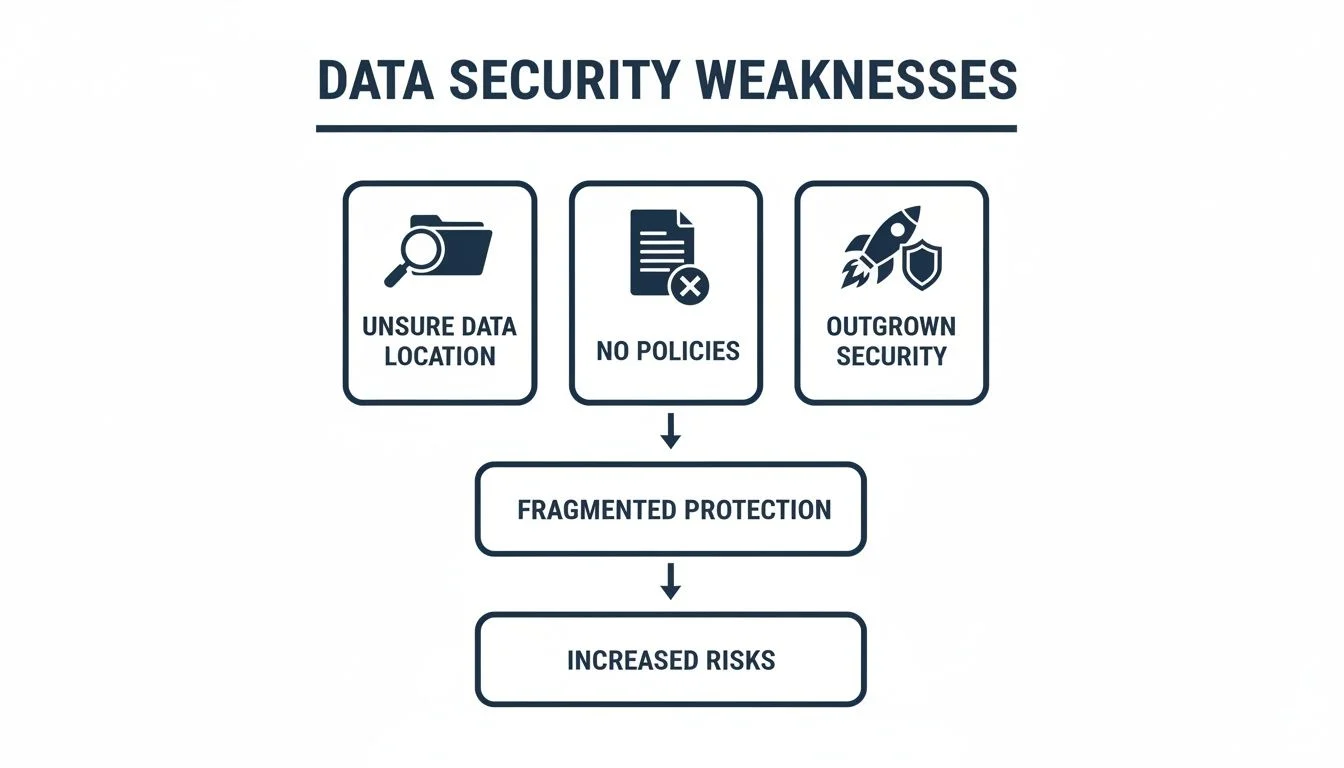
These are the foundational cracks that a good DLP strategy seals up, proving why a staged, deliberate approach is the only way to succeed in the long run.
Advanced Capabilities for Mature Organisations
As you climb the maturity ladder, you unlock more powerful and nuanced features within Microsoft Purview DLP. These tools are designed to stop more complex threats without getting in the way of your team’s day-to-day work.
Here are some of the key advanced features you’ll gain:
- Endpoint DLP: This extends your security rules from the cloud right down to your company’s Windows and macOS devices. It can control actions like copying sensitive data to a USB stick, moving files to a network share, or printing a confidential document.
- Blocking Unmanaged Cloud Apps: By integrating with Microsoft Defender for Cloud Apps, you can stop users from uploading company files to their personal Dropbox, Google Drive, or other non-approved cloud accounts.
- Adaptive Protection: This is the really clever bit. This feature uses machine learning to assess a user’s risk level in real time. If someone starts acting unusually, the system can automatically apply stricter DLP rules to them until the risk passes.
A mature DLP program is intelligent. It doesn’t just block everything in sight; it uses context and smarts to tell the difference between risky behaviour and productive work. This ensures your security actually helps the business, rather than holding it back.
Ultimately, achieving data protection maturity means creating a security ecosystem that evolves with you. It transforms the question of what is Microsoft Purview Data Loss Prevention from a simple tool into a core part of your business strategy, making sure your defences always match your operational needs and the real-world threats you face.
Frequently Asked Questions About Purview DLP
When we talk about tools like Microsoft Purview DLP, it’s natural for some practical questions to pop up. To help clear things up, here are the straightforward answers to the queries we hear most often from businesses trying to figure out where DLP fits in their security plan.
Can Purview DLP Protect Data in Non-Microsoft Apps?
Yes, it absolutely can, and this is one of its biggest strengths. While its core job is to watch over the Microsoft 365 suite, it integrates with Microsoft Defender for Cloud Apps to extend that protection to many other popular services.
This means it can monitor and control sensitive data in places like Dropbox, Google Drive, and Salesforce. It effectively stops an employee from, say, accidentally dragging a confidential client list from a secure SharePoint folder into their personal cloud drive, keeping your security consistent.
Is Purview DLP Included in My Microsoft 365 Plan?
This is a classic “it depends” situation. The full, feature-rich version of Microsoft Purview DLP is usually part of the top-tier enterprise and education plans, like Microsoft 365 E5/A5 and E5/A5 Compliance.
While some basic features might be available in lower-level plans, you’ll generally need an E5-level licence to get that comprehensive protection across all your computers and cloud apps. The quickest way to know for sure is to check your subscription details in the Microsoft 365 admin centre or just have a quick chat with an IT partner like us.
Will DLP Slow Down Our Computers?
It’s a fair question. Nobody wants a security tool that grinds productivity to a halt. The good news is that modern DLP is designed to be incredibly lightweight and efficient.
For cloud services like Exchange and SharePoint, all the heavy lifting is done in the cloud, so there’s zero impact on your team’s devices. For endpoint DLP that runs on computers, the agent is highly optimised to run quietly in the background without getting in the way.
Instead of just blocking actions, the system focuses on user education. It uses non-intrusive policy tips that pop up in real-time to gently guide employees toward secure choices. This helps prevent mistakes without sacrificing productivity.
How Is Purview DLP Different From a Firewall?
Understanding this difference is crucial. Think of a firewall as the security guard at your building’s main entrance. Its job is to protect the perimeter, stopping external threats like hackers and malware from getting in to your network.
In contrast, Microsoft Purview DLP is like the security guard inside the building, watching over the valuables. It’s focused on stopping sensitive data from getting out, whether it’s through a deliberate leak or a simple human error. They aren’t competitors; they are essential partners. A firewall protects your front door, while DLP protects what’s inside.
For a more in depth understanding of Microsoft Purview, have a look at our Guide to Microsoft Purview for Australian SMBs.
Share This Story, Choose Your Platform!