
If you’re running a small business or a school, there’s a good chance identity management already feels messy. Staff have too many passwords, students or contractors need access to specific systems, and someone in admin is never fully sure who still has access to what. That uncertainty becomes a security problem fast, especially when your files, email, devices, and business apps all live across Microsoft 365, third-party cloud tools, and older on-premises systems.
That’s where Microsoft Entra ID comes in. It gives you one place to manage sign-ins, access, and identity security across your organisation. For many Australian businesses and schools, it’s the practical step between a patchwork of old logins and a modern security model that can be managed.
Your Digital Front Door Needs a Modern Lock
A common situation looks like this. A staff member signs into Microsoft 365 one way, a finance platform another way, and a learning system with a third password that nobody remembers until it breaks. When someone leaves, the offboarding checklist depends on memory and luck. If a phishing email lands at the wrong moment, one stolen password can open more doors than anyone expected.
That’s why identity isn’t just an IT issue. It’s your digital front door.
For schools, the challenge is even broader. You’re often managing teachers, office staff, casuals, vendors, and sometimes shared devices. For small businesses, the pressure comes from doing more with less. You want stronger security, but you don’t want a complicated setup that slows everybody down.
Good security should reduce friction for the right people and increase friction for the wrong ones.
Modern identity platforms support that approach. If you’re already looking into Zero Trust security for business, Entra ID is one of the core pieces that makes it work in day-to-day operations.
What Exactly Is Microsoft Entra ID
TLDR: Microsoft Entra ID is Microsoft’s cloud-based identity and access management service. It controls who can sign in, what they can access, and how that access is protected across cloud and hybrid environments. It used to be called Azure Active Directory, and the newer name reflects a broader identity platform. For most organisations, it’s the main control point for secure sign-in to Microsoft 365 and many other apps.

For many Melbourne businesses and schools, Entra ID becomes relevant the moment the old setup starts showing cracks. Staff are working from home, students and teachers need access on different devices, Microsoft 365 is already in use, and there is still an on-premises server doing part of the job. Entra ID sits in the middle of that mix and gives you one identity layer for sign-in, access rules, and account control across cloud and hybrid systems.
Microsoft Entra ID is the service that handles authentication and authorisation for users, applications, and resources. It checks who someone is, decides whether they should get access, and applies the rules around that access. Microsoft rebranded Azure Active Directory to Microsoft Entra ID in 2023 as part of the broader Entra family, and in Australia it’s supported by Azure Australia East and Central regions, with 99.99% monthly authentication availability for tenants with at least 5,000 monthly active users since May 2024, as noted in Microsoft’s Entra updates.
In practice, that means one staff identity can be used to reach email, Teams, SharePoint, third-party apps, and admin tools without maintaining a separate login process for every system. It also means access can change quickly when someone joins, changes roles, or leaves. That matters a lot in small organisations where offboarding is often handled by whoever has time, not by a dedicated security team.
If you are coming from traditional Active Directory, the key point is simple. Entra ID is not just “AD in the cloud”.
Traditional Active Directory was built around office networks, domain-joined PCs, and servers in a cupboard or data room. Entra ID was built for web apps, mobile devices, Microsoft 365, remote access, and hybrid environments where some systems still stay on site. For organisations learning how cloud computing changes access and security, that difference explains why old assumptions often cause messy migrations.
Australian SMBs and schools frequently get caught out. They keep the legacy directory running, add cloud apps on top, and postpone identity cleanup because everything still appears to work. The cost shows up later in weak offboarding, duplicate accounts, inconsistent permissions, and sign-in methods that are too easy to phish. A properly planned multi-factor authentication rollout for business is usually one of the first signs an organisation is shifting from basic account management to modern identity control.
Why the name change matters
The old name, Azure AD, led many decision-makers to treat it like a direct replacement for every familiar Active Directory process. That misunderstanding still creates migration problems. Group policy, device management, file shares, legacy apps, and cloud sign-in do not all map across in the same way.
The better approach is to treat Entra ID as the identity control plane for a modern environment. Keep what still needs to stay on premises. Replace what is only there because “that’s how we’ve always done it.” That mindset usually leads to stronger security, less admin effort, and fewer access problems for staff and students.
The Four Pillars of Entra ID Security
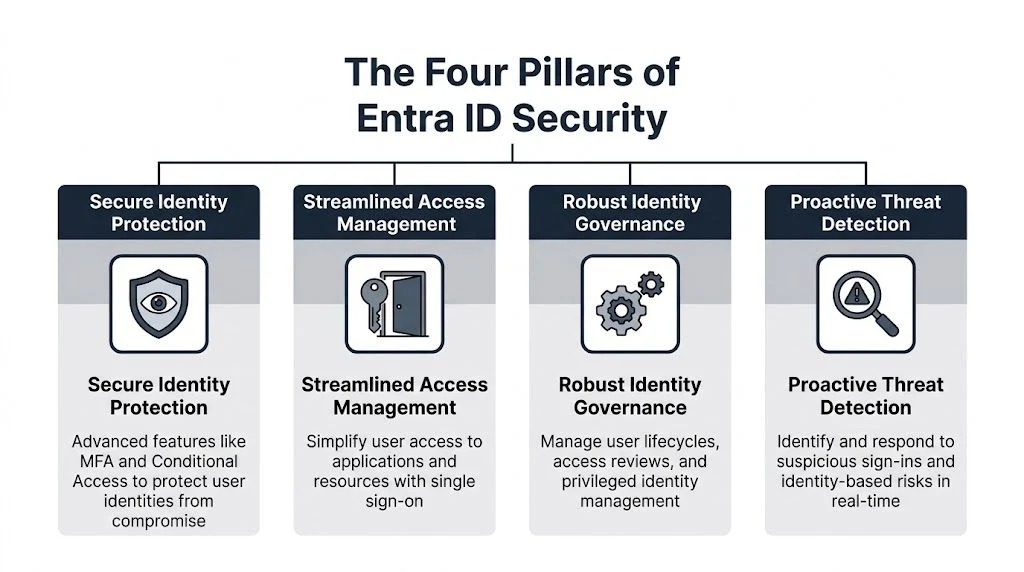
When people ask what is microsoft entra id in practical terms, I usually answer by describing what it changes on an ordinary workday. It gives you central control over users, cuts down password sprawl, adds stronger sign-in checks, and gives IT staff visibility into what’s happening.
Microsoft Entra ID’s sign-in logs capture every authentication event, which means administrators can investigate failed sign-ins, unusual sign-in activity, and app access patterns. In Australia, where 76,000 cybercrimes were reported in one year, that visibility matters for early detection and response, as described in Microsoft’s sign-in log documentation.
Identity and access management
This is the foundation. You create user accounts, groups, roles, and access rules in one place.
For a small business, that means a cleaner onboarding and offboarding process. For a school, it means less guessing about who should still have access to staff systems, student systems, or shared resources. Without a central identity layer, permissions tend to grow in messy ways over time.
A simple way to think about it is this:
- Users are the people who need access
- Groups are the teams or classes they belong to
- Roles define what level of control they have
- Policies decide the conditions under which access is allowed
Single sign-on
Single sign-on, or SSO, is the closest thing to a master key that most organisations can use safely. Staff sign in once with their work identity and then access approved applications without juggling separate passwords for each one.
That’s good for productivity, but the biggest win is operational consistency. Once sign-in is centralised, account disablement, password policy, and access review become much easier to manage. If you’re planning a broader business MFA rollout, SSO and MFA work best together rather than as separate projects.
Multi-factor authentication
MFA adds a second check beyond the password. That might be an approval in Microsoft Authenticator or another approved method. It doesn’t make accounts invincible, but it raises the cost of attack dramatically.
Many organisations get immediate value. Password-only security is too weak for modern risk levels, especially when users reuse passwords or fall for phishing prompts. A decent MFA rollout needs planning, though. If you enforce it badly, you create user lockouts and support headaches.
MFA should be strict for risky access, but still usable enough that staff don’t look for workarounds.
Conditional Access
Conditional Access is where Entra ID starts acting less like a login system and more like a gatekeeper. Instead of treating every sign-in the same, it can apply different rules depending on context.
That context can include:
- User role so admins face tighter controls than standard users
- Application sensitivity so finance or student systems require stronger checks
- Device trust so managed devices get smoother access than unmanaged ones
- Risk indicators so suspicious sign-ins trigger extra verification or blocks
This is powerful, but it’s also the area where poor design causes trouble. Rules can overlap. Legacy apps can behave badly. Users can get blocked in places the business didn’t expect. The best Conditional Access policies are deliberate, tested, and staged.
When to Call for Professional Help
A small pilot can make Entra ID look easy. The hard part starts when it has to work across old servers, Microsoft 365, shared devices, and the systems your staff rely on every day.
That is the point where outside help usually pays for itself. In Melbourne, we see this most often with schools and SMBs that have grown in stages. A bit of on-premises Active Directory here, a legacy app there, a handful of exceptions no one documented, and suddenly a “simple” identity project can lock out the wrong people or leave risky gaps behind.
Bring in specialist help if your organisation is dealing with any of the following:
- On-premises Active Directory is still in the mix, and you need a hybrid design that won’t create sync issues or duplicate identities
- Privacy, school governance, or industry requirements matter, and you need access controls and audit trails that stand up under review
- Older applications still matter to daily operations, but they struggle with modern authentication or need extra integration work
- Conditional Access needs to be configured precisely, especially where admin accounts, shared devices, contractors, or remote access are involved
- Identity, device management, and security baselines need to work together, particularly if you are aligning the project with the ACSC Essential Eight maturity guidance
Two mistakes show up again and again. One is leaving the default setup in place and assuming Microsoft has covered every risk for you. The other is adding too many policies too quickly, then finding out at 8:15 on a Monday that the principal, business manager, or payroll officer cannot sign in.
Both are expensive.
For a small business, that can mean delayed invoicing, halted approvals, and staff losing half a day to access problems. For a school, it can mean front office disruption, teaching staff unable to reach core systems, and stressed leadership trying to untangle an avoidable outage while students are arriving.
Entra ID works best when the rollout matches the actual environment, not the diagram in a planning meeting. If your setup mixes cloud apps, local servers, mobile devices, shared computers, and compliance obligations, trial and error is a poor migration strategy. That is usually the point to get experienced advice before the cutover, not after the first lockout.
Benefits and Risks for Your Organisation

A lot of Melbourne organisations still run identity the old way. User accounts live in local Active Directory, remote access has grown over time, and Microsoft 365 has been added around the edges. That setup can keep working for years until a stolen password, a failed server, or a rushed staff onboarding exposes how much depends on one ageing system.
This is the primary benefit of Microsoft Entra ID. It gives you a modern identity layer that fits cloud apps, remote work, mobile devices, and tighter access control without forcing every sign-in to depend on the server cupboard.
Where the value shows up
For most organisations, the gains show up in day-to-day operations, not just in a security review.
| Area | What improves in practice |
|---|---|
| Security | You can require MFA, limit risky sign-ins, and apply access rules based on user, device, location, or role |
| Productivity | Staff use fewer passwords, sign-in problems are easier to trace, and access follows them more cleanly between Microsoft 365 and connected apps |
| Governance | It is easier to review who has access, remove old accounts, and keep a clearer record of administrative changes |
For Australian SMBs and schools, that matters because identity is now tied to both business continuity and cyber insurance expectations. It also supports the kind of account protection and access control covered in the ACSC Essential Eight maturity guidance, even though Entra ID is only one part of the broader security picture.
The practical upside is simple. Fewer weak sign-ins. Faster onboarding. Cleaner offboarding.
The risks and trade-offs
Entra ID is not a magic switch, and this is the part many vendors gloss over.
- Licensing is only one cost line. The subscription may be reasonable, but the main effort is in planning, testing, cleaning up old groups, and fixing application dependencies.
- Older systems can slow the project down. Line-of-business apps, printers, file shares, and legacy authentication methods often need extra design work or a staged approach.
- The wrong setup creates friction. Poorly scoped access policies can lock out the wrong people or leave gaps for the accounts that matter most.
- User adoption needs attention. Staff and teachers need clear instructions for MFA, password resets, and new sign-in prompts, especially during the first few weeks.
I see one trade-off regularly. A cloud-first business with a handful of SaaS apps can often move quickly and get value fast. A school or larger SMB with on-prem servers, shared devices, and older software usually gets better results from a careful hybrid path and a proper application review first.
That slower approach often costs less in the long run.
Why delaying the move carries its own risk
Keeping legacy identity in place can feel cheaper because the hardware is already there and staff know how it works. But the risks do not stay still. Unsupported servers, inconsistent MFA coverage, shared admin habits, and remote access exceptions tend to build up subtly over time.
For schools, that can mean too many people retaining access to systems they no longer need, or senior staff relying on old authentication methods because a shared workstation does not fit modern controls. For small businesses, it often shows up in simpler ways. One password reused across services. One former employee account left active. One VPN or RDP path that no one has reviewed in months.
Those are not theoretical problems. They are the kinds of gaps attackers look for first.
Different organisations get different returns
A ten-person business usually cares most about reducing admin overhead and making access more consistent across Microsoft 365, email, Teams, and a few core apps. The business benefit is time, fewer support calls, and lower exposure to basic account compromise.
A school has a different return profile. Leadership teams need clearer role separation. Shared devices need more control. Administrative access needs tighter handling. Auditing matters more, and so does having a repeatable process when staff, contractors, or relief teachers come and go.
If you are weighing the business case, judge Entra ID against the cost of staying where you are. Measure the hours lost to password issues, the risk around old accounts, the effort of managing hybrid access manually, and the consequences of one account compromise. For organisations planning an Active Directory to Entra ID migration, that comparison is usually what makes the decision clearer.
Your Practical Setup and Migration Pointers
If you’re planning a move, start by working out what you already have. Don’t begin with licensing. Begin with identity reality.
First decide what kind of environment you run
Most organisations fit into one of three buckets:
- Cloud-first where most users already live in Microsoft 365 and web apps
- On-premises heavy where local servers and traditional Active Directory still do most of the work
- Hybrid where both matter and neither can be ignored
For organisations with on-premises Active Directory, Microsoft Entra Connect supports a hybrid identity model. One common option is Password Hash Synchronization, which securely syncs password hashes to the cloud, and with local Azure datacentres in Australia it helps support sub-100ms token issuance times and a 99.99% monthly uptime SLA, as outlined in this technical explanation of hybrid identity with Entra Connect.
Choose the right authentication approach
Many migrations often require proper design. In simple terms:
- Password Hash Synchronization is often the cleaner and lower-friction option for many SMBs
- Pass-through Authentication can suit organisations that want sign-in validated against on-premises infrastructure
- Federation is usually for more specialised environments and carries more complexity
If you want a broader technical overview of an Active Directory to Entra ID migration, that can help frame the decisions before you lock in an approach.
Roll out in phases, not all at once
A controlled rollout works better than a big-bang cutover for most SMBs and schools.
- Audit your applications and identify which ones already support modern authentication.
- Clean up user accounts so old staff, duplicate accounts, and broken group structures don’t follow you into the new setup.
- Pilot with a small group that can tolerate some change and give useful feedback.
- Test security policies carefully before broad enforcement.
- Bring devices into the picture if you want identity and endpoint management to work together through tools such as Microsoft Intune mobile device management.
A migration usually succeeds when the identity plan, app plan, and device plan line up. If those streams are handled separately, friction shows up later.
How Tbourke Solutions Can Help You Migrate

A good Entra ID migration isn’t just a technical install. It’s part security project, part operations project, and part change management exercise. That’s why many organisations need help mapping old systems to new identity controls without creating lockouts, gaps, or unnecessary spend.
One option is working with Tbourke Solutions, a Melbourne-based MSP with over 20 years of IT support experience for small businesses, sole traders, and similar environments. In practical terms, that kind of support can include identity reviews, hybrid migration planning, MFA and Conditional Access setup, and tying identity into device and Microsoft 365 management.
Useful support in this space usually covers:
- Current-state assessment so you know whether you’re cloud-first, hybrid, or carrying too much legacy complexity
- Migration planning so user sync, access changes, and cutover sequencing don’t disrupt normal work
- Security configuration including MFA, access policies, and sign-in monitoring
- Ongoing management so the setup stays aligned as staff, apps, and devices change
If your business also relies heavily on Microsoft 365, it helps to understand how MSPs manage Microsoft 365 securely because Entra ID is tightly connected to that wider environment.
The practical goal is simple. Give users easier access, give administrators better control, and reduce the security risks that build up when identity is left half-modernised.
Frequently Asked Questions about Microsoft Entra ID
Is Microsoft Entra ID the same as Azure AD
Yes. Microsoft Entra ID is the new name for Azure Active Directory after Microsoft’s 2023 rebrand. The product name changed. Its role as Microsoft’s core cloud identity service did not.
Do I need Entra ID if I still use on-premises servers
Usually, yes.
Many Melbourne small businesses and schools still run a mix of local servers, old file shares, domain-joined PCs, and Microsoft 365. Entra ID supports that reality. You can run a hybrid setup while you retire older systems in stages, which is often safer and less disruptive than trying to replace everything at once.
Is there a free version, and what do small businesses usually need
Microsoft offers a free tier, plus paid plans such as P1 and P2. The right choice depends on what you are trying to control.
If you only need basic sign-in and user management, the free features may be enough for a very small environment. If you want Conditional Access, stronger access rules, better reporting, or identity governance, most organisations outgrow the free tier quickly. That is one area where licensing advice matters, because overbuying is common and underbuying leaves security gaps.
How does Entra ID help with Australian compliance expectations
Entra ID can support compliance work, but it does not create compliance on its own.
Features such as risk-based access controls, audit logs, and support for Australian data residency can help organisations align identity practices with frameworks like the ACSC Essential Eight and meet reporting expectations under the Notifiable Data Breaches scheme. Microsoft outlines the platform at Microsoft’s Entra overview. In practice, schools and SMBs usually get the most value when those controls are matched to clear policies, documented admin roles, and regular review.
Can Entra ID reduce admin work
Yes, if it is set up cleanly.
Centralised identity can reduce time spent on onboarding, offboarding, password resets, app assignments, and access reviews. I have also seen the opposite. If groups are messy, naming is inconsistent, and nobody agrees who approves access, Entra ID makes the old confusion faster. The platform helps, but the structure behind it still matters.
What’s the biggest mistake during migration
Treating migration as an account sync exercise.
The job is reviewing who needs access, which apps still matter, how devices are managed, and what should happen when a staff member leaves. Organisations that skip that review usually carry old security problems into the new system. For schools, that often means stale student or contractor access. For small businesses, it is commonly shared accounts, broad admin rights, and old line-of-business apps that nobody has checked properly.
Is Microsoft Entra ID only for large organisations
No. Smaller organisations often benefit faster because identity problems are usually handled manually.
A school office manager resetting passwords by hand, or a small business owner chasing ex-staff access across email, laptops, and third-party apps, already feels the cost of weak identity management. Entra ID gives those organisations a single control point, which improves both security and day-to-day admin.
Do I need outside help to set it up
Not always, but many organisations do.
A simple cloud-only setup for a small team can be straightforward. Hybrid environments, legacy applications, shared devices, and compliance requirements are where mistakes become expensive. That is usually the point where practical guidance from an MSP like Tbourke Solutions makes sense, especially if you need to move in stages without locking people out or breaking older systems.
Share This Story, Choose Your Platform!