
TL;DR
For countless Australian businesses, Microsoft 365 isn’t just a software suite—it’s the central nervous system of their entire operation. It’s where deals are closed over email, critical files are stored, and teams collaborate every single day. But this centralisation also paints a massive target on its back for cybercriminals, who know that cracking just one account can be the key to the whole kingdom.
This is where many businesses get tripped up. They assume the default settings Microsoft provides are enough to keep them safe. They’re not.
Those out-of-the-box settings are built for broad usability, not for optimised security. Relying on them alone leaves gaping holes in your defences that attackers are getting incredibly skilled at finding and exploiting. It’s why having an expert Managed Service Provider (MSP) who truly understands how to manage Microsoft 365 securely isn’t just a luxury—it’s a necessity.
Securing Microsoft 365 properly means going way beyond the default settings. A skilled MSP implements a robust, multi-layered security strategy, starting with hardening the tenant to close common backdoors. This involves enforcing strict identity controls like phishing-resistant MFA, using advanced tools like Conditional Access, and maintaining constant vigilance through active monitoring and threat hunting. This guide pulls back the curtain on how IT professionals build a truly resilient and secure cloud environment for their clients.
The Modern Threat Landscape and Why M365 Security is Non-Negotiable

The Real Cost of a Breach
A security breach is so much more than a bit of temporary downtime. It’s a direct hit to your bottom line and your reputation. The stats don’t lie. In Australia’s ever-shifting cybersecurity landscape, Microsoft was impersonated in a staggering 25% of all phishing attempts as attackers scrambled to get their hands on M365 account credentials.
For small businesses, the financial fallout is devastating, with the average loss per breach hitting A$49,600. That’s a huge price to pay for a preventable incident.
This is exactly why a proactive, multi-layered security strategy isn’t optional. It’s about building a fortress around your data, not just putting a padlock on the front door. The goal is to shut down the most common and damaging attacks before they can do any harm:
- Sophisticated Phishing: Deceptive emails designed to trick your team into handing over their logins.
- Credential Theft: Gaining unauthorised access to accounts to steal data or launch further attacks.
- Ransomware: Encrypting your most critical files and holding your business hostage.
A professional MSP doesn’t just wait for something to break. They build a security framework designed to anticipate and neutralise threats from the get-go. This means aligning every technical control with recognised standards, like the framework outlined in the ACSC Essential 8. This approach ensures your Microsoft 365 environment is not just functional but genuinely secure from the ground up.
Building a Secure Foundation Through Tenant Hardening
A secure Microsoft 365 environment always starts with a strong foundation. This process, known as tenant hardening, is the first critical step any experienced MSP takes to shrink a client’s attack surface. It’s all about moving away from the default, overly permissive settings and proactively configuring the M365 environment to be secure from the ground up.
Think of an unhardened M365 tenant like a brand-new house with all the doors unlocked and windows wide open. Sure, it’s functional, but it’s an open invitation for trouble. Hardening is the process of methodically locking those doors, securing the windows, and setting up an alarm system before you move your valuable data inside.
Disabling Legacy Authentication
One of the most immediate and impactful actions you can take is to disable legacy authentication protocols. These are the old-school methods like SMTP, POP3, and IMAP that simply don’t support modern security controls like Multi-Factor Authentication (MFA). They are a massive security hole that attackers actively look for because they only require a simple username and password to break in.
By switching these protocols off, you’re effectively slamming a well-known backdoor shut in the face of cybercriminals. This single move dramatically strengthens your identity security and forces all connections to go through modern, more secure authentication channels.
Enforcing Modern Security Defaults
Microsoft provides a set of baseline protection policies called Security Defaults. They’re a decent starting point, but a professional MSP will always go further by customising these settings to fit the specific needs of your business. This usually means using more granular Conditional Access policies, but the core principle is the same.
Key actions here include:
- Enforcing MFA for all users, especially administrators. No exceptions.
- Blocking sign-ins from high-risk locations or anonymous IP addresses.
- Restricting user consent for third-party applications, which stops staff from accidentally authorising a malicious app.
- Configuring tenant-wide policies for things like external file sharing and guest access permissions.
A hardened tenant isn’t about blocking people out; it’s about making sure access is always verified and appropriate. It’s the difference between assuming everyone is friendly and demanding that everyone shows proper ID at the door.
Establishing a Secure Score Baseline
So how do we measure how effective these changes are? One of the most important tools in our kit is the Microsoft Secure Score. Think of it as a dynamic report card that gives you a numerical score representing your organisation’s security posture. Even better, it provides actionable recommendations to improve it.
An experienced MSP uses this tool not just as a one-off checklist but as a mechanism for continuous improvement. The initial hardening process is all about achieving a strong baseline score. From there, we monitor it regularly to ensure configurations stay secure and to adapt to new threats and Microsoft security updates. This data-driven approach is how you demonstrate real, long-term security management.
Managing data classification and protection policies is another key part of this foundational work. You can discover more about these controls in our comprehensive guide to Microsoft Purview. This helps in applying the right security controls to your most sensitive information.
Ultimately, tenant hardening sets the stage for every other security measure you put in place. Without a solid, locked-down foundation, even the most advanced tools for threat detection and data protection will be fighting an uphill battle. It’s the non-negotiable first step in building a resilient and truly secure Microsoft 365 environment.
Mastering Identity and Access Management
In a cloud-first world, your team’s login details are the new keys to the kingdom. Identity is the modern security perimeter, and getting it right is one of the most critical jobs an MSP performs when securing a Microsoft 365 tenant. This goes way beyond just enforcing a strong password policy.
True security comes from a solid Identity and Access Management (IAM) framework. It’s all about making sure only the right people get access to the right resources, at the right time, and only under the right conditions. Without that, even the best firewalls are useless against an attacker who waltzes in the front door with stolen keys.
This decision tree gives you a visual on the foundational steps we take in tenant hardening, which really sets the stage for strong identity management down the track.
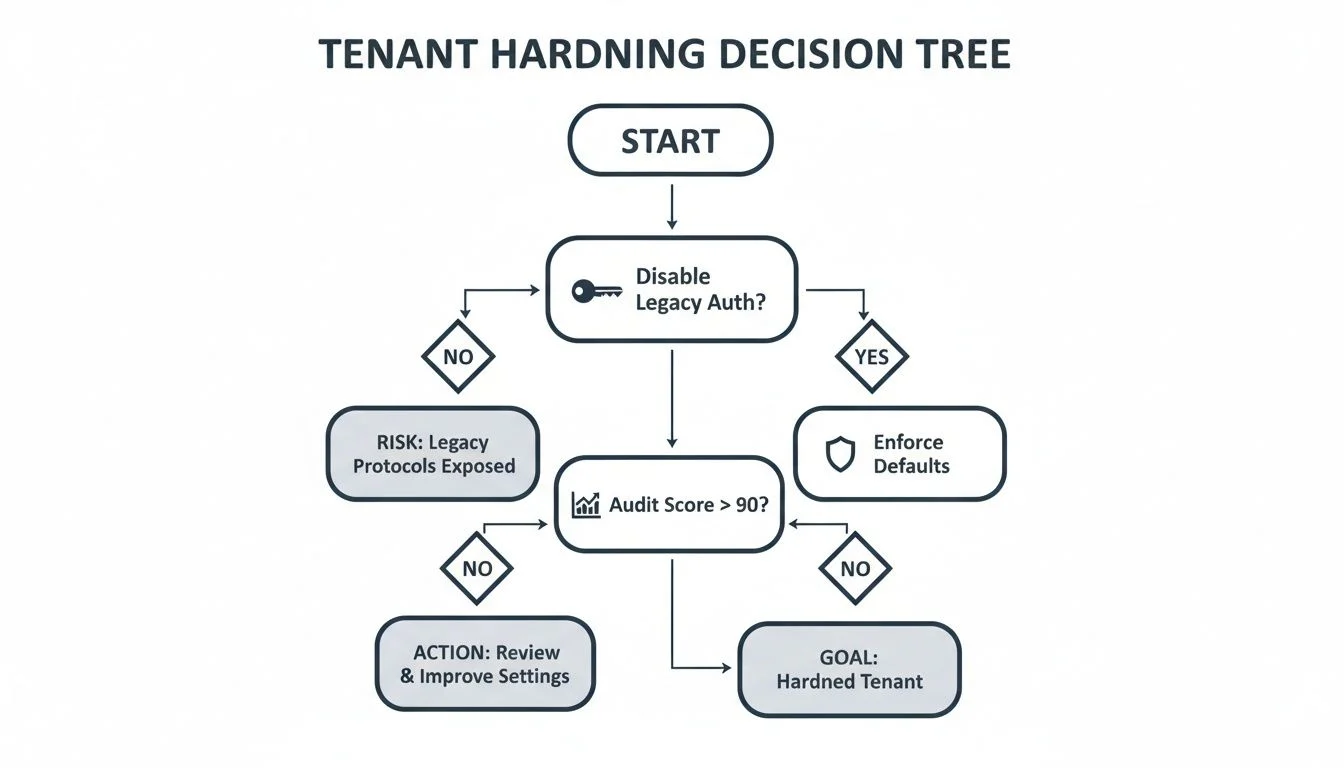
As you can see, killing off outdated protocols and auditing security scores are non-negotiable first moves before you can even think about layering on more advanced identity controls.
Beyond Basic Multi-Factor Authentication
Multi-Factor Authentication (MFA) is the absolute bare minimum for modern security. But not all MFA is created equal. A simple SMS code is certainly better than nothing, but it’s dangerously vulnerable to SIM-swapping attacks. A good MSP will always push clients towards phishing-resistant MFA methods.
These stronger, more reliable methods include:
- Authenticator Apps: Using apps like Microsoft Authenticator for time-based codes or simple push notifications.
- FIDO2 Security Keys: Physical hardware keys that provide the gold standard of verification.
- Windows Hello for Business: Biometrics like fingerprint or facial recognition built right into the device.
Credential-based attacks now account for a staggering 42% of major cyber incidents across Australia. Microsoft’s own data shows that simply enforcing any form of MFA blocks over 99% of these password-based attacks, making it an incredibly powerful first line of defence.
For a deeper dive into the fundamentals, you might find our article explaining what is two factor authentication and why it’s so vital helpful.
Dynamic Security With Conditional Access
This is where MSPs really prove their worth. Azure AD Conditional Access is a powerhouse tool that lets us build dynamic, context-aware security rules. Instead of a simple “yes” or “no” at login, Conditional Access looks at multiple signals to make a smart, real-time decision.
Think of it like a sharp security guard who does more than just glance at an ID. This guard checks the ID, notes the time of day, confirms the person is in an approved location, and ensures their device is healthy before granting access.
Here are a few common but highly effective policies we roll out for clients.
Key Conditional Access Policy Scenarios for MSPs
| Policy Scenario | What It Does | Why It’s Critical |
|---|---|---|
| Block Legacy Authentication | Stops sign-in attempts from old apps (like old Outlook clients) that can’t handle MFA. | These old protocols are a favourite backdoor for attackers because they bypass modern security checks entirely. |
| Location-Based Access | Blocks all sign-in attempts from countries your business has no reason to operate in. | It’s a simple but effective way to cut down on a huge volume of automated international attacks. |
| Require Compliant Devices | Enforces that only company-managed, healthy, and up-to-date devices can access sensitive data. | This stops compromised personal laptops or malware-infected PCs from connecting to your corporate network. |
| Session Risk-Based MFA | If a sign-in is flagged as risky (e.g., from an unusual location or an anonymous IP), it forces an MFA prompt. | This adds an extra layer of security precisely when it’s needed most, stopping attackers even if they have a password. |
By layering these kinds of policies, we create a security model that’s both incredibly strong and flexible enough to adapt to real-world situations.
Enforcing the Principle of Least Privilege
One of the most common security mistakes we see is users having far more access than they actually need to do their jobs. A compromised account with admin privileges is an absolute catastrophe waiting to happen. To manage this risk, MSPs must implement smart strategies like Role Based Access Control (RBAC).
The principle of least privilege is simple: a user should only have the bare minimum permissions required for their specific role. Someone in the marketing team has no business accessing finance data, and an accountant doesn’t need to be a global administrator for the entire M365 tenant.
We enforce this using tools like Azure AD Privileged Identity Management (PIM), which provides “just-in-time” access. This means high-level permissions are only granted temporarily when someone explicitly requests and gets approval for them. It dramatically shrinks the potential blast radius if an account ever gets compromised.
When to Get Help
Trying to manage Microsoft 365 security properly is a full-time job. It demands specific expertise and constant vigilance. While many businesses start out managing it themselves, there is a clear tipping point where the complexity and risks become too much for an internal team to handle alone. Recognising when you have reached that point is critical.
If your team is constantly reacting to new cyber threats, it’s a major sign you need professional support. Cybercriminals are always developing new attack methods, and a reactive security posture is a battle you will eventually lose. A professional Managed Service Provider (MSP) delivers proactive threat intelligence and a tested, strategic approach.
Key Signs It’s Time for an Expert
Certain challenges are undeniable signals that your current security approach is no longer sufficient. If any of the following situations sound familiar, it is likely time to seek expert help.
- You’re Out of Your Depth: You know you should be using advanced tools like Conditional Access or Data Loss Prevention, but your team lacks the deep, hands-on experience to configure and manage them correctly. An incorrect setting can be worse than no setting at all.
- Compliance is a Nightmare: You are required to meet strict compliance standards like the ACSC Essential Eight, but you don’t know how to translate those requirements into technical controls within the Microsoft 365 ecosystem.
- Drowning in Alerts: Your team is overwhelmed by a constant flood of security alerts. It has become impossible to distinguish real threats from the noise of false positives, and you worry that something critical will be missed.
An expert MSP does more than just sell you software. They deliver a complete security strategy, handle the continuous monitoring, and provide the experienced people needed to respond in minutes when an incident occurs, making sure your business stays resilient.
If you’re facing these challenges, the risks of continuing alone are simply too high. To discuss how we can professionally secure your Microsoft 365 environment, please reach out via our contact page.
Protecting Your Endpoints and Data Everywhere

Real security doesn’t stop at the login screen. While locking down your tenant and enforcing strong identity controls are the absolute bedrock of a secure Microsoft 365 environment, that protection needs to follow your data and the devices that access it. An MSP’s job is to create a protective bubble that follows your information wherever it goes.
This means securing every single endpoint, from a company laptop in the office to a personal smartphone an employee uses to quickly check emails. The modern workplace doesn’t have a fixed perimeter anymore, which makes robust endpoint management and data governance completely non-negotiable.
Enforcing Security Policies with Microsoft Intune
This is exactly where a tool like Microsoft Intune becomes indispensable for MSPs. Intune is a cloud-based service that gives us granular control over mobile device management (MDM) and mobile application management (MAM). It’s how we make sure any device accessing your company’s data meets a strict set of security requirements.
With Intune, we can roll out policies that:
- Enforce device encryption: We mandate BitLocker for Windows PCs and FileVault for Macs. If a laptop is ever lost or stolen, the data on it remains completely unreadable.
- Require screen locks and strong passcodes: It’s a simple measure, but it’s incredibly effective at preventing unauthorised access to unattended devices.
- Keep devices up to date: We can push policies that ensure operating systems and apps are consistently patched against the latest vulnerabilities.
- Deploy security software: We make sure every managed device has Microsoft Defender for Endpoint installed and configured correctly for advanced threat protection.
By managing devices this way, we can guarantee that only healthy, compliant endpoints are allowed to connect to your Microsoft 365 resources. You can learn more about how Tbourke Solutions implements these controls in our deep dive on Intune mobile device management.
Proactive Threat Hunting and Email Security
Beyond just securing the devices themselves, we need to proactively defend against incoming threats. The Microsoft Defender suite gives us the tools for this layered defence. Microsoft Defender for Endpoint is way more than just a traditional antivirus; it’s an advanced threat detection platform that uses behavioural analysis to spot and shut down sophisticated malware and fileless attacks.
At the same time, Microsoft Defender for Office 365 acts as our frontline defence for email, which is still the number one way cyberattacks are delivered. It provides critical protections, including:
- Safe Links: This feature scans URLs in emails and documents in real-time, blocking malicious sites before a user can click on them.
- Safe Attachments: Email attachments are detonated in a secure “sandbox” environment to check for malicious behaviour before they ever reach a user’s inbox.
- Anti-phishing intelligence: It uses machine learning to detect and quarantine sophisticated phishing attempts that might otherwise trick even savvy users.
Preventing Data Leaks with DLP
Protecting your data also means controlling how it’s shared. Data Loss Prevention (DLP) policies are a powerful tool MSPs use to prevent sensitive information from being shared, whether it’s by accident or with malicious intent.
We configure DLP policies to automatically identify and protect specific types of data, such as:
- Credit card numbers
- Tax File Numbers (TFNs)
- Driver’s licence numbers
- Confidential project documents
So, if an employee tries to email a spreadsheet packed with customer credit card details to an external address, a DLP policy can automatically block the email and notify both the user and an administrator. It’s about stopping data breaches before they can even happen.
The goal of a multi-layered data protection strategy is to make security seamless. It shouldn’t get in the way of productivity but should work quietly in the background to enforce policy and stop threats at every turn. While Microsoft 365 encrypts data in the cloud, physical endpoints and their data need robust protection even after retirement. Understanding practices like secure hard drive shredding is vital for preventing data breaches from decommissioned assets.
Common Questions on Microsoft 365 Security
When it comes to securing Microsoft 365, business owners often have the same crucial questions. Drawing from our years of hands-on experience managing client environments, here are straight, practical answers to the most common queries we hear.
Isn’t Microsoft 365 Secure by Default?
Microsoft 365 is a highly secure platform, but its default settings prioritize ease of use over maximum security. It operates on a shared responsibility model: Microsoft secures its global cloud infrastructure, while you are responsible for securing your data, users, and devices within that ecosystem. An experienced MSP configures the advanced security features like Conditional Access, Data Loss Prevention (DLP), and detailed audit logging, which are powerful but not enabled by default.
Do Small Businesses Really Need Advanced Security?
Yes, absolutely. Cybercriminals frequently target small businesses, viewing them as high-value targets with potentially weaker security. Reports consistently show that Australian small businesses suffer significant financial losses from security breaches. Foundational security practices like enforcing phishing-resistant MFA, hardening the tenant, and managing device compliance are critical for any business wanting to protect its data, finances, and reputation.
What Is the Single Most Important Security Measure for M365?
If you only do one thing, enforce phishing-resistant Multi-Factor Authentication (MFA) for every user. Credential theft remains the most common way attackers gain initial access. Even if a user’s password is stolen, MFA acts as a powerful barrier. Microsoft’s own data confirms that MFA blocks over 99% of identity-based attacks, making it the undisputed cornerstone of any modern security strategy.
How Does an MSP Handle Security Alerts and Incidents?
A key benefit of partnering with an MSP is proactive monitoring and rapid incident response. We use specialized tools to centralize and analyze security alerts from your Microsoft 365 environment. Our security analysts investigate potential threats, filter out false positives, and take immediate action on credible incidents based on a pre-defined response plan. This ensures threats are contained and resolved quickly, minimizing impact on your business.
How Tbourke Solutions Can Help
At Tbourke Solutions, we translate these expert principles into a practical, hands-on service for businesses, schools, and families across Melbourne. With over two decades of IT experience, our goal is to make technology secure and straightforward. We don’t believe in one-size-fits-all security. We start by understanding your specific operational needs and risk profile to build a security posture that protects your business without hindering productivity.
Our Proactive Security Approach
Our process begins with a thorough security assessment of your current Microsoft 365 environment. We identify and remediate immediate risks, such as legacy authentication gaps or users without MFA, and perform foundational tenant hardening. This establishes a strong, secure baseline from which to build. From there, we provide continuous management, actively monitoring for new threats, managing security alerts, and ensuring your configurations remain optimized as your business and the threat landscape evolve.
Our core services include:
- Initial Tenant Hardening: We lock down security defaults, disable legacy protocols, and configure policies to shrink your attack surface from day one.
- Identity and Access Management: We deploy and manage phishing-resistant MFA, build robust Conditional Access policies, and enforce the principle of least privilege.
- Ongoing Threat Management: Using tools like Microsoft Defender, we proactively monitor endpoints, filter malicious emails, and respond rapidly to security incidents.
- Data Protection and Governance: We help you implement Data Loss Prevention (DLP) policies and ensure a robust third-party backup solution is in place to protect against ransomware and accidental data loss.
Technology should be an asset, not a source of worry. Our mission is to handle the complexity of Microsoft 365 security so you can focus on running your business. For businesses seeking a comprehensive IT partnership, our support extends well beyond Microsoft 365. Explore our full range of IT managed services to see how we can become your dedicated IT department.
Ready to secure your Microsoft 365 environment with confidence? Submit a query via our contact page to start the conversation.
Share This Story, Choose Your Platform!