
The backup conversation usually starts in the wrong place. Most Melbourne business owners ask whether Azure Backup is cheaper than a local backup device, but the critical question is what it costs your business to recover when something goes wrong.
That matters because recoverability isn’t a fringe IT issue anymore. The Australian Cyber Security Centre’s Annual Cyber Threat Report 2023-24 says it received 36,700 cybercrime reports, which works out to one report every 14 minutes on average according to this Azure backup and site recovery comparison. If your business loses files, servers, or access to key systems, the monthly backup fee is often the smallest part of the problem.
Introduction The Modern Backup Dilemma for Melbourne Businesses
For a Melbourne school, law firm, tradie office, or growing startup, backup isn’t just about keeping copies of files. It’s about whether you can get payroll, client records, email, job data, and shared documents back fast enough to keep operating.
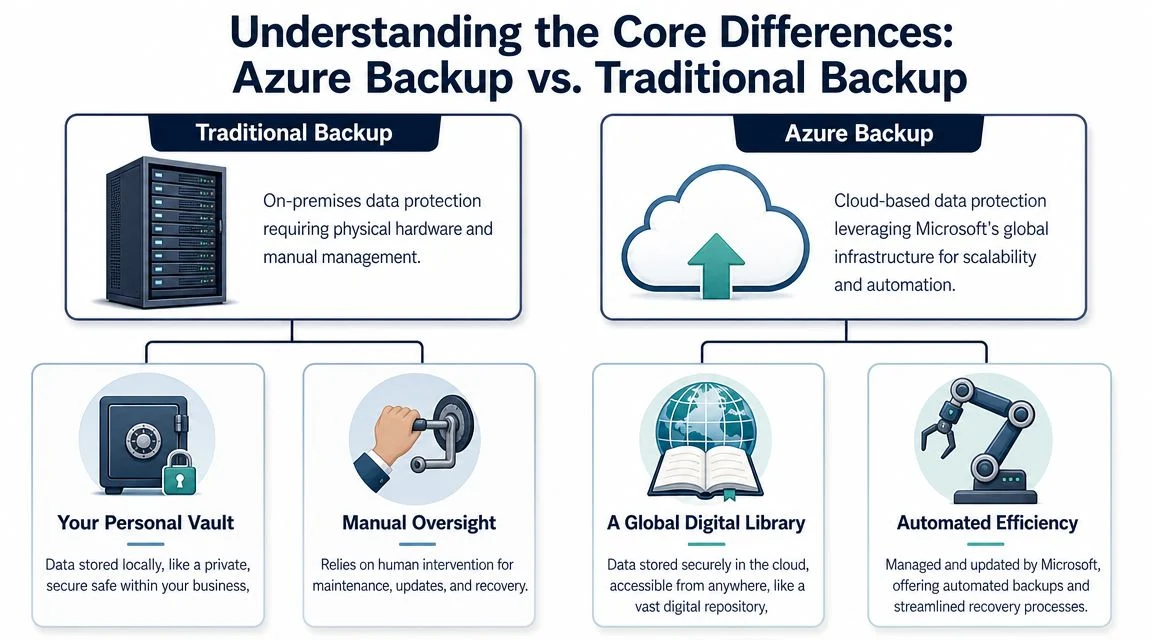
Traditional backup usually means local storage. Think NAS devices, backup appliances, USB rotation, or older tape-style processes. Azure Backup takes a different path. It stores recovery copies in Microsoft’s cloud platform and is built around central policies, automation, and hybrid protection for both cloud and on-premises workloads.
The shift towards cloud backup hasn’t happened by accident. The Australian Bureau of Statistics reported that 73% of Australian businesses used paid cloud computing services in 2022-23, up from 66% in 2021-22 and 45% in 2018-19, as noted in this overview of why businesses are moving to Azure Backup. For Melbourne SMEs, that tells you something simple. Cloud isn’t the experiment anymore. For many businesses, it’s the default operating model.
TLDR: For most Melbourne small and medium businesses, Azure Backup is usually the better baseline because it reduces hardware dependence, supports distributed work, and improves resilience when local systems fail. Traditional backup still has a place when you need very fast restores for large data sets or when internet dependency is a major operational problem. The smartest decision often comes down to total cost of recovery, not just subscription fees or hardware purchase cost. If you care about labour, downtime, and ransomware recovery, cloud-first backup usually wins.
Understanding the Core Differences
Traditional backup and Azure Backup both create recovery copies. A key difference is where the recovery process breaks, and what that break costs your business in labour, downtime, and stress.
For a Melbourne small business, that matters more than the backup method on paper. A local backup can look cheaper because the hardware is already sitting in the comms room. Then a server fails on a Monday morning, the appliance has a disk fault, the office loses power, or someone has to drive in after hours to start a restore. That is total cost of recovery. It includes staff time, lost trading hours, emergency IT work, and the chance that the backup system itself has become part of the problem.
What traditional backup looks like in practice
In many SMEs, traditional backup still means a local appliance, NAS, backup server, or rotating USB drives kept on site. The business owns the gear, controls the setup, and can often restore large files quickly across the local network if everything is working properly.
That last part is the catch.
Traditional backup usually depends on several things going right at once:
- Healthy local hardware: The backup device, disks, power, and network all need to be available during a recovery.
- Regular human checks: Someone needs to review failed jobs, replace disks, patch firmware, and test restores.
- A real offsite process: If copies stay in the same building, fire, theft, flood, or a serious electrical event can turn one incident into two losses.
- Documented recovery steps: Fast backup is not the same as fast recovery if no one remembers the restore process under pressure.
This approach still suits some businesses. I usually see it work best where file volumes are large, internet connectivity is a genuine constraint, and the business has the discipline to maintain hardware properly. If that discipline slips, the savings disappear quickly.
What Azure Backup changes
Azure Backup shifts the model from device management to policy management. Backups are scheduled, retained, and monitored through Azure services rather than relying on one box in one office. That changes the recovery conversation. The question becomes less about whether the local appliance survived, and more about how quickly systems can be restored to an operational state.
In practical terms, Azure Backup changes a few things for Melbourne businesses:
- Less manual work: Backup jobs follow defined policies instead of depending on a staff member to remember a routine.
- Lower site dependency: A problem in the office does not automatically take out the recovery copy.
- Better fit for mixed environments: On-prem servers, Azure workloads, and remote users can sit under one protection approach.
- More predictable recovery planning: Retention, alerts, and backup coverage are easier to review centrally.
There is a trade-off. Azure Backup is not automatically the fastest option for every restore. Pulling back large amounts of data can take longer than restoring from a healthy local appliance on the same network. For businesses with heavy CAD files, media libraries, or large line-of-business datasets, that point needs proper testing, not assumptions.
If your business is already reviewing cloud adoption more broadly, the benefits of Azure cloud for small business are relevant here because backup tends to follow the same operating model as the rest of your systems.
The main difference is simple. Traditional backup asks, “Do we have a copy?” Azure Backup pushes a more expensive question to the front, “How much will it cost us to recover properly when something goes wrong?”
A Head-to-Head Comparison for Melbourne Businesses
For a Melbourne business owner, the better backup option is usually the one that costs less on the worst day, not the one that looks cheaper on the monthly invoice.
That is why I compare backup through total cost of recovery. TCR includes storage and licensing, but it also includes technician labour, after-hours callouts, staff downtime, lost trading time, and the cost of getting replacement hardware or temporary systems online. On that basis, Azure Backup and traditional backup often produce very different outcomes.
Azure Backup vs. Traditional Backup A Comparison for Melbourne SMBs
| Criterion | Azure Backup | Traditional Backup (On-Premises) |
|---|---|---|
| Total Cost of Recovery | Lower reliance on local hardware usually reduces recovery labour and removes some replacement costs after a site or hardware failure | Can appear cheaper if the hardware is already paid for, but recovery often needs more hands-on work, urgent hardware fixes, and longer interruptions |
| Security and resilience | Off-site recovery copies suit ransomware planning and multi-site operations better | Good protection is possible, but systems that stay closely connected to production can create extra risk during an incident |
| Restore speed | Works well for many restores, especially smaller workloads, but performance depends on internet bandwidth and backup design | Often faster for large on-site restores if the device is healthy and still available |
| Ongoing management | Policy-based management cuts routine admin work and makes oversight easier | Needs patching, monitoring, storage planning, and physical hardware lifecycle management |
| Scalability | Easier to extend to new servers, Azure workloads, and remote staff | Growth usually means more hardware, more rack space, and more maintenance |
| Best fit | Hybrid environments, growing businesses, professional services firms, schools, and teams spread across locations | Single-site businesses with large local datasets and a strong need for same-network restores |
Total cost of recovery matters more than sticker price
Many comparisons tend to stray from the mark here.
A traditional backup appliance can look economical because the cost is visible. You buy the box, renew support, and treat the job as done. Recovery rarely works that neatly. If the appliance fails, if the office loses power, or if a ransomware event spreads wider than expected, the bill starts to show up in labour and downtime.
For Melbourne businesses, TCR is the more useful measure because it forces the right questions:
- Who is doing the restore, and how much will that labour cost
- How many manual steps sit between the outage and staff getting back to work
- Can the business operate in a reduced mode during recovery, or does revenue stop
- Does recovery depend on hardware sitting in the same office as the original systems
- How long can phones, bookings, files, or line-of-business apps be unavailable before the impact becomes serious
I have seen businesses save a few hundred dollars a month on backup, then spend far more in one outage because the restore needed urgent engineering time and half the team sat idle waiting.
Security and ransomware resilience
Recoverability during an attack now sits at the centre of the decision. If backup copies are too close to the production environment, the recovery plan has a weak point.
Traditional backup is not unsafe in itself. A well-designed on-premises system with proper isolation can still work well. The problem is that many small business setups are not built that way. They rely on a local appliance, a NAS, or connected storage that is convenient to manage but also easier for an attacker or site-wide failure to affect.
Azure Backup generally improves separation. That does not remove every risk, but it usually reduces the chance that one office incident turns into a full recovery crisis.
Recovery speed depends on what you need back first
Restore speed is where on-prem backup still wins in some environments. If a business needs several terabytes returned quickly across a local network, a healthy appliance in the server room can beat a cloud restore every time.
But that is only part of the picture. Many businesses do not need every file back at once. They need accounting first. Then email access. Then the shared documents that keep client work moving. In those cases, the fastest business recovery is not always the fastest full data recovery.
That distinction matters financially. Getting ten staff back into core systems by 10:00 am is often worth more than restoring an entire archive by end of day.
Azure Backup also needs proper planning around retention tiers and restore expectations. Lower-cost storage can make long-term retention affordable, but slower retrieval may not suit systems that need rapid recovery. This is why backup design should follow business priority, not just storage price.
Practical rule: classify systems into “must be back first,” “can wait until later today,” and “can wait longer.” That one exercise usually makes the right backup design much clearer.
Compliance and business fit
Compliance is rarely about whether cloud sounds modern or local feels safer. It is about whether the business can show that backups are consistent, retention is deliberate, and restores are tested.
Azure Backup often makes that easier to manage across mixed environments because policies and reporting are more centralised. Traditional backup can still meet the same standard, but it tends to rely more on the discipline of whoever is maintaining the hardware and checking the jobs.
If your wider infrastructure is still under review, this guide to Azure vs on-premise for Australian small businesses is worth reading. Backup decisions usually follow the same operational and financial trade-offs as the rest of the environment.
When to Get Help from an IT Expert
Get advice before a backup problem turns into a recovery bill.
Most Melbourne businesses do not overspend on backup because they chose cloud or hardware. They overspend because recovery was never costed properly. Staff sit idle. Managers coordinate workarounds. External IT labour blows out because no one documented restore order, retention rules, or testing.
That is the point where expert help pays for itself.
A good IT review should not start with “Azure or traditional?” It should start with harder business questions. What does one hour of downtime cost in wages, delayed jobs, missed appointments, and owner time? Which systems have to be back first for the business to trade? How long can each one realistically stay offline before the financial hit becomes unacceptable?
Those answers shape the backup design. They also expose where the true risk sits. I often find a business has spent years paying for backups that look fine on paper but would still leave the team unable to work for half a day after a failure. That is a total cost of recovery problem, not just a technology problem.
Outside help is usually worthwhile if any of the following are true: your backups have grown piecemeal over time, no one has tested a full restore recently, ransomware is a serious concern, or you are comparing Azure Backup with a local appliance purely on monthly price. Recovery speed, staff disruption, and after-hours IT labour often matter more than the subscription line item.
A short review from an experienced IT partner can clarify the trade-offs quickly. It should give you a restore priority plan, realistic recovery time expectations, and a clearer view of what an outage would cost your business. That is usually far cheaper than discovering the gaps during a live incident.
Real-World Scenarios Where One Outshines the Other
The right answer changes depending on how the business works day to day. Melbourne businesses don’t all fail in the same way, so they shouldn’t all back up in the same way either.

A CBD legal practice with strict document retention
A law firm usually cares about controlled retention, reliable recovery of matter files, and minimal administrative fuss. Staff may work between the office, court, and home, so access patterns are already distributed.
Azure Backup is often the better fit here, especially if the firm already uses Microsoft cloud services and wants central management. The legal team doesn’t benefit from having a backup appliance hidden in a cupboard if no one is consistently checking restore readiness. What matters is repeatable recovery and clear policy control.
A hybrid model can still help. Critical local file shares may retain a local recovery layer for speed, while Azure handles longer retention and offsite resilience.
A multi-campus school in Melbourne’s west
Schools are one of the clearest cloud-backup use cases. They often have a mix of on-site servers, staff laptops, shared curriculum files, and time-sensitive operational systems. They also can’t afford prolonged disruption during term.
Azure Backup suits this environment because administration can be centralised. That’s valuable when the people using the systems are spread across campuses or buildings. A school usually needs less hardware babysitting, not more.
This is also where broader continuity planning matters. Backup is only one part of the response. For a practical external guide, ABCO Security Services Australia has a useful article on disaster recovery planning for businesses that helps frame backup within the wider business continuity picture.
A construction or trade business with field staff and patchy connectivity
This one is different.
If the office server holds large project files, local job data, and historical documents, and site connectivity is inconsistent, a purely cloud-first recovery model may frustrate everyone when a large restore is needed. In that case, traditional local backup can still shine because large restores stay on the local network.
That doesn’t mean cloud should be ignored. A hybrid design is usually the stronger answer. Keep a fast local backup for operational recovery, then add Azure Backup or another offsite layer for resilience against theft, site incidents, or ransomware. Local speed plus offsite separation is often the practical middle ground.
A startup with no appetite for hardware
Startups usually don’t want backup appliances, disk rotation, or server-room maintenance. They want systems that scale as the business changes and don’t require a staff member to become the accidental backup administrator.
Azure Backup usually wins here because the business is already optimised for cloud-first operations. The startup doesn’t need a nostalgic backup design. It needs one that follows its actual workflow.
For businesses mapping these scenarios into a documented continuity process, these disaster recovery plan examples can help turn broad intention into an action plan.
The strongest backup model is the one your business can actually operate under pressure, not the one that looked cheapest during procurement.
Making the Switch to Azure Backup
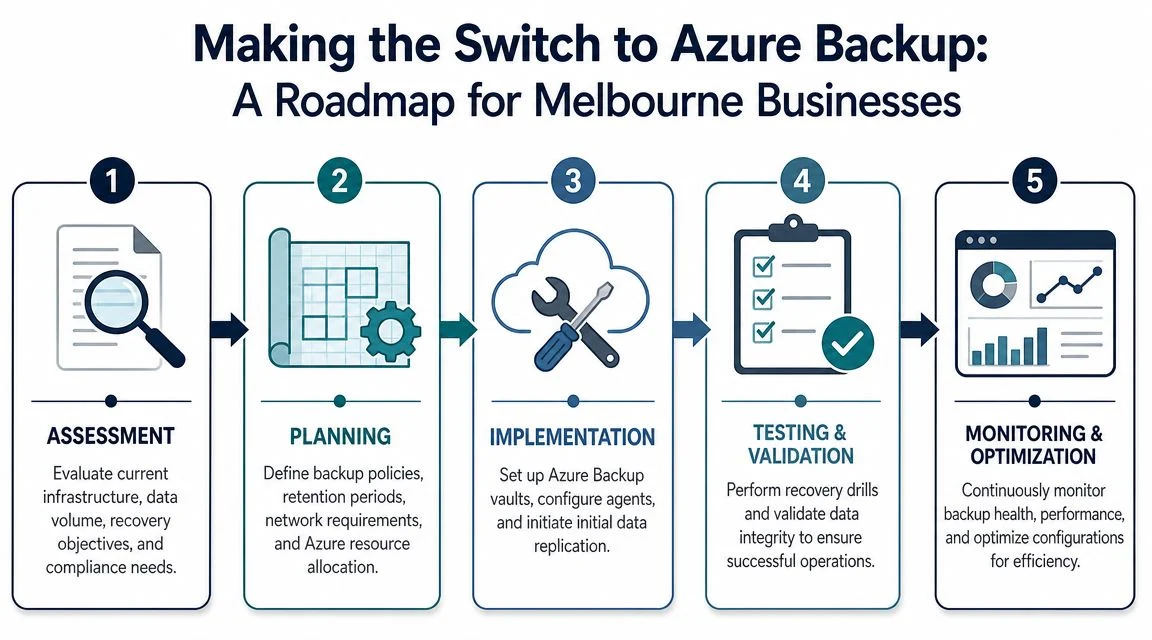
A backup migration goes wrong when a business treats it as a storage project instead of a recovery project. The question is not “How do we copy data into Azure?” It is “What will recovery cost in staff time, downtime, and lost trading if something breaks next Tuesday?”
Start with recovery cost, not storage size
Small businesses often begin by asking how many terabytes they need to protect. That matters, but it is rarely the cost that hurts most during an incident. The bigger bill usually comes from people waiting, jobs not invoiced, and internal staff scrambling through an untested restore.
Sort systems by business impact. Payroll, finance, client records, shared project folders, and the application that runs daily operations usually belong at the top. Old archives, duplicate media, and stale departmental folders can sit lower. That ranking shapes how often data is backed up, how fast it must come back, and how much you should spend protecting it.
Set the recovery policy before turning anything on
Azure Backup works well when the business rules are clear first. Decide what needs short recovery times, what can tolerate a slower restore, what must be kept for years, and who has authority to approve a recovery request. If those answers are vague, the monthly Azure bill can look reasonable while the total cost of recovery stays high.
In practice, I advise Melbourne businesses to answer five plain questions before migration starts:
- What outage period is acceptable for each system
- How much data can the business afford to lose between backups
- Which restores need to happen the same day
- What data should move into lower-cost long-term retention
- Who will test restores and sign off that they work
Migrate in stages and keep the old safety net until Azure proves itself
A staged rollout reduces risk and keeps recovery options open. Start with one or two workloads that matter enough to test properly, but not so much that a mistake becomes a business crisis. A file share, secondary application server, or test workload is often a practical first step.
Then run both backup systems in parallel for a defined period. That overlap costs a little more for a month or two, but it usually saves money compared with a rushed recovery from a brand-new platform that has never been tested under pressure.
The migration sequence is usually straightforward:
Choose the first workloads carefully
Pick systems with clear ownership and known restore requirements.Keep legacy backup running temporarily
Do not shut off the old platform on day one.Test actual restores, not just backup job reports
Recover files, folders, and any application data the business depends on.Adjust retention to match business value
Daily operational data and long-term records should not be priced the same way.Document who does what during a restore
Recovery delays often come from confusion, not technology.
If the change sits inside a broader infrastructure project, backup design should be planned alongside the server move. This is especially true for businesses shifting workloads off ageing on-prem hardware. A server migration to Azure service in Melbourne should include recovery testing, retention decisions, and rollback planning before cutover.
Budget for labour and downtime, not just the Azure subscription
This is the part many quotes miss.
Azure Backup can reduce hardware ownership, tape rotation, and manual offsite handling. But the financial case only becomes clear when you compare full recovery effort. If a local backup appliance is cheaper on paper but takes half a day of senior staff time to restore a failed server, that labour cost belongs in the comparison. So does lost production while staff wait for files, phones, or line-of-business apps to return.
For many Melbourne businesses, the better migration is the one that lowers the total cost of recovery over three to five years, even if the monthly subscription looks higher at first glance.
How Tbourke Solutions Simplifies Your Backup Strategy
A lot of backup pain comes from ownership gaps. The software exists, but no one checks alerts consistently. The device is installed, but no one runs restore tests. The cloud policy is in place, but no one revisits it when the business changes.
That gap matters because ransomware recovery rarely ends with “restore the file and move on”. Australian cyber reporting shows persistent pressure in this area, and one cited summary notes that cybercrime reports averaged one every 6 minutes, while many incidents involve business interruption, system rebuilding, and specialist support rather than just data restoration, according to this article on Azure Backup as a managed option.
A managed approach helps by making backup an operating discipline rather than a set-and-forget tool. That can include monitoring, restore testing, policy reviews, and recovery support when something goes wrong. For Melbourne businesses that want cloud planning, backup design, and ongoing support in one place, Azure cloud services from Tbourke Solutions are one option to evaluate alongside your current IT arrangements.
Typical support options usually suit a few broad categories:
- Small business baseline: Protection for core files, Microsoft-based environments, and key office systems.
- Hybrid support: For businesses that need local recovery speed plus offsite cloud resilience.
- Multi-site or school environments: Centralised policy management across more complex estates.
Frequently Asked Questions
Is Azure Backup always better than traditional backup
No. The better option depends on what a business can afford to lose during recovery. Azure Backup usually suits Melbourne businesses that want offsite protection without buying and replacing more backup hardware. Traditional backup can still make more sense where large file sets need to be restored quickly on site, especially if every hour of downtime hits revenue, wages, or customer commitments.
Can I keep my existing local backup and still use Azure Backup
Yes. That is often the most practical setup.
Local backup is usually there for speed. Azure adds a separate recovery path if the office, server, or backup appliance is damaged, encrypted, or unavailable. From a total cost of recovery perspective, that mix can reduce the expensive part of an outage, which is often staff time, business interruption, and after-hours IT labour, not just the backup platform itself.
How much internet bandwidth do I need for Azure Backup
It depends on daily data change, backup frequency, and how quickly systems need to be usable again after a failure.
A Melbourne accounting firm with modest daily changes has very different requirements from a design studio pushing large media files all day. The right question is not “Will Azure work on our connection?” The right question is “How long will backup and recovery take on our connection, and what will that downtime cost us?”
Is Azure Backup cheaper
Sometimes, but the better question is whether recovery is cheaper.
Cloud backup can lower spending on hardware, maintenance, and offsite media handling. Traditional backup can still win if a local restore gets staff working again much faster. A lower monthly storage bill does not help much if the business then pays for a full day of downtime, urgent IT labour, and missed client work during a slow recovery.
What should I ask an IT provider before choosing a backup system
Ask questions that expose the actual recovery plan, not just the product choice:
- How long would it take to restore our priority systems
- What parts of recovery are automated, and what parts need manual labour
- How often are full restore tests done
- What will still work if the office or server is completely unavailable
- What is the expected cost of downtime for our business over four hours, one day, and three days
If you’re weighing Azure Backup against traditional backup and want a recommendation based on your actual systems, recovery priorities, and budget, Tbourke Solutions can help you review the options and map out a practical backup strategy.
Share This Story, Choose Your Platform!