You’ve probably heard the term ‘Zero Trust’ being thrown around, but what does it actually mean for your business? It’s a modern security model built on a simple but incredibly powerful idea: never trust, always verify. For any Australian business, school, or even a sole trader, this approach is fast becoming a critical defence against today’s relentless cyber threats.
TLDR: What You Need to Know
Zero Trust security throws out the old idea of a “trusted” internal network where everything inside is considered safe. Instead, it assumes no one, not your staff or their devices, is trustworthy by default and demands proof from everyone, every single time they try to access something. For a small business, school, or sole trader, it means ditching the old ‘castle and moat’ defence and treating every login like a high-security checkpoint. Ultimately, if you use cloud apps, have remote workers, or handle sensitive data, you absolutely need it.
What Is Zero Trust Security in Simple Terms?

From Castle and Moat to Airport Security
For decades, cybersecurity was built like a medieval castle. You had a strong outer wall (the firewall) and a deep moat (your network perimeter). The logic was simple: anyone inside the castle walls was a trusted friend, and anyone outside was a potential enemy.
That model worked when everyone was physically inside the office. But today, your team works from home, on the road, and from local cafes. Your data isn’t just on a server in the back room anymore; it’s in the cloud with apps like Microsoft 365 and Google Workspace.
Suddenly, those castle walls are irrelevant. Attackers aren’t just trying to break down the front gate; they can sneak in by stealing the login details of one of your trusted staff members.
Zero Trust security is a modern cybersecurity framework that assumes no user, device, or network should be automatically trusted, instead requiring continuous verification of every access request, no matter where it originates from.
This is where the airport security analogy really clicks. When you’re at the airport, you don’t just get your ticket checked once at the entrance. You show your ID to check your bags, again at the security scanner, and again at the gate. Zero Trust applies that same logic to your digital world, constantly checking identity and permissions at every step.
Key Components of Zero Trust
This “never trust, always verify” mindset is built on a few core ideas:
- Strong Identity Verification: A simple password just doesn’t cut it. Zero Trust insists on stronger proof of identity, often using methods like Two-Factor Authentication (2FA). You can get the full rundown in our guide on what is Two-Factor Authentication.
- Assume Breach: This framework operates as if an attacker is already inside your network. This shifts the focus from just keeping them out to limiting the damage an intruder can do once they’re in.
- Least Privilege Access: Users and devices only get the absolute minimum level of access they need to do their job. Your accountant doesn’t need access to marketing files, and a teacher’s laptop shouldn’t be able to connect to the administration’s financial server. It’s that simple.
The growing adoption of this model reflects its effectiveness. In Australia, where cyber incidents are on the rise, businesses are making a significant shift. To truly understand the fundamentals, you can delve deeper into the concept of Zero Trust Security.
Do You Really Need Zero Trust? The Short Answer
So, let’s cut to the chase. What exactly is Zero Trust, and is it something your business or school actually needs to worry about?
Think of it this way: the old way of doing security was like a castle with a moat. Once you were inside the walls (on the office network), you were trusted. Zero Trust gets rid of that idea entirely. It assumes no one is trusted by default, inside or out, and demands proof from everyone and every device trying to access your data.
For any Australian business, school, or even a sole trader using modern tools, think cloud apps like Xero or M365, or staff working from home, the answer is a clear yes. Adopting a Zero Trust mindset is no longer an optional extra; it’s a fundamental defence you need to stay safe from today’s non-stop cyber threats.
You might also be interested to know that this approach lines up perfectly with government-backed security advice, like the ACSC Essential 8, which are designed to give Australian organisations a practical path to better protection.
The Core Principles of a Zero Trust Architecture

So, what does Zero Trust actually do? It’s not just a fancy concept; it’s a security model built on a few non-negotiable principles. These aren’t just abstract ideas, they are the practical rules of the road that dictate how access is managed in a modern IT environment.
By getting a handle on these core rules, you’ll see how Zero Trust shifts your security from a rigid, breakable wall into an intelligent system that follows and protects your data, no matter where it is. Let’s break down what these principles really mean for your day-to-day operations.
Principle 1: Always Verify Explicitly
The first and most important rule of Zero Trust is to treat every single access request as if it’s coming from an untrusted source. It doesn’t matter if the person is sitting in your office or a café, you always verify.
A simple password just doesn’t cut it anymore. This principle demands more proof before letting anyone in. It checks multiple signals to be sure the person is who they say they are, including:
- User Identity: Is this a known user account?
- Location: Is this a typical login location for them?
- Device Health: Is the laptop or phone secure, patched, and free of malware?
- Service or Workload: What specific app or file are they trying to reach?
- Data Classification: How sensitive is the data they’re asking for?
By verifying every time, you get rid of the dangerous old assumption that “inside” the network is “safe”. This constant checking is the engine that drives a true Zero Trust setup.
Principle 2: Enforce Least Privilege Access
Once you’ve confirmed a user’s identity, the next rule kicks in: give them the absolute bare minimum access required to do their job, and nothing more. We call this the Principle of Least Privilege.
Think about it like this: you wouldn’t give a new employee a master key that opens every door in your building. That would be a huge risk if the key was lost or stolen. Instead, you’d give them a key that only opens their own office and maybe the lunchroom.
This approach is powerful because it dramatically contains the potential damage from a breach. If a cybercriminal does manage to steal someone’s login, they’re trapped in a tiny digital room with very few doors. They can’t wander through your network to find the real prizes, like your financial records or client database.
This isn’t just for people, either. The same rule applies to every app, device, and server on your network, ensuring each component only has the permissions it absolutely needs to function.
Principle 3: Assume Breach
This last principle requires a complete shift in mindset. Instead of assuming your network is a safe fortress, you work from the assumption that a threat is already inside. This moves your security focus from just trying to keep attackers out to also finding and stopping them fast if they get in.
A key technique here is micro-segmentation. Instead of one big, open-plan internal network where everything can talk to everything else, you chop it up into many small, isolated zones. Think of them as secure, fire-proof rooms. To move between them, you have to go through a checkpoint. You can learn more about the specifics in our guide on network segmentation.
The result? If a breach happens in one segment, say, a staff member’s laptop gets compromised, the damage is contained to that tiny zone. The attacker is stuck and can’t easily jump to the server holding your critical data. This containment strategy is a cornerstone of building a robust security architecture.
When to Get Help
If you’re running a small business, a school, or you’re a sole trader, the idea of rolling out a whole new security model can feel daunting. You’re not alone. Figuring out where to start, what tools you need, and how to get it all working without disrupting everything is a complex job.
This is the perfect time to get some expert guidance. At Tbourke Solutions, we can help you assess your current security and map out a clear, manageable plan. Don’t wait until after a security incident to take action. Reach out and submit a query through our contact page to schedule a chat.
Does Your Business Actually Need Zero Trust Security?
After hearing all the talk about Zero Trust, the big question is simple: is this something your business, school, or practice actually needs to worry about? The whole idea of shifting from a simple “castle and moat” defence to a “verify everything, always” model can sound a bit full-on.
But figuring out if you need it is surprisingly straightforward. It just comes down to looking at how your organisation works today.
The reality is, for most modern businesses, including small outfits, schools, and even sole traders, the old security model is broken. To see why, let’s walk through a quick checklist. If you find yourself nodding ‘yes’ to any of these, you’re operating in a way that traditional security was never built to protect.
The Modern Operations Checklist
Think for a moment about how your team actually gets their work done and where your important information is stored. This quick look will probably highlight a few security gaps that a Zero Trust model is specifically designed to fix.
- Do your people work from home or on the road? If your staff are accessing company files and apps from outside the office, they are completely bypassing your old “castle walls.” Every home network, café Wi-Fi, and personal device becomes a new, uncontrolled doorway into your business.
- Do you use cloud applications? Relying on tools like Microsoft 365, Google Workspace, or Xero means your most critical data doesn’t live inside your building anymore. It’s out there on the internet, which makes strong, verified access absolutely essential.
- Do you handle sensitive information? This is the big one. If your business or school holds personal, financial, or health information, like client credit card numbers, student records, or patient details, you have a legal and moral duty to guard it. A single breach could be devastating.
If you answered yes to any of these, Zero Trust isn’t just a “nice-to-have.” It’s a necessary security upgrade for the way you already work.
Real-World Scenario: Where Old Security Fails
Let’s make this practical. Imagine a small Melbourne accounting firm. The principal accountant, Sarah, is working from a café between client meetings. She needs to jump into a client’s financial records, which are stored in the firm’s cloud system.
Under a traditional security model, the firm’s main defence is the firewall back at the office. That’s completely useless here. Sarah logs in from the café’s public Wi-Fi. What she doesn’t know is that a cybercriminal on the same network just snagged her login password.
Because the old model inherently trusts anyone who shows up with the right password, the attacker can now log in as Sarah from anywhere in the world. They get full access to highly sensitive client financial data, and the firm might not have a clue until it’s far too late.
With Zero Trust, the story is completely different. When the attacker tries to log in, the system would immediately spot that the login attempt is coming from an unrecognised device and an unusual location. It would instantly trigger a second check, like a prompt on Sarah’s phone, which the attacker can’t possibly approve. Access is denied. The breach is stopped before it even begins.
This scenario gets to the heart of the problem: the way we work today has dissolved the old network boundary. Zero Trust security protects your data by wrapping a new, smarter perimeter around your people and their devices, no matter where they are. It’s security that follows your data, giving you the protection you need for how work actually gets done now.
Your Practical Roadmap to Implementing Zero Trust
Jumping into Zero Trust doesn’t mean you have to tear down your entire IT setup and start from scratch. For most small businesses and schools, the best way forward is a phased approach, building up your security in manageable layers over time. It makes the whole process far less overwhelming.
The idea is to start with your most critical assets and work your way outwards. Think of it less like one massive, disruptive project and more like a series of smart, incremental upgrades that make you stronger with every step.
Phase 1: Identify and Understand
You can’t protect what you can’t see. Before you do anything else, you need to get a clear picture of what you have, where it is, and why it’s important. This first phase is all about discovery and mapping.
- Map Your Most Sensitive Data: Start by figuring out where your “crown jewels” are. Is it client financial records, student information, or your unique business plans? Find out exactly where this data lives, is it on a server in the office, in a cloud app like Microsoft 365, or on staff laptops?
- Understand Data Flow: Once you know where the data is, you need to trace how it moves. Who needs to access it, and from where? Do your sales staff need client files on their mobiles? Do teachers need to look at student reports from home? Getting a clear view of these pathways is essential.
- Define Your Protect Surfaces: A “protect surface” is just a small, virtual fence you can draw around a specific group of assets, like your accounting data and the software used to access it. By identifying these smaller zones, you break down your organisation into more manageable chunks to secure.
This initial discovery work sets the foundation for everything else. It gives you the blueprint you need to apply security controls where they’ll have the most impact.
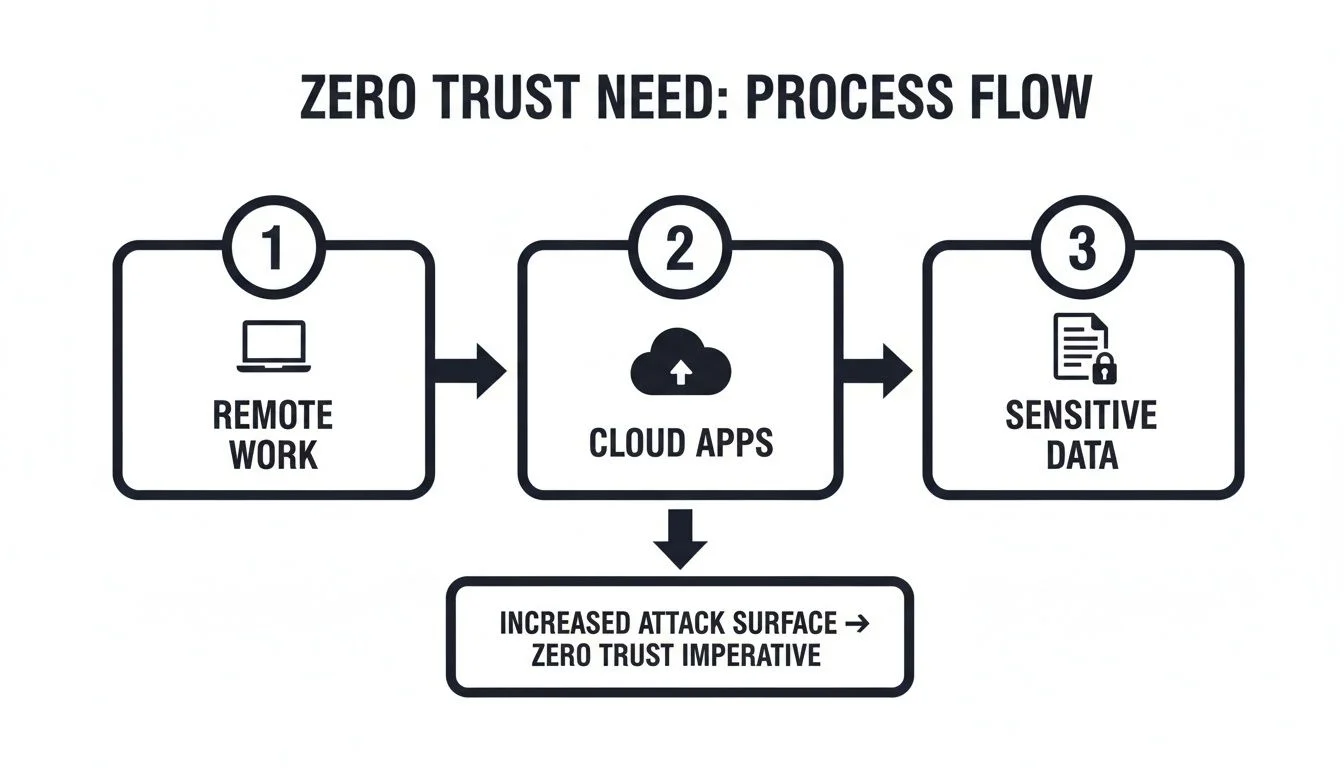
As you can see, the old idea of a secure office network is gone. Your team, data, and apps are everywhere, which means your attack surface is, too. That’s why we have to verify everything, every time.
Phase 2: Implement Foundational Controls
With your map in hand, it’s time to lay the groundwork. This phase hits the two most important pillars of any Zero Trust strategy: identity and endpoints. Getting these right gives you the biggest security bang for your buck.
Strengthen Identity Verification
The path of least resistance for any attacker is a stolen password. Your first job is to make sure a password alone is never enough to get into your systems.
The core principle is to always verify explicitly. This means every single access request must be challenged to prove it’s legitimate, and that starts with multi-factor authentication (MFA). Turning on MFA is one of the most powerful things you can do, immediately blocking 99.9% of automated cyberattacks.
Secure All Endpoints
Your endpoints, the laptops, desktops, and mobile phones your team uses, are the new perimeter. If one of those devices is compromised, attackers have a direct line into your network.
- Endpoint Management: You need a way to ensure every device accessing your data is up to your security standards. This means making sure they have the latest security patches and an active antivirus. For many organisations, a tool like Microsoft Intune is perfect for this. You can find out more in our guide to Intune mobile device management.
- Health Checks: Set up your system to check the “health” of a device before it gets access. If a device is flagged as unhealthy, say, because malware is detected, it can be automatically blocked from accessing sensitive files until the problem is fixed.
By locking down who can get in and what devices they can use, you’ve already built a very strong defence against the most common attacks. This creates a solid foundation you can build on with more advanced Zero Trust layers down the track.
Frequently Asked Questions About Zero Trust
It’s natural to have questions when you hear about a new security approach like Zero Trust. Most business owners we talk to are wondering about the same things: how much it costs, if it’s a hassle for their team, and whether they really need it.
Let’s clear up some of the common myths and get straight to the practical answers.
Is Zero Trust a specific product I can buy?
No, Zero Trust isn’t a single product you can buy off the shelf. It’s a security strategy and a mindset that you bring to life using a combination of technologies, policies, and processes. It involves re-thinking your security to enforce verification at every point.
Will Zero Trust make our systems harder for employees to use?
When it’s set up correctly, Zero Trust should feel almost invisible to your team. Modern solutions focus on a smooth user experience, using background factors like device health, location, and user behaviour to grant access. Extra verification prompts only appear when something seems unusual.
Is Zero Trust only for large corporations?
Absolutely not. The principles of Zero Trust are scalable and, frankly, more critical than ever for small and medium businesses (SMBs), schools, and sole traders. Since SMBs are huge targets for cyberattacks and heavily rely on cloud services and remote work, Zero Trust provides an essential layer of modern protection.
Isn’t a Good Firewall and Antivirus Software Enough?
For a long time, having a solid firewall and good antivirus software was the cornerstone of business security. They are still absolutely vital, but today, they’re only part of the puzzle. Think of them as a castle wall and moat, great for keeping obvious threats out, but not much help if an attacker finds another way in.
The threats facing businesses now are much more subtle. They don’t always knock on the front gate. Instead, they sneak in through a stolen password, a staff member’s compromised personal phone, or a clever phishing email. A Zero Trust approach accepts that threats can and do get inside, so it works to contain them, making it a critical layer of modern defence.
Is Zero Trust Too Expensive for a Small Business?
This is probably the biggest misconception we hear, but the reality is that Zero Trust is far more affordable than you might think. It’s not about buying one giant, expensive “Zero Trust” box. It’s a change in strategy, and you likely already have many of the tools you need in the software you use every day, like Microsoft 365.
The cost of not adopting a Zero Trust mindset can be far higher. A single data breach can lead to devastating financial loss, reputational damage, and operational downtime that could easily put a small business out of action.
Starting with the basics, like enforcing multi-factor authentication (MFA) and simple device management, can be done for very little cost while delivering a massive security upgrade. The key is a smart, phased rollout, not a huge upfront spend.
How Tbourke Solutions Can Help You Implement Zero Trust
Knowing you need Zero Trust is the first step, but actually implementing it can feel like a huge leap. For small to medium businesses, schools, and sole traders, the whole process can seem way too complex and expensive. That’s where a local expert who gets your day-to-day challenges makes all the difference. We make it easy.
Our specialty is translating high-level security ideas into practical, affordable solutions that fit how you actually work.
Your Partner in Practical Security
We firmly believe that good security shouldn’t get in the way of getting things done. Our approach always starts with a simple chat to understand your organisation, your goals, and your current IT setup. From there, we map out a clear, step-by-step plan to strengthen your defences without causing a big disruption.
Our options include:
- Zero Trust Readiness Assessment: We’ll evaluate your current setup and give you a clear, straightforward roadmap. This isn’t just a tick-box exercise. We identify your most critical assets, find the real-world weak spots, and give you a clear, actionable roadmap to implement Zero Trust in a way that makes sense for your budget and operations.
- Managed Cybersecurity Services: We design and roll out a security framework built on that “never trust, always verify” mindset. We can implement and manage the right tools to build a robust Zero Trust framework for you. For a deeper dive into how this works, learn more about what our Managed Cybersecurity Services cover.
- Ongoing IT Support and Management: Zero Trust isn’t a one-and-done project. Our ongoing support means we are constantly monitoring, managing, and fine-tuning your security to protect you against new threats. We keep your technology simple and secure so you don’t have to worry about it.
At Tbourke Solutions, our promise is simple: total transparency. We give you clear, upfront pricing with no hidden fees, so you know exactly what you’re getting. We’re not just another provider; we’re your local IT partner, dedicated to helping you succeed.
So, does your business or school really need Zero Trust? For any organisation today, the answer is a definite yes. The good news is, you don’t have to figure it all out on your own. Let us handle the technical side of things so you can get back to focusing on what you do best.
Ready to take the next step towards a more secure future? Reach out for a personalised chat. You can send us a message through our contact page and let’s get the conversation started.
Share This Story, Choose Your Platform!