
Connecting an office network to Azure isn’t just a cloud setup job. It’s a security decision that affects how staff, servers, files, line-of-business apps, and remote access all interact. In Australia, that decision carries more weight because the ACSC’s 2023–24 Annual Cyber Threat Report noted 94,000 cybercrime reports and said the average self-reported cost of cybercrime for businesses rose 14% during the year, which is a strong reminder that weak access paths into business systems don’t stay weak for long (Cloud Optimo summary of the ACSC figures).
For most Australian SMBs, the practical question isn’t whether to connect the office to Azure. It’s how to do it without creating a new hole in the side of the business. That usually means choosing between a Site-to-Site VPN, ExpressRoute, or a design that starts simple and grows as the business does.
If you’re already weighing cloud options for a small business, Tbourke Solutions has a useful overview of the benefits of Azure cloud for small business.
Your Secure Bridge to the Cloud
TLDR: For many Australian SMBs, a Site-to-Site VPN is the sensible first step because it gives encrypted office-to-Azure access without the cost and carrier lead times of a private circuit. ExpressRoute starts to make sense when the business depends on predictable performance, tighter separation from the public internet, or stricter compliance expectations. The better decision usually comes from mapping business risk first, then choosing the connection method that fits it.
A secure link to Azure is less about getting packets from A to B and more about deciding which systems should ever talk in the first place. That is the part that affects risk. If the office can reach every subnet in Azure by default, or Azure can freely reach back into the office, the business has created a larger attack path, not a safer one.
For an SMB, the trade-off is usually straightforward. A VPN is cheaper and faster to deploy, but it still relies on the public internet and careful configuration. A private circuit can reduce exposure and improve consistency, but it brings higher cost, more moving parts, and less tolerance for weak planning. I usually advise clients to start by asking three practical questions. Which workloads must stay available, which traffic needs to cross the link, and what outage or breach would cost the business in real terms.
That framing matters because hybrid networking is part of resilience now. If ransomware hits a workstation in the office, poor network design can let that problem spread into Azure. If an Azure-hosted app is exposed too broadly, the office connection can become a shortcut into internal systems. The bridge goes both ways.
Practical rule: If a workload is reachable over the VPN and also left exposed on a public IP for convenience, the secure path is not doing much work.
The safest designs are usually the least exciting. Staff reach the systems they need. Servers talk only to approved services. Admin access is controlled separately from normal user traffic. Failures are planned for, not discovered during an outage.
That is why the connection choice should sit inside a wider cloud plan, not beside it. If you are still working through what belongs in Azure and what should stay on-site, this guide to the benefits of Azure cloud for small business is a useful starting point for weighing cost, security, and operational fit.
Choosing Your Secure Connection Path to Azure
For most Australian SMBs, the connection choice comes down to one practical question. Are you protecting access to a few Azure workloads, or are you building a cloud link the business will depend on every day? Get that wrong and you either overspend on carrier-grade plumbing or accept risk that shows up during an outage.
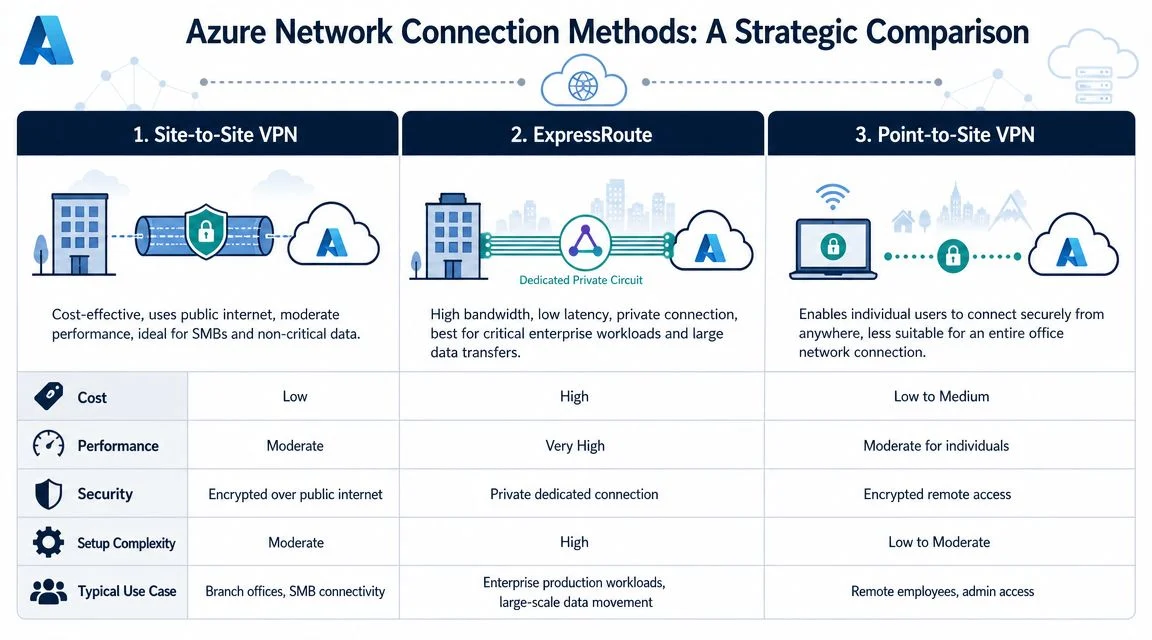
The main options are straightforward. VPN Gateway sends encrypted traffic over the public internet. ExpressRoute uses a private provider connection into Microsoft. Some businesses run ExpressRoute as the main path and keep VPN as backup, which gives better continuity but adds cost, setup effort, and another dependency to manage.
Geography matters more in Australia than many buyers expect. ExpressRoute availability depends on the providers operating in your area, and Microsoft advises checking local provider coverage before committing to that design (Microsoft ExpressRoute and VPN failover guidance). A Sydney or Melbourne office usually has more options than a regional site. That can change the business case quickly.
Azure connection methods compared
| Method | Best For | Relative Cost | Performance | Complexity |
|---|---|---|---|---|
| Site-to-Site VPN | One office connecting securely to Azure workloads | Lower | Moderate, depends on internet path | Moderate |
| ExpressRoute | Critical workloads, tighter control, predictable private routing | Higher | More consistent and private | Higher |
| Point-to-Site VPN | Individual remote users, admins, contractors | Lower to moderate | User-dependent | Lower for single users, not ideal for whole offices |
Point-to-Site VPN often gets confused with office connectivity because both use the term VPN. The use case is different. It suits a staff member, consultant, or admin connecting from a device. It does not replace a proper office-to-Azure design. If your team needs a plain-English refresher, this Guide to VPNs for Edmonton users explains the basics well.
When a Site-to-Site VPN is the right answer
A Site-to-Site VPN is usually the sensible first choice when the business has one main office, a manageable amount of Azure traffic, and no strict requirement for private carrier routing. It is faster to deploy, easier to justify on cost, and good enough for many line-of-business apps, management access, backups, and server-to-server traffic.
It also gives SMBs room to grow without locking them into a high monthly spend too early. I often recommend starting here if the cloud footprint is still taking shape and the business wants to improve security now rather than wait for a larger network redesign. If that redesign is already coming, and you are weighing multiple offices, internet breakouts, and cloud paths, Tbourke Solutions explains the wider design choices in this SD-WAN guide.
When ExpressRoute earns its place
ExpressRoute makes sense when Azure hosts systems the business relies on all day and interruptions carry a real operational or financial cost. It is also a better fit where security policy, client requirements, or internal governance push traffic away from internet-based paths, even if that traffic is still encrypted on a VPN.
The trade-off is simple. You get more predictable routing and a private connection model, but you also take on provider coordination, longer lead times, and higher recurring cost. For many SMBs, that only stacks up once Azure stops being an add-on and becomes part of the core production environment.
A useful rule is this. If a short internet outage would be annoying, start with Site-to-Site VPN. If it would halt operations, delay orders, or stop staff from doing billable work, price ExpressRoute properly and consider VPN backup at the same time.
Configuring a Site-to-Site VPN The Right Way
A Site-to-Site VPN is the most common starting point because it’s practical. It creates what Microsoft describes as a cross-premises Azure virtual network, so your office systems can directly access Azure-hosted virtual machines and Azure resources can talk back to the office where appropriate (Microsoft cross-premises connection guidance).
What matters is getting the fundamentals right. A VPN tunnel can show as up while traffic still fails because routing, address definitions, or filtering are wrong. That’s why careful setup beats “click through the wizard and hope”.
Start with the network plan
Before touching Azure, sort out the design on paper.
- List every office subnet: Don’t just include the main LAN. Include server VLANs, printer networks, Wi-Fi segments, and any network that needs to reach Azure.
- Define the Azure address space carefully: If your Azure VNet overlaps with the office ranges, routing gets messy fast.
- Decide what should cross the tunnel: Not all traffic belongs there. Keep the scope tight.
- Confirm your firewall or router supports Azure-compatible VPN settings: Compatibility problems usually appear late and waste time.
For less technical readers who want a plain-English refresher on how VPNs work at a basic level, this Guide to VPNs for Edmonton users gives a simple explanation before you get into Azure-specific design.
Build the Azure side in the correct order
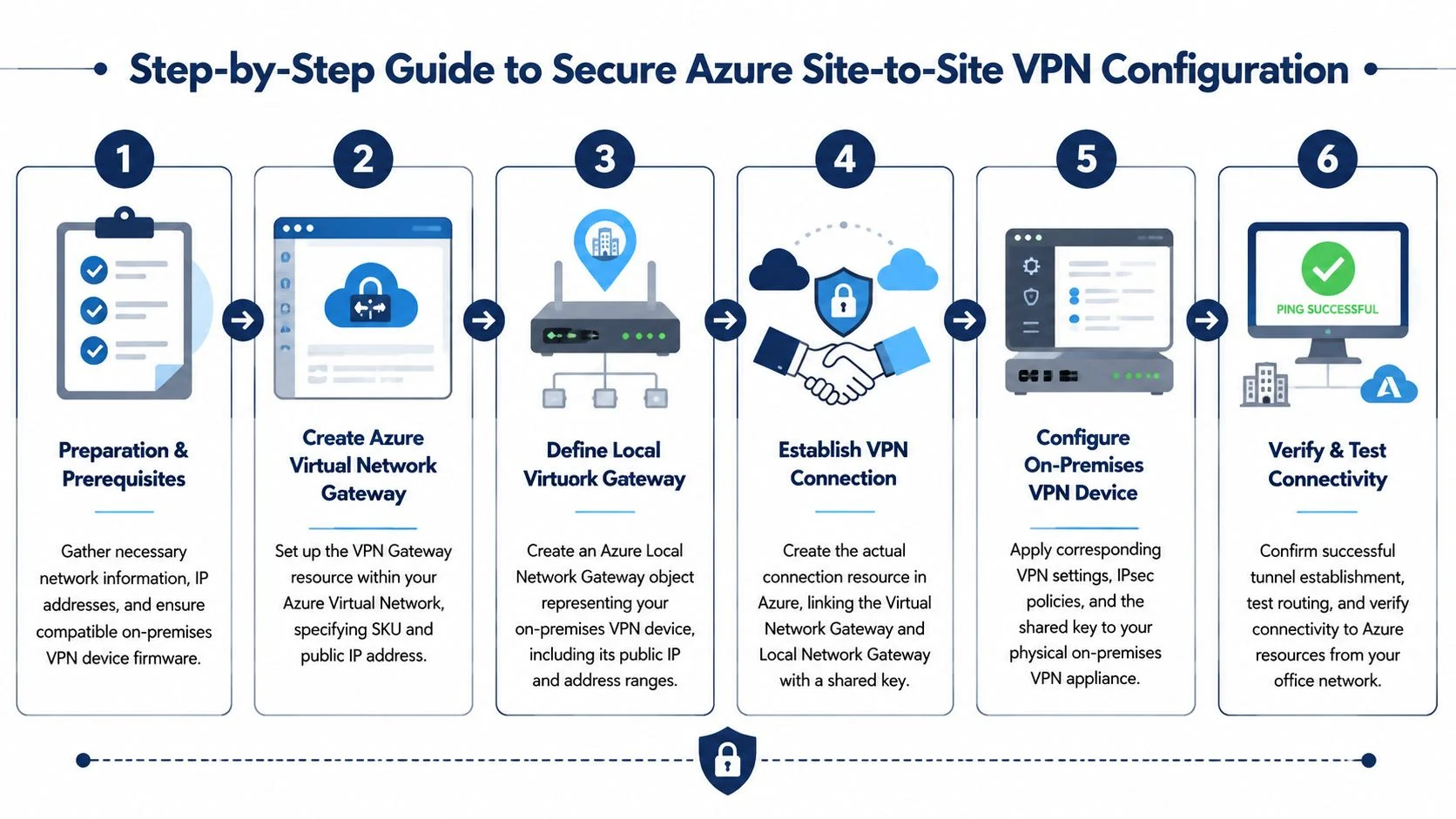
Microsoft’s standard sequence is straightforward. Create the Virtual Network Gateway, define the Local Network Gateway for the on-premises side, then create the VPN connection and choose a route-based VPN using a pre-shared key.
That order matters because each object represents a different part of the relationship.
Virtual Network Gateway
This is Azure’s end of the VPN. It lives inside the Azure networking layer and handles the tunnel.Local Network Gateway
Despite the name, this isn’t your physical office firewall. It’s Azure’s record of your on-premises environment, including the public-facing VPN endpoint and the office address spaces Azure needs to route toward.Connection object
This ties the Azure gateway to the on-premises definition and applies the shared key used to establish the tunnel.
Why route-based VPN is usually the right choice
Route-based VPN is the normal fit for Azure because it works better for modern hybrid networking and is the Microsoft-recommended pattern in the walkthrough. In practice, it’s more flexible and less awkward when the network grows or changes.
Policy-based approaches can work in some environments, but they tend to become brittle. An SMB that adds a new subnet, a branch office, or another Azure workload often finds policy-based rules become a maintenance headache.
If your VPN design only works as long as the network never changes, it’s not a good SMB design.
The failure point that catches people
Microsoft’s guidance points to a common problem. Incorrect or incomplete remote address spaces in the configuration.
This sounds minor. It isn’t. If you leave out a subnet, Azure won’t know to route that traffic through the tunnel. The VPN may show connected, but users still can’t reach the server or application they need. That leads to hours of pointless troubleshooting because the tunnel status looks healthy.
What works in practice
When configuring a Site-to-Site VPN for an SMB, these habits usually prevent the most pain:
- Keep the subnet list current: If the office network changed over time, audit it before deployment.
- Avoid broad “allow all” thinking: Only permit the paths that the business needs.
- Use internal addressing for Azure workloads: Don’t assign public IPs to servers that should only be reached from the office or controlled admin paths.
- Document the shared key and routing intent securely: Future troubleshooting depends on this.
- Test from both sides: Validate office-to-Azure and Azure-to-office communication, not just one direction.
What does not work
There are a few patterns that repeatedly cause issues:
- Building the tunnel before finalising address planning
- Publishing Azure VMs publicly “just until the VPN is sorted”
- Forgetting branch or guest network ranges that still need access
- Using the VPN as a substitute for proper segmentation
The tunnel is transport. It is not security by itself.
Implementing Essential Azure Security Controls
A VPN gets your office to Azure. The security controls around it decide whether a compromised laptop can laterally reach file servers, admin ports, or systems it should never touch. For an Australian SMB, that is the primary design question. How much risk reduction do you need, and how much complexity can your team realistically manage?
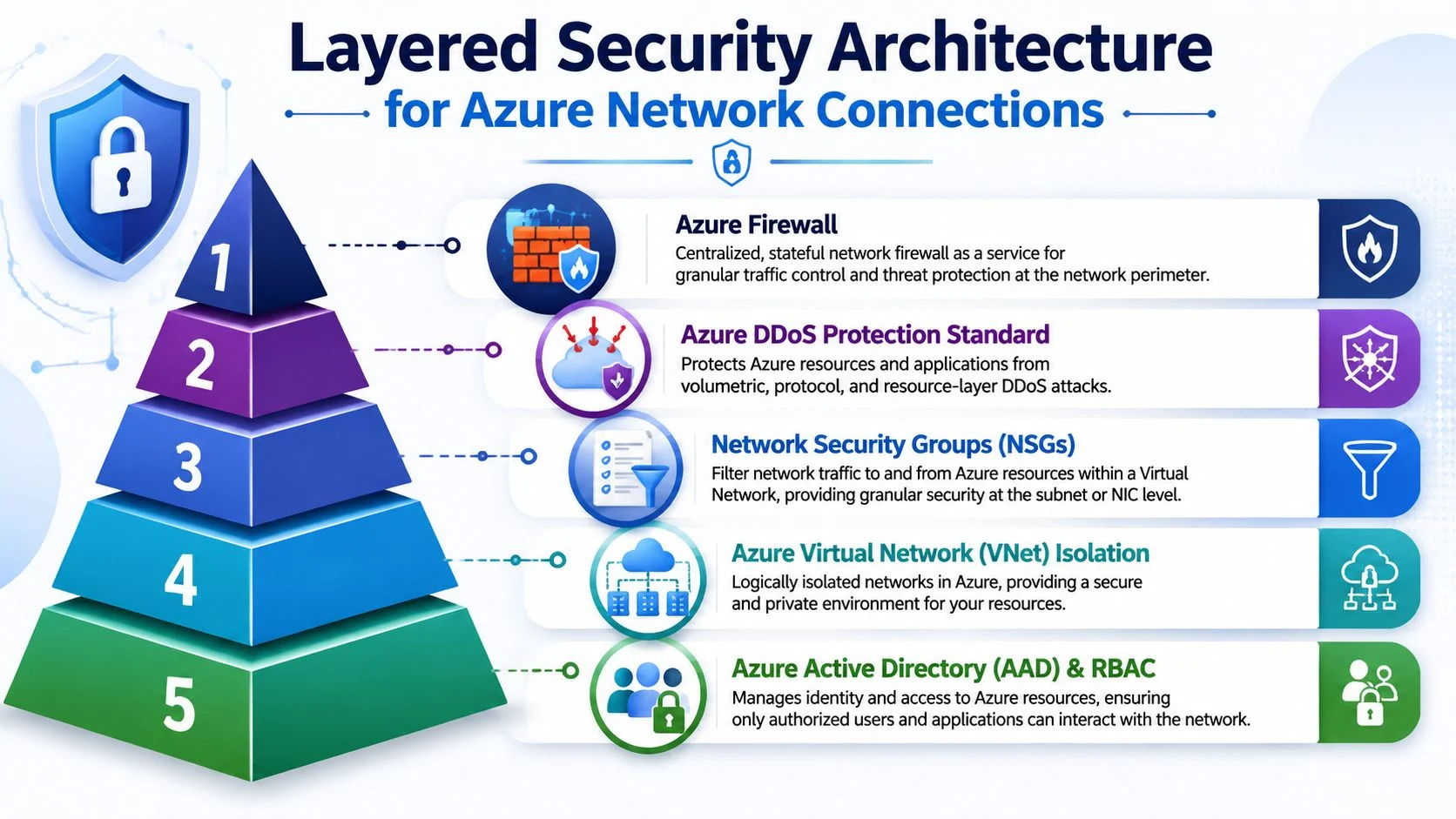
The ACSC has pushed Australian organisations toward zero-trust thinking for good reason. Once traffic enters Azure, broad internal trust becomes a liability. A flat design is cheaper to build at first, but it is harder to defend and far more painful to clean up after an incident.
Use NSGs to control east-west traffic
Network Security Groups, or NSGs, work like access rules for Azure subnets and network interfaces. They let you decide which traffic is allowed, denied, and from where.
Often, many SMB environments drift into trouble. An application server is opened up during deployment, the temporary rule stays in place, and six months later nobody remembers why RDP or SQL is exposed to half the environment.
Use NSGs to set boundaries such as:
- Which office subnets can reach specific Azure workloads
- Which application ports are allowed, and only from approved sources
- Which admin paths are limited to IT networks or jump hosts
- Which servers and services should never communicate directly
A useful rule of thumb is simple. If a system does not need to talk to another system, block it. That reduces the blast radius when something goes wrong.
Add Azure Firewall if policy is spreading out of control
NSGs are effective, but they are distributed. That suits a small environment with one or two workloads. It becomes messy once you have multiple subnets, separate application tiers, or different rules for head office, remote users, and third-party access.
Azure Firewall gives you a central inspection and policy point. For some SMBs, that is worth the extra spend because it cuts down rule sprawl and makes reviews easier. For others, it is too much too early.
The trade-off is practical. If your environment is still small and stable, well-structured NSGs may be enough. If your team is already chasing rules across several subnets and no one is fully confident about what is allowed, central firewalling usually saves time and reduces mistakes.
Good security design should be supportable by the team that inherits it, not just the person who built it.
Keep workloads private unless there is a clear business reason not to
Public exposure should be the exception. Internal application servers, management interfaces, and backend services should stay on private addressing wherever possible.
That usually means:
- Keeping internal services on private endpoints
- Using Azure Bastion or another controlled admin path instead of opening management ports to the internet
- Separating user access, admin access, and system-to-system traffic
- Reviewing any public IP against a business requirement, not convenience
Identity controls matter just as much as network controls. If you are tightening administrator access, conditional access, and resource permissions, Tbourke Solutions has a plain-English guide on what Microsoft Entra ID is and how it fits Azure access control.
Security controls that hold up as the business grows
The following controls usually give SMBs the best return because they improve security without creating unnecessary operational pain:
| Control | What it helps with |
|---|---|
| NSGs | Segmentation and traffic rules between subnets and workloads |
| Azure Firewall | Central policy control and traffic inspection |
| Private access patterns | Reducing public exposure and limiting attack paths |
| Identity and access governance | Restricting who can sign in, administer, and reach resources |
Layering matters. A VPN protects the path. NSGs restrict movement. Firewall policy adds oversight. Identity controls limit who gets in at all. That combination is far safer than relying on the tunnel alone.
When to Get Help from an IT Expert
For an Australian SMB, the expensive mistake is not paying for advice. It is treating a production network like a trial-and-error project after staff, files, and core systems depend on the Azure link.
The Azure portal can make a hybrid setup look straightforward. A few clicks will build a gateway, a local network object, and a connection. What it will not do is tell you whether the IP plan will cause routing conflicts later, whether failover matches the business’s downtime tolerance, or whether a shortcut taken during setup has created a security gap. That judgement usually comes from experience.
Get expert help if the business is hitting any of these points:
- You have more than one office or branch. Multi-site routing, shared services, and internet breakout decisions become harder to manage cleanly.
- The tunnel drops, flaps, or only works one way. That often points to mismatched policies, route issues, MTU problems, or firewall behaviour that needs proper diagnosis.
- Management expects higher uptime than a single connection can provide. A cheap design can be fine for a small office, but it is the wrong fit if an outage stops operations.
- You are not confident about segmentation between servers, users, and admin access. That is where I often see avoidable exposure.
- No one in-house wants to own the environment day to day. If you are weighing internal support against outsourced management, this guide on what MSPs are gives useful context.
A good consultant does more than fix a tunnel. They pressure-test the design against the way the business works. For an SMB, that usually means balancing three things at once: keeping costs sensible, reducing the chance of downtime, and avoiding a setup the team cannot support six months from now.
If every change seems to solve one problem and create another, stop making live guesses. A second opinion at that point is usually cheaper than recovering from an outage, a rushed redesign, or an exposed service.
Validating, Monitoring, and Managing Your Connection
A VPN showing “connected” proves very little on its own. For an Australian SMB, the true test is whether the right systems can communicate, the wrong paths are blocked, and someone gets alerted before staff lose access to line-of-business systems.
Validate the path, not just the tunnel
The usual failure point is not the tunnel itself. It is the design around it.
I regularly see office networks and Azure VNets built with overlapping IP ranges, incomplete remote networks, or return paths that were never tested properly. In each case, the connection can look healthy in the portal while business traffic still fails or takes the wrong route. That is why validation needs to focus on application flow, not just gateway status.
Check these first:
- Can office devices reach the intended Azure resource
- Can Azure resources return traffic to the office
- Do only the approved subnets traverse the tunnel
- Are management paths separated from user traffic
- Are any Azure workloads still reachable publicly when they shouldn’t be
A simple rule helps here. Test from both ends. Then test with a real service, such as file access, RDP through an approved admin path, or an application connection, rather than relying only on a ping.
Use Azure’s monitoring tools properly
Many SMB environments are built to connect, not to be observed. That keeps upfront cost down, but it usually means the business finds out about trouble from a user at 8:15 on a Monday.
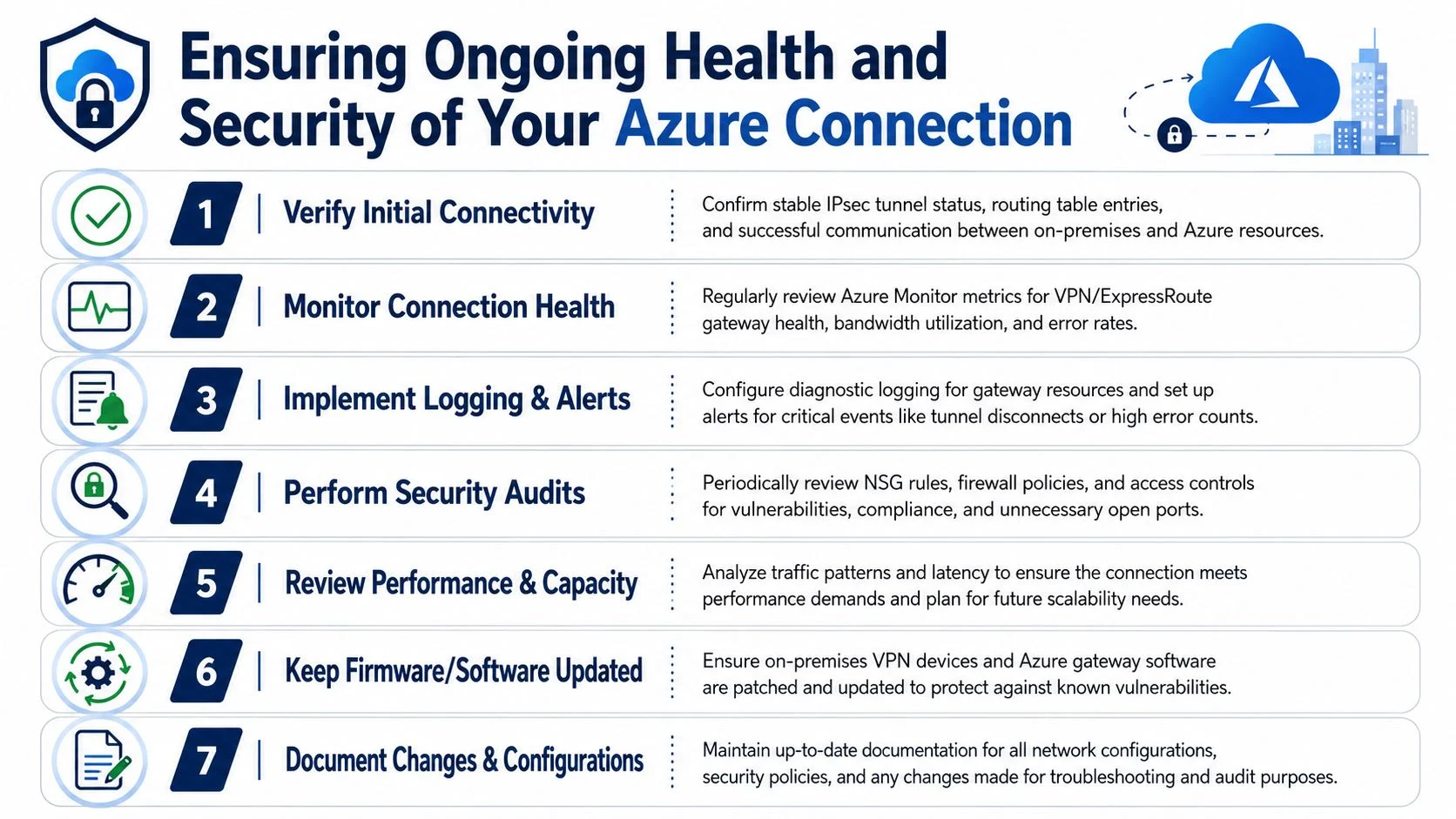
Azure gives you enough native tooling to catch most of the common issues if you set it up properly:
- Azure Monitor: Track gateway health, throughput, and alert conditions.
- Network Watcher: Check path behaviour and troubleshoot connectivity faults.
- Connection Monitor: Confirm whether specific endpoints can still talk to each other.
- Diagnostic logging: Keep records for outages, flapping tunnels, and failed negotiation events.
- Microsoft Sentinel: Useful if the business wants security monitoring across cloud and on-premises systems in one place.
If you plan to feed logs and security alerts into a broader review process, this guide to SIEM and security event management is a practical next step.
Healthy hybrid networking is observable. If no one can tell whether the tunnel is degraded, overloaded, or incorrectly routed, the design is incomplete.
Build an operating routine
This does not need a large enterprise process. It does need consistency.
A workable routine for an SMB usually includes:
Weekly checks
Review tunnel status, recent firewall rule changes, and any failed communication reports from staff or monitoring.Monthly review
Check traffic patterns, confirm access still matches business need, and remove rules that no longer serve a purpose.Change control
Any new subnet, VLAN, ISP change, or Azure service should trigger a routing and security review before it goes live.Patch management
Keep the office firewall, VPN appliance, and related firmware current so known bugs and security issues are not left sitting in production.Documentation updates
Record what changed, why it changed, and who approved it. That matters when troubleshooting at speed.
The trade-off is straightforward. More monitoring and process adds a bit of admin overhead, but it usually costs far less than an outage, a rushed rollback, or an exposed service.
A practical checklist for secure office-to-Azure connectivity
Use this as a quick audit list:
- Addressing is clean: No overlap between office networks and Azure VNets.
- The VPN or private circuit matches the business need: Not oversized for the budget, and not so limited that it creates reliability problems.
- Azure workloads that should be private have no public IP exposure
- NSGs restrict traffic to approved ports and source ranges
- Centralised firewall policy exists where the environment is large enough to justify it
- Remote address spaces are complete and accurate
- Admins use controlled management access
- Logging and alerting are turned on
- The failover expectation is documented: If the primary path drops, staff know what happens next.
- The design is documented well enough for another engineer to support it
Cost and sizing discipline
Azure networking costs often drift because businesses buy for a future design they may not need for years. A better approach is to size for current workloads, leave room for growth, and review usage before adding more complexity.
That matters for SMBs in particular. Overspending on gateway tiers, duplicated services, or unnecessary monitoring add-ons can eat into the budget that should have gone to resilience, security controls, or proper support. Underbuilding creates a different problem. The connection works until one outage, one new workload, or one office expansion exposes the shortcuts.
The goal is a connection the business can afford, secure, and maintain without constant rework.
Frequently Asked Questions
Should I use a Site-to-Site VPN or Point-to-Site VPN for my office?
Use Site-to-Site VPN for an office network. It connects the office firewall or router to Azure so the whole site can access approved resources. Point-to-Site VPN is usually for individual users on laptops and is better suited to remote access than full office connectivity.
Why is my Azure VPN connected but users still can’t reach the server?
The most common causes are routing and address definition problems. If the remote address spaces were entered incorrectly, or a required subnet was missed, the tunnel can still show as up while traffic goes nowhere. Check the subnet lists, route intent, and any NSG or firewall rules that might be blocking the path.
Do I still need security rules if I’m using a private connection?
Yes. A private path is not the same as a trusted path. You still need segmentation, restricted access, and controlled admin methods. The safer model is to assume every path must be explicitly allowed and justified.
How Tbourke Solutions Can Help
A secure office to Azure connection is a business decision as much as a technical one. Australian SMBs usually need to balance three things at once. Risk, cost, and day-to-day support. The right design is the one your team can afford, manage, and trust under pressure.
Tbourke Solutions helps Melbourne businesses assess their current network, choose a connection model that fits their workload and budget, and set up Azure access without avoidable complexity. That includes network assessment, Azure connectivity design, Site-to-Site VPN deployment, ExpressRoute planning, Azure Firewall and NSG configuration, and ongoing managed support.
In practice, that work often starts with the questions that matter later. Are the office and Azure address ranges going to conflict. Does the current firewall support stable VPN performance. Is the business protecting a few internal apps, or building a path for broader cloud migration. Those choices affect security controls, failover options, support overhead, and monthly spend.
Tbourke Solutions can also review an existing setup that keeps dropping out, exposing too much access, or becoming hard to support as the environment grows. For many SMBs, cleaning up a weak design before migration is cheaper than fixing it after staff depend on it.
If you want a clear plan for a secure office to Azure rollout, Tbourke Solutions can help you assess the environment, make the trade-offs clear, and implement a design that fits the business.
Share This Story, Choose Your Platform!