
A staff member hands in their notice, and most business owners go straight to the obvious problems. Who covers their work, how fast can you hire, what needs to be handed over. What often gets missed is the quieter issue sitting underneath all of that. What happens to your business data when a staff member quits.
In small businesses and schools, data rarely lives in one place. It sits in Microsoft 365, Google Drive, Xero, MYOB, Teams, Slack, OneDrive, Dropbox, shared mailboxes, browser-saved passwords, personal phones, USB sticks, and old laptops in desk drawers. If the offboarding process is loose, that data doesn’t leave neatly. It lingers in accounts, devices, sync folders, forwarded emails, and access tokens you forgot existed.
Your Data Security Blind Spot When an Employee Resigns
When someone resigns, the handover usually gets framed as an HR task. But from an IT and security point of view, resignation is an access event. One person who used to be trusted now needs their access changed, reduced, transferred, or removed in a controlled way.
That sounds simple until you look at how most businesses operate. Staff often have a mix of formal and informal access. They know the Wi-Fi password. They have admin rights they no longer need. They’re in old Teams groups, shared inboxes, Canva accounts, vendor portals, and maybe a director once texted them the login to a shared service. That’s why a resignation can create security exposure even when everyone parts on good terms.
If you’re reviewing HR process at the same time, it can also help to understand the employment side of protecting your business with garden leave, especially when you need to limit access during a notice period while keeping the exit orderly.
For businesses tightening access before offboarding, a proper multi-factor authentication rollout for business also reduces the damage a forgotten password can cause.
TLDR: When a staff member quits, your business data can remain exposed through active accounts, synced files, personal devices, shared passwords, and undocumented systems. A simple password change usually isn’t enough. The practical answer is a structured offboarding process that covers access removal, data handover, device recovery, and post-exit review. If you don’t have that process, you’re relying on luck.
The Digital Trail a Departing Employee Leaves Behind
A departing employee leaves more than a vacant role. They leave a digital trail across every system they touched while doing their job.

Turnover isn’t rare background noise anymore. Built In’s employee turnover statistics show that in 2022, over 4.2 million employees quit monthly, representing 2.5% of the workforce in comparable Western markets. For Melbourne SMEs, that kind of churn creates practical data problems. Credentials get lost, systems stay undocumented, and no one is fully sure who still has access to what.
Data doesn’t live where you think it does
Most owners think of business data as “our files” or “our email”. In practice, it spreads out like crumbs across a long workday.
A single staff member might interact with:
- Email and calendars through Microsoft 365 or Google Workspace
- Cloud storage such as OneDrive, SharePoint, Google Drive or Dropbox
- Finance platforms like Xero or MYOB
- CRM systems such as Salesforce or HubSpot
- Messaging tools including Microsoft Teams, Slack, and mobile chat apps
- Browsers and saved credentials on company and personal devices
- Personal cloud accounts used for convenience when someone “just needed to get a file home”
- Paper notes and exported reports saved outside your main systems
That spread is why one account disablement rarely solves the whole problem. Offboarding isn’t only about turning off email. It’s about tracing where the person worked, what they could reach, and what data may now sit outside business control.
The risky systems are often the informal ones
The dangerous access points aren’t always the expensive platforms. Often, they’re the side doors.
A staff member might still have:
- access to a shared mailbox no one remembers
- an auto-forward rule in Outlook
- files synced locally from SharePoint
- a Teams chat containing client attachments
- an old VPN profile on a personal laptop
- a browser extension that remains signed in
- ownership of a cloud folder used by the rest of the team
Schools and small businesses see this a lot because practical workarounds become normal. Someone uses a personal phone to photograph paperwork. A teacher takes work home on a USB. A sales manager exports a contact list to work offline. Nobody intended to create risk, but the result is the same. Data ends up outside the tidy systems chart.
If you can’t list every app, device, shared folder, and login tied to a departing employee, your offboarding process is incomplete.
Why password resets miss the real issue
Changing one password feels decisive. It also creates false confidence.
Modern access is layered. Staff may have active sessions on mobile apps, delegated access to mailboxes, shared credentials, recovery email addresses, connected third-party apps, and synced files already copied onto a device. Resetting a password can block the front door while several windows are still open.
This is one reason businesses are looking more closely at tools like Microsoft Purview data loss prevention for visibility over where sensitive information moves, especially across Microsoft 365 environments.
A useful analogy is a keyring. If someone leaves and you only take back one key, you haven’t secured the building. You’ve just removed the most obvious one.
Common Offboarding Failures and Their Hidden Costs
Most offboarding failures don’t come from dramatic sabotage. They come from ordinary delay, missing steps, and assumptions that “someone else handled it”.

The biggest mistake is thinking that a resignation is low-risk if the employee seems trustworthy. Fidelis Security’s analysis of resignation and data risks reports a critical spike in insider threat activity during departures, and that employees are 69% more likely to exfiltrate data immediately before resigning. The technical reason is straightforward. Manual offboarding creates delays between HR being told and IT removing access.
Failure one is delayed access removal
This is the classic gap. HR knows the employee is leaving. The manager assumes IT will disable accounts. IT waits for the official finish date. Meanwhile the employee still has working access to email, cloud storage, file shares, and remote login.
That delay is especially risky during a notice period. A person still has a valid reason to be in systems, so unusual activity can blend in with normal work.
Failure two is incomplete asset recovery
Getting the laptop back isn’t the same as securing the data.
A returned device may still contain:
- Local copies of synced folders
- Saved browser passwords
- Cached email
- Access tokens for apps
- Personal backups of company files
The same problem applies to phones and tablets. If a staff member used a personal device for work, you need a clean way to remove company data without wiping their personal content by mistake.
Failure three is ignoring orphaned accounts
Small businesses accumulate subscriptions over time. Marketing tools, rostering platforms, design apps, training portals, website hosting, vendor dashboards. Often one staff member signs up, becomes the admin, then leaves.
The account keeps running. The billing keeps running too. Worse, no one notices that the former staff member still controls the login or recovery email.
A business that only works reactively on these issues usually pays more in time, risk, and disruption. That’s one reason many owners eventually compare this against why reactive IT costs more than managed IT.
Practical rule: If an offboarding task depends on memory, it will eventually fail. Put it on a checklist or automate it.
Intentional versus accidental data loss
Not every data problem at exit is malicious. Some people leave with files because they mixed personal and work storage. Others forward messages to a personal account so they can “finish things later”. That’s still a business risk.
The harder cases are intentional. Client lists, pricing documents, designs, curriculum material, strategy decks, tender documents, and code repositories can be copied quickly and unnoticed. If you only focus on passwords, you miss the export, sync, screenshot, and forwarding paths that happen before the account is disabled.
When to Get Professional IT Help with Offboarding
A resignation lands on your desk on Tuesday. The employee finishes on Friday. They approve invoices, know the Wi-Fi admin password, have access to shared mailboxes, and signed up half your cloud apps with their work email years ago. That is the point to bring in IT support, before the last day becomes a scramble.
Professional help makes sense when the departure affects more than one login. In Australian small businesses and schools, risk often sits in the messy access points no one tracks properly. Shared Microsoft 365 permissions, Google Workspace file ownership, finance systems, student platforms, backup consoles, website hosting, domain registrars, mobile device management, and recovery emails tied to old accounts are common examples.
Get specialist IT help if any of these apply:
- You do not have in-house IT support
- The person had broad or privileged access, such as an office manager, finance lead, principal, senior teacher, operations manager, or anyone with admin rights
- There is tension, misconduct, or a risk of dispute
- You store sensitive records, including client, financial, health, or student information
- Staff use a mix of company and personal devices
- No one can produce a clear list of systems, apps, and accounts the person used
- The employee set up key services under their own email, including software subscriptions, hosting, domains, or vendor portals
The trade-off is simple. Handling a routine exit internally can be perfectly reasonable. Handling a high-access exit without a clear map of systems usually costs more in cleanup, downtime, and stress.
If you are unsure, start by reviewing what a managed IT provider does for businesses that need help controlling systems, access, and support. A quick review before the last working day is far easier than trying to reconstruct access, ownership, and missing data after the person has already left. If the risk feels unclear, our team can help you assess it and decide whether a light review or a full offboarding process makes more sense.
The Essential Employee Offboarding Security Checklist
A checklist works because people get busy, not because people are careless. Offboarding should be repeatable, fast, and easy to follow under pressure.
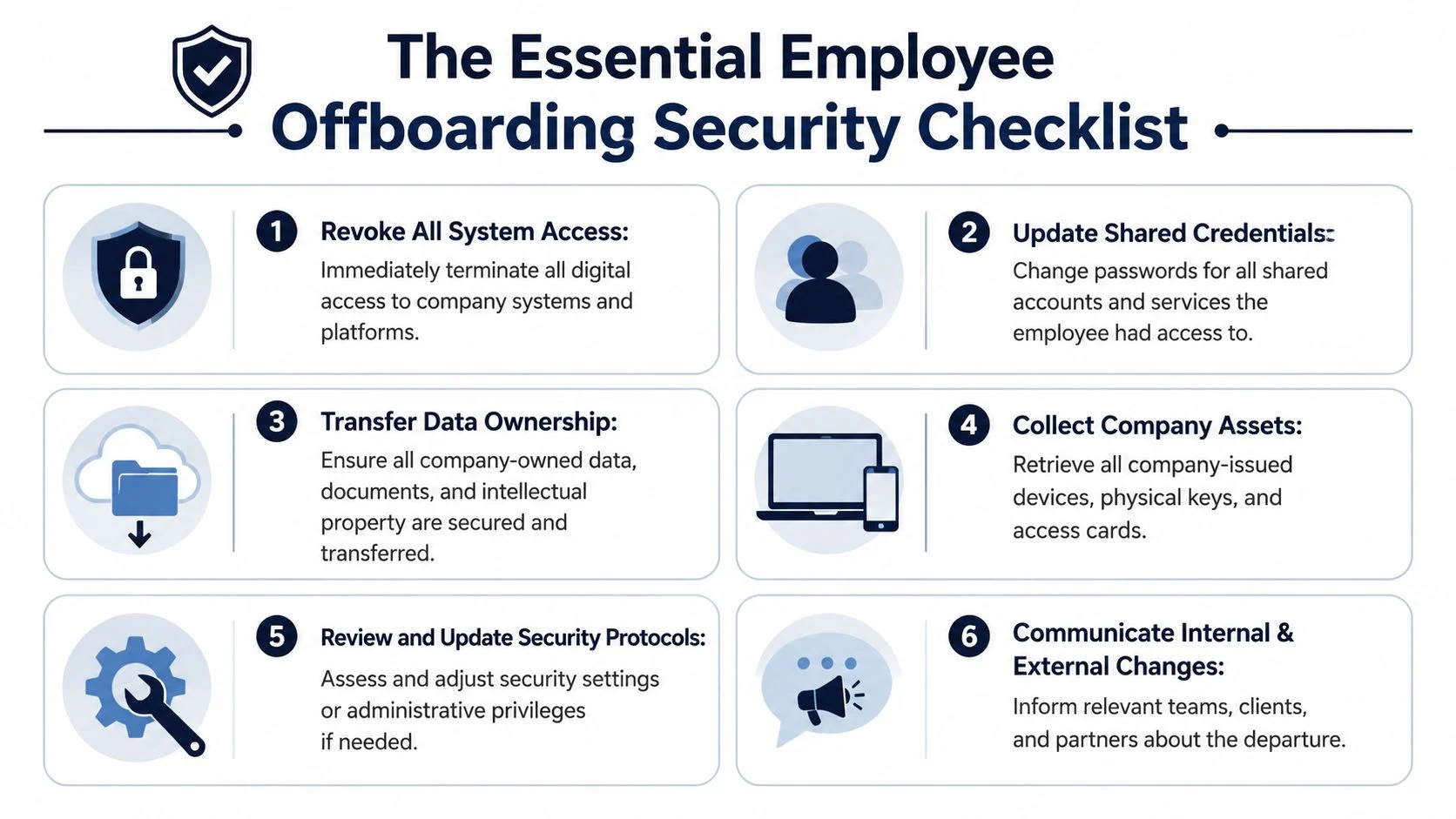
That matters because the cost of a miss can be severe. Spanning’s guidance on reducing data loss risk when employees leave states that the average data loss incident costs a business over AUD $1.35 million, and notes common exfiltration paths such as USB drives, cloud-to-personal account transfers, and email forwarding. It also reports that 15% of companies found more than 1,000,000 files open to every employee. For SMEs, a disciplined checklist is the first line of defence.
Before the last day
This phase is about preparation, not confrontation.
- List every system the employee uses
Include Microsoft 365, Google Workspace, Xero, MYOB, CRMs, industry software, phone systems, VPN, Wi-Fi, shared folders, email groups, and any niche portals. - Identify what they own
Look for mailbox ownership, SharePoint folders, Teams channels, calendar responsibilities, software admin roles, and external service accounts. - Review access level, not just access existence
Admin rights need closer attention than standard user rights. The same goes for access to finance, HR, customer data, student data, and backups. - Plan the handover of files and accounts
Move ownership before the person leaves. Don’t wait until after departure to discover that invoices, client threads, or school records sit in one person’s personal folder. - Check devices and BYOD arrangements
Confirm what company devices they hold and whether any personal devices have company email, files, or mobile device management profiles. - Decide whether notice-period access should be limited
In some roles, it makes sense to reduce access immediately while still allowing a controlled handover.
On the last day
This is the control point. Timing matters.
- Disable primary sign-in access: Turn off core account access at the agreed time, not “sometime later”.
- Revoke active sessions: Sign the user out of cloud apps, mobile apps, browsers, and remote access sessions where possible.
- Remove MFA methods and recovery options: Otherwise the person may still have a route back in.
- Change shared passwords: Especially for social media, booking systems, shared mailboxes, vendor portals, and legacy services.
- Collect physical assets: Laptops, phones, chargers, USB devices, access cards, keys, and any notebooks holding business information.
- Confirm mailbox and file continuity: Set forwarding or shared access appropriately for business continuity, with care and proper oversight.
- Document what was done: A short audit trail saves a lot of confusion later.
One useful benchmark for shaping this process is the ACSC Essential 8, particularly around restricting administrative privileges and strengthening overall security hygiene.
Remove access in a sequence, not at random. Ownership transfer first, access cut-off second, verification third.
After departure
A lot of businesses stop too early. This last phase closes the loose ends.
Review for unusual activity
Check logs, file movement, forwarding rules, cloud sharing links, and large exports around the departure window. You’re looking for anomalies, not trying to prove guilt upfront.
Secure and rebuild access paths
Reassign licences, transfer ownership of cloud content, update distribution lists, and remove the former employee from internal and external collaboration spaces.
Wipe and redeploy returned devices
A returned laptop should be properly reset and validated before it goes to the next user. “Quickly checked and put back on the shelf” is how old data reappears later.
Chase hidden dependencies
Former staff often sit behind business processes nobody documented well. Look for automated reports, website accounts, payment gateways, domain registrars, printer portals, and backup alerts still tied to their email address.
Record lessons from the exit
If offboarding exposed weak documentation or over-broad access, fix that for the next departure. A resignation often reveals where your systems are more fragile than they looked.
From Checklist to Company Policy A Proactive Approach
A good checklist handles one departure. A good policy makes the next departure less risky before it even happens.
The hidden cost of turnover is bigger than recruitment. All HR Software’s turnover analysis notes that voluntary turnover costs employers about 33% of an employee’s annual salary, or $20,000 to $26,000 for a typical SME role, and that a significant part of the cost is the harder-to-measure loss of data knowledge and operational continuity. That’s why offboarding policy isn’t admin paperwork. It’s business continuity planning.
Build around least privilege
Most businesses grant access quickly and review it rarely. Over time, staff collect permissions they no longer need.
A stronger model is least privilege. Give people access to the systems and data required for their role, and nothing broader by default. That way, when someone leaves, the blast radius is smaller.
Standardise identity and ownership
Where possible, tie systems back to business-controlled identities. Use named company accounts, central identity management, and business password managers instead of shared logins in text messages or notebooks.
That shift sounds small, but it changes offboarding from detective work into process. You know where access lives, who owns what, and what has to be reassigned.
Make policy readable and enforceable
A policy only works if managers use it. Keep it practical. Include:
- Who notifies IT
- What happens before the final day
- How access is removed
- How devices are recovered
- How business data is transferred
- Who signs off the process
If you’re reviewing broader people documentation as well, these Benely insights on employer handbooks are a useful reference for making expectations clear and consistent.
Good offboarding policy reduces risk before anyone resigns, because it limits unnecessary access, clarifies ownership, and removes the scramble.
Audit regularly, not only at exit
The cleanest offboarding process starts months earlier with periodic access reviews. If you check shared accounts, admin rights, software ownership, and device records regularly, resignation becomes an event you can manage, not a surprise audit of your own environment.
How Tbourke Solutions Can Help Secure Your Business
A resignation often exposes how many systems no one has been actively tracking. The Microsoft 365 account gets attention. The shared inbox, old laptop, BYOD phone, classroom app, finance portal, and saved browser sessions often do not.
Tbourke Solutions works with Australian small businesses, schools, and smaller organisations that need a practical way to close those gaps without turning off half the business by mistake. The focus is not just account removal. It is identifying where business data sits, which access points matter most, what needs to be preserved for continuity, and what should be shut down straight away.
That work usually falls into two categories.
One is urgent cleanup after a departure that has already happened. For example, a staff member leaves and the business realises they still had access to email on a personal phone, files synced to a home computer, admin rights in a niche cloud app, or ownership of a shared mailbox no one else can manage.
The other is process design. That means setting up Microsoft 365 administration, device management, access reviews, cybersecurity controls, and a clear offboarding workflow so managers know what to do, IT knows what to check, and business data stays under business control.
For Australian SMBs and schools, the right answer is rarely the most aggressive one. High-risk exits need fast containment. Routine departures need a consistent process that protects data, preserves records, and avoids unnecessary disruption for staff, students, and customers.
If your current offboarding process depends on memory, shared spreadsheets, or one person who “just knows” where everything is, it is time to tighten it up. Tbourke Solutions can assess the weak points, sort them by risk, and help put a workable process in place.
Frequently Asked Questions About Employee Offboarding
Is changing the employee’s password enough
No. A password change only covers one slice of the problem. Former staff may still have synced files, mobile app sessions, saved browser access, shared credentials, exported documents, and data on personal devices. Offboarding needs to cover accounts, sessions, data ownership, devices, and audit review.
What if the employee is leaving on bad terms
Use a tighter process. Think Consulting’s article on employees taking company data when they leave notes that up to 90% of employees take company data when they leave, and 50% have intentionally stolen it, while also recognising that some data loss is inadvertent. For a disgruntled employee, treat the exit as higher risk. Limit access earlier, closely control device return, and review activity around the departure window.
Can we still access a former employee’s work email
If the account is company-owned, businesses often need controlled access for continuity, customer service, or record keeping. But this should be handled carefully, consistently, and with proper authority. If you’re unsure about your obligations in Australia, get legal advice and make sure your employment agreements and internal policies support the process.
What if they refuse to return a laptop or phone
Document the request, disable access immediately, and preserve any records showing assigned assets. If the device contains business data, treat it as a security issue, not just an HR inconvenience. You may also need legal or employment advice depending on the circumstances.
How do we handle personal devices used for work
Many SMEs often get stuck on this issue. If staff used BYOD, you need a clear policy in advance covering mobile management, business data separation, and what can be removed when employment ends. Without that, recovery becomes harder and disputes become more likely.
If you want a practical review of your current offboarding process, or you need help securing accounts, devices, and business data when a staff member leaves, Tbourke Solutions can help. Submit an enquiry through the contact page and get advice suited to your business, school, or team.
Share This Story, Choose Your Platform!