
Late June in an aged care facility usually looks the same. A nurse is waiting on a slow workstation during handover, reception is fielding family calls about patchy video connection, and finance needs a decision on whether the next IT spend belongs in this financial year. In Fraser Rise, that pressure is sharper because newer estates and growing services often leave providers juggling expansion, device demand, and installation timing all at once.
EOFY IT decisions in aged care affect far more than the asset register. A weak Wi-Fi rollout can interrupt telehealth and family contact. Old endpoints can slow charting and medication administration. Gaps in backups, cybersecurity, or network resilience can create operational risk at exactly the wrong time, especially when resident information must stay available and protected.
For providers trying to use June well, the primary task is to match tax timing with care delivery, compliance, and what your site can install before 30 June. I see facilities get caught when they approve hardware in time but leave no room for supplier lead times, configuration, testing, and staff rollout. Buying the equipment is only part of the job. Having it installed and ready to use is what matters.
TLDR
Treat EOFY IT spending as an operational plan first and a tax decision second. If you are replacing servers, laptops, wireless gear, or security hardware, the purchase needs to support resident care, privacy obligations, and day-to-day reliability at your Fraser Rise facility. For the tax side, your finance team should review the guide to claiming the $20k write-off with your accountant, then line that advice up with realistic delivery and installation dates.
A simple rule works well here. If the upgrade will reduce clinical friction, lower compliance risk, or prevent outages, prioritise it early and confirm the site can have it installed ready for use before 30 June. If you need a practical planning framework, start with this article on using your EOFY IT budget before you lose it.
Your EOFY Guide for Aged Care IT Investment
EOFY can be one of the few times in the year when an aged care facility can step back and make deliberate infrastructure decisions instead of patching problems one by one. That matters because reactive spending usually creates a mixed environment. One wing has decent Wi-Fi, another still struggles. A few clinical workstations are fast, but the carts on the floor are slow. Security improves in one area while old devices remain exposed in another.
A better approach is to tie each Capex decision to a practical operational result. If you replace access points, the reason should be better coverage for staff mobility and resident connectivity. If you upgrade firewall and endpoint hardware, the reason should be safer handling of resident data and fewer disruptions from security incidents. If you refresh staff devices, the reason should be faster charting, fewer login issues, and less friction during handover.
For finance teams sorting out the tax side, it helps to read a plain-English guide to claiming the $20k write-off from Australia Wide Tax Solutions alongside your own accountant’s advice. Then bring that into a practical IT planning discussion so purchase timing, installation windows, and operational readiness line up.
If you’re reviewing projects now, Tbourke Solutions also has a useful EOFY planning article on using your IT budget before you lose it. For aged care providers, that conversation works best when the budget is tied to care quality, reliability, and risk reduction rather than generic “tech upgrades”.
Practical rule: In aged care, the best IT Capex items are the ones staff notice less because systems stop getting in the way.
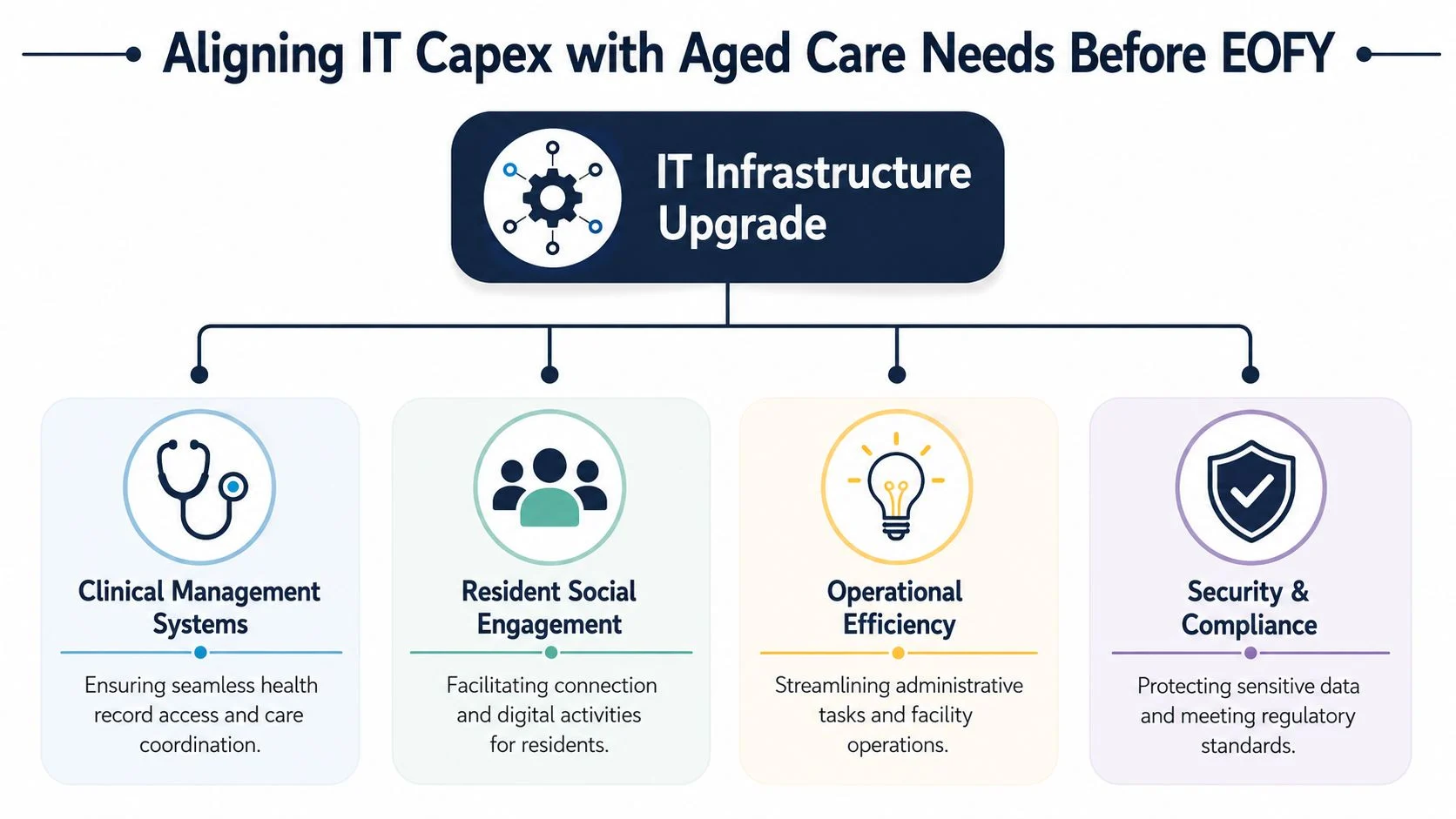
Aligning IT Capex with Aged Care Needs Before EOFY
Late June often exposes the underlying problem. A facility in Fraser Rise might have budget left, a supplier offering fast delivery, and pressure to spend before 30 June. Then the practical questions land. Will the new Wi-Fi reliably hold up in resident rooms? Can staff use the devices without changing their workflow mid-shift? Will the upgrade reduce risk under aged care and privacy obligations, or just add another box in the comms rack?
EOFY Capex decisions work best when they start with care delivery and compliance pressure, then move to hardware. In aged care, the wrong purchase shows up quickly. Nurses spend longer charting. Telehealth calls drop out. Families complain about poor connectivity. Managers inherit a project that cost money but did not fix the operational issue.
Start with resident and staff impact
The strongest Capex choices in aged care usually support four areas.
- Clinical systems access. Staff need fast, reliable access to care records, medication information, incident logs, and communication tools at the point of care.
- Resident connection. Stable internet and suitable shared or personal devices support video calls, entertainment, and day-to-day digital engagement.
- Operational continuity. Printers, switches, wireless coverage, backup systems, and shared workstations shape how smoothly the facility runs each day.
- Security and compliance. Resident data, staff access, backups, and device management need to be built into the environment from the start.
The ownership model matters too. Some facilities should buy core infrastructure because it gives them better control over uptime, configuration, and replacement timing. Others are better served by shifting some costs into managed services, especially if internal IT oversight is light. This Capex vs Opex budgeting guide is a useful reference if you are weighing upfront purchase against ongoing service cost.
What works and what doesn’t
Good Capex planning matches the asset to the bottleneck.
If staff lose time moving through dead spots between resident rooms and common areas, access points and switching may deliver a bigger operational gain than replacing office PCs. If your firewall cannot support modern access control, secure remote support, or proper network separation between staff, residents, and guests, that issue should move ahead of cosmetic upgrades.
Poor Capex planning usually looks neat on paper and messy on site. A new switch does not fix weak wireless design. New laptops do not solve long login delays caused by poor device setup, old profiles, or clumsy authentication. A server refresh does not help much if backups still fail or recovery is untested.
In aged care, piecemeal upgrades often just move the pain from one team to another.
The timing issue that catches facilities out
Timing is where many EOFY plans slip.
For tax treatment, purchase date is only part of the story. What matters in practice is whether the equipment is operational by the deadline you are planning around. A server delivered on 29 June but configured on 1 July can create a very different outcome from the one finance expected. The same applies to wireless projects that need cabling, switch changes, controller setup, and testing before staff can use them safely.
For an aged care provider, that creates a few predictable risks:
- Staged installations can run past your target date when cabling, switching, and Wi-Fi rollout happen across separate visits.
- June stock shortages can disrupt the plan if replacement hardware is back-ordered or substitutions create redesign work.
- Change windows are tight because upgrades often need to happen around medication rounds, handovers, visiting periods, and overnight care requirements.
- Testing is part of readiness because equipment sitting onsite but not working properly still leaves staff exposed to delays and workarounds.
A good rule is simple. If the project needs coordination between supplier delivery, onsite install, user setup, and clinical operations, leave buffer time. In Fraser Rise facilities, where providers are often balancing compliance pressure with lean operational teams, late-June purchasing without a clear deployment plan is one of the easiest ways to waste both budget and effort.
Paying in June and getting the real benefit in July can be acceptable operationally. It is a poor assumption to build an EOFY deduction plan around without checking the timing with your accountant and your IT provider.
Assessing Your Facilitys Current IT Infrastructure
Most aged care facilities already know something feels off in their environment before they can name the exact problem. Staff say the system is slow. Families mention poor guest Wi-Fi. Clinical teams avoid using devices in some areas because connection drops are common. The right assessment turns those complaints into a ranked list of risks and upgrade priorities.
A useful audit isn’t built around technical jargon. It’s built around what your staff and residents are trying to do, where that process breaks down, and whether the fix belongs in Capex, support, or workflow.

Check the network where care actually happens
Start on the floor, not in the server rack. Walk the building and ask where staff lose time.
Look at:
- Wi-Fi reliability in resident rooms. Can staff complete documentation and communication tasks without reconnecting or moving locations?
- Coverage in treatment and common areas. Telehealth, digital activities, and mobile care tools all depend on stable wireless performance.
- Guest and resident access separation. Shared connectivity without clear separation creates avoidable security and performance issues.
- Old switching and cabling choke points. These often sit in the background until everything slows down at once.
If your Wi-Fi can’t support telehealth consults or point-of-care access consistently, that’s not a comfort issue. It’s an operational weakness.
Review staff devices and shared hardware
Aged care facilities often carry a mix of old desktops, nursing station PCs, mobile laptops, printers, and ad hoc replacements bought during urgent failures. That mix usually creates support headaches.
Check for patterns such as:
- Slow logins at shift change
- Devices that can’t reliably run current software
- Workstations that freeze during documentation
- Printers that create bottlenecks for medication charts or administrative paperwork
The question isn’t whether a device still turns on. The question is whether it still supports safe, efficient work.
Look closely at clinical systems and workflow friction
Your software stack might be technically functional while still wasting staff time. That often shows up as duplicate entry, awkward handoff between systems, or staff relying on paper because the digital process is too cumbersome.
Ask:
- Can staff access resident information where they need it?
- Do your systems work smoothly together, or are teams retyping the same information?
- Are mobile workflows practical, or do they push staff back to a fixed desk?
- Does your current setup support communication with families and external providers without workarounds?
A poor workflow can make decent software feel broken.
Audit security, backups, and resilience
Many facilities frequently underestimate their exposure. In aged care, cybersecurity is about continuity as much as privacy. If a security event blocks access to systems, your team still has to care for residents, complete documentation, and communicate clearly.
Use this quick review:
- Access control. Are shared logins still being used in places where individual accountability matters?
- Endpoint protection. Are old devices sitting outside your normal management and security processes?
- Backups. Do you know what is being backed up, where recovery would happen from, and what operations would look like during an outage?
- Vendor dependencies. If one software platform or internet link fails, what is your practical fallback?
For a broader planning lens, this article on whether your IT infrastructure is ready for the new financial year is a good companion to your internal review.
The cleanest Capex business case is simple. This system is failing, staff are working around it, and the upgrade removes a known risk or bottleneck.
When to Get Help From an IT Consultant
A common EOFY mistake in aged care is waiting until the budget is nearly locked, then discovering the underlying issue is larger than a device replacement. A Fraser Rise facility might start by pricing new laptops and end up facing poor Wi-Fi coverage, patchy mobile access for carers, an ageing firewall, and no clear plan for what happens if internet access drops during a medication round. At that point, buying hardware without outside advice is like replacing tyres when the steering itself is faulty.
An IT consultant is worth bringing in when the decision affects resident care, compliance, or your ability to keep operating during an interruption. That point arrives earlier in aged care than in a standard office because your systems support clinical records, team communication, visitor coordination, and privacy obligations at the same time.
Signs the job has moved beyond an internal review
Bring in help if your team is asking questions that nobody can answer with confidence, especially where risk sits across operations, finance, and compliance.
Typical signs include:
- You’ve identified a security issue but can’t judge the operational risk
- An upgrade will affect multiple buildings, wings, or roaming staff workflows
- You need equipment purchased, installed, and in use before EOFY deadlines
- Finance, software vendors, and hardware suppliers are all giving different advice
- Staff have built unofficial workarounds around slow systems or unreliable access
- You need to decide what should sit as Capex now versus what should be staged later
That last point matters. In aged care, the right answer is not always to replace everything in June. Sometimes the safer call is a staged project. Core network and security gear might belong in this year’s Capex plan, while lower-priority endpoints or non-critical upgrades wait until the facility can absorb the change without disrupting care.
Why outside advice lowers risk
A capable consultant should do more than hand over a shopping list. They should test assumptions, map dependencies, and tell you where a tidy-looking EOFY purchase could create trouble later. I’ve seen facilities approve new devices before checking whether charging, device management, wireless coverage, and software access were ready. The result is predictable. New gear arrives, staff still cannot work efficiently on the floor, and the Capex spend fails to fix the daily problem.
Aged care also has less room for trial and error. Systems can’t go offline for half a day because an installer underestimated the cutover. Resident information still needs to be available. Staff still need to document care. Families still expect updates. Compliance does not pause because a project ran over time.
If you are weighing internal capability against external support, it helps to review different outsourced IT and vendor support options for Australian businesses and compare them against the realities of your facility.
Get advice while there is still time to stage the work properly
June gets crowded fast. Stock tightens, installers get booked out, and rushed decisions usually produce the wrong scope. Early advice gives you time to separate urgent infrastructure from nice-to-have purchases, confirm what can be capitalised, and plan deployment around the rhythms of the home rather than the supplier’s calendar.
For Fraser Rise providers, that usually means getting a second opinion as soon as your review turns up uncertainty, conflicting advice, or a compliance concern that could affect residents or staff.
Choosing the Right IT Partner in Fraser Rise
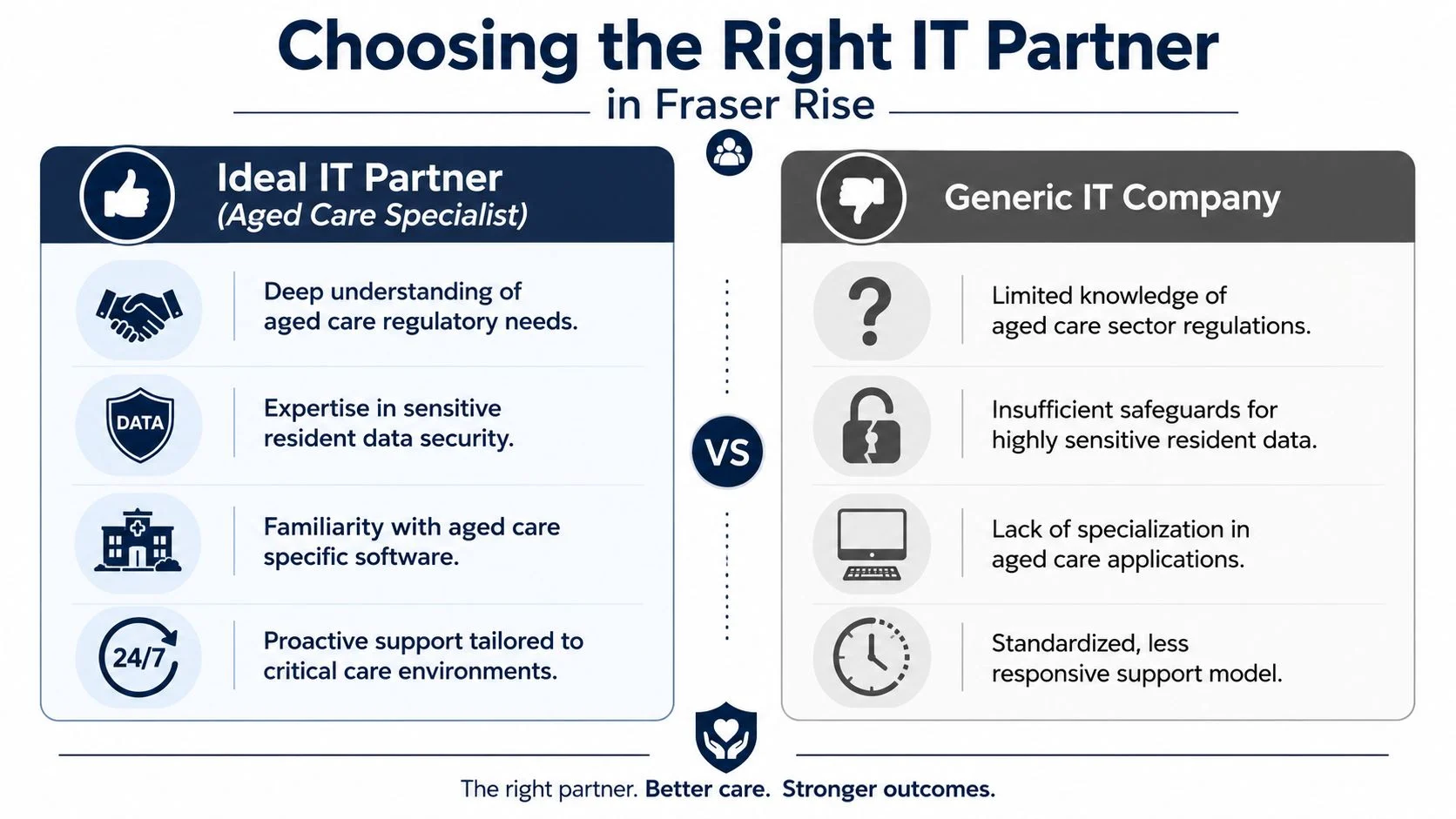
Choosing an IT partner for an aged care facility isn’t the same as hiring someone to support a retail shop or a standard office. The stakes are different. You’re not only buying uptime. You’re buying safer handling of resident information, cleaner support for staff workflows, and fewer interruptions to care.
That’s why a generic quote full of devices and monthly fees isn’t enough. You need to know how the provider thinks.
What good looks like
A suitable aged care IT partner should be able to discuss your environment in operational terms. They should ask how staff move through a shift, where mobile access matters, how resident and guest access is separated, and what systems are critical if something fails.
Look for these qualities:
- Care-aware design thinking. They understand that every outage or slowdown lands on staff and residents, not just a help desk queue.
- Security discipline. They can explain how they protect sensitive resident data in practical terms, including device management, access, and recovery.
- Deployment realism. They talk about lead times, staging, testing, and handover, not just product availability.
- Clear commercial structure. Their quote separates hardware, project work, and recurring support so you can tell what you’re buying.
Red flags to take seriously
A few warning signs show up quickly in supplier meetings.
- They only talk brands and boxes. Hardware matters, but your main problem is usually workflow, design, or support quality.
- They dodge responsibility for cutover timing. If nobody owns delivery and installation scheduling, the project can drift.
- They don’t ask about compliance or resident data. That suggests they see your facility as a generic small business.
- They promise everything without clarifying assumptions. In IT, vague confidence is often more dangerous than a cautious answer.
Local support still matters
For facilities in Fraser Rise and the broader western Melbourne area, local presence is valuable because some issues need hands-on response. Remote support is useful for many tasks, but network faults, hardware swaps, wireless surveys, and onsite troubleshooting still benefit from a technician who can physically attend.
The best partner usually isn’t the one with the flashiest proposal. It’s the one whose advice still makes sense when you picture a busy shift, a distressed family call, or a documentation backlog.
The Local Supplier Checklist and Key Interview Questions
A provider meeting should feel less like a sales presentation and more like a structured vetting process. If you don’t guide the conversation, you’ll often get broad promises instead of usable answers. A checklist keeps the process objective, especially when multiple people inside the facility are involved in the decision.
For facilities around Fraser Rise, this can also help you compare local support options against specialists who claim aged care experience. If you want a local service benchmark, reviewing material such as managed IT for aged care providers in Sydenham can help you understand how providers position their sector knowledge.
IT Partner Vetting Checklist for Aged Care
| Criteria | What to Look For | Red Flags |
|---|---|---|
| Aged care understanding | They ask about resident care workflows, staff mobility, family communication, and sensitive data handling | They treat your facility like a standard office |
| Security approach | Clear explanation of endpoint management, access control, backups, and incident response | Vague statements like “we do security” without process detail |
| Clinical software familiarity | They ask which platforms you use and how staff interact with them day to day | They focus only on hardware refreshes |
| Deployment planning | Written rollout steps, testing approach, downtime planning, and handover | No defined install sequence or acceptance process |
| Pricing clarity | Separate line items for hardware, labour, recurring support, and optional services | Bundled quotes that make comparison difficult |
| Support model | Clear contact path, escalation process, and onsite availability | Generic support promises with no accountability |
| Documentation | Network, devices, access, and backup arrangements documented for handover and continuity | Knowledge sits with one technician only |
| Training and adoption | Basic staff enablement included where needed | They assume staff will just “figure it out” |
Questions that reveal real capability
Ask direct, scenario-based questions. That’s where weak providers usually unravel.
- How would you separate resident, guest, and staff network access without making daily use harder for staff?
- If our clinical team relies on mobile access in resident rooms, what would you check before recommending new hardware?
- What would your rollout plan look like if we needed to replace core network equipment while minimising disruption to care operations?
- How do you handle backup and recovery planning for a site that can’t stop operating?
- What documentation would you provide us after the project is complete?
- If a device fleet refresh is approved near EOFY, how would you reduce the risk of delivery and installation delays?
What to listen for in the answer
A strong answer usually includes trade-offs. The provider should explain what they’d inspect, what they’d avoid, and where the operational risks sit. If every answer sounds effortless, that’s often a bad sign. Good IT planning is practical, not theatrical.
A reliable partner doesn’t just say yes. They explain what has to happen for yes to work.
How Tbourke Solutions Can Help Your Facility
An EOFY IT project in aged care usually stalls at the same point. Finance wants clear asset treatment, care teams need reliability on the floor, and managers need the work done without upsetting resident routines. The job is to turn those competing pressures into one practical plan.
Tbourke Solutions helps Fraser Rise and wider Melbourne west aged care providers do that by starting with the site as it operates. That means checking where Wi-Fi drops out in resident rooms, where shared devices slow staff down, where backup arrangements leave too much risk, and where old network gear is one fault away from disrupting medication rounds, handovers, or family communication.
The Capex decision is only part of the work. A facility also needs to know whether the proposed purchase will suit the building, the staff workflow, and the compliance obligations that sit around resident information and business continuity. A cheaper switch, firewall, or server is not a saving if it creates downtime, weak audit trails, or extra burden for care staff.
That is the practical value of working with an experienced IT consultant. Tbourke Solutions brings more than 20 years of experience across managed IT services, infrastructure support, cloud, cybersecurity, and consultancy. The focus stays on fit, timing, and handover, not on selling a standard bundle that looks good on paper but causes problems after install.
For facilities trying to use the EOFY window well, the work usually includes scoping the right assets for Capex, checking procurement timing, planning installation around care operations, testing properly before cutover, and documenting the environment so the site is easier to support afterward. In aged care, that discipline matters. Residents notice when phones fail, call systems lose connectivity, or staff spend extra minutes fighting slow devices.
If your facility needs a grounded review of its current setup or a second opinion on an EOFY infrastructure purchase, Tbourke Solutions can assess the risks, the trade-offs, and the rollout approach before you commit.
EOFY IT Capex FAQs for Aged Care Providers
What is the difference between Capex and Opex for IT services
Capex usually covers assets you buy and use over a longer period, such as servers, laptops, switches, wireless hardware, or a larger infrastructure rollout. Opex usually covers recurring costs such as internet, cloud subscriptions, software subscriptions, support agreements, and managed service fees.
A simple way to think about it is this. Capex is buying the kitchen equipment. Opex is paying for the groceries and the chef. Both matter, but they sit differently in budgeting and tax treatment. Your accountant should confirm the treatment for your specific purchase.
Can software be claimed as Capex
Sometimes, yes. It depends on how the software is purchased and used. An outright software licence with ongoing value may be treated differently from a monthly SaaS subscription, which is commonly handled more like an operating expense.
This is one area where facilities should avoid assumptions. Ask your accountant and your IT provider to classify the purchase before committing, especially if the software is bundled with implementation or support services.
What if our new server arrives before 30 June but isn’t installed
That’s a risk for deduction timing. For an immediate write-off outcome, the key issue is whether the asset is first used or installed ready for use before 30 June, not whether the invoice was paid earlier. If the server is delivered but still sitting boxed, unconfigured, or not operational, your facility may not be in the position you expected for that financial year.
Should we prioritise cybersecurity or hardware refresh first
Whichever item removes the bigger operational risk should usually go first. In some facilities, that’s endpoint replacement because old devices can’t be secured properly or are too unreliable for care workflows. In others, the priority is firewall, backup, access control, or network segregation.
If you’re forced to choose, don’t pick based on what looks most visible. Pick based on what creates the highest risk to resident care, staff productivity, or sensitive data handling.
Is June too late to start planning
It might be, depending on what you need. Simple purchases can still be manageable. Multi-part projects involving procurement, delivery, installation, testing, and user handover are much harder to complete cleanly under pressure.
If your project touches core infrastructure, clinical workflows, or multiple areas of the facility, earlier planning is safer.
If you need a practical EOFY IT plan that fits aged care operations, speak with Tbourke Solutions. We can help you assess your current environment, prioritise the right upgrades, and turn your Capex decisions into systems your staff can rely on.
Share This Story, Choose Your Platform!