
June gets noisy fast. A business owner looks at the remaining IT budget and thinks, “If we do not spend this now, we lose it.” A school principal has the same problem, but with extra pressure around student data, ageing devices, and a short delivery window before term planning kicks in again.
The mistake is treating EOFY like a shopping sprint. The better approach is to treat it like a maintenance window for your business. You use the budget to fix weak spots, buy time back for staff, and reduce the risk of starting the new financial year with the same IT problems still hanging around.
TLDR
If you are wondering how to use your eofy it budget before you lose it, start with what lowers risk first. Security gaps, backup verification, critical hardware refreshes, and software or support prepayments usually deliver the best mix of immediate operational value and EOFY tax efficiency. For eligible Australian businesses, the instant asset write-off can allow immediate deductions for IT assets under $20,000 in the year of purchase, which makes timing matter before June 30. The best EOFY spending is not panic buying. It is practical buying that is installed, usable, documented, and aligned to what your team needs.
Your EOFY IT Budget Playbook Starts Here

EOFY spending gets a bad name because a lot of organisations leave decisions too late. They end up buying whatever is easy to approve, not what solves a problem.
That is the wrong lens. EOFY is one of the few times in the year when finance, operations, and IT all pay attention at the same time. Used properly, it is a reset point.
Think like an owner, not a shopper
A useful question is not “What can we buy before June 30?” It is “What problem will still be costing us money in August if we ignore it now?”
For most small businesses and schools, the answer usually sits in one of these buckets:
- Security weaknesses such as expired licences, weak access controls, or unmanaged devices
- Data protection gaps where backups exist, but nobody has confirmed a clean restore
- Productivity drag caused by slow laptops, flaky Wi-Fi, old switches, or clunky file access
- Compliance and governance work that becomes more urgent as cloud tools and AI features spread across the workplace
Tip: EOFY spend works best when each item has a plain-English business reason beside it. “Replace old firewall” is vague. “Reduce outage risk and improve remote access security” gets approved faster.
The Australian tax angle matters
In Australia, the EOFY deadline is not just an admin milestone. It affects what can be claimed and when. According to Matthews on EOFY planning and the instant asset write-off, businesses with turnover under $10 million can claim immediate deductions for IT assets under $20,000 via the instant asset write-off, allowing the full deduction in the year of purchase.
That is why waiting can cost more than the sticker price suggests. Miss the timing, and the same purchase may still be useful, but less tax-efficient.
For a more detailed planning framework, this IT budget planning guide is a practical place to map needs against budget before the rush takes over.
The three-pillar filter
Before approving any EOFY spend, run it through this filter:
| Pillar | Good EOFY spend looks like | Poor EOFY spend looks like |
|---|---|---|
| Protect | Security renewals, backups, access control, audit work | Buying extra hardware with no clear risk reduction |
| Stabilise | Replacing failed or failing devices, network upgrades, storage cleanup | Cosmetic upgrades that leave core issues untouched |
| Improve | Productivity software, cloud improvements, staff-ready rollouts | Tools nobody is trained to use |
A simple analogy helps here. Your IT budget is not a gift card. It is more like a service interval on a vehicle. If you skip the brakes and spend the money on nicer floor mats, the car still has the original problem.
Prioritising Your Spend for Maximum Impact
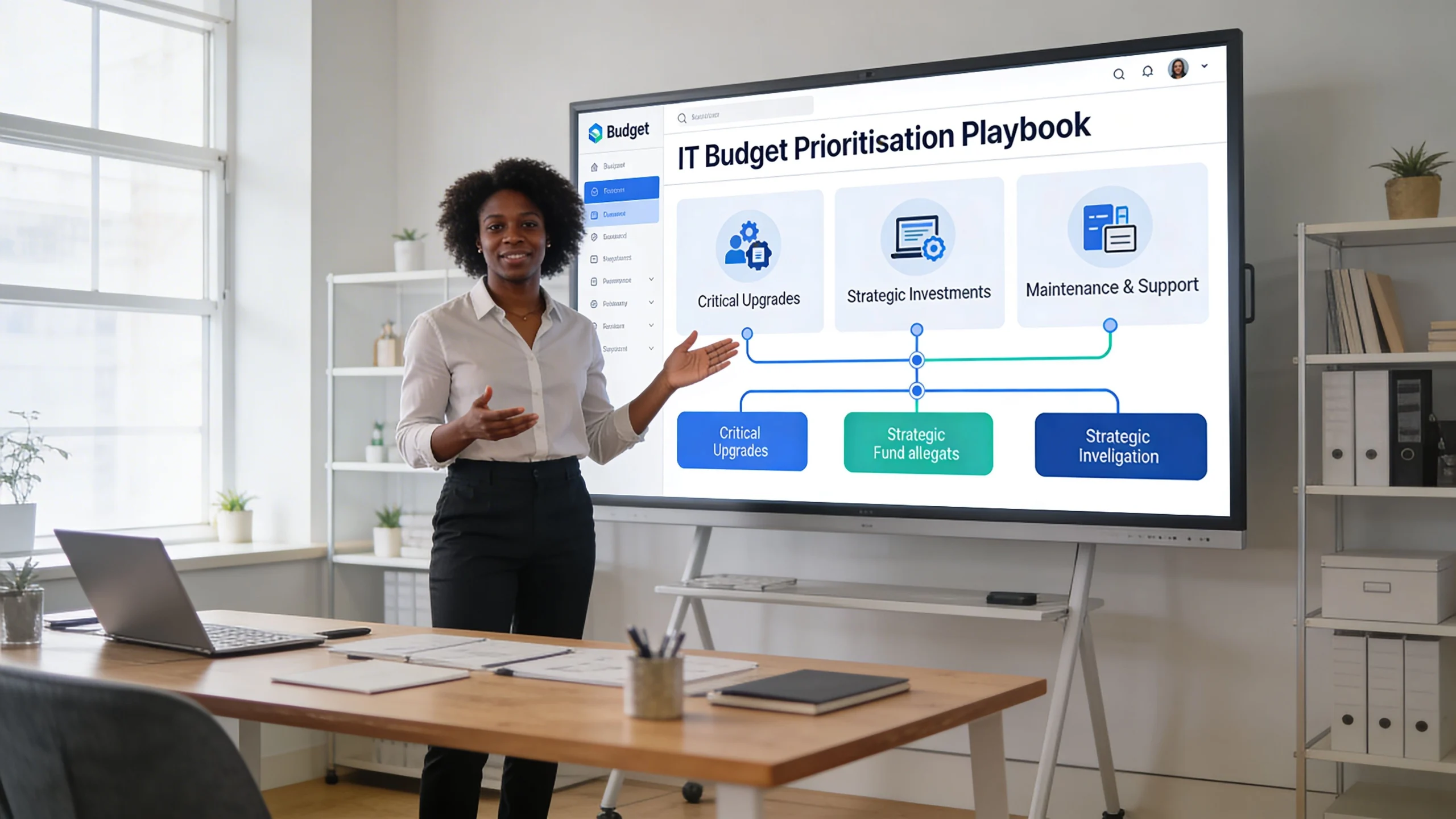
If there is not enough budget to do everything, rank spend by damage prevented first, convenience second. That sounds blunt, but it saves people from wasting EOFY funds on low-impact upgrades.
First priority security and access control
Cybersecurity is not a line item you squeeze in if there is money left. It belongs at the top because one weak point can undo every other investment.
Start with the basics that affect the whole organisation:
- Renew core security tools before they lapse
- Roll out MFA where accounts still rely on passwords only
- Review admin access so former staff, over-privileged users, and shared logins are cleaned up
- Check endpoint coverage across laptops, desktops, and mobile devices
- Audit Microsoft 365 settings if your team uses Exchange, OneDrive, SharePoint, or Teams
Schools should apply the same logic to staff systems, shared devices, and access to student information. Many breaches do not begin with complex attacks. They begin with ordinary oversights.
Second priority backup and recovery
A backup that has never been tested is a theory. EOFY is the right time to stop guessing.
According to Kilimanjaro Consulting on EOFY rollover and backup practice, a best practice is a dual-backup protocol with one backup just before the June 30 rollover and a second immediately after. That setup helps when accountants ask for historical reports later. The same source notes that 81% of organisations lack adequate backup verification procedures, which is why many businesses discover backup problems only after a failure.
That changes how I would rank spending. If your budget is tight, put money into:
- Backup automation
- Restore testing
- Redundant storage
- Disaster recovery documentation
Key takeaway: Paying for backup storage without paying for restore testing is like paying for insurance and never checking the policy covers the building you own.
Here is also where a capex versus opex decision matters. Hardware-heavy backup design is not always the smartest fit for a smaller organisation. This capex vs opex budgeting guide can help you decide whether to buy infrastructure outright or spread the spend through managed services.
Third priority hardware and software that remove friction
Once security and backups are covered, spend on the bottlenecks your staff complain about every week.
Common examples include:
- Ageing laptops that struggle with Teams, browsers, and document work at the same time
- Old desktop fleets that slow down admin teams and front office staff
- Wi-Fi access points or switches that create patchy coverage or random dropouts
- Server refreshes where local workloads still matter
- Microsoft 365 licensing changes that unlock better collaboration or governance features
The right purchase is usually the one staff already notice when it fails. If a single printer is annoying, it may not deserve the budget. If the whole office loses time waiting on devices to load, that deserves action.
Fourth priority cloud and governance work
Cloud migrations can be excellent EOFY investments when they remove recurring headaches. File access clean-up, mailbox migrations, SharePoint structure work, and identity governance all fit this category.
What does not work is buying licences first and planning later. If nobody has decided where data should live, who should access it, and how old systems will be retired, the business ends up paying for two environments and using both badly.
When to Call for Expert IT Help
Some EOFY tasks are straightforward. Others look simple until they collide with tax rules, vendor lead times, licensing traps, or rushed implementation.
Bring in expert help if any of these sound familiar:
- You are unsure what qualifies and do not want to buy the wrong thing
- You need security work done quickly but do not know where to start
- Your team has no spare capacity to manage ordering, setup, and user rollout before June 30
- You are replacing multiple systems at once and need them to work together properly
- Your school or business has compliance concerns around data, remote access, or cloud storage
The risk with DIY EOFY buying is not just overspending. It is buying equipment that does not fit your environment, ordering software that is never implemented, or making rushed changes that create fresh support issues in July.
A managed provider can scope the work, check compatibility, sequence the rollout, and make sure the spend translates into usable outcomes. If you are still deciding whether outside support is the right fit, this overview of what a managed IT provider does gives a clear picture.
If any of the red flags above apply, reach out through the Tbourke Solutions contact page and submit a query before the final rush. A short planning conversation is usually cheaper than fixing a rushed EOFY purchase later.
Quick Wins and Smart Procurement Tactics
The best late-June projects share one trait. They are easy to justify, easy to deliver, and useful on day one.
Quick wins that often make sense
Website work is one of the cleanest examples. According to WFB on using remaining budget before EOFY, Australian tax regulations allow immediate deduction of website maintenance, content updates, and security improvements as business expenses. That includes practical items like SSL certificates, security plugins, and content refreshes, provided the work is completed and invoiced before June 30.
Other quick wins often include:
- Wi-Fi upgrades in offices, classrooms, or reception areas
- New monitors for staff doing long hours of admin work
- Password managers for the full team
- Docking stations for hybrid staff
- Microsoft 365 clean-up to remove unused licences and align plans to roles
- Managed support prepayments if your provider offers annual terms
If you are comparing licensing options, a practical reference point is this breakdown of Microsoft Office 365 business plans from Cloud Move. It is useful for understanding how plan differences can affect email, storage, and collaboration choices before you commit.
Procurement mistakes that waste EOFY budget
Buying the right thing too late is still a problem. Lead times and invoice timing matter.
Use this checklist before approving spend:
- Confirm stock first. Do not assume laptops, switches, or accessories are ready to ship.
- Ask for written lead times. Verbal “should be fine” answers are not enough in late June.
- Check what is included. Hardware without setup, migration, or disposal planning can create extra work.
- Make invoice timing explicit. If your accountant needs work completed and invoiced by June 30, tell the supplier upfront.
- Get approval in writing. Internal delays often cost more time than the vendor does.
Tip: Prepaying for support, hosting, or software can be smarter than forcing a hardware purchase that your team does not need yet.
For businesses deciding which functions to outsource rather than buy tools for directly, this guide to what IT services can be outsourced is worth reviewing before you lock in the final spend.
What usually does not work
A rushed EOFY purchase often fails for one of three reasons:
| Bad decision | Why it fails | Better move |
|---|---|---|
| Buying hardware with no rollout plan | Boxes sit unopened in July | Bundle procurement with setup and deployment |
| Upgrading every licence tier | Users do not need the extra features | Match licences to roles |
| Choosing the cheapest supplier | Delays and missing services create rework | Choose the supplier who can deliver properly and on time |
Sample EOFY Plan for SMBs and Schools
A simple timeline removes a lot of EOFY stress because people stop trying to solve everything in the final week.
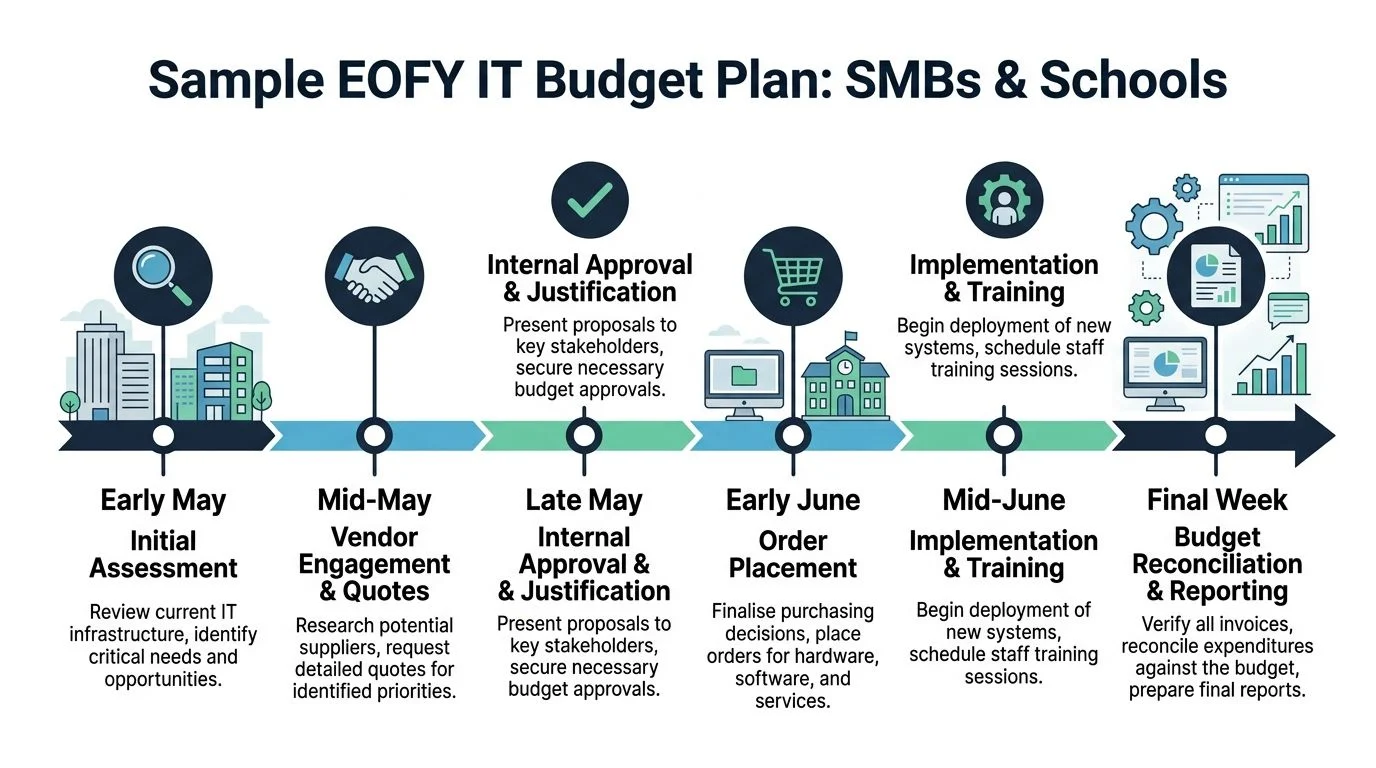
A practical timeline from May to June
Use the sequence below as a working model.
- Early May. Review the current environment. List devices near end of life, security gaps, support pain points, and projects that have stalled.
- Mid-May. Get quotes and compare options. Here, you pressure-test whether the spend is solving a real problem.
- Late May. Seek internal approval. Attach the business reason to each line item.
- Early June. Place orders and lock in delivery windows.
- Mid-June. Complete implementation, user setup, and any training.
- Final week of June. Check invoices, reconcile spend, and document what changed.
Example allocation logic for two common environments
For schools, the pressure can be more acute. According to Applied Tech on year-end IT budget use, 92% of Victorian schools need to allocate funds by June 30. The same source notes that prepaying local MSP services for hybrid cloud solutions or cybersecurity audits can be a strategic move, especially when post-incident recovery costs average $250,000.
That supports a different spending pattern from a typical small business. A school usually needs to protect shared environments, student data, and classroom continuity. A business often cares more about staff productivity, remote access, and commercial system uptime.
Here is a sample allocation framework.
| Spending Category | Sample SMB (15 Staff) | Sample School (200 Students) |
|---|---|---|
| Security and access control | High priority for MFA, endpoint security, Microsoft 365 review | High priority for staff access, device controls, student data protection |
| Backup and recovery | Verify backups, test restores, improve retention and reporting | Protect admin systems, file stores, and critical teaching resources |
| Hardware refresh | Replace the slowest laptops, monitors, and network gear first | Target shared classroom devices, office machines, and weak Wi-Fi zones |
| Cloud and software | Licensing tidy-up, file access improvements, collaboration tools | Hybrid cloud support, teacher access, shared storage structure |
| Support and training | Prepaid support, onboarding, workflow cleanup | Prepaid support, staff guidance, cybersecurity awareness |
How this looks in real life
A 15-person SMB might use EOFY funds to replace the handful of oldest laptops, renew security tools, verify backups, and clean up Microsoft 365 access.
A small school might focus on safer Wi-Fi, shared device stability, a cybersecurity review, and prepaid support so staff are not chasing ad hoc fixes during term.
If you are reviewing device options for classroom use, this guide to affordable laptops for students can help narrow down practical considerations before purchasing. Schools looking for more specialised support should also review these IT services for education to see what can be scoped before EOFY.
Key takeaway: The best sample plan is not the one with the most line items. It is the one your team can approve, receive, implement, and use properly before the deadline pressure turns into cleanup work.
Let Tbourke Solutions Secure Your EOFY Spend
EOFY is where rushed decisions create expensive follow-up work. Licences get renewed without review. Hardware is ordered without deployment planning. Security gaps stay open because nobody had time to scope the fix properly.
That is where a local provider can make the process a lot cleaner. Tbourke Solutions works with Melbourne small businesses, schools, sole traders, and startups that need practical IT support without jargon or hidden costs. With over 20 years of experience, the team can help assess priorities, recommend the right mix of hardware, cloud, security, and support, and handle the procurement and rollout so your staff can keep working.
There is also a tax efficiency angle. For FY2026, the instant asset write-off allows businesses with turnover under $50 million to immediately deduct IT assets up to $20,000 per item, and MarkeTeam’s EOFY website tips article states that 78% of eligible small businesses underutilise this. Structuring EOFY spend with an MSP for items like prepaid support or cloud migrations can help make that budget work harder.
If you want a calm, practical review before June 30, use the contact page at http://tbourke-solutions.com.au/contact and submit an enquiry.
EOFY IT Budgeting Common Questions
What if I order hardware before June 30 but it arrives in July
Do not assume the order date alone settles the tax outcome. The treatment can depend on when the asset is installed or ready for use. Confirm this with your accountant before relying on timing.
Can I prepay software or support before June 30
In many cases, prepaying can be a sensible EOFY move, especially for support, hosting, or annual subscriptions that your business already knows it needs. The key is to make sure the arrangement is documented clearly and checked against your accounting advice.
Is it better to lease equipment or buy it outright at EOFY
That depends on cash flow, how quickly the equipment ages, and whether ownership gives you a clear advantage. Buying can suit assets you know you need now. Leasing can suit businesses that want predictable monthly costs and easier refresh cycles.
My budget is small. What should I spend it on first
Spend it on the item most likely to prevent a bigger problem. In most environments, that means cybersecurity or backup verification before cosmetic upgrades.
What is the most common EOFY mistake
Buying tools without planning for setup, training, or support. A rushed purchase can still leave your team with the same old problem, just in a newer box.
If your EOFY budget is still sitting there and June 30 is getting closer, Tbourke Solutions can help you turn that pressure into a practical plan. Whether you need security upgrades, backup verification, hardware procurement, cloud advice, or support for a school environment, the team can help you make the spend useful, compliant, and easier to manage. Reach out through the contact page at http://tbourke-solutions.com.au/contact and submit a query.
Share This Story, Choose Your Platform!