Late June has a way of exposing every shortcut in your IT setup. The payroll file won’t open on the one PC that matters, a former staff member still has Microsoft 365 access, backups say “successful” but nobody has tried a restore, and someone asks for a clean asset list you don’t have. That’s the point where EOFY IT auditing stops being an admin task and becomes a business risk.
If you run a small business or manage a school, the challenge isn’t just compliance. It’s getting through EOFY without losing time, data, or confidence in the systems you rely on every day.
TLDR: EOFY IT auditing is about making sure your systems, access, backups, documentation, and financial reporting support are ready before 30 June. For Australian organisations, that date is fixed, and the safest approach is to start early, narrow the scope, verify backups with a real restore test, review user access, and tidy up licensing and records. SMBs and schools don’t need a giant enterprise audit. They need a focused, practical process that catches the failures most likely to hurt operations and compliance.
Your EOFY IT Audit Game Plan and Timeline
In Australia, the End of Financial Year is a fixed milestone on 30 June, and for IT auditing it’s an essential checkpoint where backups should be verified, payroll superannuation data reconciled, and BAS kept current, as outlined in this overview of what EOFY means in Australia. If you leave those checks until the last week of June, you’re not auditing. You’re gambling.
The best EOFY IT auditing process for an SMB or school usually starts in April or May. That gives you enough room to find a problem, fix it, and verify the fix before year end. If you start on 25 June, all you can really do is discover issues.
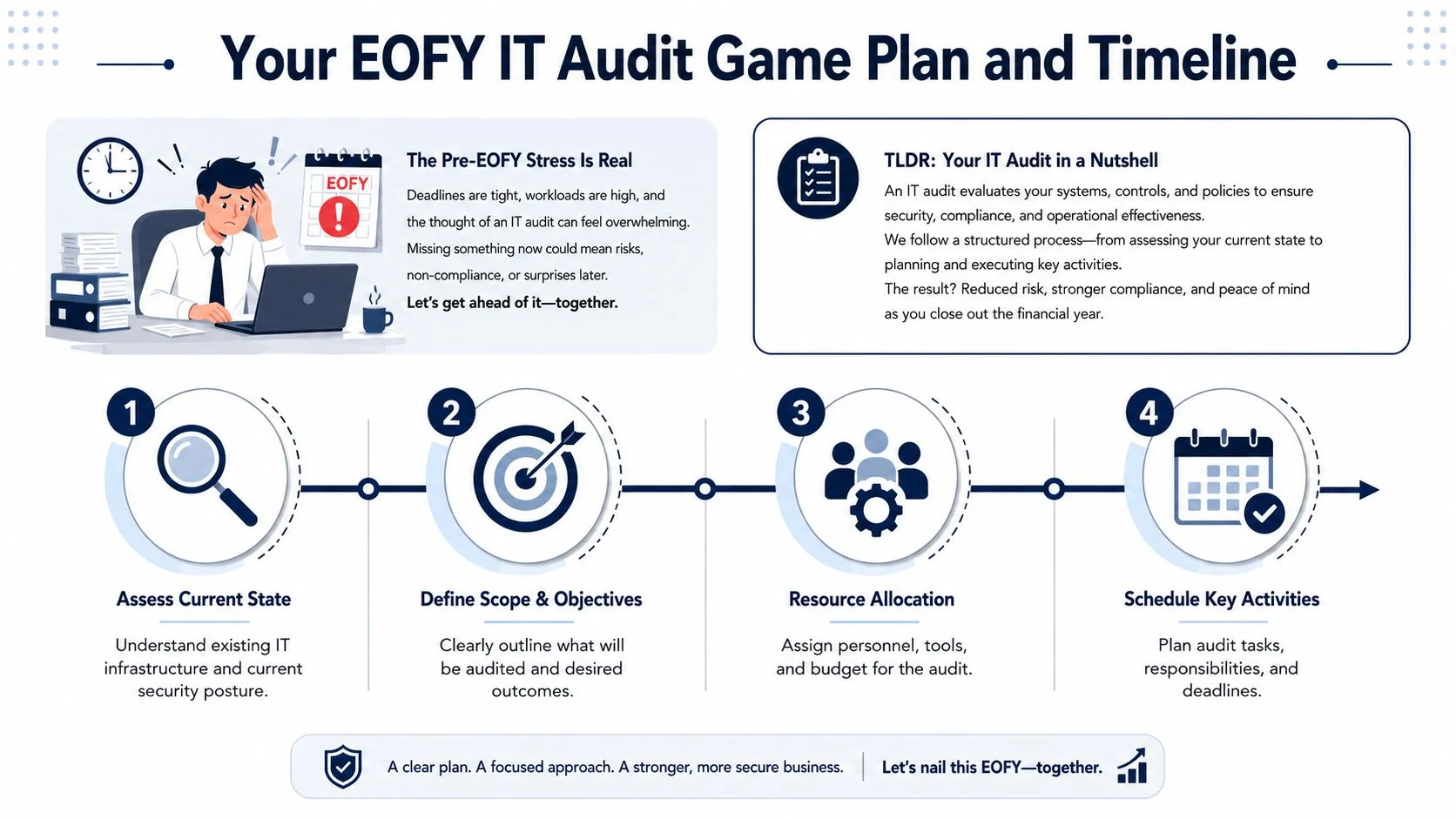
Start with a tight scope
A common mistake is trying to review everything at once. For smaller organisations, that creates noise and delays. Start with the systems that affect money, access, continuity, and compliance.
A sensible first-pass scope usually includes:
- Core devices: servers, business laptops, admin desktops, shared computers, and any device used for payroll or finance.
- Cloud platforms: Microsoft 365, Google Workspace, backup portals, finance platforms, student management or line-of-business systems.
- Critical accounts: global admins, payroll users, finance users, and shared mailboxes.
- Backup and recovery: what’s backed up, where it goes, retention, and whether restoration has been tested.
- Documentation: asset lists, software licensing, vendor contracts, and support contacts.
If your website drives enquiries, bookings, or enrolments, include it in the review. A structured comprehensive website audit checklist is useful because EOFY pressure often reveals forgotten web forms, old plugins, or broken tracking that nobody noticed during the year.
A practical timeline that works
This is the rhythm I’d recommend for first-time EOFY IT auditing.
| Timing | Focus | What good looks like |
|---|---|---|
| Late April to early May | Define scope | You know which systems, users, and records are included |
| Mid May | Asset inventory | Devices, software, cloud services, and key accounts are listed |
| Late May | Access and licensing review | Ex-staff removed, admin roles checked, licence counts reviewed |
| Early June | Backup and patch verification | Restore test completed, updates checked, obvious gaps flagged |
| Mid June | Documentation and finance support checks | Payroll, STP support systems, BAS-related records and evidence are organised |
| Before 30 June | Final review | Open issues assigned, urgent risks addressed, evidence stored |
Practical rule: If a task affects payroll, access, backups, or reporting, finish it before the final week of June.
For many organisations, the hardest part is turning good intentions into scheduled work. Put the audit tasks on the calendar, assign names against each task, and treat them like any other operational deadline. If you need a broader readiness view, this guide on whether your IT infrastructure is ready for the new financial year is a useful companion.
Building Your IT Inventory and Asset Register
Most small organisations know roughly what technology they own. That’s not the same as having an audit-ready asset register.
An asset register is a stocktake for your technology. If you can’t see what you have, who uses it, what it runs, and when it needs replacing, every other audit step becomes slower and less reliable. This matters even more in schools and growing SMBs, where devices move between users and shared logins tend to creep in over time.

What belongs in the register
Don’t stop at laptops and printers. EOFY IT auditing needs a fuller picture.
Include these categories:
- Hardware: laptops, desktops, servers, switches, firewalls, phones, tablets, printers, and backup appliances.
- Software: Microsoft 365, Adobe, antivirus, finance software, line-of-business apps, and any specialist education platforms.
- Cloud services: email hosting, file storage, backup services, accounting systems, website hosting, DNS management, and remote support tools.
- User and admin accounts: standard staff accounts, global admin accounts, shared accounts, service accounts, and contractor access.
- Commercial details: purchase date, renewal date, assigned user, warranty status, and vendor.
That last point is where many registers fall apart. A list of device names is helpful, but it won’t tell you what’s near end of life, what’s uninsured, or what still belongs to a staff member who left months ago.
The fields worth tracking
You don’t need expensive software to get started. A spreadsheet is fine if it’s accurate and someone owns it.
Here’s a practical structure:
| Asset type | Key fields to record |
|---|---|
| Laptop or desktop | Device name, serial, user, location, purchase date, warranty, OS version |
| Server or NAS | Hostname, role, location, warranty, backup status, support contact |
| Software licence | Product, licence type, assigned user or device, renewal date, owner |
| Cloud tenant | Platform, primary admin, billing owner, MFA status, renewal date |
| Shared account | Purpose, owner, where it’s used, password control method, review date |
A lot of security work starts with this inventory. If you’re interested in the security angle, understanding asset inventory for penetration testing is useful because it shows why unseen assets become easy targets.
The fastest way to miss a security issue is to forget an asset exists.
Common blind spots in SMBs and schools
Schools often have shared carts, AV gear, student devices, and admin systems that sit outside the “main” IT list. SMBs often miss the owner’s laptop, the spare PC in reception, old phones used for MFA, and cloud services set up on a company credit card.
These gaps create real problems:
- Support delays: nobody knows what model a device is or whether it’s still covered.
- Security holes: a tool is still active, but nobody knows who administers it.
- Budget surprises: hardware failures hit all at once because replacement dates were never tracked.
- Audit friction: you spend more time finding basic facts than fixing risks.
If your team uses mobile devices heavily, a proper device register becomes much easier when it’s tied to management policies. This overview of Intune mobile device management shows the kind of structure that helps organisations keep device ownership, compliance, and user assignment tidy.
What works and what doesn’t
What works is a living register. One owner. Regular updates. Clear naming. Real accountability.
What doesn’t work is rebuilding the list from scratch every June. That burns time, misses detail, and usually leaves out cloud services, which are often the biggest exposure.
Validating Backups and Security Posture
Many EOFY audits become uncomfortable when organisations cannot provide adequate proof. Plenty of organisations have backup software. Fewer can prove they can restore data cleanly and quickly. The same pattern applies to security. They have tools, but not always verification.
EOFY pressure tends to magnify weaknesses that have been lying dormant in the background. That’s why this step deserves more attention than almost any other part of EOFY IT auditing.
Expert benchmark data for Australian EOYF IT audits notes that 68% of SMEs in Melbourne fail their initial audit due to specific pitfalls including inadequate documentation and weak continuous monitoring for change management, which causes 45% of control failures, according to the ANAO audit manual benchmark reference. That should change how you think about this work. The issue usually isn’t that businesses don’t care. It’s that they assume “configured” means “working”.
Backups need proof, not confidence
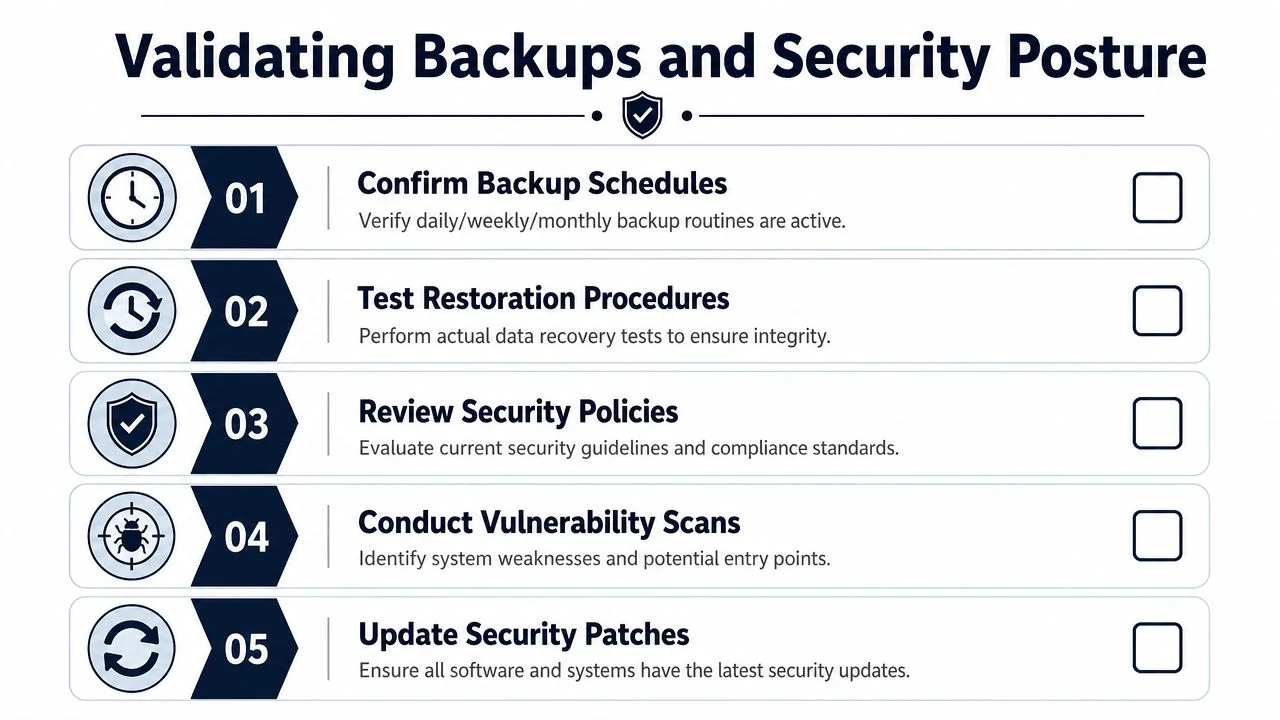
If your backup dashboard says green but you haven’t tested a restore, you have a backup assumption, not a backup strategy.
For a small business or school, a practical EOFY restore test can be simple:
- Choose a non-critical file or folder.
- Restore it to a safe location, not over the live copy.
- Open the restored files and confirm they’re usable.
- Record the date, who performed the test, and what was restored.
- Note any delay, error, or missing data.
That test tells you far more than a screenshot of a successful backup job. If the restore fails, EOFY has done you a favour by exposing it before an outage or ransomware event does.
Security posture means checking the basics properly
The biggest wins often come from routine checks done carefully. For SMBs and schools, I’d focus on these areas first.
- User access reviews: remove former staff, contractors, and stale shared access. Pay special attention to finance folders, payroll systems, and Microsoft 365 admin roles.
- MFA coverage: make sure multi-factor authentication is enabled wherever possible, especially for email, remote access, backup consoles, and admin accounts.
- Patch status: check that Windows, firmware, browsers, Microsoft 365 apps, and security tools are current.
- Endpoint protection: confirm every active device is reporting into your security platform.
- Email security settings: review forwarding rules, suspicious mailbox permissions, and spam filtering.
The reason this matters is practical, not theoretical. If an ex-employee still has access or an admin account has weak protection, EOFY is exactly when those oversights hurt the most because payroll, reporting, and executive approval workflows are all busy.
Microsoft 365 is a frequent weak spot
Many smaller organisations treat Microsoft 365 as “set and forget”. That’s risky. Email, file storage, Teams, OneDrive, and identity controls all sit there. If the tenant is messy, EOFY processes become fragile.
I’d check:
- Global admin count: keep it limited and intentional.
- Shared mailbox access: confirm it still reflects current roles.
- OneDrive and SharePoint ownership: make sure important folders aren’t tied to departed users.
- External sharing: review whether sensitive files can be shared too broadly.
- Retention and recovery settings: know what can be recovered and for how long.
A lot of teams benefit from a broader security review framework during this stage. This guide for CISO security audit preparation is written for security leaders, but the checklist logic is useful even if your organisation is much smaller.
A passing backup report doesn’t recover payroll data. A real restore does.
Schools also need to think about staff movement, casual workforce changes, and shared systems used by multiple departments. That creates permission drift. SMBs face a similar issue when one person wears five hats and gradually accumulates access nobody reviews.
If you find weak recovery arrangements or vague incident steps, it helps to compare your current setup against practical disaster recovery plan examples. That makes the gaps easier to see because backup and recovery are related, but they’re not the same thing.
When to Get Professional IT Help
A common EOFY pattern looks like this. The office manager has a spreadsheet, the business owner has the supplier emails, the school admin team knows which systems matter most, and nobody is fully confident about who can fix a failed restore or clean up years of inherited access. That is usually the point where outside help saves time and prevents an expensive mistake.
For SMBs and schools, the trigger is rarely a dramatic outage. It is usually a stack of smaller warning signs that point to the same problem. The environment has grown beyond what an internal generalist can safely review between payroll, enrolments, reporting, and day-to-day support.
Bring in professional IT help if the audit has found issues like these:
- Backups that look healthy on paper but have never been restored in a test. This is one of the biggest failure points I see. A green status report does not confirm that payroll data, student records, finance files, or shared drives will come back cleanly.
- Admin access that has drifted over time. Former staff, old contractors, shared admin accounts, and unclear Microsoft 365 roles create risk fast.
- Microsoft 365 licensing or setup that no longer matches the way the organisation works. If you are unsure which plans fit your users, this guide to Microsoft 365 business plans and what each one includes helps separate overspend from genuine security needs.
- Multiple cloud systems owned by different people. This is common in schools and growing businesses. One person set up M365, another bought backup software, finance has a separate SaaS tool, and nobody owns the full picture.
- An action list that is bigger than your capacity. Even a clear audit loses value if no one has the time or authority to work through it.
The trade-off is straightforward. DIY works for basic checks and record gathering. It stops working when the next step involves remediation, testing, or decisions with security and compliance consequences.
An external review also helps when leadership needs priorities, not just problems. School principals, business owners, and boards usually do not need a fifty-point findings list. They need to know what must be fixed this quarter, what can wait, what will cost money, and what creates real operational risk if left alone.
Good advice should reduce noise. It should turn a messy EOFY audit into a short list of practical actions, assigned owners, realistic timelines, and a budget you can defend.
Auditing Licences Compliance and Documentation
Licence compliance is one of the least glamorous parts of EOFY IT auditing, but it’s where a lot of avoidable waste and risk sits. Too many licences means you’re paying for idle accounts. Too few, or the wrong licence type, can create support, security, and compliance headaches.
The fix starts with matching three things: what you’ve bought, who’s using it, and what the product requires.
Check how the licence is meant to be assigned
Some platforms are licensed per user. Others are per device. Some add-ons only make sense for a small group, not the whole business.
Review software with these questions:
| Review point | What to ask |
|---|---|
| Assignment method | Is this licence meant for a user, device, or shared environment? |
| Actual usage | Is the assigned person still employed and actively using it? |
| Overlap | Are two products doing the same job for the same user group? |
| Renewals | Is this set to auto-renew without a review? |
| Admin ownership | Who controls the subscription and billing access? |
This matters a lot with Microsoft 365, Adobe, antivirus products, remote support tools, and niche school or business apps. The waste is often small line by line, then substantial when added up over a year.
Documentation has to support compliance
EOFY also puts a spotlight on whether your records support your operational and financial obligations. For Australian businesses preparing for the 2026 financial year-end, payroll and STP reporting need to align with payroll records, PAYG withholding balances need to reconcile with the June BAS, and superannuation liabilities should be verified by 30 June, according to this EOFY 2026 year-end accounting checklist for Australia.
That doesn’t mean your IT team becomes the finance department. It means your systems must support those obligations reliably. Payroll files need secure storage. Access to payroll systems should be controlled. Backups must cover the records finance relies on. Shared folders should have clear owners.
Contracts and renewals deserve an EOFY review
Vendor contracts often get ignored because they live in inboxes rather than systems. EOFY is a good time to check:
- Internet and phone agreements
- Microsoft 365 and cloud subscriptions
- Backup contracts
- Firewall or security appliance renewals
- Website hosting and domain renewals
- Software support agreements
Look for price changes, bundled services nobody uses, and subscriptions tied to former staff members. In schools, also look at educational software that was purchased for a programme that no longer runs.
Watch for this: if the organisation can’t answer who owns a subscription, assume it will become a problem during an incident or renewal.
For organisations reviewing Microsoft 365 specifically, this breakdown of Microsoft 365 business plans compared is helpful because licence mismatch is one of the most common sources of overspend and missing capability.
From Audit to Action Plan and Budgeting
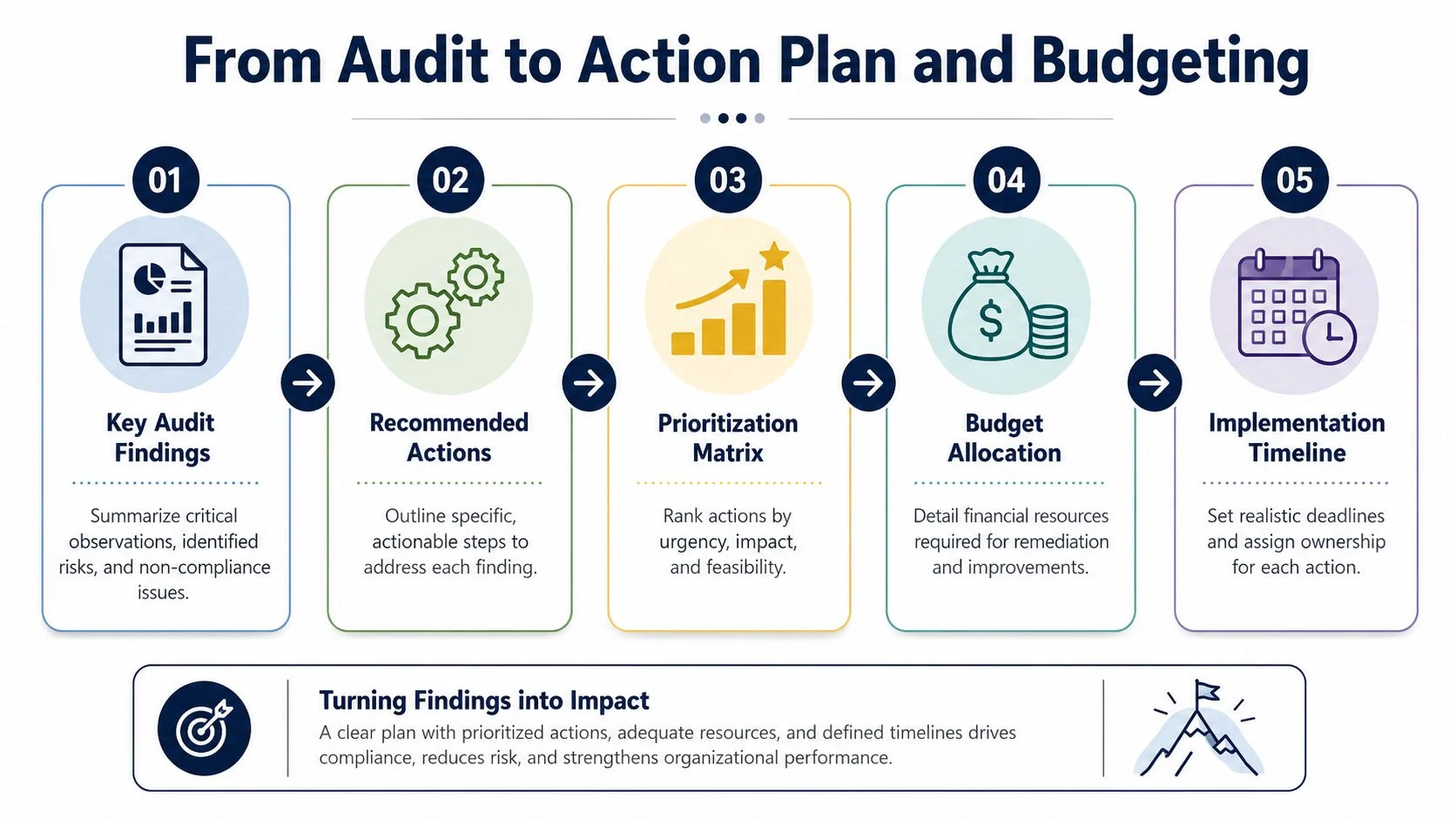
An EOFY audit isn’t finished when the checklist is complete. It’s finished when the findings have owners, deadlines, and budget decisions attached to them. Otherwise, the same issues return next June wearing different clothes.
Australian firms often hit the same trouble spots during EOFY, including slow systems, Microsoft 365 gaps, email fraud risk, weak backups, and client data issues, as highlighted in this review of EOFY IT risks firms notice too late. The value of the audit is that it lets you rank these issues before they turn into disruption.
Turn findings into priorities
A simple High, Medium, Low model works well for SMBs and schools.
High priority items usually affect security, recovery, payroll, finance, or legal exposure. Failed backups, stale admin accounts, missing MFA, and unsupported devices in critical roles belong here.
Medium priority issues are important but not immediately dangerous. Examples include uneven patching, poor asset records, messy mailbox permissions, or licence waste.
Low priority items can wait for planned improvement. Think ageing printers, non-critical software clean-up, or cosmetic standardisation work.
Here’s a practical version:
| Finding | Priority | Why |
|---|---|---|
| Backup restore test failed | High | Recovery risk is immediate |
| Former staff still active in Microsoft 365 | High | Access risk and data exposure |
| Incomplete asset register | Medium | Slows support and audit evidence |
| Too many unused software licences | Medium | Financial waste, manageable short term |
| Old shared meeting room PC | Low | Replace during normal refresh cycle |
Build the budget from risk, not from guesswork
Too many IT budgets are based on what was spent last year plus a little extra. EOFY IT auditing gives you a better model. Fund the risks you’ve identified, then schedule improvements in a realistic order.
Your budget may need room for:
- Immediate remediation: backup fixes, MFA rollout, licence corrections, urgent hardware replacement
- Operational improvements: documentation clean-up, device management, access reviews, training
- Planned upgrades: replacing ageing laptops, standardising equipment, improving Wi-Fi, modernising file storage
- Contingency: a buffer for discoveries that appear once remediation starts
If leadership wants a clear rationale, tie each budget item to an audit finding. That changes the conversation from “IT wants new tools” to “this spend addresses a verified business risk”.
A planning framework helps here. This guide to IT budget planning is useful when you need to turn technical findings into a sensible new-financial-year roadmap.
Sample FAQs
| Question | Answer |
|---|---|
| What is EOFY IT auditing in plain terms? | It’s a structured review of your systems, access, backups, devices, software, and records before 30 June so you can identify risks and support year-end compliance. |
| Do small businesses really need an EOFY IT audit? | Yes, but it doesn’t need to be enterprise-sized. A focused audit around backups, access, licensing, and documentation usually delivers the most value. |
| What’s the first thing to check? | Backups and restore capability. If you can’t recover key data, every other control matters less during an incident. |
| Why are schools different from other SMBs? | Schools often have shared devices, rotating staff access, specialist software, and multiple data owners. That makes asset tracking and permissions harder to manage informally. |
| Is Microsoft 365 part of an EOFY audit? | Absolutely. Email, identity, file storage, sharing, mailbox access, and admin roles are all worth reviewing. |
| How long does a first EOFY IT audit take? | It depends on how organised your records are and how many systems you use. A smaller, well-scoped audit is usually far more effective than trying to review everything at once. |
| What documents should we keep? | Asset register, licence list, vendor contracts, backup test records, access review notes, patch status evidence, and any actions assigned from the audit. |
| When should we start? | April or May is usually a practical window. It gives you time to identify and fix issues before 30 June. |
Good EOFY IT auditing doesn’t produce a thick document that nobody reads. It produces a short list of real risks, clear actions, and a budget you can defend.
Tbourke Solutions works with Melbourne SMBs, sole traders, and schools that need practical IT support without the jargon. If your EOFY review has uncovered messy Microsoft 365 access, unreliable backups, poor device visibility, or a budget that doesn’t match your risks, Tbourke Solutions can help you assess the gaps, prioritise fixes, and put a support plan in place for the new financial year. If you’re ready to talk through your setup or submit a query, use the contact page.
Share This Story, Choose Your Platform!