

TL;DR: For most Australian small businesses, Business Basic at $9 AUD/user/month suits lean startups that need email, Teams, and web apps, Business Standard at $18.70 AUD/user/month fits growing offices that need full desktop Office, and Business Premium at $32.90 AUD/user/month is the right call for security-focused businesses that need device management and stronger protection. All Microsoft 365 Business plans support up to 300 users and include 1 TB of OneDrive storage per user. The primary dividing line isn’t email or storage. It’s whether you only need apps, or you also need security controls that reduce risk and simplify management.
A lot of Melbourne business owners hit the same point with Microsoft 365. They know they need professional email, file sharing, Teams, and Office, but then they land on a pricing page full of Basic, Standard, Premium, Apps for business, Enterprise, add-ons, and security terms that sound more complicated than they need to be.
The mistake I see most often is choosing a plan based only on the monthly licence price. That feels sensible on day one, but it often creates higher support costs, security gaps, and messy workarounds later. The better question is this. What does your business need to run properly, and what risk are you willing to carry if the setup is too light?
Choosing Your Microsoft 365 Plan A Melbourne Business Guide
A Melbourne business with 12 staff is often where this decision gets expensive. The team needs email, shared files, Microsoft Teams, and Office apps. They also have a few laptops working from home, phones accessing company mail, and years of files spread across desktops, USB drives, and old folders no one fully trusts.
At that point, Microsoft 365 business plans compared properly becomes a risk and cost decision, not just a licence decision. The monthly fee matters, but the bigger question is what happens after setup. A cheaper plan can still cost more if it leads to extra IT support, poor file control, weak device management, or a painful recovery after a phishing incident or lost laptop.
From an MSP perspective, the gap between plans is usually less about email and storage and more about what the business can control. If staff save files into shared libraries, use mobile devices, or collaborate across sites, tools such as Microsoft SharePoint for document management and collaboration start to matter because they affect how securely people work day to day.
The four plans below cover most small business buying decisions.
| Plan | Best fit | Main strength | Main limitation |
|---|---|---|---|
| Business Basic | Startups, sole traders, light admin teams | Low licence cost with email, Teams, and cloud services | No desktop Office apps, which usually creates workarounds for regular office staff |
| Business Standard | Growing offices that live in Word, Excel, and Outlook | Full desktop Office apps for daily work | Lacks the security and device controls that reduce support load and risk |
| Business Premium | Security-focused businesses, firms with mobile staff, businesses handling sensitive data | Combines desktop apps, collaboration, device management, and stronger security | Higher monthly spend per user |
| Apps for business | Businesses that only want Office apps and cloud storage | Useful where email is hosted elsewhere | Not a complete Microsoft 365 business platform |
A simple buying mistake shows up often. A business picks Standard because staff want installed Office apps, then adds third-party security tools, manual laptop setup, and ad hoc support later to fill the gaps. On paper, Standard looked cheaper. In practice, the total cost of ownership often ends up closer to Premium, without the same level of integration or control.
Security should be treated as part of the operating cost, especially for Melbourne businesses handling client files, finance data, health information, or school records.
Basic suits lean operations. Standard suits offices that need familiar desktop apps. Premium usually makes more financial sense for businesses that want fewer preventable issues, cleaner device management, and less exposure if something goes wrong.
The Four Main Microsoft 365 Business Plans Explained
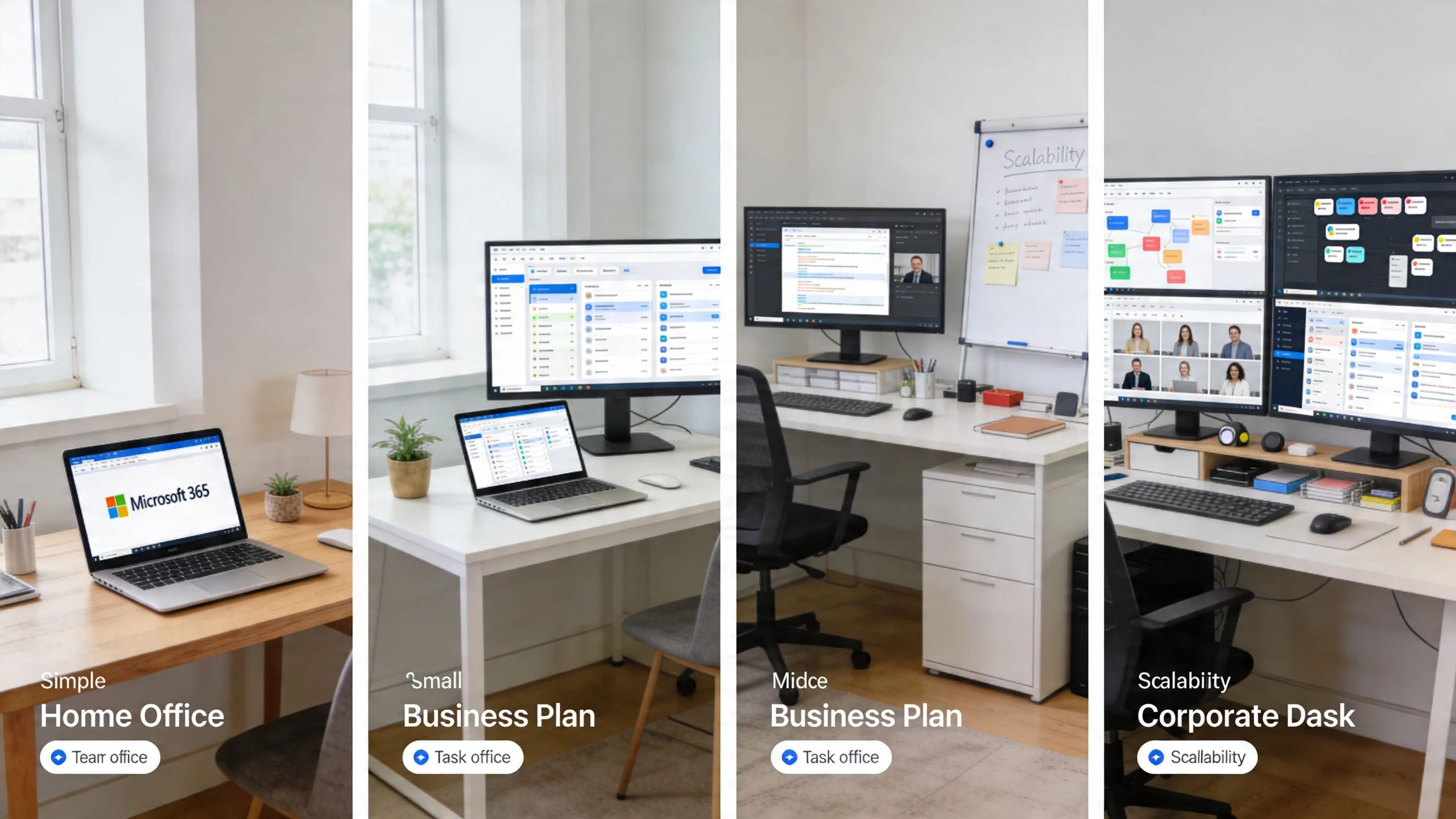
A Melbourne business with 12 staff usually starts this conversation the same way. The director wants to keep licence costs down, the office team wants desktop Outlook and Excel, and nobody wants to pay for security tools until there is a problem. That is how businesses end up comparing plans by monthly price instead of support load, security exposure, and the cost of fixing gaps later.
The four business plans are designed for different operating models. The practical difference is not just what apps staff can open. It is how much control you have over devices, data, and day-to-day admin.
Business Basic
Business Basic suits businesses that mainly work in a browser and want email, Teams, OneDrive, and Microsoft’s online apps at the lowest entry price.
For a small retail office, a reception team, or a business with shared PCs, Basic can be enough. Staff can access files, join meetings, and use web versions of Word, Excel, and Outlook without paying for full desktop software.
The trade-off shows up quickly in businesses with heavier admin work. If someone spends half the day in spreadsheets, relies on Outlook rules, or works offline on a laptop, Basic often leads to workarounds, complaints, and lost time.
Business Standard
Business Standard adds the desktop Office apps. For many small and mid-sized businesses, that is the first plan that feels familiar enough for daily office work.
This is usually the right fit for accounting teams, professional services firms, and admin-heavy offices where staff live in Outlook, Excel, Word, and PowerPoint. It removes the friction that comes with browser-only apps and gives staff a setup that matches how they already work.
The catch is security and management. Standard gives you the productivity layer, but not the same level of device control and policy enforcement that helps reduce support tickets and contain risk. Many Melbourne businesses buy Standard, then add separate security products or manual processes to cover the gaps. That is where total cost of ownership starts to creep up.
Business Premium
Business Premium is the plan I usually compare most closely with Standard, because here, the numbers on a pricing page stop telling the full story.
Premium includes the desktop apps, email, Teams, and cloud storage, but it also adds tools for device management, access control, and threat protection. In plain terms, it gives a business a better baseline for managing laptops, enforcing security settings, and reducing the damage from a lost device or compromised account.
For businesses handling client records, finance data, legal documents, or health information, that matters. Premium often costs more per user but less over time than patching together third-party tools and manual admin. It is usually the cleaner option for businesses that want fewer preventable problems and a more consistent setup across every device.
Apps for business
Microsoft 365 Apps for business is the narrowest option of the four. It is mainly for businesses that want desktop Office apps and OneDrive, while email and collaboration sit somewhere else.
That can suit a business with an existing mail platform or a specialised line-of-business system that does not rely on Exchange or Teams. It is less common for the average SMB because most offices now need email, meetings, shared calendars, file collaboration, and basic security in one stack.
It also leaves more integration decisions on your plate. If your team is building shared document libraries, internal file structures, or collaborative workflows, proper Microsoft SharePoint support becomes part of the conversation, not an afterthought.
Detailed Feature and Security Comparison
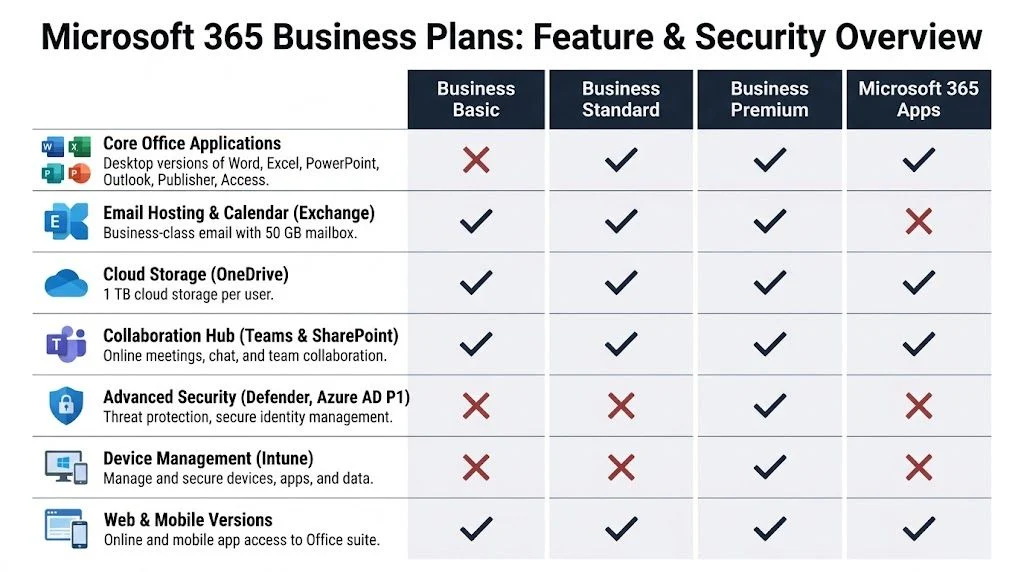
A Melbourne business with 15 staff can buy Microsoft 365 Standard in a few minutes. Six months later, the same business can be dealing with personal laptops holding client files, no consistent sign-in controls, and no clean way to wipe company data from a lost device. That is why a feature comparison needs to go further than apps and inbox size.
On paper, the plans look close. In practice, they solve very different problems. Basic and Standard are mainly productivity licences. Premium is the plan that starts reducing operational risk and admin overhead.
Apps and day-to-day work
For pure productivity, the split is straightforward.
- Business Basic suits browser-based work with web and mobile apps.
- Business Standard adds the desktop versions of Office.
- Business Premium includes the same desktop apps, plus security and management tools.
- Apps for business covers the desktop apps and OneDrive, but leaves out the full email and collaboration stack many SMBs expect.
That matters because user frustration has a cost too. Teams who live in Outlook, Excel, and Word all day usually work faster on Standard or Premium than they do in browser-only setups. Basic can still be a sensible fit for casual users, frontline staff, or businesses that have already standardised on another mail platform.
The mistake I see most often is treating desktop apps as the main decision point. For many small businesses, the bigger cost sits in what happens after a device is lost, a staff member leaves, or a compromised login slips past weak controls.
Collaboration is common across plans. Control is not.
Email, Teams, SharePoint, and OneDrive are available broadly enough that many owners assume the lower tiers are close substitutes for Premium. They are not.
Basic and Standard give staff the tools to communicate, meet, and share files. They do not give the business the same level of control over how those tools are used across devices and logins. For an Australian SMB handling client records, finance documents, school data, or medical information, that difference affects both risk and support time.
A licence that looks cheaper each month can cost more once you add manual offboarding, inconsistent laptop setups, third-party security tools, and the time spent fixing preventable issues.
Where Premium earns its keep
Business Premium changes the conversation because it adds policy enforcement. You can control sign-ins, apply device rules, and limit access to business data when the device or user does not meet your standards.
That has practical consequences.
If a staff member signs in from an unmanaged home laptop, Conditional Access can restrict what happens next. If a company notebook goes missing, you have options to protect the data. If someone leaves the business, the clean-up process is tighter and less dependent on hoping nothing was synced locally or saved in the wrong place.
Premium is not just a feature upgrade. It is a risk reduction tool.
The most significant gap is device management
Device management is where the lower-cost plans often fall short for growing businesses. Without it, every laptop becomes its own little project. Settings drift. Security depends on individual habits. New starters get inconsistent setups, and old devices stay in circulation longer than they should.
Intune addresses that problem by giving the business a central way to manage laptops, mobiles, policies, and app access. For businesses reviewing Intune mobile device management, the tipping point is usually simple. Staff are working from multiple locations, using a mix of devices, and the old informal setup is no longer safe or efficient.
From a TCO perspective, this matters more than many licence comparisons admit. Good device management cuts rework, shortens onboarding, improves offboarding, and lowers the chance of a small incident becoming an expensive one.
Security trade-offs by plan
| Area | Basic | Standard | Premium | Apps for business |
|---|---|---|---|---|
| Desktop Office apps | No | Yes | Yes | Yes |
| Exchange business email | Yes | Yes | Yes | No |
| Teams and collaboration | Yes | Yes | Yes | Limited by broader setup |
| OneDrive cloud storage | Yes | Yes | Yes | Yes |
| Intune device management | No | No | Yes | No |
| Advanced identity and access controls | No | No | Yes | No |
| Best use case | Lean cloud-first setup | Office productivity | Productivity plus security and management | App-only requirement |
For many Melbourne SMBs under the business plan user cap, Premium sits in the most practical position. It gives stronger protection without forcing an early jump into higher-cost enterprise licensing.
That is why I rarely compare these plans as a simple feature ladder. I compare them as a risk and investment decision. Basic and Standard can work well in the right environment. Premium is often the cleaner long-term choice for businesses that want fewer security gaps, less manual admin, and a more consistent setup across every device.
If your licence decision connects to a broader systems rollout, the same planning discipline applies in a successful Microsoft Dynamics 365 implementation.
When to Get Help With Your Microsoft 365 Setup
This is usually the point where a business owner realises the licence choice is only half the job. Buying Microsoft 365 is easy. Setting it up properly is where things can go wrong.
A basic tenant with a few user accounts is manageable for many businesses. A migration from old email, shared drives, mixed devices, and inconsistent logins is different. So is rolling out Conditional Access, device compliance policies, secure file sharing, and staff access rules without locking people out or leaving gaps behind.
Signs you shouldn’t DIY it
- You’re migrating from older systems and can’t afford email disruption or missing files.
- Staff use business data on multiple devices and you need clear control over where that data goes.
- You’re unsure how to configure security settings and don’t want to rely on default options.
- Your business has compliance pressure from client expectations, school governance, or privacy obligations.
A lot of Microsoft 365 problems don’t show up on day one. They show up later, when a device is lost, a staff member leaves, a shared mailbox breaks, or a file structure turns into chaos. That’s why security and governance work is worth planning properly.
If your business is working through broader cloud and business application changes, even reading about a successful Microsoft Dynamics 365 implementation can help frame the bigger lesson. Good Microsoft projects succeed when licensing, security, migration, and adoption are treated as one job rather than separate tasks.
For businesses that need help tightening the Microsoft side of that equation, guidance on how MSPs manage Microsoft 365 securely is worth reviewing. If you’re unsure which plan fits, or whether your current setup is exposing unnecessary risk, reach out through the contact page and submit a query at http://tbourke-solutions.com.au/contact.
Which Microsoft 365 Plan Is Right For Your Business

The best plan depends less on your industry label and more on how your staff work, what data you handle, and how much control you need over devices.
The startup or sole trader
A one-person business often starts with very simple needs. Professional email. Teams meetings. Cloud file storage. The ability to open Word or Excel on the web without paying for more than necessary.
That’s where Business Basic usually fits well. It keeps costs low and gives the business a proper Microsoft foundation without forcing full desktop app licensing from day one.
The catch is that many businesses outgrow it quickly. If you spend most of your day in Excel, build documents offline, or want everyone using installed Outlook, Basic starts to feel restrictive.
The growing office team
A growing office, such as an accounting firm, real estate group, or consulting practice, usually lands in Business Standard first. Staff want desktop Word, Excel, PowerPoint, and Outlook because that’s how they work best. They need shared calendars, file syncing, and Teams collaboration, but they may not yet be thinking thoroughly about security policy.
This plan works well when the priority is productivity and the business already has a sensible security approach elsewhere. It doesn’t work as well when Microsoft 365 is expected to be the main control point for user access, devices, and data protection.
The security-focused business
This is the category that most often ends up on Business Premium. Think businesses with mobile staff, client records, finance data, school environments, or a mix of managed laptops and personal devices touching company systems.
Premium suits businesses that don’t want security spread across separate tools and manual admin. It gives the organisation one platform for productivity, identity, device management, and threat protection.
If your business would feel real pain from a compromised account or an unmanaged laptop, Premium is usually the safer decision.
The business already using other cloud tools
Some companies already use another email platform or line-of-business systems and only want the Office apps. In those cases, Apps for business can make sense, especially if the goal is to standardise Word, Excel, PowerPoint, and OneDrive across the team.
But this option often looks better on paper than it does in practice. Once a business wants shared mailboxes, Teams meetings, or tighter collaboration, it tends to drift back toward the main Microsoft 365 business plans.
A simple decision filter
Ask these questions:
- Do you only need email, Teams, and browser-based work? Basic is the likely fit.
- Do your staff rely on installed Office every day? Standard is usually the better choice.
- Do you need to manage devices and reduce security risk inside Microsoft 365? Premium is the one to look at first.
- Do you only want Office apps because other platforms already cover the rest? Apps for business may be enough.
That’s the practical core of microsoft 365 business plans compared. It’s not really about which plan has the longest list. It’s about which one matches the way your business operates.
The Financial Case For Microsoft 365 Business Premium

A Melbourne business with 15 staff can save money on licences by choosing Business Standard. Then the gaps start to show. A lost laptop needs better controls. A compromised mailbox raises questions about MFA, device compliance, and who can still access company data. The monthly price looked lower, but the operating cost did not stay lower for long.
That is the true financial case for Microsoft 365 Business Premium. It is a total cost of ownership decision, not just a licence comparison.
Licence price is only one line item
Business Standard often looks like the safe middle ground because it includes the desktop apps staff expect. On paper, that can be enough. In practice, many businesses then add third party security tools, spend more time on manual admin, or pay their IT provider to build workarounds that Premium already includes.
From an MSP perspective, that pattern is common in small and mid-sized Australian businesses. The licence is cheaper. The environment is harder to control. Support time goes up because the business is trying to run a more exposed setup with fewer built-in controls.
That changes the maths.
Where Premium usually saves money
The value in Premium is not one feature. It is the reduction in overlap between tools, support effort, and security risk.
For many businesses, Premium can reduce or avoid costs tied to:
- separate device management tools
- extra security products for identity or endpoint protection
- labour spent configuring policies by hand
- cleanup work after staff leave or devices go missing
- downtime and remediation after preventable security incidents
Those costs rarely appear in the first spreadsheet review. They show up later as support tickets, emergency fixes, and exceptions that have to be managed one by one.
Security spend should be judged against business impact
A lot of owners ask whether Premium is worth the extra spend per user. The better question is what a weak setup costs when something goes wrong.
If your team handles client records, finance data, legal documents, health information, or commercial IP, the price difference between Standard and Premium is usually modest compared with the cost of account recovery, device cleanup, lost productivity, and reputational damage. For Melbourne firms dealing with Australian privacy obligations, that risk has a direct business cost, even before you count management time and customer trust.
Practical view: Premium makes sense when the cost of one avoidable incident is higher than the annual licence uplift.
Premium versus patching the gaps later
For businesses under 300 users, Business Premium often sits in the sweet spot. It covers the controls many SMBs need without forcing an early move into more complex enterprise licensing.
That keeps procurement simpler and support cleaner. A good IT cost optimization plan is not about buying the cheapest licences. It is about cutting duplicated tools, reducing avoidable support hours, and paying once for capabilities you will almost certainly need anyway.
Here is the practical trade-off:
| Approach | Short-term view | Long-term reality |
|---|---|---|
| Choose Basic or Standard to keep licence cost down | Lower monthly spend | Often leads to added tools, more admin, and higher security exposure |
| Choose Premium for staff using managed devices or handling sensitive data | Higher monthly licence cost | Lower tool sprawl, better policy control, and fewer expensive workarounds |
| Move to Enterprise too early | Access to features beyond SMB needs | Higher spend, more complexity, and more to administer |
For many Melbourne businesses, Premium is the cleaner financial decision because it reduces hidden costs. It also fits the same logic behind why reactive IT costs more than managed IT. Paying less up front often leads to more expensive fixes later.
Your Next Steps With Tbourke Solutions
Choosing the right Microsoft 365 plan is important. Implementing it properly is what makes it useful.
Tbourke Solutions works with Melbourne businesses that want a setup that’s practical, secure, and easy to manage day to day. That includes sole traders who need a clean starting point, growing teams that need a migration from old systems, and organisations that want Business Premium configured properly rather than left on default settings.
Where support usually helps most
- Plan selection: Match licences to actual staff roles so you’re not overbuying or exposing the wrong users to unnecessary risk.
- Migration: Move email, files, and user accounts with minimal disruption.
- Security configuration: Apply the policies that make Premium worth having in the first place.
- Ongoing support: Keep the tenant organised as staff, devices, and business needs change.
That’s the difference between buying licences and having a working Microsoft 365 environment. A good MSP doesn’t just provision accounts. They help shape the system around how your business runs. If you’d like a clearer picture of what MSPs do, that’s a useful place to start.
If you want help reviewing your current Microsoft 365 setup, planning a migration, or deciding which licences make sense for your team, submit a query through the contact page at http://tbourke-solutions.com.au/contact.
Frequently Asked Questions About Microsoft 365
Here are the questions that come up most often when businesses are comparing plans.
| Question | Answer |
|---|---|
| Can I mix Microsoft 365 Business plans in one company? | Yes. Many businesses mix licences based on role. A front-desk or casual user may only need Basic, while office staff use Standard and managers or mobile staff use Premium. The key is making sure the people with the highest risk have the right protection. |
| Is Business Basic enough for a new business? | Often, yes. If you mainly need business email, Teams, web apps, and cloud storage, Basic is a sensible place to start. Just be realistic about whether you’ll soon want desktop Office apps or stronger device controls. |
| When should I move from Standard to Premium? | Move when device management, account protection, and data control become important. That usually happens once staff use company laptops remotely, access business files from multiple devices, or handle more sensitive client or operational data. |
| What if I only need Word, Excel, and PowerPoint? | Apps for business can fit if you already have email and collaboration handled elsewhere. For many SMEs, though, that creates an incomplete setup and they later add the broader Microsoft 365 services anyway. |
| Do all Business plans support the same number of users? | The Microsoft 365 Business range is designed for organisations with up to 300 users. If you’re heading beyond that, it’s worth reviewing whether Enterprise licensing is more appropriate. |
| Is Business Premium only for larger businesses? | No. Some of the strongest use cases for Premium are actually smaller organisations that don’t have internal IT staff and need Microsoft to handle more of the security and device management burden in one platform. |
| Should every user get Premium? | Not always. It depends on role, risk, and device use. Some businesses standardise on Premium for simplicity. Others mix plans. The wrong approach is treating every user as identical when their access and risk profile clearly isn’t. |
| What about Microsoft 365 Copilot? | Copilot licensing should be treated as a separate decision. It can be useful, but it won’t fix a poor file structure, messy permissions, or weak data governance. Get the Microsoft 365 foundation right first. |
| Where is my data stored? | Data location and residency questions should be checked against your tenant setup, Microsoft’s current service terms, and your compliance needs. If data sovereignty matters for your contracts or sector, confirm it during planning rather than assuming the default arrangement fits. |
| Can I switch plans later? | Yes, but changes are easier when the environment is already clean and well managed. If the tenant has inconsistent devices, weak permissions, or old migration issues, changing plans doesn’t solve the underlying problems by itself. |
If you want practical advice on microsoft 365 business plans compared, Tbourke Solutions can help you choose the right licences, migrate safely, and set up Microsoft 365 so it supports the business instead of creating more admin. Start the conversation with Tbourke Solutions or submit your query through the contact page at http://tbourke-solutions.com.au/contact.
Share This Story, Choose Your Platform!




