
A server replacement rarely starts as a planned project. It usually starts on a Monday morning when the accounting system drags, remote staff cannot connect properly, backups have become hit and miss, and nobody wants to hear the cost of the next hardware fault. For many small businesses and schools, that is the point where cloud infrastructure stops being an abstract IT idea and becomes a business continuity decision.
An Azure Virtual Machine, or Azure VM, gives you a Windows or Linux computer in Microsoft’s cloud. The practical question is not just what a VM is. The key question is whether your organisation wants the responsibility that comes with it. A VM gives you control over the operating system, applications, and configuration, but it also leaves you responsible for patching, backups, security settings, monitoring, and cost management.
That trade-off matters.
For an Australian business or school, an Azure VM can be a sensible way to replace an ageing on-premises server, support remote access, host a line-of-business application, or improve disaster recovery without buying new hardware first. It can also be the wrong choice if your team wants cloud benefits without ongoing server administration. In those cases, a more managed platform or serverless option often reduces support overhead and lowers the risk of important maintenance jobs being missed.
This article focuses on that practical decision. It explains where Azure VMs fit, where they create extra operational load, and how to judge the total cost properly rather than looking only at the monthly Azure bill. If you want broader context on why local organisations are shifting infrastructure into Microsoft’s cloud, see our guide to the benefits of Azure cloud for small business.
It also reflects a common reality in Australia. Many SMBs and schools do not have a full internal infrastructure team, so the success of an Azure VM project often depends less on the platform itself and more on who is going to manage it well after go-live.
Your Introduction to Cloud Computing with Azure
Cloud computing often gets explained in abstract terms, but its business application is simpler than that. Instead of buying a physical server, storing it in a comms room, replacing failed parts, and planning the next hardware refresh, you rent computing resources from a cloud platform as you need them.
That matters when your current setup is holding you back. A school might have an old file or application server that only one contractor understands. A small business might rely on a line-of-business app that can’t just be moved into a modern web service. In both cases, the question isn’t whether cloud is fashionable. The question is whether the organisation needs a safer, more flexible place to run an important workload.
TLDR
An Azure Virtual Machine is an on-demand cloud computer that runs Windows or Linux without your business having to buy physical server hardware first. It’s a good fit when you need full control over the operating system, need to run older or custom software, or want a practical way to host remote desktop, websites, or business applications. It’s not always the right default, because a VM still needs patching, backups, security hardening, and monitoring. If your team wants less maintenance, a managed platform may be the better option.
Why cloud became the practical option
A physical server is like owning a building. You control everything, but you also wear every maintenance cost and every failure risk. Cloud is closer to leasing space in a professionally managed facility. You still decide what goes inside your space, but you don’t need to buy the land, install the power, or replace the air conditioning when it fails.
For business owners, that changes the conversation from capital purchases to service design. You can start smaller. You can adjust more easily. You can avoid tying critical systems to one ageing box sitting in one office.
Why Azure matters in Australia
Local presence changes the risk profile. When infrastructure is available in Australian regions, businesses and schools can keep workloads closer to their users and data sources while still using Microsoft’s broader cloud platform. That’s especially useful when you’re balancing performance expectations, internal policy, and data location concerns.
Cloud isn’t valuable because it’s remote. It’s valuable because it gives you options you usually don’t have with a single on-site server.
The key point is this. Azure gives you access to cloud infrastructure, but an Azure VM is only one way to use it. That distinction matters because many organisations ask for “a server in the cloud” when what they really need is either less management overhead or a more controlled environment.
Deconstructing the Azure Virtual Machine
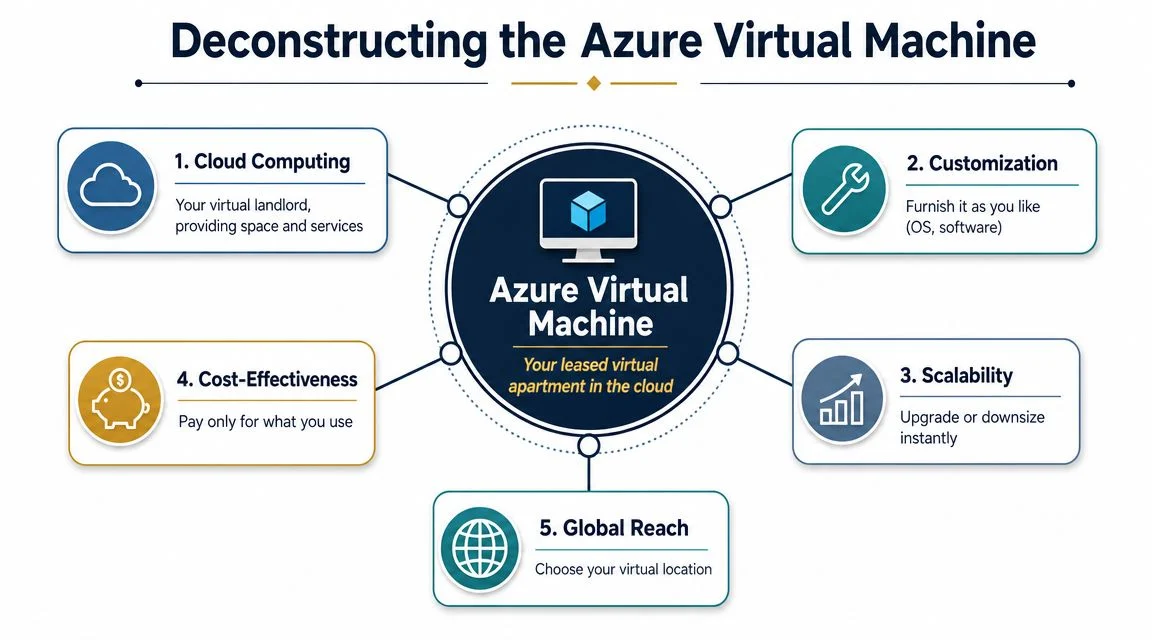
At a practical level, an Azure VM is a tenant-isolated cloud computer. You choose the operating system, the amount of compute, the memory, the disks, and the networking. Microsoft supplies the underlying datacentre hardware. You manage what runs inside the machine.
A useful analogy is a private office in a secure building. You didn’t pour the concrete or wire the lifts, but you control your office layout, who gets access, and what equipment goes inside. That’s what makes a VM different from software-as-a-service. You aren’t just using an app. You’re renting a full environment.
What sits inside a VM
Every VM is built from a few core parts:
- vCPU means virtual CPU. It’s the compute capacity that runs your applications.
- Memory is the RAM your operating system and applications use while running.
- Disks store the operating system, application files, and business data.
- Network interfaces connect the VM to other systems, users, and the internet if needed.
If you’ve used the term Infrastructure as a Service before, this is the clearest example of it. You’re still close to the server layer, which means more control and more responsibility. Tbourke explains that service model in more detail in its guide to Infrastructure as a Service.
Why VM sizing is not just a technical detail
Many business owners assume all server capacity is roughly the same if the machine “looks powerful enough”. In Azure, the VM family you choose changes how the workload behaves. Microsoft notes that an Azure VM has one or more vCPUs, and some VM families handle those resources differently. For CPU-heavy workloads, that can matter a lot. In the Dpsv6 family, Microsoft states that each vCPU is backed by an entire physical CPU core, which is useful when you want predictable performance for databases or line-of-business applications in the D-family VM documentation.
That’s the sort of detail non-technical buyers often don’t see until performance problems appear later.
What an Azure VM is good at
A VM is usually the right tool when you need:
- Full OS control because your software needs specific Windows or Linux settings
- Custom software stacks that don’t fit neatly into a managed platform
- Workload isolation for business systems you don’t want bundled with everything else
- Predictable infrastructure behaviour for applications that are sensitive to CPU, memory, or storage performance
Practical rule: If the application vendor says “we need administrator access to the server” or “this only runs on a full Windows server”, you’re often in VM territory.
An Azure VM is not magic. It’s a well-defined, flexible compute option. That’s its strength. It gives you control. The trade-off is that control comes with operational work.
Practical Use Cases for Your Business or School
The easiest way to understand What Is an Azure Virtual Machine and When Should Your Business Use One is to stop thinking about infrastructure and start thinking about jobs that need doing.

Running a legacy business application
This is one of the most common reasons to use a VM. Many SMBs still depend on accounting, inventory, payroll, or education software that was built for a traditional Windows server. Rewriting or replacing that software may not be realistic in the short term.
An Azure VM lets you lift that workload into the cloud while keeping the operating system and application model it expects. You get breathing room without forcing a rushed software replacement project.
Hosting secure remote desktop access
Some organisations need staff to access business software from home, from another campus, or while travelling. In those cases, a VM can provide a controlled environment where staff log into a central system instead of copying data onto personal devices.
This works well for:
- Administrative teams accessing finance or student systems
- Professional services firms using specialist desktop software
- Small operations that need a central remote work platform without building a full in-house environment
Supporting a custom web or app server
A standard website usually doesn’t need a VM. But custom applications often do. If your business has a niche portal, internal workflow tool, or integration service that needs particular software components or server settings, a VM can be the simplest way to host it.
That’s especially true when the app won’t run cleanly on a more managed platform.
Building a test or training environment
Schools and businesses often need temporary environments for software testing, application upgrades, or staff training. A VM is useful here because it can be created for a specific purpose, configured to match production conditions, and changed as needed.
A common pattern is using a VM to trial an application update before touching the live system.
Matching the VM family to the workload
Practical design is important. Microsoft’s Azure VM series information shows that different VM families are built for different jobs. Epsv6 and Epdsv6 can provide up to 672 GiB of RAM for memory-heavy tasks, while Dldsv6 supports all-core turbo speeds up to 3.0 GHz for more latency-sensitive applications, according to the Azure virtual machine series page.
Here’s the business version of that:
| Workload type | What usually matters most | Likely VM direction |
|---|---|---|
| Database-heavy system | More memory, less paging | Memory-optimised family |
| Busy transactional app | Faster sustained CPU performance | General-purpose or lower-latency family |
| Temporary processing or cache-heavy work | Fast local temporary storage | Family with local temp storage |
| Light office app server | Balanced CPU and RAM | General-purpose family |
A VM should fit the application’s behaviour, not just the budget spreadsheet. Cheap infrastructure that struggles under load usually becomes expensive in staff time.
Where VMs work badly
A VM is often the wrong answer when the primary requirement is email, file sharing, a standard website, or a straightforward line-of-business app that already has a mature hosted version. In those cases, running a whole server can create more admin work than business value.
That’s why the right question isn’t “Can Azure run this?” It’s “Should this be a VM at all?”
When to Get Help with Azure
A common pattern looks like this. A business or school moves one server into Azure to reduce hardware headaches, then discovers the main effort starts after the VM is running. Someone still has to sort out access, backups, patching, firewall rules, monitoring, licensing, and recovery if something breaks on a Monday morning.
That is usually the point where outside help makes financial sense.
Azure VMs suit organisations that need server-level control, but they also shift day-to-day responsibility onto your team. For an SMB or school, the key question is not just whether a VM will run the workload. It is whether your staff have the time and experience to run it properly month after month without pulling focus from other priorities.
Bring in help if any of these apply:
- You are planning a server migration and downtime would disrupt classes, staff, customers, or operations
- Your Azure costs keep drifting upward because services were spun up without a clear design, tagging standard, or shutdown policy
- You are not confident about security settings such as admin access, MFA, remote connectivity, logging, and alerting
- You need disaster recovery but have not tested whether the VM, data, and dependencies would come back online cleanly
- Your internal IT team is already at capacity and another server means another system that can be missed during patching or backup checks
I see this most often with organisations that choose a VM because it feels familiar, then underestimate the operating load. A VM works like leasing a vehicle for your business. You avoid buying the car outright, but you still need servicing, insurance, tyres, and someone responsible for keeping it roadworthy.
For migration planning, a structured process reduces expensive surprises. Our Azure migration guide for businesses moving servers and workloads outlines the main decisions to make before cutover. If you are still comparing cloud infrastructure with traditional hosting for small businesses, the same principle applies. The sticker price is only part of the cost. Ongoing management effort matters just as much.
Local support also matters more than many owners expect. Australian schools and SMBs often need practical help with data location concerns, Microsoft licensing, local business hours, and accountability when something stops working. That is where an MSP earns its keep. Not by deploying a VM in isolation, but by making sure the environment is supportable, secure, and realistic for the team that has to live with it.
Azure VMs vs Other Cloud Compute Options
A lot of Azure overspend starts with the wrong compute choice.
An owner approves a VM because it sounds like the cloud version of a server they already understand. Six months later, the monthly bill includes the VM, storage, backups, monitoring, and support time to keep Windows and the application healthy. In plenty of cases, the business only needed somewhere to run a website, an internal app, or a scheduled process. A managed service would have done the job with less admin and less risk.
The real trade-off
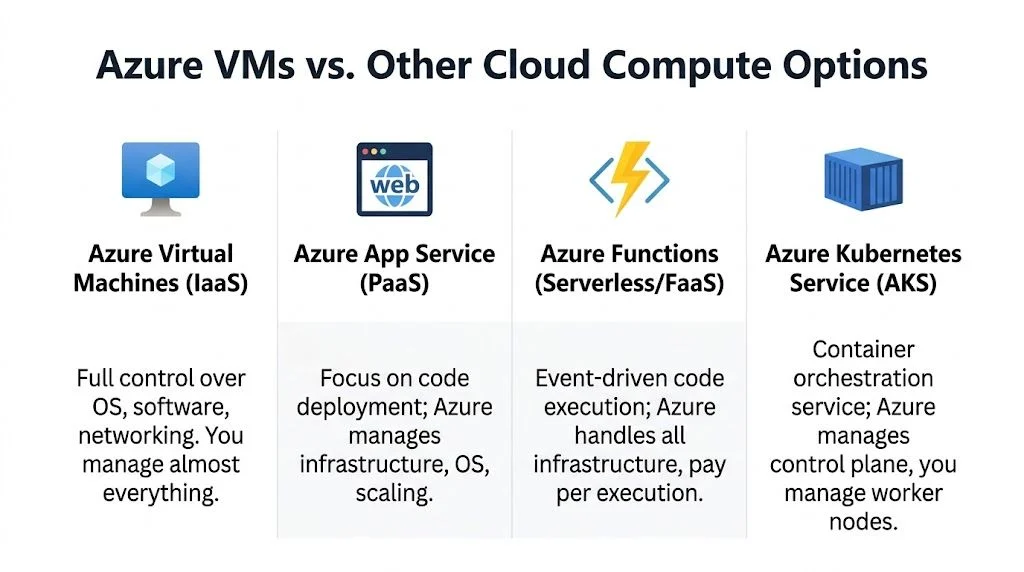
Azure VMs give you the most control because you manage the operating system and much of the server stack yourself. That control is useful when an application needs it. It also means your team, or your MSP, owns more of the day-to-day work.
Azure App Service, Azure Functions, and other platform services remove part of that burden. You give up some flexibility, but you also reduce patching, server maintenance, and the number of things that can break at 2 am.
For a school or SMB, that distinction matters more than the product names.
| Option | Best when you need | Your management load | Typical fit |
|---|---|---|---|
| Azure Virtual Machines | Full OS access and custom server configuration | High | Legacy apps, vendor software, domain controllers, Remote Desktop, custom line-of-business systems |
| Azure App Service | A hosted web app without managing Windows or Linux at server level | Lower | Websites, client portals, standard web applications |
| Azure Functions | Code that runs on a trigger, event, or schedule | Lower | Integrations, automation, notifications, lightweight background jobs |
| Azure Kubernetes Service | Container orchestration across several services | Significant | Mature development teams with container-based applications |
Where a VM fits well
A VM is usually the right call when the software vendor requires a full server, the application depends on specific OS settings, or the workload has been built around traditional infrastructure. That still covers a lot of real businesses. Older finance systems, school administration platforms, SQL-based applications, and specialist industry software often land here because they were never designed for modern platform services.
A VM also makes sense when you need predictable compatibility during a migration. If the immediate goal is to move a working server into Azure with minimal application changes, a VM can be the lowest-friction path.
Where a managed platform is the better business decision
If the goal is to publish a website, run a standard web application, or execute small pieces of code on demand, a VM can be more server than you need. App Service and Functions shift more maintenance to Microsoft, which usually lowers support hours and shortens the list of things your team must actively manage.
That matters when internal IT is already stretched.
For business owners comparing broader infrastructure models, hosting for small businesses can help clarify the difference between basic hosting, managed application platforms, and full server-based environments.
Use this filter before you choose
Ask four plain questions.
- Do you need full control of the operating system and installed software? Choose a VM shortlist.
- Do you just need to deploy an application or website? Check App Service first.
- Does the workload only run on a schedule or in response to an event? Functions may be the cleaner option.
- Do you have a capable development or DevOps team managing containers already? AKS may fit.
The key is total cost of ownership, not just the monthly Azure line item. A lower VM price can still become the more expensive option once patching, backups, security review, monitoring, and support time are added. Our guide to Azure cost for a small business breaks down the costs owners should compare before making that call.
Essential Management and Security Checklist
An Azure VM gives you flexibility, but it also gives you a server to run properly. For many SMBs and schools, this is the point where cloud projects drift off course. The application goes live, everyone is relieved, and the ongoing work gets pushed aside until a failed login, a storage alert, or a bad update forces attention.
Start with the basics that keep the VM supportable
A VM in Azure does not remove your operating responsibility. It changes where the server lives.
That means patching, access control, monitoring, backup checks, and recovery planning still need an owner. If nobody on your team has clear responsibility for those jobs, the VM may end up costing more in downtime and support effort than the monthly Azure bill suggests.
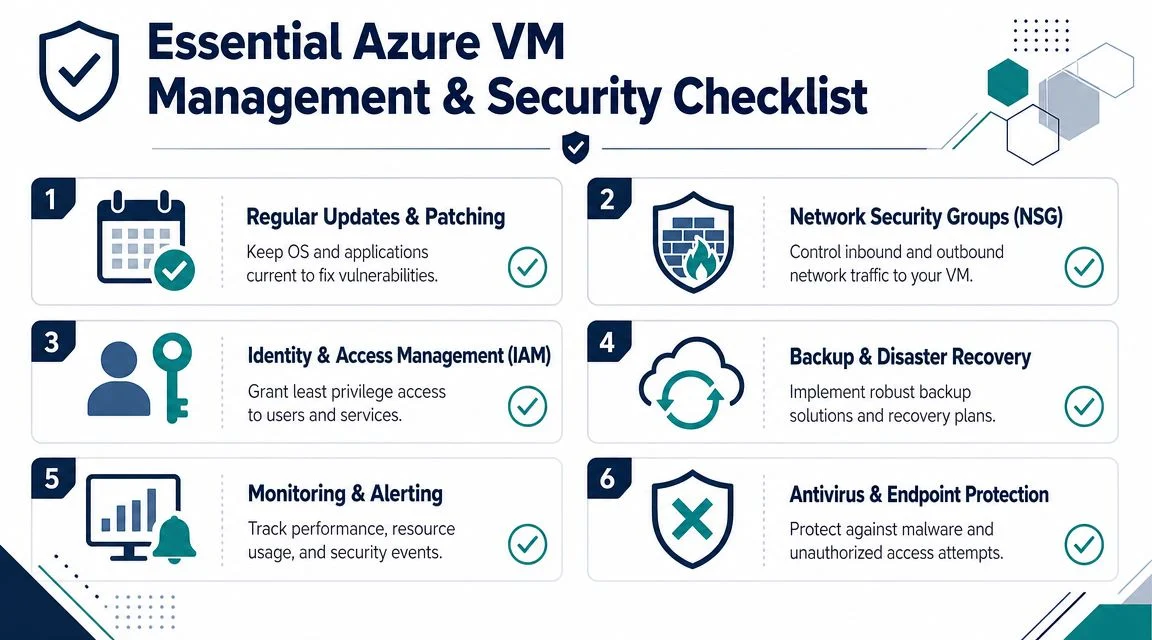
A practical baseline looks like this:
- Patch the operating system and applications on a schedule. Azure supplies the infrastructure. It does not keep your guest OS, line-of-business software, or third-party dependencies current. For Windows environments, this Windows patch management guide shows the sort of patching process that keeps systems stable without turning updates into guesswork.
- Restrict network access. Remote access should be limited by role, source, and business need. Leaving management ports open broadly creates risk without adding value.
- Tighten administrator access. Use named accounts, least-privilege permissions, and regular access reviews. Shared admin logins make auditing harder and incident response slower.
- Harden the machine itself. Remove unused software, disable unnecessary services, and apply a standard build where possible. Every extra component is another thing to patch and secure.
Monitoring needs to cover performance, faults, and cost
Many owners assume Azure will automatically tell them everything that matters. In practice, you still need to decide what to watch, who receives alerts, and what response time is acceptable.
At minimum, track CPU, memory, disk activity, network traffic, availability, and failed sign-in or system events. The goal is simple. Catch the early warning signs before staff or students start logging support tickets.
For small organisations without an internal operations team, basic visibility is often the difference between a short fix and a full morning of disruption. Monitoring also helps with cost control. An oversized VM, an idle disk, or a machine left running around the clock can lift monthly spend.
Backups are only useful if recovery works
Backups need to run automatically, complete successfully, and be tested. A lot of businesses stop at the first step.
I usually explain it this way. A backup job tells you data was copied somewhere. A restore test tells you whether the business can recover. Those are not the same thing.
If the VM supports a finance system, student management application, file share, or other important workload, document the recovery steps clearly. Include where the backups live, who can start a restore, how long recovery is likely to take, and what the business should do while systems are unavailable. That is what turns backup from a checkbox into a working recovery plan.
A quick operational checklist
| Area | Minimum standard |
|---|---|
| Updates | Scheduled OS and application patching |
| Security | Restricted access, least privilege, hardened configuration |
| Monitoring | CPU, memory, disk, network, and alerting |
| Backups | Automated backups with restore checks |
| DR planning | Written recovery steps and tested runbooks |
| Cost control | Review sizing, runtime, and attached resources |
The total cost of ownership becomes clear. The VM itself may be reasonably priced, but the ultimate decision includes the time, process, and skill needed to keep it secure, recoverable, and worth running.
How Tbourke Solutions Can Manage Your Azure VMs
Running an Azure VM well takes more than provisioning a server and turning it on. Someone still has to decide whether a VM is the right fit, build it properly, keep it patched, review alerts, test recovery, and keep monthly spend from drifting upward.
That workload often lands on an office manager, business owner, or school staff member who already has a full-time job. In practice, that is where cloud projects start to feel heavier than expected.
A managed service provider can take that operational load off your internal team. The job is not only technical. It is also about making sure the environment matches the organisation. A small business with one line-of-business application needs a different approach from a school managing staff access, student systems, shared files, and holiday-period maintenance windows.
Tbourke Solutions supports Azure environments as part of its managed IT, cloud, infrastructure, cybersecurity, and consultancy services. For Azure VM deployments, that typically includes:
- Workload assessment to confirm whether a VM is the right option, or whether a managed platform would reduce cost and admin overhead
- Solution design covering sizing, networking, security, backup approach, and access requirements
- Migration planning and execution for moving servers or applications from on-premises into Azure with less disruption
- Ongoing management for patching, monitoring, backup checks, and day-to-day administration
- Security oversight including access reviews, hardening decisions, and risk reduction
- Cost reviews to identify oversized machines, unused resources, and avoidable monthly spend
For SMBs and schools, the practical value is straightforward. You still get the flexibility of Azure where it makes sense, but you are not left carrying every maintenance task internally. That matters most when your team needs systems to stay available without becoming Azure specialists.
If you are weighing up a migration, inherited an Azure setup that feels messy, or are unsure whether a VM is even the right answer, a local MSP can give you a clearer path and ongoing accountability.
Frequently Asked Questions About Azure VMs
Are Azure VMs cheaper than buying a physical server?
Sometimes yes, sometimes no. If you only compare hardware purchase costs, cloud can look straightforward. If you compare the full picture, you also need to include licensing, backups, monitoring, security controls, and the staff time required to manage the environment. That’s why total cost of ownership matters more than the monthly VM line item.
Can staff access an Azure VM from outside the office?
Yes, if remote access is designed properly. The important issue isn’t whether it’s possible. It’s whether access is secured, restricted, and monitored in a way that suits your business or school.
How quickly can a new Azure VM be deployed?
A new VM can be provisioned relatively quickly, but a production-ready VM takes longer because it still needs correct sizing, security settings, networking, monitoring, backups, and application setup. Fast deployment is easy. Safe deployment takes planning.
Should every business application be moved to an Azure VM?
No. Some applications belong on a VM because they need full server control. Others are better on a managed platform, or replaced by SaaS altogether. If you don’t need operating system control, a VM may add unnecessary overhead.
Are Azure VMs good for disaster recovery?
They can be, but only if the recovery design is real rather than assumed. A VM can be part of a strong recovery plan, but it still needs backups, architecture choices that support resilience, and tested recovery procedures.
Is Azure suitable for Australian schools and small businesses?
Yes, especially when there’s a real need for flexibility, remote access, legacy application support, or local hosting options within Australia. The bigger question is whether the organisation also has the capacity to manage the environment properly after deployment.
If you’re deciding whether an Azure VM is the right fit, or you need help migrating, securing, or managing cloud infrastructure, Tbourke Solutions can help you assess the options and submit a query through the contact page.
Share This Story, Choose Your Platform!