
Your Azure bill probably looks fine one month, then jumps the next, even though nobody in the business feels like they changed much. That’s normal in Azure. The platform is flexible by design, but flexibility also makes it easy to pay for the wrong thing in the wrong way.
For most small businesses and schools, the question isn’t whether Azure is expensive. It’s whether the workload sitting in Azure is on the right pricing model. In practice, that usually comes down to Pay-As-You-Go versus Reserved Instances.
Understanding Your Azure Bill An Introduction
If you’re reviewing Azure costs and wondering why the bill feels harder to control than a traditional server lease, you’re not alone. Cloud billing rewards good planning and punishes guesswork. A server that runs all day every day should usually be priced differently from a test machine that gets turned on only when someone needs it.
That’s why this decision matters so much. Azure Reserved Instances vs Pay-As-You-Go: Which Saves More Money isn’t really a pricing question alone. It’s an operations question. You’re deciding whether your workload is stable enough to commit to, or variable enough that flexibility is worth paying extra for.
For many SMBs, a good first step is understanding where Azure costs typically come from in the first place. If you need that broader context, this guide on Azure cost for a small business is a useful companion before you start changing billing strategy.
TLDR: Reserved Instances usually save more money for steady, always-on workloads because the discount ceiling is higher. Pay-As-You-Go is better for variable, short-term, or experimental systems because you only pay for what you actually run. In the real world, most Australian SMBs and schools get the best outcome from a hybrid setup. Reserve the predictable core, and leave the changing edge on flexible billing.
Two billing models, two very different risks
Pay-As-You-Go is the simple one to understand. You run resources, Azure bills for usage, and there’s no long-term commitment. That lowers financial risk when your environment changes often.
Reserved Instances work differently. You commit to a specific compute profile for a term, typically one or three years, and in return Azure applies a lower billing rate to matching usage. That creates the chance for stronger savings, but only if your workloads stay consistent enough to use what you reserved.
The mistake that causes overspend
A lot of overspend happens because businesses choose one model for everything. That rarely works.
If you put all workloads on Pay-As-You-Go, your stable systems can stay on unnecessarily expensive rates for years. If you put everything on Reserved Instances, you can end up paying for commitments that no longer match your environment. The money isn’t saved at the point of purchase. It’s saved only when the billing model matches how the workload behaves.
Core Comparison Azure Reserved Instances vs Pay-As-You-Go
An Australian school can run the same finance server all year and still waste money on Azure if it uses the wrong pricing model. A growing SMB can do the opposite. It can lock in a discount, then change its setup six months later and keep paying for a commitment that no longer fits. That is why headline discount percentages are only the starting point.
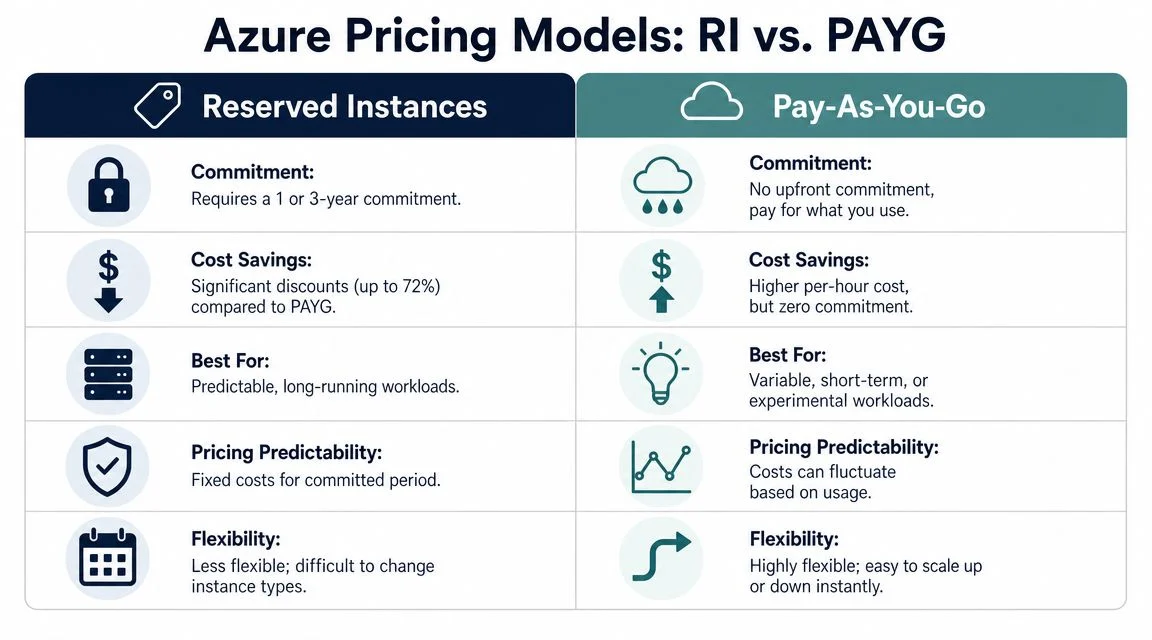
The practical comparison comes down to one question. Are you paying for certainty, or paying for flexibility?
| Area | Reserved Instances | Pay-As-You-Go |
|---|---|---|
| Commitment | Requires a 1-year or 3-year commitment for matching compute workloads | No long-term commitment |
| Potential savings | Usually lower cost for steady compute that runs consistently and matches the reservation | Higher unit cost, but no risk of unused commitment |
| Flexibility | Lower. Savings depend on the workload continuing to match the reserved VM family, region, and usage pattern | High. Easier to resize, shut down, replace, or remove workloads |
| Best fit | Stable production systems, long-running line-of-business servers, predictable school or office infrastructure | Projects with changing demand, short-term systems, dev/test, seasonal services |
| Budget behaviour | More stable if the environment stays settled | More variable because usage can rise or fall each month |
| Main risk | Paying for capacity you no longer use properly | Paying premium rates for workloads that should have been discounted |
What the advertised discount does and does not tell you
Microsoft promotes strong savings on commitment-based pricing, and those offers can be worthwhile. But a discount ceiling is not the same as a business case. For many Australian SMBs and schools, the better question is whether the server will still be running in the same form next term, next budget cycle, or after the next IT refresh.
If the answer is yes, Reserved Instances usually deserve a close look. If the answer is no, Pay-As-You-Go often protects cash flow better, even at a higher hourly rate.
Azure also has other commitment options, such as savings plans, which can suit environments that need more flexibility than a strict reservation. Even then, the same operating rule applies. A lower unit price only helps when actual usage stays high enough for long enough.
How this plays out in smaller environments
In managed environments, I rarely recommend one model for everything. A small business might have a domain controller, line-of-business application server, and backup server that run day and night. Those are the types of workloads where commitment pricing can reduce waste. The same business may also have test machines, temporary project servers, or systems tied to enrolment periods, grant-funded programs, or seasonal demand. Those belong on flexible billing.
That split matters more in smaller organisations because every billing mistake is felt faster. A large enterprise can absorb some waste for a quarter. A 60-seat business in Brisbane or a school in regional New South Wales usually notices it in the next monthly bill.
If you are still weighing whether Azure is a good fit for your broader IT setup, these benefits of Azure cloud for small business provide useful context beyond pricing alone.
A cheaper hourly rate is only cheaper if the workload keeps earning that discount month after month.
The primary trade-off
Reserved Instances are a billing commitment. They do not improve speed, uptime, or performance by themselves. They reduce compute cost when your usage stays predictable enough to match what you bought.
Pay-As-You-Go works the other way around. It keeps your options open. That usually makes it the safer choice for uncertain workloads, pilot projects, and environments that are still changing, even though it often costs more for systems that never switch off.
Matching Your Workload to the Right Pricing Model
The right Azure pricing model usually becomes obvious once you look at what the server does each week. An accounting VM that runs all day, every day should not be billed the same way as a lab server used for two months or a project machine that gets rebuilt three times a term.

For Australian SMBs and schools, this is usually an operations question first, and a pricing question second. The savings come from matching billing to usage patterns you can defend on a monthly bill review.
A startup still changing direction
A startup in growth mode often reshapes its environment faster than its budget assumptions can keep up. The team tests a new application design, resizes compute, shifts regions, then retires part of the stack a few weeks later.
In that case, Pay-As-You-Go is usually the better fit.
The extra hourly cost can be cheaper overall than locking into capacity you stop using. Early-stage environments change often enough that flexibility has real financial value, especially when the business has not settled on its production design.
A school administration server that never stops
A school running a student management or administration server has a very different pattern. If that VM stays online through school terms, holidays, reporting periods, and finance cycles, usage is predictable enough for commitment pricing to start making sense.
The practical test is simple. Would the school still expect that same workload, in the same region and VM family, to be running well into next year? If the answer is yes, a reservation is often the cleaner fit. If the answer is maybe, Pay-As-You-Go is usually safer.
This matters in schools because not every system is “always on.” Administration, identity, and core file services often are. Training labs, assessment platforms, and short-term project workloads often are not.
A retailer with a stable core and busy peaks
This is the pattern I see most often with small businesses. A retailer or e-commerce firm has a steady base load, then sharper bursts around EOFY, Christmas, local campaigns, or stock events.
The cheapest option is rarely all reserved or all flexible. It is usually a split model.
- Use reservations for the base load such as the production app server, domain services, or a database that runs continuously
- Keep burst capacity on Pay-As-You-Go so extra servers can be added and removed without paying for idle commitment
- Review after changes such as a platform rebuild, acquisition, new POS rollout, or application modernisation
If you are still planning the move itself, this Azure migration guide for small business workloads helps sort out what should be moved first and what should stay flexible until usage settles.
Practical rule: Buy reservations for workloads with a proven pattern, not workloads you hope will become steady.
A good Azure bill looks boring. The stable systems sit on the pricing model built for stability. The variable systems stay variable. That is how small organisations avoid paying enterprise-sized mistakes.
Calculating Your Break-Even Point for Real Savings
A school runs a server all term, then barely touches it during holidays. A small business keeps one production system online all month, but shuts down test machines every night. Both can look similar in Azure if you only compare Microsoft’s headline discount percentages. The money is made or lost in the hours used.
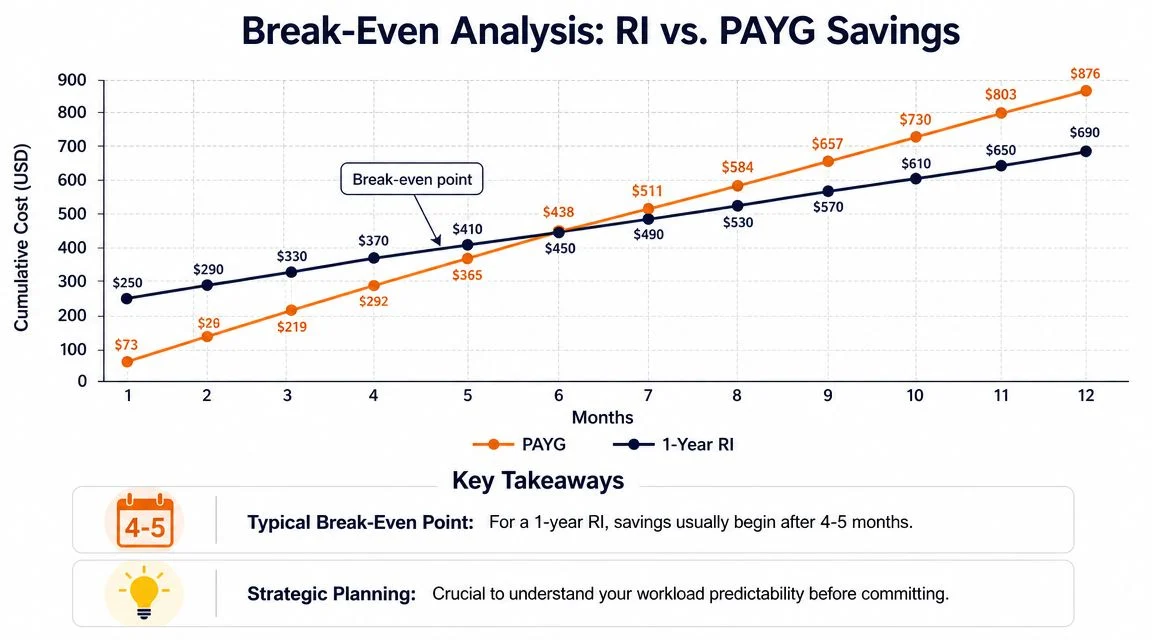
That is why the break-even point matters. It tells you when a Reserved Instance becomes cheaper than Pay-As-You-Go for a specific workload, in its real operating pattern, not in a pricing example.
For Australian SMBs and schools, this is usually where the wrong decision happens. Teams buy a reservation based on a VM that looks permanent on paper, then find it only runs during business hours, school terms, or a project window. The reservation still needs to be paid for, even when the workload is quiet.
Why the 730-hour assumption causes mistakes
A lot of Azure cost comparisons implicitly assume a full month of runtime. That works for domain controllers, core application servers, and other systems that stay online almost continuously. It breaks down fast for workloads that are turned off overnight, paused on weekends, or scaled back outside peak periods.
Pay-As-You-Go charges track actual runtime much more closely. Reserved pricing only wins cleanly when you use enough hours, consistently enough, to cover the commitment. If the server spends large parts of the month off, the discount headline can look better than the actual outcome.
A practical way to calculate break-even
Start with the workload, not the discount table.
Measure actual runtime
Check how many hours the VM is on across a normal month. Use real usage, not what the team assumes.Check for stability
Reservations suit workloads that stay in the same VM family, region, and size pattern. Frequent resizing weakens the case.Price the compute only
A reservation helps with compute charges. Storage, backup, networking, licensing, and managed services still need to be costed separately.Test a normal month and a quiet month
This matters for schools, seasonal businesses, and project-based firms. If the numbers only work in your busiest month, the commitment is probably too aggressive.
Here is the simple logic I use with clients. If a server is on nearly all the time and the business expects that pattern to hold for the next one to three years, reservation maths usually gets stronger. If the server is regularly shut down to save money, that is already a sign Pay-As-You-Go may be the better fit.
Where break-even calculations usually go wrong
The mistakes are predictable:
- Dev and test machines that should run office hours only, but have inconsistent usage
- Migration servers that feel permanent during a project, then disappear
- School systems with sharp drops outside term time
- Temporary application servers kept online longer than planned, then retired after a platform change
These are operational issues, not just pricing issues. A reservation works best on boring workloads with boring behaviour. That is exactly what makes the savings reliable.
If you are reviewing Microsoft server workloads at the same time, this Windows Server in Azure cost and planning guide gives a useful framework for deciding what should stay on continuously and what should not.
A reservation saves money when the workload is predictably busy. Pay-As-You-Go saves money when the workload is predictably intermittent.
When to Seek Expert Azure Cost Management
A common pattern shows up after the first few Azure invoices. One server looked straightforward. Then a backup workload was added, a test VM stayed online longer than planned, a second subscription appeared during a project, and the monthly bill stopped matching anyone’s expectations.
That is usually the point where cost control becomes an operations issue, not just a pricing choice.
For Australian SMBs and schools, the problem is rarely a lack of discount options. Instead, the challenge lies in time, visibility, and confidence. Someone still has to check whether workloads are steady enough for a reservation, whether term-based usage has changed, and whether a short-term project is being treated like a permanent platform.
Expert help starts to make sense when:
- Your Azure bill moves around and the cause is unclear
- You are running across multiple subscriptions, regions, or VM families
- A migration or refresh is coming up and the wrong commitment could lock in waste
- Finance needs cleaner forecasting for the next budget cycle
- Internal IT staff are busy keeping systems running and cannot review utilisation properly
The value of outside review is practical. It helps separate workloads that are stable from workloads that only look stable for a quarter. It also catches the billing details that often distort the decision, such as mismatched VM sizes, region choices, or reservations bought before usage patterns settled.
I see this most often in schools and growing businesses. A workload can feel permanent because it has been running for months. That does not make it a good reservation candidate. If usage drops sharply in school holidays, after a migration phase, or once a line-of-business application is replaced, the original savings case can weaken fast.
A good review should leave you with three things: a clearer shortlist of workloads worth committing to, a better forecasting method, and a regular process for checking whether the original assumptions still hold. That is the difference between one-off cost cutting and ongoing Azure cost control.
If you need that kind of review, Tbourke Solutions provides Azure cost management and cloud support services built around real usage patterns, operational constraints, and budget accountability.
Optimise Your Azure Spend with Tbourke Solutions
The right Azure pricing model depends less on what Microsoft advertises and more on how your business uses compute. Stable workloads usually deserve commitment. Unpredictable workloads usually deserve flexibility. Most real environments benefit from both.
That’s where implementation matters. It’s one thing to understand Azure Reserved Instances vs Pay-As-You-Go: Which Saves More Money. It’s another to map that answer across production servers, school systems, line-of-business apps, test environments, and future migration plans without creating new cost risk.
Where practical support helps
Tbourke Solutions works with Melbourne-area small businesses, schools, and sole traders that need cloud decisions to be clear, supportable, and commercially sensible. With over 20 years of experience, the business focuses on making technology easier to manage, not harder to justify.
That support can include:
- Azure cost analysis for identifying steady workloads versus variable ones
- Cloud infrastructure management so compute choices align with operational reality
- Migration planning to avoid carrying bad pricing decisions into a new environment
- Ongoing IT support when cloud costs need regular review rather than a one-off fix
If you want help turning Azure billing from a monthly surprise into a managed strategy, explore cloud and Azure services from Tbourke Solutions.
The practical next step
The best time to review Azure pricing is before another renewal, migration, or budgeting cycle locks in the wrong pattern. If the current bill feels reactive, the next step is to assess what should stay flexible and what should be committed.
Common Azure Pricing Questions Answered
Do Reserved Instances always save more than Pay-As-You-Go
No. Reserved pricing saves money only when a workload runs in a steady, predictable way for long enough to use the commitment properly. A school’s always-on domain controller or a line-of-business server that runs day and night is a common fit. A test server, seasonal workload, or project environment usually is not.
For many Australian SMBs, the mistake is focusing on Microsoft’s headline discount range instead of asking a simpler question. Will this VM still be running in roughly the same form six or twelve months from now? If the answer is uncertain, flexibility often protects the budget better than a larger advertised discount.
Do Reserved Instances cover all Azure costs
No. They apply to eligible compute usage, not your full Azure bill.
Storage, backup, bandwidth, licensing, Microsoft 365 integration, third-party marketplace items, and other services still need separate review. That matters because plenty of smaller organisations reduce VM rates, then wonder why the monthly invoice still feels high. The VM may be cheaper while the rest of the environment stays unchanged.
Can a business use both pricing models at the same time
Yes. In practice, that is often the sensible setup.
A steady production server can sit on reserved pricing while development, holiday spikes, short-term projects, and uncertain workloads stay on Pay-As-You-Go. For schools and smaller businesses, this mixed approach usually gives better control than trying to force every workload into one billing model.
What if I’m not sure whether a workload is stable enough
Hold off on the commitment until the pattern is clear.
If a VM is likely to be resized, decommissioned, moved to another service, or shut down outside business hours, the savings can disappear faster than expected. I usually advise clients to treat uncertainty as a cost risk, not a minor detail. A reservation only works well when the usage is boring. Same size, same region, same purpose, month after month.
Is this decision mainly financial or technical
It is both, because billing follows technical behaviour.
A workload that looks stable on a spreadsheet may still be a poor reservation candidate if the business plans a migration, application upgrade, or school timetable change that alters usage. Good Azure cost decisions come from checking the numbers against what the systems team plans to do.
If you want a practical review of your Azure environment, Tbourke Solutions can help assess which workloads should stay flexible, which ones are strong reservation candidates, and where a mixed model makes better commercial sense.
Share This Story, Choose Your Platform!