
Data tends to outgrow the systems that first held it. A business starts with a shared drive, an office server, a USB backup habit, or a website hosted on a plan that seemed fine at the time. Then the files pile up. Staff need access from different locations, backups start failing at awkward times, and nobody feels confident that the latest version of an important document is safe.
That’s usually the point where business owners start asking what Azure Blob Storage is and what businesses can use it for. The short answer is that it’s Microsoft’s cloud storage service for large amounts of unstructured data such as documents, media files, backups, logs, and archived records. Used well, it gives Australian SMBs and schools a practical way to store growing data without constantly buying, patching, and replacing hardware.
Your Data Needs a Bigger Home
Most small organisations don’t hit a storage problem all at once. It creeps in.
A school starts storing more lesson videos and student resources. An accounting firm keeps years of client records and scanned documents. A builder accumulates site photos, PDFs, and project backups. A retail business adds more product images and website media every month. Before long, the old setup feels cramped, messy, and risky.
On-premise storage still has a place in some environments, but it often becomes expensive in the wrong ways. You pay for hardware, maintenance time, replacement cycles, and the stress of planning around capacity limits. If your team is already comparing Azure vs on-premise options for Australian small businesses, storage is usually one of the first pressure points.
Azure Blob Storage is a practical answer to that pressure. Microsoft describes it as its object storage service for cloud-scale, unstructured data, built for scenarios such as serving images and documents, storing files for distributed access, streaming media, writing log files, backup and restore, disaster recovery, archiving, and analytics in its Azure Blob Storage introduction. In business terms, think of it as a digital storage facility that expands when you need it and doesn’t force you to keep buying bigger cupboards.
TLDR
Azure Blob Storage is Microsoft’s cloud service for storing unstructured data like documents, media, backups, logs, and archives. It suits Australian SMBs and schools that need scalable storage without relying on ageing servers or constant hardware upgrades. It’s especially useful for backup, website media, long-term retention, and application data. Value comes from matching the right storage tier and setup to how your business uses its files.
Practical rule: If your business is storing more files every month but your current setup still depends on fixed hardware capacity, you’re already in the zone where Blob Storage is worth considering.
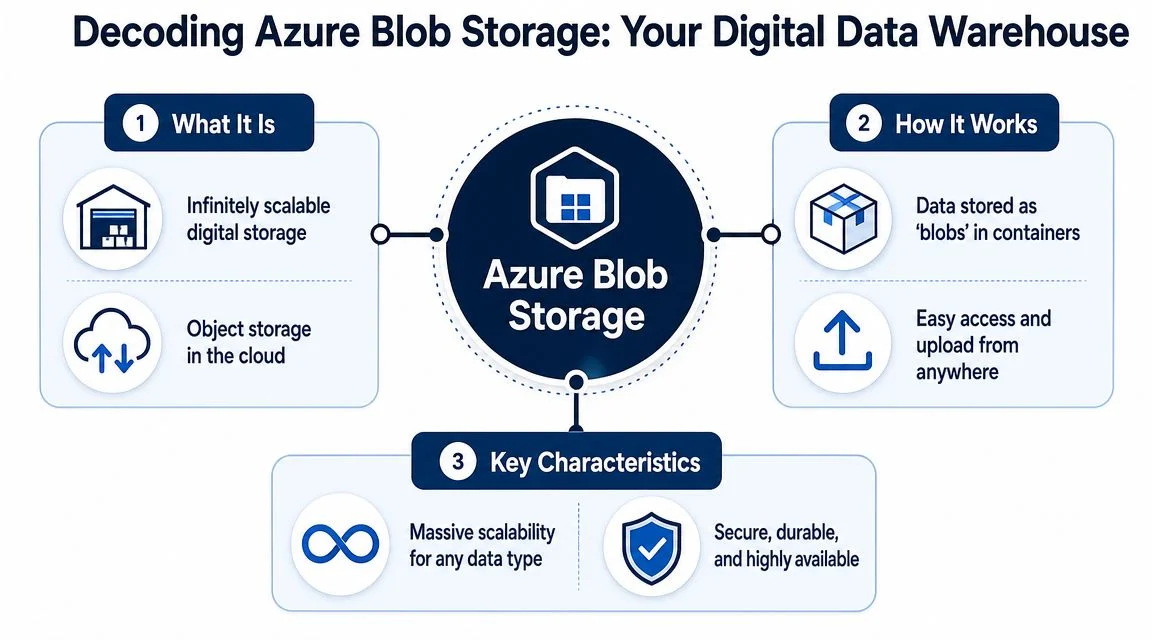
Decoding Azure Blob Storage What It Is and How It Works
Azure Blob Storage makes more sense when you stop thinking about it as a traditional file server.
A normal office server behaves like a filing cabinet with folders inside folders. That works until the volume gets large, access needs change, or different systems need to read and write data in flexible ways. Blob Storage works more like a digital warehouse. You place items into containers, label them properly, and retrieve them when needed, but you aren’t relying on a familiar Windows folder tree to make it all work.
Microsoft defines Azure Blob Storage as an object storage service for cloud-scale, unstructured data in its official documentation on Azure infrastructure cloud services. The important phrase there is unstructured data. That includes the files most businesses create every day outside a database, such as PDFs, images, videos, exports, logs, and backup files. Microsoft also notes that Azure offers Australia-based regions, which helps keep workloads closer to local users in Australia.
Think in objects, not folders
In Blob Storage, each stored item is a blob, which is a stored object plus related information about it. That setup matters because it scales cleanly and works well for web apps, backup systems, reporting feeds, and automation.
For a non-technical owner, the easiest way to picture it is this:
- A storage account is the property
- A container is a room inside that property
- A blob is the item stored in the room
That sounds simple, but the design is powerful because applications, websites, and backup tools can access those stored objects efficiently without needing a traditional mapped drive.
The three blob types in plain English
Blob Storage isn’t just one generic bucket. It supports different blob types for different jobs.
- Block blobs are the standard option for most business files. Use them for documents, images, video files, exports, and backup content.
- Append blobs are built for files that grow over time by adding new information to the end. Log files are the classic example.
- Page blobs are used for scenarios that need a different pattern of read and write activity, such as virtual hard disk files.
Most SMBs and schools will mainly deal with block blobs, often without ever needing to know the term. But the distinction matters when an app developer, backup vendor, or IT provider is choosing the right storage design.
Blob Storage works best when you treat it as a service for business outcomes, not as a like-for-like replacement for every file share you already have.
Why this matters locally
For Australian organisations, proximity matters. If staff, students, or customers are here, keeping data in Azure’s Australia-based regions can be the right operational fit for access, governance, and service design. It won’t solve every compliance requirement on its own, but it gives businesses a more sensible starting point than sending everything offshore by default.
Practical Uses for Your Small or Medium Organisation
The biggest mistake I see is businesses hearing “cloud storage” and assuming Blob Storage is only for large enterprises or software companies. It isn’t. In practice, its best use cases are often very down-to-earth.
A local accounting practice might use it to store backup copies and archived client documents. A school can use it for lesson media, scanned records, and operational backups. A creative agency can host website images and video assets without stuffing everything into its web server. A custom app can store user-uploaded files in Blob Storage rather than on a fragile VM disk.
Five use cases that make sense
Backup and disaster recovery
This is often the first worthwhile use.
If your current backup process still depends on local devices, rotating drives, or a server in the same building as the production data, you’re carrying obvious risk. Blob Storage gives backup software and recovery workflows a cloud destination that’s separate from the office hardware. Microsoft lists backup and restore plus disaster recovery among Blob Storage’s intended scenarios in its product documentation.
For schools and SMBs, this usually means more reliable offsite protection and less dependence on somebody remembering to swap drives.
Long-term archiving
Some files need to be kept long after their day-to-day usefulness has passed.
That includes historical financial documents, old project files, completed student records, compliance materials, and previous-year media assets. Blob Storage is well suited to archiving because it’s designed for large volumes of unstructured data, and later in this article we’ll look at how tiering helps control cost.
Website and media hosting
Many small businesses run slow websites because the web server is doing too much. It’s serving pages, running plugins, handling forms, and also trying to host every image, PDF, and downloadable asset.
Blob Storage can act as a central repository for website media and documents. That doesn’t automatically fix every website issue, but it’s a clean design pattern. Media is stored where storage belongs, and the website infrastructure can focus on the site itself. That’s one reason Azure positions Blob Storage for serving images and documents to browsers.
Operational logs and reporting feeds
As businesses add more systems, they create more logs and exported data.
Append blobs are useful for log-style data, and block blobs work well for CSV exports, application output, and files used in reporting workflows. A growing organisation may not need a full data platform on day one, but storing operational data properly now makes later reporting and analytics much easier.
Application file storage
Any app that lets staff, clients, students, or customers upload files needs a dependable home for those files.
Blob Storage fits well here because application data such as images, forms, attachments, and generated documents is often unstructured. Instead of tying that data to one server, you can store it in a service designed for that purpose.
Azure Blob Storage use cases for SMBs
| Business Use Case | Example Data | Primary Benefit | Recommended Tier |
|---|---|---|---|
| Backup and disaster recovery | Server backups, Microsoft 365 backup exports, device images | Offsite protection and easier recovery planning | Cool or Archive, depending on restore needs |
| Long-term archival | Old financial records, historical student files, closed project folders | Lower-cost retention for rarely used data | Archive |
| Website and media hosting | Product images, PDFs, marketing videos, downloadable documents | Takes storage load off the web server | Hot |
| Operational data and reporting | Logs, exports, data feeds, audit records | Better organisation for reporting and troubleshooting | Hot or Cool |
| Application file storage | User uploads, attachments, generated reports, app media | Scalable storage for growing systems | Hot |
A good general primer on the benefits of Azure cloud for small business helps explain why these patterns work so well when the goal is flexibility rather than overbuilding.
What works and what doesn’t
Blob Storage works well when:
- You need scale without hardware churn. Data can grow without forcing another server purchase.
- Files don’t need a classic shared-drive experience. Backups, media, archives, and app files are ideal.
- You want better separation. Production systems stay separate from backup and storage targets.
Blob Storage is usually the wrong fit when:
- Staff need a normal file share with familiar drive mapping behaviour. In that case, another storage service may suit better.
- Nobody has ownership of data structure. Cloud storage gets messy fast if naming and retention rules are ignored.
- You lift and shift chaos. Moving disorganised storage into the cloud doesn’t automatically make it organised.
When to Get Help with Azure
A common pattern for Australian SMBs and schools is starting Azure with a simple goal, then discovering the core task is governance. A principal wants student records retained properly. A business owner wants backups that can be restored. Someone in admin just wants staff to stop saving files in five different places. Blob Storage can support all of that, but only if the setup matches how the organisation works day to day.
Get advice early if the storage decision affects risk, compliance, or recovery. That usually means more than “where do we put the files?” It means deciding who can access what, how long data stays there, what gets backed up, and what happens when someone needs a file back fast.
Signs you should bring in Azure help
- You are migrating years of mixed files off an old server. Poor folder structures, duplicate files, and unclear ownership usually become harder to fix after migration.
- Your organisation handles sensitive information. Schools, allied health providers, and finance-related businesses often need clearer rules around access, retention, and auditing.
- You need the monthly bill to stay predictable. Azure is flexible, but the wrong design can put frequently used data in the wrong place or create avoidable retrieval costs.
- You cannot afford a failed recovery. Backups are only part of the job. Restore testing, retention settings, and recovery priorities need to be planned properly.
- No one internally owns the platform. If your team is already stretched, Azure can drift into a half-finished setup that works until the first incident.
One practical test is your recovery plan. If it is vague, outdated, or lives only in someone’s head, review these small business disaster recovery plan examples before you lock in a storage design. For many smaller organisations, that exercise quickly shows whether Blob Storage is being used as a proper business system or just as a cheaper dumping ground.
Good Azure help should be specific. It should cover data layout, access rules, backup and restore expectations, cost controls, and the parts your staff will use. For Australian businesses and schools, that guidance often prevents two expensive mistakes. Buying more cloud than you need, or choosing a bare-bones setup that creates workarounds, confusion, and risk later.
Early advice usually costs less than reworking storage after a rushed migration, failed restore, or access problem.
Managing Costs and Securing Your Data
For most owners, two questions matter more than anything else. What will it cost, and how safe is it?
The good news is that Azure Blob Storage gives you useful control on both fronts. The bad news is that cost and security only stay sensible if the storage is set up around real usage patterns. A poor design can leave frequently accessed data in the wrong tier, weak access rules in place, or archived content that’s painful to retrieve when someone suddenly needs it.
How the tiered pricing model works
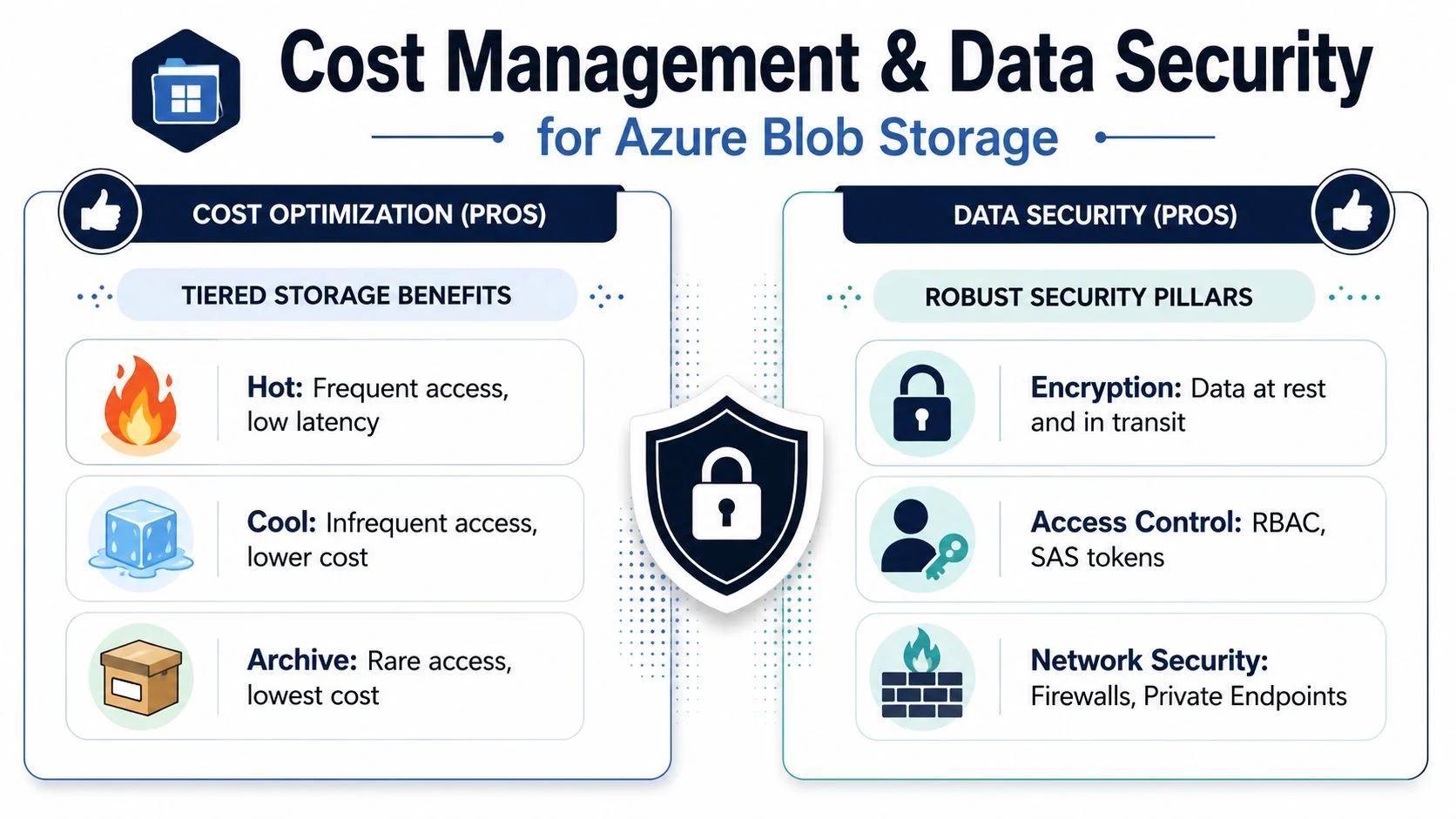
Microsoft documents Hot, Cool, and Archive access tiers for blob data, plus a Premium block blob option for high-transaction, low-latency workloads in its Azure storage account overview. Microsoft also notes a pay-as-you-go model with no upfront cost.
For a business owner, the practical reading is simple:
- Hot suits data you use regularly
- Cool suits data you still need online but access less often
- Archive suits data you must keep but rarely open
- Premium is for specialised workloads that need consistently low latency and high transaction performance
Choosing the right tier without overthinking it
A simple business lens usually works better than a technical one.
Hot for active operations
Use Hot when the files support daily work. Website images, app content, current uploads, and frequently referenced documents belong here. You don’t want your staff or systems paying the penalty for touching data all the time.
Cool for recent but quieter data
Cool is often a strong fit for backups, secondary data copies, and files that are still available but not opened often. Many businesses land here for backup repositories because the data matters, but ordinary staff aren’t accessing it every hour.
Archive for retention obligations
Archive is where you place records you need to keep but almost never use. That might be old financial material, completed project data, or long-term school records that rarely need review.
Decision shortcut: Store by access pattern, not by emotion. Businesses often keep old files on expensive storage simply because they’re nervous about moving them.
Security in business terms
Security discussions around cloud storage often become too technical too quickly. The basics matter more.
A sound Blob Storage setup should answer these questions clearly:
- Who can access the data
- How that access is granted
- Whether the data is protected while stored and transferred
- Whether the selected region aligns with operational and governance needs
Azure supports strong access control options and security tooling, but the business risk usually comes from configuration decisions, not from the concept of cloud storage itself. In plain terms, Blob Storage can be very secure, but it still needs proper permissions, sensible administration, and separation between ordinary staff access and administrative control.
Cost and security trade-offs to watch
Here’s where practical experience matters.
- Cheap storage can become expensive to retrieve if data lands in a low-cost tier but still gets accessed often.
- Broad access feels convenient until the wrong user or app can touch too much.
- Centralising everything in one place is efficient, but only if lifecycle rules, naming, and ownership are set from the start.
- Australian hosting helps operationally, but it doesn’t replace policy, permissions, and backup discipline.
If you’re trying to map likely usage to budget before rollout, this guide on Azure cost for a small business is a useful next read.
Getting Started and Best Practices
Most Blob Storage projects go wrong for ordinary reasons. The team migrates too much, structures it badly, or never agrees on what belongs there in the first place. Starting small and setting rules early usually works better than a massive all-in move.

Start with one clear use case
Don’t begin by saying, “Let’s move all storage to Azure.”
Begin with a contained use case such as backup storage, website media, archived records, or application uploads. That gives you a manageable test case, makes cost behaviour easier to understand, and avoids turning migration into a cleanup project disguised as a cloud project.
Use the right tools for migration
If you’re moving files into Blob Storage, common Microsoft tools include Azure Storage Explorer and AzCopy. Storage Explorer is useful when you want a graphical interface to inspect and manage data. AzCopy is often the practical choice for larger transfers and repeatable migration tasks.
The tool matters less than the process. What matters is that someone owns the structure, verifies what has moved, and checks permissions before the old copy is retired.
Keep it organised from day one
Blob Storage becomes difficult to manage when naming is inconsistent.
Use simple conventions for storage accounts, containers, and key business data groupings. Apply tags where they help identify ownership, environment, or retention type. A school, for example, might separate curriculum media, archived administration records, and operational backups rather than dropping everything into one catch-all container.
Match region and access pattern to reality
For Australian organisations, choosing an Australia-based region often makes sense operationally because staff and users are local. Performance planning also starts with honesty about access patterns. Keep frequently used content in the right tier, and don’t treat archive as a dumping ground for data you’ll probably need next month.
Connect Blob Storage to the rest of the business
Blob Storage is most useful when it integrates cleanly with other systems.
- Backup software can send protected copies offsite
- Web platforms can serve media from a proper storage layer
- Apps can store uploads outside the application server
- Reporting workflows can collect exports and logs in one place
Good cloud storage design is usually boring. Clear naming, sensible tiers, and controlled access don’t look exciting, but they prevent most of the pain later.
How Tbourke Solutions Can Help and FAQs
Azure Blob Storage works well when it matches the way your organisation operates.
For an Australian small business or school, that usually means something specific. Offsite backups that do not depend on ageing hardware in a comms room. Website files that load reliably without filling a local server. Archived records that stay accessible without forcing you to keep buying disks every time data grows. The technical setup matters, but the business result matters more: lower risk, less admin overhead, and fewer expensive storage decisions made in a rush.
Tbourke Solutions helps small to medium businesses, schools, sole traders, and growing organisations set up cloud storage that fits real budgets, local compliance expectations, and day-to-day operations.
Support options that make sense
Consultancy and strategy
Some organisations are still working out whether Blob Storage is the right fit. Others know they need cloud storage, but they are unsure how to separate backups, archived files, application uploads, and website assets without creating a mess later.
A practical review helps answer those questions before money is spent. That includes looking at what data you have now, who needs access, what should stay in Australia, how often files are used, and where a lower-cost storage tier makes sense. For schools, that might mean separating media libraries from archived administration records. For SMBs, it often means drawing a clear line between live business data and long-term retention.
Implementation and migration
A migration project succeeds or fails on planning.
Implementation support can cover storage account structure, container layout, permission settings, migration sequencing, and connections to existing systems such as backup platforms, websites, or business applications. That reduces the common problems I see in smaller organisations: everything pushed into one location, unclear ownership, and costs rising because old data was moved without classification.
Managed support and optimisation
Cloud storage is not a set-and-forget service. Usage changes. Staff leave. New systems appear. Old files keep accumulating.
Ongoing oversight helps keep the environment organised, review access, and catch avoidable cost drift before it becomes a budget problem. For schools and growing businesses with limited internal IT time, that kind of review is often more useful than adding more storage and hoping the structure holds.
If you want practical advice on whether Azure Blob Storage suits your business, school, or backup setup, Tbourke Solutions can help plan, migrate, and manage it with advice specific to your environment.
Frequently asked questions about Azure Blob Storage
| Question | Answer |
|---|---|
| Is Azure Blob Storage only for big companies? | No. It suits many SMBs and schools because the common uses are straightforward: backups, archives, website media, and application file storage. |
| Is it the same as a shared drive? | No. Blob Storage is object storage, so it is better for defined storage workloads than for replacing every familiar file share. |
| Can it store website files and images? | Yes. It is commonly used for web media, downloads, and content that should sit outside the web server itself. |
| Is it suitable for backups? | Yes. It is a common choice for protected copies, restore points, and offsite retention. |
| Will it help reduce hardware dependence? | Often, yes. It can reduce the need to keep expanding local storage for data that does not need to remain on-site. |
| Is it hard to migrate to? | That depends on how well your current data is organised. Clean, clearly grouped data is usually much easier to move than years of mixed folders with unclear ownership. |
| How do I control costs? | Classify data before migration, keep active content in the right tier, and review what really needs long-term retention. Cost blowouts usually come from poor planning, not from Blob Storage itself. |
| Should schools consider it? | Yes, especially for backups, archived records, media libraries, and systems that need shared access without relying on old on-premises storage. |
Share This Story, Choose Your Platform!