Choosing the right hypervisor for your virtual machines is one of those foundational decisions that can make or break your IT strategy. It’s a choice that directly impacts your budget, day-to-day operations, and how easily you can scale down the track.
For Australian small to medium-sized businesses (SMBs), schools, and even advanced home lab users, wading through the technical jargon of Proxmox, VMware, and Hyper-V can feel overwhelming. This guide cuts through the noise to give you a practical, real-world comparison.
TLDR: The 30-Second Summary
This guide provides a practical comparison of Proxmox, VMware, and Hyper-V to help Australian SMBs choose the right virtualization platform. We’ll explore the core technology, feature sets, and true cost of ownership for each hypervisor. By the end, you will understand which solution best fits your specific needs, whether you’re prioritizing budget, enterprise features, or deep integration with your existing IT ecosystem.

Key Differences at a Glance
This table breaks down the core DNA of each platform.
| Feature | Proxmox VE | VMware vSphere/ESXi | Microsoft Hyper-V |
|---|---|---|---|
| Core Technology | KVM & LXC (Debian-based) | ESXi (Bare-metal hypervisor) | Windows Server Integrated |
| Licensing Model | Open-source (free core product) | Per-core subscription | Included with Windows Server |
| Best For | Cost-conscious SMBs, tech enthusiasts, mixed OS environments | Large enterprises with big budgets | Microsoft-centric SMBs |
We’ll unpack these differences in more detail, but this gives you a starting point. Choosing the right platform is a strategic move, and sometimes getting expert business IT consulting services can provide the clarity needed to make the right call.
It’s also helpful to see how these on-premise choices stack up against the cloud, as the decision-making process is similar. Resources like this guide on understanding major cloud provider comparisons can offer some valuable perspective.
Digging into the Core Technology and Architecture
To really get to the bottom of the Proxmox vs. VMware vs. Hyper-V debate, you have to look under the bonnet at how they’re built. Each platform has a completely different design philosophy, and that’s what shapes its performance, flexibility, and where it shines. These architectural choices are the real deal-breakers.

At its heart, Proxmox VE is built on top of a hardened Debian Linux distribution. This is its secret sauce. It allows Proxmox to blend two powerful virtualisation technologies: Kernel-based Virtual Machine (KVM) for full-fat virtual machines and Linux Containers (LXC) for super lightweight, OS-level virtualisation. This dual-threat capability is a massive advantage if you’re running a mix of different workloads.
Type 1 Bare-Metal Hypervisors
On the other side of the fence, both VMware ESXi and Microsoft Hyper-V are what we call Type 1 “bare-metal” hypervisors. This just means they run directly on the server hardware, without a general-purpose operating system getting in the way. This direct line to the physical resources is all about wringing out every last drop of performance and efficiency.
VMware ESXi uses a tiny, proprietary kernel that’s been fine-tuned for one job and one job only: virtualisation. Its minuscule footprint is legendary for both security and rock-solid stability, which is why it has long been the go-to for enterprises running mission-critical applications.
Windows-Integrated Architecture
Hyper-V is also a Type 1 hypervisor, but its architecture is welded to the Windows Server operating system. It gets installed as a “role” within Windows Server, so the management OS (called the parent partition) runs right alongside your virtual machines. For any organisation heavily invested in the Microsoft ecosystem, this tight integration is a huge plus. To see what’s coming next, you can explore the new features in the next generation of Windows Server.
Here’s the key takeaway: Proxmox gives you incredible flexibility with its Linux foundation and dual VM/container tech. VMware doubles down on a lean, purpose-built hypervisor for raw performance. Hyper-V, meanwhile, is all about seamless integration with the Windows world.
This difference really matters for Australian SMBs. Proxmox often comes out on top as the cost-effective champion, delivering enterprise-grade features without the eye-watering licensing fees that can cripple a budget. Its all-in-one web interface also makes life much simpler for smaller IT teams—a world away from needing separate products like vCenter just to get full functionality in the VMware camp. This architectural flexibility makes it a powerful alternative for local businesses wanting serious virtualisation without the serious overhead.
A Detailed Look at Features and Capabilities
When you get down to brass tacks, the daily experience of using a hypervisor is all about its feature set. In the Proxmox vs VMware vs Hyper-V contest, each platform brings a different toolbox to the table for managing everything from storage and networking to making sure your systems stay online. Nailing down these differences is the key to picking a platform that actually fits how your team works.
Proxmox VE really shines with its all-in-one, web-based graphical user interface (GUI). From a single browser tab, you can manage virtual machines, containers, storage, networking, and even high-availability clusters. This unified dashboard is a huge win for smaller teams that don’t have specialists for every little thing—it just simplifies life.
VMware’s world, on the other hand, is more compartmentalised. You can manage a basic ESXi host directly, but to unlock the platform’s real power, you need vCenter Server. It’s the brains of the operation, giving you powerhouse features like vMotion (live migration) and Distributed Resource Scheduler (DRS). The catch? It adds another layer of complexity and, more importantly, cost.
Microsoft’s Hyper-V is managed through tools like Hyper-V Manager, Windows Admin Center, or PowerShell. These feel right at home for Windows admins but can seem a bit disjointed compared to the single-pane-of-glass approach Proxmox offers.
Advanced Storage and Networking Options
Storage is where you see the biggest philosophical divide between these platforms. Proxmox comes with built-in, first-class support for some seriously powerful open-source storage technologies right out of the box.
- ZFS: Proxmox’s deep integration with ZFS is a massive plus. It gives you incredibly robust data integrity, snapshots, and compression without needing to buy an extra licence.
- Ceph: For businesses wanting to build a hyperconverged infrastructure (HCI), Proxmox’s native Ceph support lets you create a resilient, scalable, software-defined storage cluster using the local disks you already have.
VMware’s answer is its own software-defined storage solution, vSAN, which is a genuine market leader in the HCI space. But vSAN is a premium, licensed product that can add a significant chunk to your budget. Hyper-V brings Storage Spaces Direct (S2D) to the fight, a feature included in Windows Server Datacenter edition that also enables HCI, but it’s naturally welded to the Microsoft ecosystem.
The real game-changer here is accessibility. Proxmox gives you enterprise-grade storage tools like ZFS and Ceph for free, democratising features that are often locked behind expensive paywalls in the VMware and Microsoft camps.
Networking follows a similar script. Proxmox uses standard Linux bridging and Open vSwitch, which gives you incredible flexibility for sorting out complex network setups. VMware’s vSphere Distributed Switch and its NSX platform offer advanced networking and security, but again, they come with a hefty price tag. Hyper-V’s Virtual Switch is powerful and integrates well with Windows networking, but it can feel less intuitive if you’re not living and breathing the Windows world.
Feature Comparison Proxmox vs VMware vs Hyper-V
Here’s a side-by-side look at the core features and capabilities of each virtualization platform, focusing on aspects most relevant to SMBs and educational institutions.
| Feature | Proxmox VE | VMware vSphere/ESXi | Microsoft Hyper-V |
|---|---|---|---|
| Management Interface | All-in-one Web GUI | vCenter Server (required for advanced features) | Hyper-V Manager, WAC, PowerShell |
| Live Migration | Built-in (Live Migration) | vMotion (requires vCenter license) | Live Migration (requires Failover Clustering) |
| High Availability (HA) | Built-in HA Clustering | VMware HA (requires vCenter license) | Failover Clustering (Windows Server feature) |
| Software-Defined Storage | ZFS & Ceph (built-in, free) | vSAN (premium licensed product) | Storage Spaces Direct (S2D) (in Datacenter edition) |
| Container Support | Linux Containers (LXC) – Native | vSphere with Tanzu (Kubernetes focus, licensed) | Windows & Linux Containers (via Docker integration) |
| Backup Solution | Proxmox Backup Server (integrated, free) | vSphere Data Protection (deprecated), third-party | Windows Server Backup, DPM, third-party |
| Licensing Model | Open-source (free), optional support subscription | Per-CPU licensing, multiple editions, vCenter required | Included with Windows Server (Standard/Datacenter) |
This table gives a quick snapshot, but the story is in the details. While all three can deliver similar results, the cost and complexity to get there vary dramatically.
High Availability and Live Migration Compared
Keeping the lights on is non-negotiable for any organisation. All three platforms have solid solutions for high availability (HA) and live migration, but how they’re implemented and how much they cost to access are very different.
Proxmox HA is a built-in feature that automatically restarts VMs on another node if a host fails. It’s dead simple to set up right from the web UI. For planned maintenance, its live migration feature lets you move running VMs between hosts without any downtime.
VMware HA and vMotion are the gold standard in the enterprise world, famous for their rock-solid reliability and performance. They are core features of vSphere but won’t work without a vCenter Server license.
Hyper-V’s Failover Clustering and Live Migration are deeply woven into Windows Server. They provide excellent HA, especially for Microsoft workloads, but the setup can be more involved than with Proxmox.
While each platform can get you to a similar destination, the journey varies. For businesses running a mix of on-premise and cloud workloads, it’s also worth seeing how these tools stack up against cloud-native solutions; our guide to setting up a virtual desktop in Azure offers some great insights into what the public cloud can do. Ultimately, the choice often boils down to balancing the polished, best-in-class features of VMware against the powerful, integrated, and wallet-friendly toolkit that Proxmox puts on the table.
Understanding the True Cost of Ownership
When you’re comparing Proxmox, VMware, and Hyper-V, the initial sticker price is just the tip of the iceberg. For Australian small businesses and schools, the real number to watch is the total cost of ownership (TCO). This figure accounts for everything—licensing, support, hardware, and those sneaky future upgrade costs. Getting a clear financial picture upfront is the only way to avoid nasty surprises down the track.
The financial models for these three platforms couldn’t be more different. Each one offers a distinct value proposition, depending entirely on your organisation’s budget and in-house technical skills.
Proxmox: The Open-Source Model
Proxmox VE operates on a completely different financial principle: the core software is 100% free and open-source. You can download, install, and run a fully-featured, enterprise-grade hypervisor on as many hosts, CPUs, and VMs as you like without paying a cent in licensing fees.
This model is a massive draw for any organisation trying to stretch its IT budget. The main cost with Proxmox comes from optional enterprise support subscriptions. These paid plans give you access to a production-tested update repository and professional technical support, which is essential for peace of mind when running business-critical systems.
The key takeaway here is simple: with Proxmox, you’re paying for service and support, not for software features. This creates a predictable and scalable cost structure that grows with your support needs, not your hardware footprint.
VMware and Hyper-V Licensing Costs
VMware’s licensing has long been the gold standard for big enterprises, but that pedigree comes at a premium. Its model is notoriously complex, often based on per-core licensing, and essential features like vCenter Server for central management demand a separate, significant investment. Recent post-acquisition changes have also driven prices up, pushing many SMBs to look for alternatives.
Microsoft Hyper-V is a different story. The hypervisor role is simply included with a Windows Server license. If your business is already deep in the Microsoft ecosystem, this can make Hyper-V feel like a “free” bonus. However, the costs are baked into the Windows Server licensing itself, which can be substantial, especially if you need the Datacenter edition for advanced features like Storage Spaces Direct.
For Australian small to medium enterprises, schools, and startups, the price gap between these platforms is stark. Proxmox can lead to up to 80% cost savings on virtualisation alone. While VMware’s 42.97% market dominance is fuelled by large corporations, recent licensing hikes—with some reporting 2-3x increases in annual fees—have alienated many SMBs. Hyper-V offers zero extra cost for existing Microsoft shops, but it lacks Proxmox’s native container support, which limits efficiency for the hybrid setups common in agile Australian businesses.
Getting the finances right is paramount. For a deeper look into managing ongoing operational costs in virtualised environments, it’s worth exploring these strategies for cloud cost optimization. This broader view helps in making a financially sound decision for your entire IT landscape, which is a core part of our infrastructure and cloud services. Calculating the true TCO means looking well beyond the initial purchase and considering the full lifecycle cost of the solution.
Matching the Right Platform to Your Needs
Technical specs and feature lists only get you so far. The real test of a hypervisor is how it actually performs on the ground, solving real business problems. When it comes to the Proxmox vs VMware vs Hyper-V debate, picking the winner means matching its core strengths to your specific operational needs, budget, and the tech you already have.
Let’s step away from the spec sheets and walk through a few common scenarios. This practical approach gives you clear, situational guidance to help you see which hypervisor is the most natural fit for your organisation.
The Budget-Conscious Startup or School
Imagine a growing Australian startup or a local school where every dollar in the IT budget has a job to do. They need a powerful, scalable virtualisation platform that delivers enterprise-grade features—think high availability, live migration, and solid storage options—but without the crippling upfront licensing costs.
In this scenario, Proxmox VE is the undisputed champion. Its open-source model completely eliminates software licensing fees, freeing up limited funds to be invested in better hardware or an optional support subscription for extra peace of mind. The all-in-one web interface makes management straightforward, which is a massive win for small IT teams where everyone wears multiple hats.
For organisations where total cost of ownership is the number one priority, Proxmox delivers a feature-rich, production-ready platform at a fraction of the cost of its commercial rivals. It effectively democratises advanced virtualisation, making it accessible to everyone.
The Established Enterprise with Complex Needs
Now, let’s picture a larger, more established enterprise. They have a significant IT budget and a complex environment full of mission-critical applications. For them, absolute stability, extensive third-party hardware and software certifications, and access to premium, round-the-clock vendor support are non-negotiable. Their ecosystem is vast, and they need advanced networking and security features to match.
This is the traditional home turf for VMware vSphere. Its maturity, legendary stability, and enormous ecosystem of compatible products and skilled engineers make it the de facto standard for large-scale enterprise virtualisation. While the price tag is considerably higher, for a business where downtime is measured in thousands of dollars per minute, the investment in VMware’s proven reliability and comprehensive support network is an easily justifiable business decision.
The Microsoft-Centric Business
Finally, think about an SMB that runs almost exclusively on Microsoft technologies. Their entire workflow is built around Windows Server, Active Directory, and Microsoft 365, and they’re looking to integrate more deeply with Azure cloud services. Their IT team lives and breathes the Windows ecosystem and values seamless integration above everything else.
For this type of organisation, Microsoft Hyper-V is the logical choice. Because it’s an integrated role within Windows Server, there are no extra hypervisor licensing costs beyond what they already pay. Management feels instantly familiar to any Windows administrator, and the tight integration with services like Active Directory simplifies security and permissions. For any business looking to get the most out of its existing investment in the Microsoft stack, Hyper-V offers the path of least resistance and a truly cohesive management experience.
This decision tree infographic can help you visualise how your main focus—whether it’s cost or your existing ecosystem—can steer your choice between Proxmox, Hyper-V, and VMware.
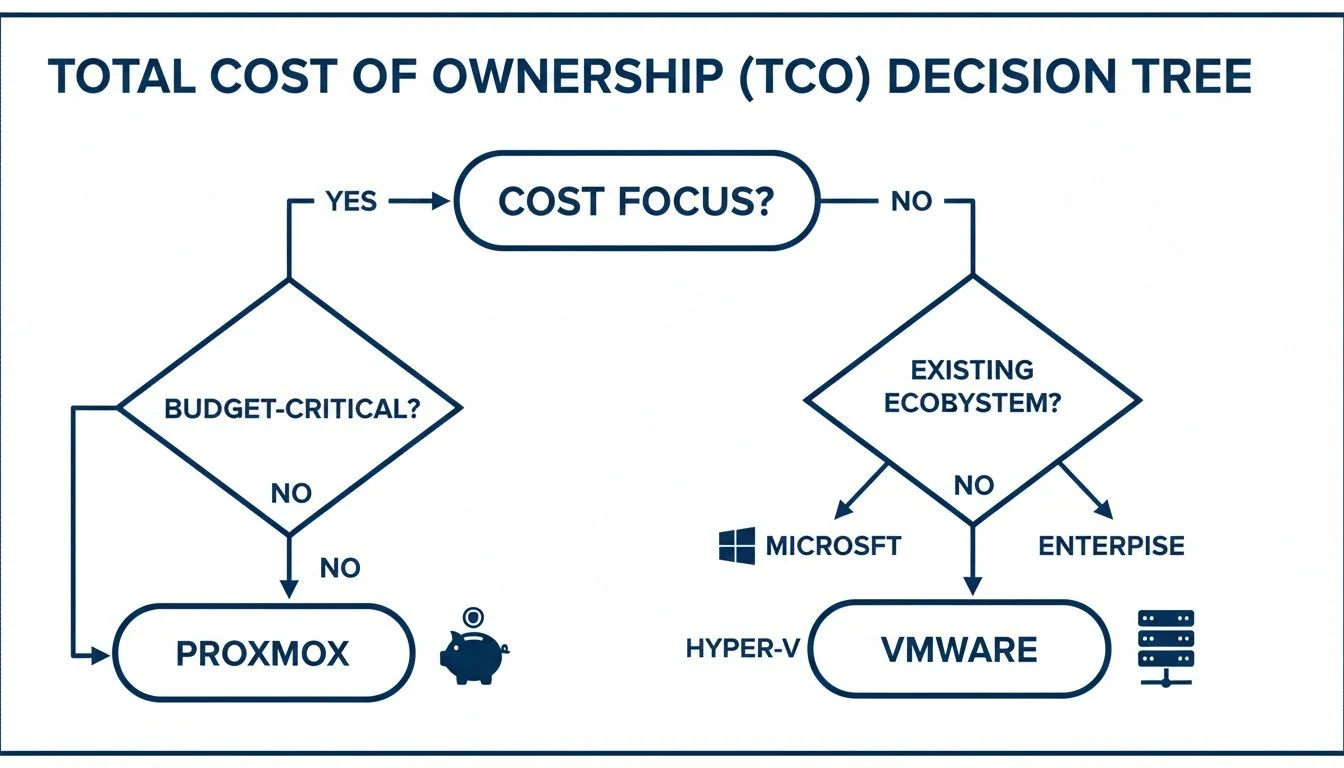
The key takeaway here is pretty clear: if your budget is the critical constraint, Proxmox is the immediate frontrunner. On the other hand, if your focus is on deep ecosystem integration, your choice points squarely toward either Hyper-V for Microsoft shops or VMware for large, complex enterprise environments. These scenarios show that the “best” hypervisor isn’t a universal title—it’s a contextual one, defined by your unique business priorities.
Answering Your Key Questions
When you’re weighing up Proxmox, VMware, and Hyper-V, a few common questions always seem to pop up. Let’s cut through the noise and get you some straight answers to help finalise your decision.
Which hypervisor is best for beginners?
For beginners, Proxmox is often the easiest to start with due to its all-in-one web interface that simplifies management. However, if your team is already skilled in Windows Server, Hyper-V will feel more familiar and intuitive. While VMware offers a free version, unlocking its advanced features can present a steeper learning curve for newcomers.
Is Proxmox really free and ready for business use?
Yes, the core Proxmox VE software is 100% free and open-source. It is a robust, enterprise-ready platform used by thousands of businesses worldwide for critical operations. The business model revolves around optional paid support subscriptions, which provide access to professional technical support and a stable, production-tested update repository, offering a safety net for commercial environments.
Can I migrate from VMware or Hyper-V to Proxmox?
Absolutely. Migrating from VMware or Hyper-V to Proxmox is a common strategy for businesses looking to reduce licensing costs and avoid vendor lock-in. While it requires careful planning to ensure a smooth transition with minimal downtime, there are well-documented procedures and tools available to help convert and import your existing virtual machines.
How does performance compare between the three?
In most real-world scenarios for SMBs, the performance difference between Proxmox, VMware, and Hyper-V is negligible. All three are Type 1 hypervisors that offer excellent, near-native performance. The biggest performance gains will come from proper hardware selection (fast storage, ample RAM) and correct configuration, not from the hypervisor choice itself.
How Tbourke Solutions Can Help
Picking the right virtualization platform is a strategic decision that impacts your IT infrastructure for years. With over 20 years of hands-on experience, Tbourke Solutions helps SMBs and schools navigate the Proxmox vs VMware vs Hyper-V debate to find a solution that fits your budget and long-term goals. Our approach is to partner with you to deliver transparent, simple solutions that empower your team.
We offer practical services to ensure your virtual environment is a success:
- IT Consultancy: We provide straight-up, expert guidance to help you choose the most suitable and cost-effective hypervisor for your specific needs.
- Implementation & Migration Support: Our team provides hands-on help to deploy your chosen platform or migrate from an existing one, ensuring minimal disruption to your operations.
- Ongoing Managed Services: We ensure your virtual infrastructure runs securely and performs at its best with our proactive support, giving you long-term peace of mind.
Ready to make a confident decision about your virtualization strategy? Reach out to Tbourke Solutions by visiting our contact page to submit a query and let’s start the conversation today.
Share This Story, Choose Your Platform!