
Monday morning in Flemington. The phones are ringing, staff are logging in, someone needs a file before a client meeting, and the Wi-Fi starts dropping out. Then a suspicious email lands in three inboxes at once. Nothing has fully failed, but everyone loses momentum while somebody tries to work out whether it’s the internet, the router, Microsoft 365, a laptop, or “just one of those IT things”.
That pattern is more expensive than most business owners realise. Not because one slow computer is catastrophic, but because reactive IT creates a constant drag on the business. Staff wait. Owners get pulled into technical problems they shouldn’t be handling. Security gaps sit unnoticed until something serious happens. Schools face the same pressure from a different angle, especially when staff need stable systems, secure access, and confidence that student data is being handled properly.
Managed IT Support for Flemington Businesses is about changing that model. Instead of fixing technology only after it breaks, a managed provider looks after the environment continuously so problems are prevented, risks are reduced, and support is already in place when something goes wrong.
Introduction Your Flemington Business Deserves Better Than ‘Good Enough’ IT
For many Flemington businesses, “good enough” IT means systems that mostly work until the worst possible moment. The printer behaves all week, then fails before invoices need to go out. Email is fine until an attachment won’t send during a tender submission. A server that’s been “a bit slow lately” suddenly becomes everyone’s problem on a busy day.
These aren’t minor annoyances. They’re signs that the business is relying on break-fix IT, where support only appears after something has already disrupted work. That approach can feel cheaper because you only pay when there’s an obvious issue, but it leaves the business exposed to downtime, rushed decisions, and patchy security.
What better IT looks like
A managed approach treats technology the way a sensible business treats any critical system. You don’t wait for the roof to collapse before maintaining the building. You inspect it, repair weak points early, and make sure it can handle normal business pressure.
With managed support, your systems are monitored, maintained, backed up, and reviewed on an ongoing basis. Staff know where to go for help. Business owners get clearer visibility over risk. Growth becomes easier because the technology has a plan behind it.
Practical rule: If your team only thinks about IT when something breaks, your business is probably running on reactive support.
That matters just as much for schools and regulated organisations as it does for retail, trades, medical, legal, and professional services firms. Technology shouldn’t be the thing that slows the day down. It should quietly support the work you’re already trying to do.
TLDR Your Quick Guide to Managed IT in Flemington
Managed IT support is an ongoing service where a specialist team looks after the day-to-day health of your business technology. That usually includes monitoring, maintenance, helpdesk support, cybersecurity, backups, user management, and advice on upgrades or risk.
The practical difference is simple. Problems get picked up earlier, staff have a clear support path, and IT costs become easier to forecast instead of arriving as surprise repair bills.
For a Flemington business owner, the value is not just technical coverage. Monitoring checks systems in the background for faults before they disrupt the day. Cybersecurity reduces the chance that weak passwords, missed updates, or unsafe email habits turn into a serious incident. Cloud management keeps shared files, Microsoft 365, and business apps organised, secure, and properly supported.
That matters in different ways depending on the organisation. A retailer may care most about reliable EFTPOS and Wi-Fi. A school may need tighter user permissions, device oversight, backup discipline, and a support model that works around teaching hours and student safety obligations.
A useful way to judge managed IT is by return, not by features alone. Ask whether it reduces downtime, saves owner time, lowers risk, and gives the business a clearer plan for replacing equipment or supporting growth. If your setup depends on one overstretched staff member or a technician who only appears after something fails, managed support is usually the steadier long-term choice.
Beyond Slow Computers The True Cost of DIY IT in Flemington
The obvious cost of weak IT is easy to spot. A laptop won’t connect. The internet drops. Someone can’t print. But the bigger cost usually hides in the background, spread across small delays, repeated interruptions, and preventable risk.
A business owner might spend half an hour chasing an email issue, then another hour dealing with a file access problem, then lose time again because software updates were ignored for too long. None of that appears neatly on an invoice, but it still costs the business. It pulls attention away from customers, sales, payroll, scheduling, teaching, or compliance work.
The hidden costs most businesses miss
DIY IT often starts with good intentions. A capable staff member knows more than the rest of the team. A friend set up the network years ago. A local technician helps when things go badly wrong. The trouble is that informal support rarely scales well.
Here’s where the cost shows up:
- Lost staff time: People stop doing their actual job while they troubleshoot logins, printers, file sync problems, or unstable Wi-Fi.
- Inconsistent security: If updates, antivirus reviews, access permissions, and device policies aren’t checked regularly, gaps build up.
- Weak backup habits: Many businesses think they have backups until they need to restore something under pressure.
- Owner distraction: In smaller firms, the owner becomes the unofficial IT manager by default, which is usually a poor use of their time.
- Growth bottlenecks: New hires, extra devices, remote work, and software changes all become harder when the environment has no structure.
Schools and regulated businesses face a different level of risk
The problem gets sharper in education and regulated sectors. Existing market content around managed IT in Flemington is largely sector-agnostic, with little useful guidance for organisations that face compliance or operational requirements beyond standard support tasks, as noted in this overview of service gaps in the Flemington market.
For schools in Australia, that gap matters. Managing student data under the Australian Privacy Act, securing remote learning platforms, and integrating education technology safely require more than generic IT help. A provider that understands those obligations acts more like a compliance partner than a repair service.
Cheap IT often becomes expensive the moment your business depends on it for something important.
Why break-fix feels cheaper than it is
Break-fix support is appealing because the bill arrives only when there’s a visible issue. Managed support asks you to budget for prevention, maintenance, and planning before a crisis appears. That can feel harder to justify until you compare the two properly.
If you want a practical comparison of that decision, this guide on break-fix IT vs managed IT costs is worth reading. The key point is simple. The monthly service fee is only one part of the picture. The bigger question is what your current setup is already costing you in downtime, stress, and avoidable risk.
Demystifying Managed IT Support A Breakdown of Core Services
A lot of business owners hear “managed IT” and picture a vague bundle of technical tasks wrapped in a monthly fee. In practice, it’s easier to understand if you treat it like operational maintenance for the systems your business depends on every day.
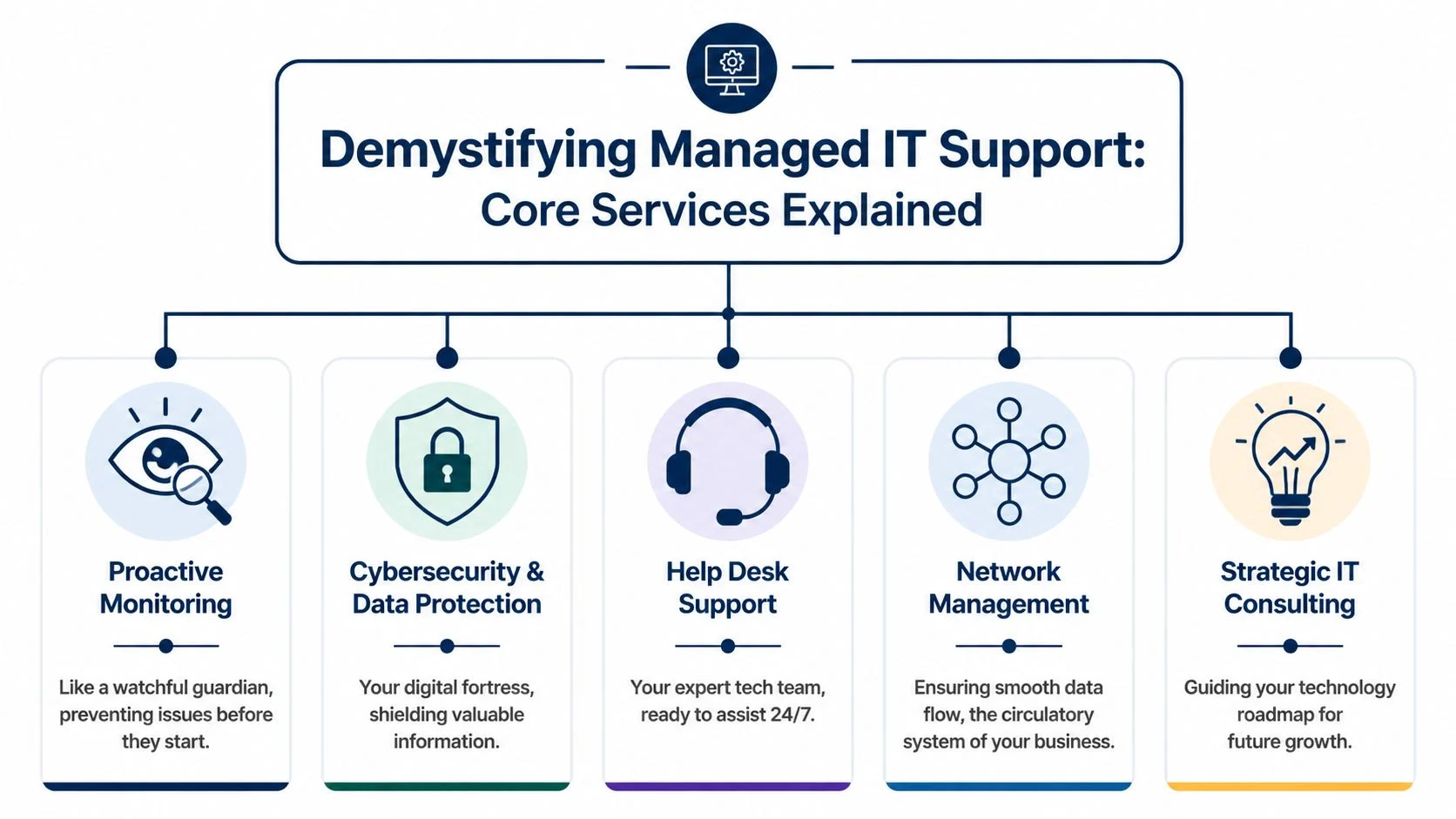
Proactive monitoring and maintenance
This is the part many businesses never see, which is why they underestimate its value. Monitoring watches key systems for signs of trouble before users start complaining. Maintenance applies updates, checks system health, and reduces the chance that a small issue turns into a business interruption.
Managed IT support is like routine servicing for a work vehicle. You don’t service it because it’s broken. You service it so it can keep doing the job reliably.
Typical work in this area includes:
- Device health checks: Watching for storage, performance, hardware, or software issues.
- Patch management: Keeping operating systems and business applications updated.
- Alert response: Investigating unusual activity before it becomes an outage.
- Performance tuning: Identifying bottlenecks that make systems feel slow or unstable.
Cybersecurity and data protection
Cybersecurity isn’t one product. It’s a stack of controls working together. Firewalls, endpoint protection, email filtering, access controls, multi-factor authentication, backup strategy, and staff guidance all play a role.
A lot of businesses buy one security tool and assume the job is done. It isn’t. Good security works more like layers in a building. The front door matters, but so do the locks, cameras, alarms, visitor access, and procedures for who can enter what area.
Useful test: If a staff member clicked a fake invoice link today, would you know what protections are in place after that click?
Help desk support and user assistance
When staff can’t work, they need help quickly and clearly. A proper help desk doesn’t just answer tickets. It gives people a known path for fixing problems without wasting half the day asking around the office.
That support might include password resets, Microsoft 365 issues, printer problems, file permissions, device setup, software troubleshooting, and remote assistance. The value isn’t just solving the issue. It’s restoring momentum.
Network management and connectivity
If your network is unreliable, everything feels unreliable. Cloud apps lag, calls drop, shared files stall, and users often blame the wrong thing because the symptoms show up everywhere.
Network management covers the plumbing of your IT environment:
| Area | What it affects | Why it matters |
|---|---|---|
| Wi-Fi stability | Laptops, mobile devices, meeting rooms | Staff can move and work without dropouts |
| Internet reliability | Cloud tools, email, calls, browsing | Core business systems stay available |
| Switching and routing | Traffic flow between systems | Data moves efficiently through the business |
| Access control | Who can connect and where | Reduces unnecessary exposure |
Backup, recovery, and continuity
Backups matter because mistakes happen. Files get deleted. Devices fail. Accounts get compromised. Software changes go wrong. A managed provider should help you answer three practical questions: what is backed up, how fast it can be restored, and who is responsible if something goes wrong.
Many businesses only discover the weakness in their backup plan during a stressful restore request. By then, it’s too late to design the process properly.
Strategic IT planning
This is what separates a real managed service from a basic support contract. Strategic guidance means someone is looking ahead. Are your systems still fit for the way the business works now? Is the hardware ageing out? Are you adding staff, opening another location, moving more work into cloud platforms, or dealing with stronger compliance expectations?
That’s where an MSP becomes more than a repair function. It becomes part of operational planning. If you want a plain-English explanation of that role, what a managed IT provider does breaks it down well.
From Surviving to Thriving The Business Case for Proactive IT
A Flemington business owner usually notices the value of proactive IT in the middle of a busy day, not during a sales pitch. The internet drops during EFTPOS payments. A staff member cannot open a shared file before a client meeting. Someone asks whether last night’s backup ran, and nobody can answer with confidence. At that point, IT is no longer a background function. It is affecting revenue, time, and credibility.

Stop judging IT on monthly fee alone
A low monthly support fee can look sensible on paper and still cost more over a year.
The comparison isn’t provider A versus provider B on invoice price. It is stable operations versus recurring disruption. If staff lose time to login issues, Wi-Fi dropouts, patching problems, or slow recoveries, the business is already paying for weak IT. The cost just shows up in wages, delays, missed work, and owner attention instead of a single line item.
That is why smart buying starts with total operating impact. A managed service should reduce avoidable interruptions, make risk easier to control, and give you a clearer plan for future spending.
A practical way to assess return on investment
Business owners do not need a complicated formula. They need a clear way to judge whether support improves the business.
Use this framework when reviewing your current setup or comparing providers:
| Business area | If IT is reactive | If IT is proactive |
|---|---|---|
| Staff productivity | Work stops while issues are investigated | Fewer interruptions and faster resolution |
| Security posture | Controls vary by user, device, or location | Security checks and updates follow a defined process |
| Budget clarity | Costs spike after failures or urgent fixes | Spending is planned with fewer surprises |
| Business continuity | Recovery is assumed but rarely verified | Backup and restore responsibilities are documented and tested |
| Growth readiness | New users, sites, or tools create friction | Systems are reviewed before growth creates bottlenecks |
| Leadership time | Owners and managers get pulled into technical decisions | Oversight sits with a provider that tracks issues and priorities |
A simple test helps. Ask what would happen if a key laptop failed this afternoon, a staff account was compromised, or your internet connection became unstable during your busiest period. If the answer depends on guesswork, goodwill, or whoever is available first, the setup is still in survival mode.
Why industry fit changes the business case
Generic support can keep devices running. That does not mean it fits the business.
A school, for example, has very different pressure points from a law firm or an accounting practice. Classroom platforms need to stay available. Student data needs tighter handling. Shared devices, staff permissions, filtering, remote access, and term-time disruptions all need to be managed with more care than a standard office setup. A provider that understands education will approach support differently because the operational risks are different.
The same applies to healthcare, legal, and financial businesses. If your organisation deals with sensitive records, audit requirements, or privacy obligations, your IT provider should help reduce operational exposure, not just close support tickets.
The better question is not “what does support cost?” It is “what does unstable IT cost us every month?”
What proactive support looks like in real operations
For a retailer, proactive support means the point of sale stays usable during peak trade, guest Wi-Fi does not interfere with business traffic, and replacement hardware is planned before failure causes a trading problem.
For a professional services firm, it usually means staff can access documents reliably, new starters are set up properly on day one, and account security is monitored instead of checked only after an incident.
For a school, it can mean fewer teaching interruptions, clearer control over user access, and less scrambling when shared devices, printers, or online learning tools misbehave.
That is the commercial argument. Proactive IT gives the business more predictable working hours, fewer preventable incidents, and better use of staff time. Owners comparing options can get a clearer view by looking at the business benefits of managed IT services through the lens of downtime, recovery, compliance, and growth.
Recognising the Signs When to Seek Professional IT Support
Monday, 8:55 am. Staff are trying to log in, the printer is offline again, one person cannot access a shared folder, and nobody knows whether last night’s backup ran. That is usually the point where a business owner realises the issue is not a single fault. It is an operating model that no longer fits the business.
I see this in growing Flemington businesses all the time. Ad hoc support can hold together a very small team for a while. Once the business adds more staff, more devices, cloud apps, remote access, or tighter client expectations, every small IT problem starts stealing paid time from several people at once.
Red flags you shouldn’t ignore
The warning signs are usually operational before they are technical.
- Interruptions are becoming normal: Staff lose time to slow startups, Wi-Fi instability, printing faults, sync errors, or repeated password resets.
- One internal “IT person” is carrying too much: A manager, admin team member, or technically confident employee keeps getting pulled away from their actual job to fix recurring issues.
- Support only starts after something breaks: Problems are patched case by case, but nobody is checking updates, backups, device health, or security settings consistently.
- You cannot answer simple risk questions quickly: If a laptop is lost, Microsoft 365 access is compromised, or a file share fails, the response steps are unclear.
- New starters and changes feel clumsy: Setting up accounts, permissions, email, devices, and software takes too long or gets done differently each time.
- Your industry has requirements your current setup does not reflect: Schools, legal firms, healthcare providers, and finance businesses often need tighter access control, clearer record handling, and better visibility over who can reach what.
Those signs matter because they point to cost. Not only repair cost. They point to lost hours, delayed customer work, preventable risk, and owners spending time on systems when they should be focused on sales, staff, or service delivery.
The practical test
A useful way to assess this is simple. If the same type of issue has happened three times and the business still relies on memory, goodwill, or a rushed phone call to sort it out, the problem is no longer incidental. It is process failure.
That does not mean every business needs a fully outsourced arrangement tomorrow. Some firms only need monitoring, patching, backup oversight, and a proper escalation path. Others need a broader managed service because growth, compliance, or multi-site operations have made the old approach too fragile. The right point to bring in outside help is when reactive fixes are costing more than structured support would.
If you want a clearer benchmark, these signs your business has outgrown ad hoc IT support match what many growing businesses run into before they make the switch.
Your Checklist for Choosing the Right Flemington IT Partner
A provider can sound capable in a sales meeting and still be a poor fit once the contract starts. The right test is simple. Can they explain how their service will reduce interruptions, control risk, and support your business as it grows?
Start with the commercial side. If pricing is hard to follow before you sign, it usually gets worse once projects, after-hours work, and onboarding start appearing on invoices. Clear pricing does not mean the cheapest monthly fee. It means you understand what is included, what sits outside scope, and how costs change when you add staff, open another site, or take on tighter compliance requirements.
Ask direct questions and push for direct answers:
- What is included in the recurring service: Monitoring, helpdesk support, patching, security tools, backup checks, vendor liaison, and on-site visits.
- What falls outside the agreement: Projects, hardware procurement, after-hours work, major remediation, licensing, and user onboarding.
- How changes are priced: New users, extra devices, cloud migrations, site moves, and policy or compliance work.
- Who reviews the environment: Someone should look at trends, recurring issues, and risks regularly, not just close tickets.
Cost needs to be assessed properly. A low monthly fee can still be expensive if staff lose hours to recurring issues, backups fail when needed, or the owner keeps acting as the unofficial IT manager. Good managed support should produce a clear return. Less downtime, fewer avoidable disruptions, faster staff onboarding, and a more predictable support budget.
MSP Evaluation Checklist
| Area of Inquiry | What to Ask | Why It Matters |
|---|---|---|
| Support model | Who handles support requests, and how do staff contact you? | Staff need a clear support path when work stops |
| Response process | What happens after we log an issue? | A defined process reduces delays and confusion |
| Security coverage | Which security controls are managed as part of the service? | Security only works when someone owns it day to day |
| Backups and recovery | What data is covered, and how is recovery tested? | Backup without recovery testing is a false sense of safety |
| Industry experience | Have you supported businesses or schools with similar requirements? | Schools and regulated firms often need tighter access control and clearer handling of sensitive data |
| Accountability | Who reviews our setup and recommends changes? | Someone should own improvement planning, not just ticket resolution |
| Contract terms | How flexible is the agreement if our needs change? | Business requirements rarely stay fixed |
| Pricing transparency | What is excluded from the recurring service? | Hidden costs usually surface when the pressure is already on |
The best conversations get specific quickly. Ask how they onboard a new employee, respond to a phishing incident, restore lost files, replace failed hardware, or support a school office during term time. A capable provider will answer in a way that reflects process, ownership, and realistic timeframes. Vague language usually means vague delivery.
Look for these signs:
- Plain language: They explain technical work in business terms.
- Defined roles: They state what they manage and what your team still owns.
- Operational discipline: They document systems, follow escalation paths, and run regular reviews.
- Business fit: They understand the difference between supporting a small accounting firm, a retail site, a school, or a multi-location office.
One option businesses can assess is Tbourke Solutions, which provides managed IT services, helpdesk support, network and infrastructure support, cloud solutions, cybersecurity, backup and recovery, and consultancy for small to medium organisations. If you are comparing providers more broadly, this overview of IT outsourcing vendors and what to look for is a useful reference.
If a provider cannot explain service boundaries, accountability, and extra costs in plain language before you sign, expect disputes after you sign.
Why Local Expertise Matters Imagined Flemington Success Stories
At 8:25 on a school morning or five minutes before a client meeting, businesses do not care about abstract IT capability. They care whether staff can log in, open the right files, print what they need, and keep working. Local expertise matters when the provider understands that pressure in practical terms and responds accordingly.
A provider being nearby does not automatically make them a good fit. What matters is familiarity with how small organisations in areas like Flemington operate. That includes tight staffing, a mix of old and new devices, software that has grown organically over years, and owners who need clear answers fast.
A small accounting practice
Consider a small accounting firm during BAS season. The team is working across shared files, email, cloud accounting tools, and a few older desktop systems that still run a key application. If one machine slows down, a shared folder goes offline, or a backup has been failing, unnoticed, the cost is not just inconvenience. Billable hours disappear, deadlines tighten, and the principal gets pulled into technical triage instead of client work.
Structured managed support changes that equation. Devices are maintained on a schedule. User access is cleaned up as staff roles change. Backup checks happen routinely instead of relying on assumptions. Support requests go through a defined process, which means the team knows who owns the problem and what happens next.
The visible result is often simple. Fewer interruptions during the busiest weeks of the year.
A local primary school
A primary school has a different operating rhythm and a different risk profile. Teachers need classroom devices, displays, printers, and online tools working at the start of the lesson, not after a half-day delay. Office staff handle enrolment records, family contact details, and other sensitive information. Students share devices, passwords get forgotten, and term dates leave very little room for avoidable outages.
Support in that environment has to fit the school calendar and the school day. A provider who understands education settings will treat filtered internet access, account permissions, shared device management, and quick issue resolution as daily operational requirements. They will also understand the trade-off schools face all the time. Security controls need to be strong enough to protect student information, but not so cumbersome that they slow teachers down every period.
That industry context is often missed in generic IT articles. It matters because a school does not buy support the same way a retail business or a law firm does.
Why this matters for your next decision
These examples are hypothetical, but the financial logic is real. Good managed IT is not just a technical purchase. It is an operations decision. Owners should ask a simple question: does this support model reduce downtime, lower avoidable risk, and free up staff time that is currently being spent on patching recurring issues?
That is the ROI framework many businesses skip. A cheaper arrangement can cost more if it leaves gaps in backups, inconsistent security, slow response during busy periods, or too much dependence on one internal person who is already stretched.
Tbourke Solutions works with small to medium enterprises, sole traders, and organisations that need secure, reliable support without unnecessary complexity. For a Flemington business, the fundamental value of local expertise is not geography by itself. It is getting support that matches how your business operates, what your staff can realistically manage, and where downtime hurts most.
Frequently Asked Questions About Managed IT Support
Is my business too small for managed IT support
Usually, no. Size matters less than reliance on technology. If your business uses email, shared files, cloud apps, accounting systems, remote access, or customer data, then IT reliability and security already affect your operations. Managed support can often be scoped to fit smaller environments, which makes it more practical than many owners assume.
We have an in-house person who’s good with computers. Why would we need an MSP
Because “good with computers” and “responsible for business IT operations” are different jobs. An MSP can complement internal staff by handling monitoring, maintenance, security operations, vendor coordination, backup oversight, and broader technical coverage. That gives your in-house person backup, structure, and access to a wider skill set.
How hard is it to switch from our current IT provider
A professional provider should make the process orderly. That usually means reviewing accounts, devices, licences, support history, backups, and admin access before the handover starts. The main risk in a transition isn’t the switch itself. It’s poor documentation from the outgoing arrangement.
What’s the difference between managed IT and break-fix support
Break-fix support responds after something fails. Managed IT works continuously to reduce the chance of failure and provide ongoing support, maintenance, and oversight. One model is reactive. The other is operational.
Can managed IT help with schools and education environments
Yes, if the provider understands the sector properly. Schools need more than general troubleshooting. They need stable platforms, safer handling of student data, support for staff and devices, and awareness of privacy obligations and classroom realities.
Will managed support lock us into tools we don’t want
It shouldn’t. A good provider explains what tools are used, what they do, what they cost, and where flexibility exists. If the proposal feels opaque or overengineered, ask for simpler language and clearer boundaries before agreeing to anything.
Your Next Step Towards Smarter IT in Flemington
If your business is still relying on reactive support, informal fixes, or a setup that nobody has reviewed properly in a long time, the issue usually isn’t one broken device. It’s the lack of structure around systems your team depends on every day.
Managed IT Support for Flemington Businesses works best when it’s treated as an operational decision, not just a technical purchase. The right provider helps reduce interruptions, strengthens security, supports staff more consistently, and gives business owners a clearer way to judge whether their IT spend is delivering value.
Tbourke Solutions can help with managed IT services, cybersecurity, cloud services, network and infrastructure support, backups and recovery, consultancy, and day-to-day helpdesk needs for small to medium organisations. With a client-first approach, clear pricing, and experience supporting SMEs and schools, the focus is on making technology more dependable and easier to manage.
If you want a clearer view of your current risks, support gaps, or options for moving from ad hoc IT to a managed model, the simplest next step is to start a conversation. Reach out through the Tbourke Solutions contact page and submit your query.
If you’re ready to make IT simpler, safer, and easier to budget for, Tbourke Solutions is a practical place to start. Get in touch to discuss your current setup, the issues slowing your team down, and what a more proactive support model could look like for your business or school in Flemington.
Share This Story, Choose Your Platform!