
Preventing phishing attacks isn’t about one single trick; it’s a layered strategy combining employee education, strong technical controls, and a clear incident response plan. When you teach your team to spot suspicious emails and back them up with security measures like multi-factor authentication, you build a solid defence against cybercriminals trying to get their hands on your sensitive information.
TL;DR: A Quick Summary
This guide explains how to prevent phishing attacks by creating a layered defence for your business. It covers the essential strategies of training your staff to be a “human firewall,” implementing critical technical safeguards like Multi-Factor Authentication (MFA), and fostering a proactive security culture. By combining vigilant people, smart technology, and clear processes, you can significantly reduce your risk and protect your organisation’s data and finances.
Recognising the Real Threat of Phishing Attacks
Phishing is so much more than just an IT buzzword. It’s a direct and relentless threat to your business’s bank account and reputation. It often starts with something that looks completely innocent, like a perfectly crafted invoice landing in your inbox from what appears to be a regular supplier.
One wrong click is all it takes for a breach to begin. That’s why understanding how to prevent phishing attacks is absolutely non-negotiable for Australian businesses today.
The game is always changing, too. Cybercriminals have moved way beyond those generic, poorly worded emails we used to laugh at. Today’s threats are targeted, personal, and dangerously convincing.
The Evolution of Phishing Tactics
We’re seeing a sharp rise in specific attacks that are designed to hit businesses where it hurts. To build an effective defence, you first have to know what you’re actually up against.
- Spear Phishing: This isn’t a wide-net approach. Attackers do their homework. They’ll research key people in your company—like your accounts manager or CEO—and craft personalised emails that seem completely legitimate, often referencing real projects or internal chatter to build trust before they strike.
- Business Email Compromise (BEC): This is one of the most damaging attacks out there. Criminals impersonate executives to authorise fraudulent wire transfers. An email that looks like it’s from the boss asking for an urgent, confidential payment can easily trick even the most careful employee.
- Smishing (SMS Phishing): Scammers are hitting our phones hard, using text messages disguised as delivery notifications from Australia Post or alerts from our banks to trick us into clicking malicious links.
Phishing remains one of the most effective tools for cybercriminals because it exploits the one vulnerability no software can ever patch: human trust. With AI now being used to automate the creation of flawless, convincing emails, the threat has never been greater.
These modern attacks are specifically designed to slip past traditional security filters, which makes a knowledgeable, vigilant team your first and most important line of defence.
The financial and reputational damage from a single successful attack can be immense, often spiralling into a significant data breach. Learning more about how to prevent data breaches is a critical next step. In the face of these ever-present risks, a proactive defence is the only strategy that truly works.
A Quick Guide to Phishing Prevention
If you’re a business owner and just need the fast-track summary, here’s how to think about phishing prevention in a nutshell. Real, effective protection isn’t about one magic tool; it rests on three core pillars: empowering your people, implementing smart technology, and building a culture where everyone is vigilant.
When you combine these, your entire organisation transforms from a target into a formidable defence against scammers.
It all starts with your team. You need to train them to spot the classic red flags—things like sudden urgent requests, emails with mismatched sender addresses, or links that just feel ‘off’. Your staff are your first and best line of defence, but they can only be effective if they know what they’re looking for.
Next, you need to get the essential technical guards in place to filter out as much of the garbage as possible before it even hits an inbox.
- Multi-Factor Authentication (MFA): This is non-negotiable. It’s a simple layer of security that can stop a criminal in their tracks, even if they’ve managed to steal a password.
- Advanced Email Filtering: Modern systems are incredibly good at catching malicious emails, quarantining them so your team never has to deal with them.
- A Clear Reporting Plan: Make sure every single person knows exactly what to do when they see something suspicious. This removes any fear of getting it wrong and encourages them to flag potential threats immediately.
Finally, a strong security posture doesn’t have to be reinvented from scratch. It should align with recognised frameworks that give you a proven roadmap. Many of these measures are foundational components of robust strategies like the ACSC Essential 8, which provides a fantastic baseline for Australian businesses.
By weaving these elements together, you create a truly resilient environment that’s far harder for phishers to penetrate.
To make this clearer, here’s a simple breakdown of how these strategies work together.
Core Pillars of Phishing Defense
This table summarises the essential strategies you need for comprehensive phishing protection.
| Pillar | Key Actions | Why It Matters |
|---|---|---|
| People | Security awareness training, simulated phishing tests, clear reporting channels. | Turns employees from potential victims into your first line of defence. An aware team is your best asset. |
| Technology | Multi-Factor Authentication (MFA), advanced email filtering, DNS security (SPF, DKIM, DMARC). | Creates a technical barrier that automatically blocks the vast majority of threats before a human ever sees them. |
| Process | Develop an incident response plan, establish clear security policies, and regularly review procedures. | Ensures a calm, coordinated, and effective response when an incident does occur, minimising damage and downtime. |
Ultimately, a strong defence is about making sure your people, your tech, and your processes are all working in sync to keep your business safe.
Building Your Human Firewall with Employee Training
Your technical defences are a fantastic start, but let’s be honest—your team is the most powerful and adaptable security asset you have. Building a “human firewall” is about more than just a once-a-year reminder email. It’s about creating an ongoing security culture that turns every single employee into a vigilant defender against phishing attacks.
An effective training program doesn’t just list generic advice. It arms your staff with the skills to instinctively spot phishing red flags, from the subtle grammar mistakes that AI often misses to the slightly ‘off’ sender domains trying to impersonate legitimate contacts. This gives them the confidence to pause and question suspicious messages instead of reacting out of a manufactured sense of urgency.
Putting Your Team to the Test with Phishing Simulations
One of the most powerful tools in the training arsenal is the simulated phishing exercise. These are controlled, safe “attacks” we send to your team to see how they react in a real-world scenario. The goal is never to shame or punish anyone; it’s about creating powerful, blame-free learning moments that actually stick.
When an employee clicks on a simulated phishing link, it should take them to a page that immediately explains what just happened and points out the specific red flags they missed. This instant feedback is far more effective than any PowerPoint presentation could ever be. Running these simulations regularly builds muscle memory, making threat recognition an automatic reflex.
The risk is growing, especially for local businesses. A recent report found that an average of 1.2% of Australian employees clicked on real phishing links each month over the past year—a staggering 140% increase from the previous period. But here’s the good news: the same report found that organisations running monthly phishing simulations saw their click rates drop by up to 60% within just six months. You can get more insights into Australia’s cyber threat landscape from Security Quotient.
Key Phishing Red Flags to Teach Your Team
Your training has to be practical and grounded in the real world. This table summarises the common red flags every employee should be trained to look for.
| Red Flag Category | What to Look For | Example |
|---|---|---|
| Sense of Urgency | Language designed to create panic or demand immediate action, like “Urgent Action Required” or “Account Suspension Notice.” | An email claiming your password has expired and you must reset it within the next 15 minutes or be locked out. |
| Sender’s Details | The sender’s email address looks slightly off. It might have a small misspelling or use a public domain (like @gmail.com) for official business. | An email from [email protected] instead of an official Commonwealth Bank domain. |
| Suspicious Links | Hyperlinks where the display text doesn’t match the actual URL destination when you hover your mouse over it. | The link text says Click here to view your invoice but the URL preview shows a random, unrelated web address. |
| Unusual Requests | Out-of-the-blue requests for sensitive information (passwords, financial details) or to bypass standard procedures, especially for payments. | An email from the “CEO” asking the finance team to urgently pay a new supplier without following the usual verification process. |
Think of this table as a quick-start guide for your team. The more familiar they are with these tactics, the harder it will be for scammers to trick them.
The “Verify, Then Trust” Mentality
Beyond just spotting suspicious emails, the single most important habit you can instil is the practice of independent verification. This is absolutely critical for any request involving financial transactions or the transfer of sensitive data.
The core principle is simple: If a request arrives via email, verify it through a completely separate and trusted communication channel.
For instance, if an email from a “supplier” provides new bank details for an invoice, your team must be trained to stop, pick up the phone, and call a known, trusted contact at that company to confirm the change. They should never use the phone number or contact details provided in the suspicious email itself. This one simple habit can single-handedly shut down most Business Email Compromise (BEC) attacks.
Building this culture of healthy scepticism is everything. It’s about creating an environment where employees feel comfortable questioning requests, no matter how legitimate they seem or how senior the supposed sender is. When your team understands they are a vital part of your defence, they become your strongest asset. To help build this culture, you can explore dedicated security awareness and training programs that provide structured learning and simulation tools.
Implementing Technical Defences That Actually Work
While a well-trained team is your best human firewall, you simply can’t rely on people alone. To properly shut down phishing attacks, you need strong technical barriers that filter out the junk before it ever lands in an inbox. It’s all about creating a layered defence where technology takes the first hit, protecting your staff from the relentless barrage of malicious emails.
Let’s demystify the essential security controls every modern business should have. These aren’t just for big corporations; they are foundational tools for any organisation that’s serious about protecting its data and finances.
This simple process flow shows the core actions every employee should take when they spot a potential threat.
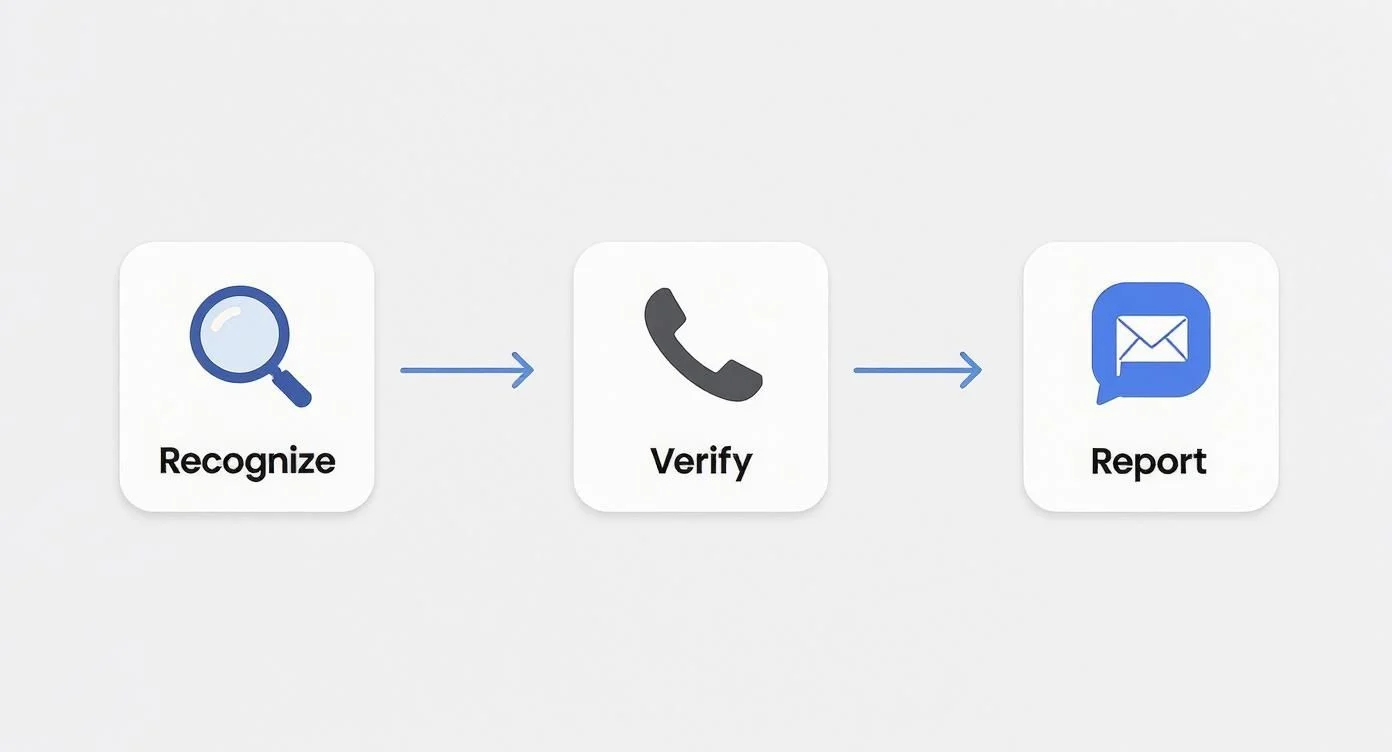
This visual really hammers home the point: technical defences are there to support a simple, repeatable human process of recognising, verifying, and reporting threats.
Multi-Factor Authentication: Your Most Powerful Shield
If you only implement one technical control from this guide, make it Multi-Factor Authentication (MFA). Think of it like needing two different keys to unlock a door instead of just one. Even if a cybercriminal steals your password (the first key), they’re completely stopped. Why? Because they don’t have the second key—usually a one-time code sent to your phone or generated by an authenticator app.
This simple step is arguably the single most effective way to lock down accounts against unauthorised access. It moves your security from something an employee knows (a password) to a combination of what they know and what they have (their mobile device).
The impact of MFA is staggering. Studies consistently show that enabling it can block over 99% of automated attacks, essentially slamming the door on criminals who rely on stolen passwords. For a deeper dive, you can learn more about what two-factor authentication is and how it works.
Stopping Scammers from Using Your Own Name
One of the sneakiest phishing tactics is email spoofing, where an attacker sends an email that looks like it came from your own company. They might impersonate your CEO to authorise a fraudulent payment or trick a customer into sharing sensitive details.
Thankfully, a trio of email authentication protocols works together to put a stop to this.
- SPF (Sender Policy Framework): This is basically a public list of your approved mail servers. It tells the recipient’s email server which IP addresses are authorised to send emails on behalf of your domain. If a message comes from an unlisted server, it gets flagged.
- DKIM (DomainKeys Identified Mail): This adds a unique digital signature to your outgoing emails. The receiving server can check this signature to verify the email hasn’t been tampered with on its way.
- DMARC (Domain-based Message Authentication, Reporting & Conformance): DMARC is the enforcer. It uses SPF and DKIM to verify an email’s authenticity and then tells the receiving server what to do with messages that fail the check—either stick them in quarantine or reject them outright.
Implementing SPF, DKIM, and DMARC is like putting a digital seal of authenticity on every email you send. It not only protects others from spoofed emails impersonating your brand but also significantly improves your own email deliverability rates.
Leveraging AI for Advanced Email Filtering
Traditional email filters are pretty good at catching known spam and basic phishing attempts, but they often fall short against modern, highly targeted attacks. This is where advanced, AI-powered email filtering systems come in. These solutions go way beyond simple keyword matching or sender reputation checks.
They analyse countless data points in real-time, looking for subtle red flags that a human might easily miss. This includes:
- Intent analysis: Figuring out if an email is trying to create a sense of urgency or solicit credentials.
- Link inspection: Safely opening links in a secure “sandbox” environment to see where they lead before the email is delivered.
- Attachment scanning: Analysing attachments for malicious code or suspicious behaviour.
Adopting these technologies is a key strategy for preventing phishing attacks in Australia. The Anti-Phishing Working Group (APWG) recently observed over 1,000,000 phishing attacks in a single quarter. Yet, organisations that deployed AI-powered email security and enforced MFA saw a 70% reduction in successful phishing attempts. It’s a powerful showcase of how a layered technical defence really works. You can discover more insights about the rising phishing surge from E-BITS.com.au.
Fostering a Proactive Security Culture

All the fancy tech and training sessions in the world won’t stop a phishing attack if your team is too scared to speak up. The real secret weapon is a proactive security culture—it’s the glue that binds everything else together.
This is where cybersecurity stops being just an “IT problem” and becomes a shared responsibility. The goal is to build an environment where security is second nature, and people feel empowered to flag something suspicious without worrying they’ll be blamed for making a mistake.
Making It Safe to Speak Up
What’s the biggest roadblock to catching a breach early? Fear. If an employee clicks on a dodgy link, their first instinct might be to stay quiet, worried they’ll get in trouble. That hesitation can be the difference between a minor hiccup and a full-blown disaster.
A blame-free reporting culture is the only way around this. You need dead-simple procedures for flagging suspicious emails, and you need to celebrate the act of reporting itself. It doesn’t matter if it’s a false alarm; what matters is that someone was vigilant enough to raise their hand.
Treat every reported email as a valuable piece of intel. This positive reinforcement turns your entire team into a human firewall, a network of active sensors all looking out for threats. A huge part of knowing how to prevent phishing attacks is making sure your people are comfortable sounding the alarm.
Research backs this up time and again. The Australian Cyber Security Centre (ACSC) found that organisations with formal reporting systems and an open culture saw a 50% reduction in successful phishing attacks over a single year. You can read more about how human risk impacts Australian fraud.
Creating Your Incident Response Playbook
When someone thinks they’ve spotted an attack, the last thing you want is panic. This is where a simple, clear incident response plan—your playbook—becomes critical. It strips away the guesswork in a high-stress moment, telling your team exactly what to do and who to call.
This doesn’t need to be some hundred-page manual. For most small businesses, a one-page checklist is far more powerful. It just needs to outline the immediate, crucial actions.
Your incident response playbook is like a fire drill for a cyber attack. You hope you never have to use it, but when you do, everyone needs to know their role and act without hesitation.
A good playbook empowers your team, giving them the confidence to act decisively. This quick, coordinated response can dramatically limit the damage from an attack, often stopping it dead in its tracks.
Key Elements of a Simple Response Plan
Your response plan needs to be easy for anyone to grab and follow, not just your tech guru. Here are the core things it must include:
- Immediate Isolation: The first move is always to disconnect the affected computer from the network. Just pull the cord or turn off the Wi-Fi to stop the threat from spreading.
- Who to Contact: List the name, phone number, and email of the go-to person for security incidents. This could be a manager or your IT provider like Tbourke Solutions.
- Information to Gather: Tell the employee to jot down the key details: sender’s email, subject line, and the time it arrived. Critically, they should not forward the suspicious email to anyone.
- Do Not Turn Off the Machine: It’s vital to leave the computer on. Shutting it down can wipe away crucial evidence needed for any investigation.
- Password Reset Protocol: Outline the next steps for changing passwords for any accounts that might have been compromised, starting with the most critical ones.
By fostering this culture and backing it with a clear plan, you build a truly resilient business. You’re not just blocking attacks; you’re creating a system where every close call becomes a lesson learned, making your whole operation stronger and safer.
Frequently Asked Questions About Phishing Prevention
Even with a solid game plan, questions always pop up. That’s a good thing—it means you’re thinking critically about your security. Let’s tackle some of the most common questions we hear from Australian business owners trying to get this right.
What is the single most important step to prevent phishing?
If you could only do one thing, the answer is simple: enable Multi-Factor Authentication (MFA) on every possible account. No exceptions. While training your team and filtering emails are vital, MFA is the strongest technical wall you can build. Even if a staff member has a momentary lapse and gives away their password, MFA acts as the final gatekeeper, stopping attackers cold by demanding a second code they don’t have.
Can antivirus software stop phishing attacks?
Antivirus plays a role, but it’s not a silver bullet for phishing. Its main job is to find and remove malicious software after it has already landed on a device. Many modern phishing attacks don’t use malware; they use fake websites to steal login details. Antivirus might block a known malicious link, but it’s powerless against a brand-new, convincing fake login page, which is why you need a layered defence.
How often should we conduct phishing training?
Security awareness isn’t a one-and-done event. To build a lasting security culture, training must be consistent. We recommend a mix of quarterly formal training sessions to cover new tactics, monthly simulated phishing tests to keep skills sharp, and immediate feedback for anyone who clicks a simulation link. This steady rhythm turns security from a chore into a reflex.
Is my small business really a target for phishing?
Yes, absolutely. Cybercriminals often see small businesses as easier targets because they assume they have fewer security resources. Attackers know that a successful hit on an SMB can still lead to a big payday, access to sensitive client data, or a way to attack larger companies in your supply chain. Never assume you’re too small to be on their radar.
How Tbourke Solutions Can Help
Knowing how to prevent phishing attacks is one thing, but implementing a robust, layered defence requires time and expertise. At Tbourke Solutions, we partner with Australian businesses to turn security theory into real-world protection.
We offer a range of services to build and manage your defences:
- Security Assessments: We start by identifying your unique vulnerabilities to create a practical, prioritised action plan.
- Technical Implementation: We deploy and manage the essential controls, including advanced email filtering, MFA, and email authentication protocols like DMARC, SPF, and DKIM to stop domain spoofing.
- Security Awareness & Training: We deliver engaging training and realistic phishing simulations to transform your team into a vigilant human firewall.
- Managed Cybersecurity Services: For a complete, stress-free solution, our Managed Cybersecurity Services provide ongoing, proactive protection for your business, letting you focus on what you do best.
Don’t leave your business exposed. Let us build a security posture you can rely on. To start the conversation about protecting your business, please submit a query through our contact page.
Share This Story, Choose Your Platform!



