
If you run a childcare centre in Sydenham, you’ve probably had this kind of morning. Parents are lining up at the foyer tablet to sign children in, the app stalls, an educator can’t upload observations from a room with weak Wi-Fi, and the office computer crawls when you need to process enrolments, compliance records, or subsidy admin.
That kind of disruption doesn’t feel like an IT problem in the abstract. It feels like lost time, frustrated staff, delayed parent communication, and extra pressure on a team that already has enough to manage. In a childcare setting, tech problems don’t sit neatly in the background. They interrupt care, documentation, family trust, and daily operations all at once.
That’s why IT Support for Sydenham Childcare centers needs a different approach from standard small business support. A childcare centre isn’t just an office with a few laptops. It’s a regulated environment handling sensitive child and family information, room-to-room communication, attendance records, medication notes, compliance documentation, and parent-facing platforms that have to work when the day is busiest.
The Daily IT Struggle in Sydenham’s Childcare Centres
A childcare director usually doesn’t call IT because technology is interesting. They call because something has already interrupted the day.
One common pattern looks like this. The front desk kiosk or tablet becomes unreliable during drop-off. Staff fall back to paper, then need to re-enter records later. Meanwhile, an educator in another room can’t access the platform they use for learning stories or parent updates because the wireless signal fades the further they get from the office. By midday, someone is trying to restart a printer, reconnect a device, or chase an internet provider while still supervising staff and families.
Why these issues hit childcare harder
In a standard office, a slow laptop might mean an employee gets less done for an hour. In a childcare centre, the same issue can affect attendance tracking, authorised pickup details, medication information, family communications, or compliance records. The pressure is different because timing matters more.
There’s also very little spare capacity in most centres. Staff aren’t sitting around waiting to troubleshoot a login issue. Directors aren’t free to spend half the afternoon on the phone with a software vendor. Every minute lost to unstable systems usually comes from admin time, leadership time, or educator focus.
Practical rule: If staff are creating workarounds for unreliable systems, the problem is already bigger than “just a few glitches”.
Generic IT support often misses the real problem
A general IT provider might fix a printer, replace a router, or remove a pop-up warning. That can help in the moment. But it often misses the operating reality of childcare.
Childcare centres depend on a chain of connected systems. Sign-in devices rely on stable Wi-Fi. Parent communication platforms rely on clean device management and browser compatibility. Compliance records depend on backups and controlled access. If one part is weak, the whole day gets shakier.
That’s also why break-fix support often feels unsatisfying. The immediate symptom gets patched, but the same underlying problem returns next week under a different name. The tablet freezing at reception may, in fact, be a network design issue. The “bad internet” complaint from educators may be caused by poor access point placement. The repeated account lockouts may point to weak user setup rather than user error.
For a closer look at the hidden cost of recurring disruptions, the guide on childcare IT downtime and its operational impact is worth reading.
What directors usually want
Most centre leaders aren’t asking for complicated systems. They want technology that is:
- Reliable in busy periods: especially at drop-off, pickup, and end-of-month admin times
- Simple for educators: because staff should focus on children, not settings screens
- Secure for family data: so sensitive records aren’t left exposed
- Predictable to maintain: with fewer surprises and less reactive spending
That’s the baseline. If your centre doesn’t have that, technology stops being a support function and starts becoming an operational risk.
Your Quick Guide to Childcare IT and Why It’s Different
TLDR: Sydenham childcare centres need IT support that understands more than devices and internet connections. It needs to support reliable attendance systems, secure child and family data, smooth parent communication, and the compliance demands that come with early childhood education. When Wi-Fi, tablets, backups, or user access are set up poorly, the impact reaches daily operations fast. A provider that understands education environments can prevent those avoidable disruptions before they affect staff and families.

Childcare IT touches compliance every day
A lot of centre directors think about compliance as policies, staff qualifications, incident records, and documentation. That’s correct, but those processes now run through technology almost constantly.
If your centre stores enrolment details digitally, tracks attendance through an app, communicates with families through a portal, or keeps internal records in cloud systems, then your IT setup directly affects how consistently those obligations are met. A weak setup doesn’t just make work slower. It increases the chance that information is delayed, inaccessible, duplicated, or handled inconsistently.
The practical question isn’t “Do we use much tech?” Most centres do. The better question is “Would a system outage create confusion around records, communication, or access?” If the answer is yes, your IT setup is part of your compliance environment whether you planned it that way or not.
Privacy risk is higher in childcare than in many small businesses
A standard trades business might store invoices, job notes, and supplier contacts. A childcare centre often holds a much more sensitive mix of information. That can include child identities, family contact details, authorised nominee records, health details, emergency contacts, developmental notes, and internal staff information.
That changes the security standard you should expect from your systems.
A weak password policy, shared logins at the front desk, an old Wi-Fi password used for years, or a tablet that never receives updates may all seem minor in isolation. In a childcare environment, they create avoidable exposure around highly sensitive data. That’s why cybersecurity in this setting isn’t just a technical add-on. It’s a governance issue.
Good childcare IT should make the safe option the easy option. Staff shouldn’t need technical knowledge to handle data properly.
Why education-aware support matters
Software and workflows in childcare don’t behave like software in retail, trades, or professional offices. Centres often rely on a mix of admin desktops, room tablets, shared devices, printers, foyer kiosks, and web-based platforms that all need to stay compatible and connected.
That mix creates different support priorities:
| Area | Standard office assumption | Childcare reality |
|---|---|---|
| Wi-Fi | Mostly desk-based coverage | Coverage must reach rooms, shared spaces, and often outdoor areas |
| Devices | Mostly individual staff laptops | Shared tablets and kiosks need tighter control and simpler use |
| Access | Staff often work in fixed roles | Casuals, room leaders, admin staff, and directors may need different permissions |
| Downtime impact | Productivity slows | Attendance, communication, and records can be disrupted immediately |
That’s why many centres benefit from support built around the education environment rather than generic business assumptions. If you want a broader view of what specialist support in this space looks like, IT services for education environments gives useful context.
Common IT Nightmares for Childcare Centre Directors
Monday, 7:55 am. Families are arriving, the foyer sign in tablet stalls, one room cannot upload observations, and the office printer has dropped off the network again. None of that sounds like a major IT incident, but in a childcare centre it quickly becomes an operational problem, and sometimes a compliance problem as well.
In Sydenham centres, these issues often build up slowly. A router stays in place years longer than it should. An extra access point gets added to fix one weak room. Tablets are shared across shifts with loose sign-in habits. New software gets rolled out on top of old hardware. The result is a setup that works just well enough until the busiest part of the day exposes every weak point at once.
Why these problems hit childcare harder than a standard office
A regular office can sometimes tolerate patchy Wi-Fi or a slow PC for a few hours. A childcare centre has less room for that. Digital attendance, family communication, medication records, incident notes, staff rosters, and compliance evidence all depend on systems being available when staff need them.
That is the trade-off directors deal with. Convenience matters, but so do privacy and record keeping. If educators start writing things down on paper because the app keeps timing out in one room, the centre has created a second problem. Records can be delayed, duplicated, or missed altogether. Under the NQF, that kind of inconsistency is not just frustrating. It can affect how reliably the service documents care, incidents, and daily operations.
The failures directors report most often
These are the patterns I see repeatedly in childcare environments:
- Foyer check-in slows at peak time: the device works with one family, then freezes when several parents arrive together
- One room always has weak signal: uploads fail, photos stall, and staff wait until they get back to the office to finish updates
- Shared tablets create messy access: educators end up in the wrong account or continue in someone else’s browser session
- Printing and scanning become manual work: forms need to be rescanned, renamed, or emailed to get around a device that will not stay connected
- Passwords get reused because shifts are busy: access becomes easier in the moment and riskier over time
- Backups are assumed, not checked: the centre believes data is safe because it is cloud-based, but no one has tested recovery
A weak wireless setup is a good example of where generic IT advice misses the point. In a childcare centre, poor coverage does not just mean inconvenience. It can interrupt sign-in records, delay learning updates to families, and leave staff retrying entries later from memory. That affects accuracy, and accuracy matters when records relate to duty of care.
Software complaints often start below the software layer
The software itself isn’t always the culprit.
If the childcare platform works properly on one device but not another, the first check should be the device, browser, updates, storage, and login setup. If it fails in one room and works in another, start with Wi-Fi design and access point placement. If staff are getting odd permission errors, examine account structure and shared access rules before blaming the vendor.
A practical way to sort this out is to break the problem into layers:
| Layer | What to check | Typical symptom |
|---|---|---|
| Network | Wi-Fi coverage, internet stability, access point placement, network congestion | Dropouts, failed uploads, slow syncing |
| Device | Age, updates, browser condition, available storage, battery health | Freezes, slow logins, random app issues |
| User setup | Shared sign-ins, permissions, account handover between shifts | Wrong records, access errors, inconsistent use |
The fix is different in each case. Replacing a tablet will not solve a badly placed access point. Calling the software vendor will not correct poor password practices. Resetting the router every few days is not a maintenance plan.
Everyday habits create some of the biggest risks
Some of the worst disruptions start with ordinary routines. An admin email asks for invoice payment. A staff member clicks a fake parent portal login page. A shared password gets passed between casual educators because it saves time during handover.
Those habits create both security and privacy exposure. Childcare centres hold parent contact details, child information, health details, and staffing records. Under Australian privacy obligations, that is sensitive information. Directors do not need technical jargon here. They need staff habits that are safe under pressure and simple enough to follow on a busy floor.
For family-facing conversations about digital safety more broadly, Kubrio online safety insights offer useful context. For centre operations, staff need direct training on suspicious emails, login hygiene, and fake portal pages. This guide to how to prevent phishing attacks in everyday business settings is a practical starting point.
The common thread in these nightmares is not bad luck. It is an environment that has grown without clear standards for network design, devices, access, and recovery. Once those are cleaned up, daily problems usually drop fast.
When to Get Help With Your IT
A director usually asks for help after a bad morning, not after a full-scale disaster. The sign-in tablet drops off Wi-Fi during the rush, the office printer will not talk to the admin PC, and a staff member cannot access the app used for attendance or incident records. None of those problems look dramatic on their own. In a childcare centre, they can quickly turn into missed documentation, delayed parent communication, and avoidable pressure on staff.
That matters in Sydenham because childcare IT is tied directly to operational compliance. If staff cannot reliably get online, they delay entries, write notes on paper, and update systems later from memory. That creates risk around accuracy, privacy, and record handling under the NQF and Australian privacy obligations.
The decision point is simple. Get help when technology problems start changing how your team works.
Here are the patterns I look for:
- Staff build workarounds into the day: attendance gets written down for later, incident notes are re-entered after the fact, or one office computer becomes the only machine people trust
- Wi-Fi problems affect reporting or parent communication: certain rooms lose signal, apps time out, or uploads fail at the times you need them
- Passwords and access are handled informally: shared logins stay in circulation, old staff accounts remain active, or casual educators use whatever access someone can find quickly
- Backups exist, but nobody has checked recovery: files may be copying somewhere, but no one has confirmed they can be restored properly after deletion, device failure, or ransomware
- One person carries all the IT history: a former provider, staff member, or family friend knows how things were set up, and everyone else is guessing
- Small faults keep affecting compliance tasks: printing medication forms, accessing enrolment records, syncing room devices, or sending parent updates all depend on luck rather than a reliable system
Centres often wait because each issue feels manageable. Taken together, they are expensive. Staff time gets pulled into troubleshooting. Directors spend energy chasing faults instead of running the service. Of greater concern, weak systems create conditions where privacy mistakes are more likely. A poorly secured guest network, for example, is not just an IT flaw. It can expose business devices used for child records, photos, and family information.
If that pattern sounds familiar, your centre has probably outgrown ad hoc IT support.
There is also a second trigger that gets missed. Ask for help before introducing a new app, expanding rooms, changing your internet service, or adding more tablets and laptops. Those changes often expose old network problems that were hidden when fewer devices were connected. I see this regularly in growing centres around Sydenham, especially in buildings where Wi-Fi was never planned around room layouts, brick walls, outdoor areas, and front-desk traffic.
Some directors also want to introduce more digital learning tools for older children. That can be worthwhile, but only if the basics are under control first. Resources on how to teach coding to kids are useful for programming ideas. In a centre environment, device controls, filtered access, account permissions, and network separation need attention before any new screen-based activity is rolled out.
A straightforward rule works well here. If your team is talking about the same IT issue every week, or if staff have changed their behaviour to avoid unreliable systems, it is time to bring in proper support.
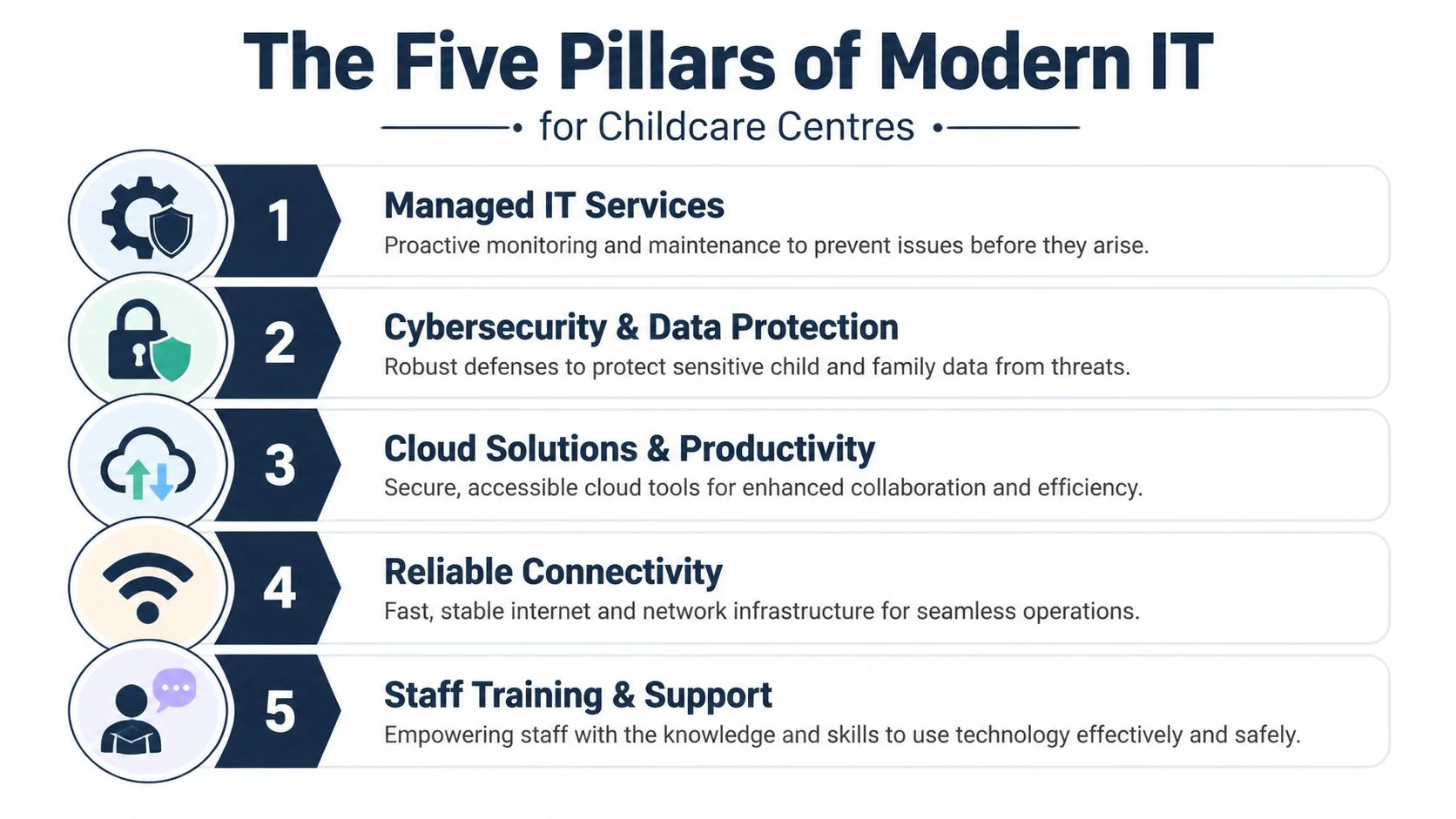
The Five Pillars of Modern IT for Childcare Centres
A childcare centre runs on routines. IT should support those routines quietly in the background. If the front desk cannot check a child in, a room tablet drops out during documentation, or an admin PC cannot access enrolment records, the problem is no longer technical. It affects staffing, parent communication, and in some cases your ability to keep records in order under NQF and privacy obligations.
Managed network and Wi-Fi
Wi-Fi in a childcare centre works like plumbing. If pressure drops in one part of the building, the whole service feels it.
In Sydenham, I often see coverage problems caused by brick internal walls, converted room layouts, and outdoor sign-in points that were added long after the original internet setup. A weak network is not just annoying. It can interrupt attendance records, delay incident reporting, and push staff into workarounds such as writing things down to enter later. That creates errors and privacy risks.
A sound setup includes:
- Access points placed around real usage areas: reception, offices, play rooms, staff areas, and outdoor zones where devices are used
- Separate networks for business and guest access: so family or visitor devices do not sit on the same network as systems holding child and staff information
- Consistent logins and roaming settings: so tablets and laptops move around the building without dropping off
- Monitoring and maintenance: to catch failing hardware, interference, or congestion before it disrupts the day
Adding another cheap extender every few months usually makes the network harder to manage and less stable.
Proactive device management
Most centres have a mix of equipment bought at different times for different reasons. Front desk PCs, office laptops, room tablets, shared kiosks, and printers all age differently. Without standards, each device becomes its own little exception.
That is where small problems turn into operational ones. One tablet still works with your childcare software. Another is too old for current security updates. A shared office computer still has saved passwords from former staff. A foyer sign-in device is running under a generic account that no one reviews. Those are security issues, but they are also governance issues if access to family data is not controlled properly.
Proactive management means setting devices up the same way, patching them on schedule, removing old accounts, and planning replacements before hardware fails at a bad time. For many centres, that also means having ongoing IT helpdesk support for day-to-day device and account issues so faults are fixed before staff invent their own workaround.
Expert support for childcare software
Childcare software sits at the centre of enrolments, attendance, parent communication, learning documentation, and compliance records. Support has to cover the full workflow, not just whether the login page appears.
A director does not need three vendors blaming each other while the problem drags on. The practical job is to work out whether the fault sits with the browser, the device, permissions, sync settings, the local network, or the software provider itself.
The main pressure points are usually:
- Browser and app compatibility: outdated browsers, overloaded profiles, and stale cached data often break forms and logins
- Permission design: directors, room leaders, admin staff, educators, and casuals should not all share the same level of access
- Shared-device behaviour: room tablets need simple, controlled logins so staff can use them without exposing another educator’s session
- Vendor coordination: one person should own the diagnosis and push the issue through to resolution
Sector context matters here. Childcare software problems often involve attendance timestamps, medication notes, incident records, family contacts, and educator observations all at once.
Automated backup and recovery
Backups matter most on the day you need one.
Many centres assume Microsoft 365, Google Workspace, or a childcare platform will cover everything by default. Sometimes they do part of the job. Often they do not cover deleted files, overwritten records, or data held on local PCs as fully as directors expect. That gap only becomes clear after a mistake, device loss, or account compromise.
A workable backup plan answers a few plain questions. What data is backed up? Where is it stored? How fast can it be restored? Who checks that restoration works?
| Backup area | Why it matters |
|---|---|
| Business files | Policies, enrolment records, rosters, finance documents, and templates need reliable recovery |
| Shared email and communications | Important family and operational correspondence should not depend on one mailbox staying intact |
| Critical device data | Local files on admin machines still matter in many centres |
| Restore testing | A backup only proves its value when restoration actually works |
Cybersecurity and compliance
This pillar gets missed because the immediate risk is not always obvious. In childcare, a weak password policy or poorly separated Wi-Fi network can become a privacy issue long before it looks like a cyber incident.
Centres handle health information, family contacts, staff records, photos, and internal documentation. That brings legal and practical responsibilities under privacy law, and it affects how safely you can meet record-keeping expectations under the NQF. If a shared account is used across multiple rooms, it becomes harder to show who accessed or changed information. If staff use the same network as guests, you increase the chance of unauthorised access to business systems. If a phishing email reaches the admin team and no one recognises it, payroll, invoices, and parent communications can all be affected.
A sensible baseline includes:
- Individual user accounts: so access can be controlled and reviewed
- Role-based permissions: staff should only see the systems and records they need for their job
- Regular patching: especially on shared tablets, office PCs, and any device used for sign-in or records
- Basic staff training: fake login pages, invoice scams, and email attachment fraud are common and preventable
- Documented incident steps: the centre should know who isolates a device, who contacts the software vendor, and who assesses whether a privacy notification issue exists
- Network separation: guest access, staff devices, and business systems should not all sit together
Some centres also want to introduce more digital learning tools for older children. That can be a worthwhile program decision, but only after device controls, filtered access, and account permissions are in place. For broader programming ideas, resources on how to teach coding to kids can be useful. Inside the service, the first job is keeping systems safe, auditable, and simple for busy staff to use properly.
How Tbourke Solutions Supports Sydenham’s Centres
At 7:15 am, the sign-in tablet is offline, the office printer will not talk to the enrolment PC, and a staff member cannot access the room app they need for attendance. In a childcare centre, those are not minor tech annoyances. They slow drop-off, disrupt records, and can leave gaps in information the service is expected to keep accurate under the NQF and privacy obligations.
A centre in Sydenham rarely needs an in-house IT team. It needs a local provider that can keep core systems stable, fix faults quickly, and set things up so they suit the building, the staffing pattern, and the way the service runs.

What useful support looks like in practice
For childcare, good IT support starts with the parts of the day that cannot fail. Reception devices need to work at peak times. Staff need reliable access to attendance, communication, and administration systems. Directors need confidence that backups, account access, and software updates are being checked properly, not assumed.
That usually means a mix of practical services:
- Day-to-day helpdesk support: staff can get help with logins, email issues, printer faults, shared device problems, and software access without losing half the morning
- Preventative maintenance: workstations, tablets, and network gear are reviewed and updated before they start causing avoidable disruption
- Wi-Fi and network remediation: dead spots, unstable access points, and poorly separated networks are fixed with the building layout in mind
- Security and privacy controls: access is set per role, shared devices are tightened up, and business systems are better protected from accidental or unauthorised access
- Planning and budgeting advice: directors get a clear view of what should be replaced now, what can stay in service, and what needs to be budgeted before it becomes a problem
Centres that need quick, practical assistance day to day can see how that model works through managed helpdesk support for childcare and business IT issues.
Two support paths centres usually ask for
Some centres need stability first. Others need stability plus a plan.
Secure and comply
This suits services where the main concern is keeping the environment dependable and easier to account for. The work usually focuses on device health, backups, staff access, shared tablets, and Wi-Fi issues that affect attendance systems or parent communication. In childcare, a weak setup is not just an efficiency problem. It can make it harder to show who accessed records, whether updates were applied, or why a key device was unavailable when staff needed it.
Typical priorities include cleaning up user accounts, checking backup routines, improving wireless reliability, and reducing the number of informal workarounds staff rely on.
Strategic growth
This suits centres that also want technology planning tied to operations. That can include hardware lifecycle advice, cloud migrations, better file organisation, and cleaner processes for enrolments, reporting, and internal communication.
The difference is practical. Instead of repeatedly paying to patch the same issues, the centre gets a clearer view of where technology is helping, where it is creating risk, and what should change over the next few years.
Local support matters in older buildings and busy services
Some issues are easy to resolve remotely. Others need someone on site who can test signal strength in the actual rooms, inspect how the reception desk is connected, check whether equipment is overheating in a comms cabinet, or trace why one part of the building drops out at the same time each day.
That matters in Sydenham and nearby areas because many centres operate in buildings that were not originally designed for modern wireless coverage, multiple cloud platforms, guest access, and always-on reception devices. On paper, the internet service may look fine. In practice, poor access point placement, wall materials, and mixed-use networks are behind the problem.
Tbourke Solutions supports local businesses with managed IT, network troubleshooting, cybersecurity, cloud systems, and technical planning. For childcare centres, that local context matters because the fix has to work in the building, during operating hours, with minimal disruption to staff and families.
A realistic example
A director might say the centre does not have a serious IT problem. Then the details come out. The foyer tablet drops connection twice a week. The office PC takes ten minutes to open key files. One room has poor Wi-Fi. Passwords for shared devices are passed around informally. Nobody is fully sure whether backups are being tested or just running.
Each issue looks small on its own.
Together, they create risk. Attendance records become harder to trust. Staff lose time every day. Parent communication gets delayed. If there is a privacy incident or a compliance question, the centre is left trying to reconstruct what happened from an environment that was never set up clearly.
A proper review usually finds familiar causes. Shared devices were configured casually. Wireless coverage was never mapped room by room. Older hardware stayed in admin roles too long. Access permissions grew without review as staff changed. Once those are corrected, the centre usually feels calmer within weeks. Fewer workarounds. Less confusion. Better visibility for the director.
Frequently Asked Questions
We’re a small centre. Is professional IT support still worth it
Yes, in many cases it is. Small centres often feel IT problems more sharply because there’s less spare admin capacity and fewer internal workarounds. A managed arrangement is usually easier to budget for than repeated urgent callouts, replacement purchases made in a rush, or ongoing staff time lost to preventable problems.
The value isn’t just in fixing faults. It’s in reducing the number of faults that interrupt the week in the first place.
What if we already have “someone who helps us with computers”
That can work for a while, especially if your setup is simple. The problem comes when knowledge sits with one person and nothing is documented or standardised. If that person is unavailable, leaves, or only handles problems reactively, your centre is still carrying risk.
A proper support setup gives you continuity, clearer accountability, and a better handle on backups, access, updates, and network health.
Can you help with internet and Wi-Fi problems even if the issue is with the provider
Yes. In many cases, the primary job is sorting out where the fault sits. Sometimes the service provider needs to fix the connection. Other times the internet line is fine and the issue is internal Wi-Fi design, poor hardware, or interference inside the building.
A good IT partner coordinates with providers, checks the local environment, and avoids the usual blame loop where each party says the issue belongs to someone else.
Will changing IT support be disruptive for staff
It doesn’t need to be. The best transitions are quiet. Existing devices, accounts, backup arrangements, and vendors are reviewed first. Then the most important risks are addressed in order, rather than changing everything at once.
For staff, the visible result should be simpler systems and fewer interruptions, not a long learning curve.
How quickly should a childcare centre get help during an emergency
That depends on the severity of the issue and the support agreement in place. In practice, childcare centres should expect clear response expectations, straightforward communication, and escalation paths that reflect the impact on operations.
The more important point is prevention. A centre that relies only on emergency response usually pays for the same problems repeatedly.
Can you support shared tablets, office computers, printers, and child-facing admin devices together
Yes. In fact, they should be managed together because they affect the same workflows. The front desk device, room tablets, office computers, email accounts, printers, and Wi-Fi all connect operationally even if they seem separate.
When one provider sees the whole environment, problems are diagnosed faster and recurring issues are easier to eliminate.
What should we do before contacting an IT provider
You don’t need a technical audit prepared in advance. It helps to note the issues staff complain about most, which devices are oldest, where Wi-Fi is weakest, and whether you’re confident in your backups and security practices.
That’s enough to start a useful conversation. A good provider should be able to translate that operational frustration into a practical support plan.
If your childcare centre in Sydenham is dealing with recurring tech issues, patchy Wi-Fi, unreliable devices, or uncertainty around data protection, Tbourke Solutions can help you assess the setup and work out a practical next step. You can submit an enquiry through the contact page for a no-obligation discussion about your centre’s needs.
Share This Story, Choose Your Platform!